USB Ports not functioning properly

Riff88

New member
Member
Local time
6:03 PM
Messages
56
Location
Pretoria, South Africa
Hi there,

I have a Toshiba Laptop 1.86Ghz with Windows 7, 32-bit with 2 GB ram.

I recently had a new CPU installed in my computer. When I got my PC back, my 2 USB ports don’t function properly anymore.

The main problem seems to be with my USB Internet modem. (HUWAEI Mobile Connect)

Firstly I checked that the Modem works fine on other computers. I have all the latest drivers installed on my laptop for this modem.

What happens is the following: I put my modem into USB slot 1, and it works for 5 minutes, then disconnects on its own. Then it would work for 30 minutes, and then disconnect on its own, etc.

Worst happens when I put it in USB slot 2, it only connects for a few seconds, then disconnects.

I also cannot put any other items such as a USB memory stick or USB cable into one USB port while the Modem is in another slot. It simply doesn't function.

IN SHORT, I can only use one USB port at a time if I use my Internet Modem, and then my Internet Modem doesn’t even function properly. I can however, use both USB ports if I use other items such as a memory stick or USB cable for printer, other devices. Then the USB porst work fine.

Any help is appreciated. THank You!
 

My Computer

Computer type
Laptop
Computer Manufacturer/Model Number
Toshiba
OS
Microsoft Windows 7 Professional 64-bit 7601 Multiprocessor Free Service Pack 1
CPU
Intel(R) Celeron(R) CPU 540 @ 1.86GHz
Motherboard
Intel Corporation SANTA ROSA CRB
Memory
2.00gGB
Graphics Card(s)
(1) Mobile Intel(R) 965 Express Chipset Family
Sound Card
High Definition Audio Device (Microsoft)
Monitor(s) Displays
Generic Monitor
Screen Resolution
1280 x 800 x 32 bits (4294967296 colors) @ 60 Hz
Hard Drives
(1) WDC WD3200BPVT-22JJ5T0 ATA Device (2) HUAWEI TF CARD Storage USB Device
Keyboard
Standard PS/2 Keyboard
Mouse
Synaptics PS/ Port Touchpad
Antivirus
Avast
Browser
Google Chrome

My Computer

Computer type
PC/Desktop
Computer Manufacturer/Model Number
Home made Desktop
OS
Windows 10 Pro. 64/ version 1709 Windows 7 Pro/64
CPU
Intel i7-6800K @ 4.3
Motherboard
ASUS X-99 Deluxe II
Memory
Corsair Platinum 16 gig @2400
Graphics Card(s)
EVGA GTX 1070 OC
Monitor(s) Displays
Asus 27" LED LCD/VE278Q
Screen Resolution
1920-1080 or 1280-720 HDMI
Hard Drives
INTEL SSD 730-240 Gb Sata 3.0/
PSU
EVGA Platium 1200W
Case
Phanteks Luxe Tempered Glass 8 fans/ one radiator
Cooling
XSPC/ Water Cooled CPU
Keyboard
Das 4 Professional
Mouse
Logitech M705/MX Anywhere 2-S
Internet Speed
100 mbits
Antivirus
Microsoft Security Essentials/ Malwarebytes Premium 3.0/ SAS
Browser
I.E. 11 default/Firefox/ ISP Time Warner Cable/Spectrum
Other Info
LG BluRay Burner/
Sound system-KLipsch-THX/
Icy Dock ssd Hot Swap bays.
You were asked a long time ago to fill in your specs and you still haven't.

http://www.sevenforums.com/graphic-...antly-screensaver-doesnt-run.html#post3034415

We need your system specs.

http://www.sevenforums.com/tutorials/180324-system-info-see-your-system-specs.html

Your system specs now are this; which tell us nothing.
OS don't know

Apologies for that. I updated most of my System Specs. Just don't know where to find the PSU, CASE and COOLING information.
 

My Computer

Computer type
Laptop
Computer Manufacturer/Model Number
Toshiba
OS
Microsoft Windows 7 Professional 64-bit 7601 Multiprocessor Free Service Pack 1
CPU
Intel(R) Celeron(R) CPU 540 @ 1.86GHz
Motherboard
Intel Corporation SANTA ROSA CRB
Memory
2.00gGB
Graphics Card(s)
(1) Mobile Intel(R) 965 Express Chipset Family
Sound Card
High Definition Audio Device (Microsoft)
Monitor(s) Displays
Generic Monitor
Screen Resolution
1280 x 800 x 32 bits (4294967296 colors) @ 60 Hz
Hard Drives
(1) WDC WD3200BPVT-22JJ5T0 ATA Device (2) HUAWEI TF CARD Storage USB Device
Keyboard
Standard PS/2 Keyboard
Mouse
Synaptics PS/ Port Touchpad
Antivirus
Avast
Browser
Google Chrome
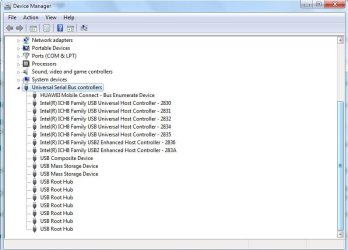
We're the closet drivers installed for the new CPU? Open Device Manager and expand the Universal Serial Bus section to see if there are any :warn: there. Post a screenshot of Device Manager with the USB section expanded.
 

My Computer

Computer type
PC/Desktop
Computer Manufacturer/Model Number
Custom Build
OS
W7 Pro x64 SP1 | W10 Pro IP x64 | W8.1 Pro x64 VM | Linux Mint VM
CPU
i7-4790k @ 4GHz (4.4GHz Boost)
Motherboard
ASUS Sabertooth Z87 (BIOS Rev 2004)
Memory
16GB DDR3 Kingston HyperX Fury @ 1600MHz CL 9-9-9-27
Graphics Card(s)
EVGA GTX 980 Classified
Sound Card
Realtek Onboard
Monitor(s) Displays
Samsung S27D390
Screen Resolution
1920 x 1080
Hard Drives
240GB Intel 520 Series SSD |
Samsung 850 EVO 120GB SSD |
2TB WD Caviar Black |
2TB WD Caviar Green
PSU
Corsair HX850-80 Gold Modular
Case
Cooler Master Silencio 650
Cooling
Corsair H80i w/2 x Corsair SP120 | 2 x 120mm Noctua NF-S12B
Keyboard
Microsoft Sidewinder X4
Mouse
Gigabyte M6900 optical
Internet Speed
152mb
Antivirus
F-Secure
Browser
Firefox 38.0
Other Info
Backup Rig: Win 7 Pro 64-bit | AMD A10-5800k | ASUS F2A85-V Pro | 8GB Samsung DDR3 @1600MHz | 120GB Toshiba SDD | 2TB Seagate HDD | Cooler Master Silencio 550
We're the closet drivers installed for the new CPU? Open Device Manager and expand the Universal Serial Bus section to see if there are any :warn: there. Post a screenshot of Device Manager with the USB section expanded.

I honestly don't know. I have no way of getting in contact with the guys who installed the CPU.

attachment.php
 

My Computer

Computer type
Laptop
Computer Manufacturer/Model Number
Toshiba
OS
Microsoft Windows 7 Professional 64-bit 7601 Multiprocessor Free Service Pack 1
CPU
Intel(R) Celeron(R) CPU 540 @ 1.86GHz
Motherboard
Intel Corporation SANTA ROSA CRB
Memory
2.00gGB
Graphics Card(s)
(1) Mobile Intel(R) 965 Express Chipset Family
Sound Card
High Definition Audio Device (Microsoft)
Monitor(s) Displays
Generic Monitor
Screen Resolution
1280 x 800 x 32 bits (4294967296 colors) @ 60 Hz
Hard Drives
(1) WDC WD3200BPVT-22JJ5T0 ATA Device (2) HUAWEI TF CARD Storage USB Device
Keyboard
Standard PS/2 Keyboard
Mouse
Synaptics PS/ Port Touchpad
Antivirus
Avast
Browser
Google Chrome

My Computer

Computer type
PC/Desktop
Computer Manufacturer/Model Number
Custom Build
OS
Windows 7 Ultimate x64 SP1
CPU
AMD Phenom 2 1090T
Motherboard
Gigabyte GA-890FXA-UD5
Memory
2x8GB Kingston HyperX Fury Black 1600Mhz Unganged
Graphics Card(s)
MSI GTX 970 Gaming 4G
Sound Card
Realtek On-Board HD 7.1 Audio / Logitech G35
Monitor(s) Displays
3xAcer GD245HQ
Screen Resolution
1920x1080
Hard Drives
Samsung 850 Pro 512GB SSD - OS /
WD Caviar Black SATA 3 - 1 TBx2 - Dynamic RAID 0 /
WD Caviar Green SATA 2 - 640GBx2 - Dynamic RAID 0 /
WD Caviar Green SATA 2 - 640GB - Internal Backup /
Seagate Barracude SATA 3 - 3TB - External Backup/ Sync
PSU
HighPower 1000W
Case
Cooler Master HAF 932
Cooling
Noctua NH-D14
Keyboard
Logitech G19
Mouse
Logitech G500
Internet Speed
100/4 Mbit Cable (100GB quota)
Antivirus
ZoneAlarm Extreme Security / MBAM Pro / MBAE Free / SAS Free
Browser
IE 11 - Firefox - Chrome
Other Info
Logitech F710/ G27/ G940/ Z5500 // TrackIR 5 // Nvidia 3D Surround Vision
My last post was meant to say chipset drivers not closet drivers. iPhone autocorrect strikes again.
 

My Computer

Computer type
PC/Desktop
Computer Manufacturer/Model Number
Custom Build
OS
W7 Pro x64 SP1 | W10 Pro IP x64 | W8.1 Pro x64 VM | Linux Mint VM
CPU
i7-4790k @ 4GHz (4.4GHz Boost)
Motherboard
ASUS Sabertooth Z87 (BIOS Rev 2004)
Memory
16GB DDR3 Kingston HyperX Fury @ 1600MHz CL 9-9-9-27
Graphics Card(s)
EVGA GTX 980 Classified
Sound Card
Realtek Onboard
Monitor(s) Displays
Samsung S27D390
Screen Resolution
1920 x 1080
Hard Drives
240GB Intel 520 Series SSD |
Samsung 850 EVO 120GB SSD |
2TB WD Caviar Black |
2TB WD Caviar Green
PSU
Corsair HX850-80 Gold Modular
Case
Cooler Master Silencio 650
Cooling
Corsair H80i w/2 x Corsair SP120 | 2 x 120mm Noctua NF-S12B
Keyboard
Microsoft Sidewinder X4
Mouse
Gigabyte M6900 optical
Internet Speed
152mb
Antivirus
F-Secure
Browser
Firefox 38.0
Other Info
Backup Rig: Win 7 Pro 64-bit | AMD A10-5800k | ASUS F2A85-V Pro | 8GB Samsung DDR3 @1600MHz | 120GB Toshiba SDD | 2TB Seagate HDD | Cooler Master Silencio 550

My Computer

Computer type
Laptop
Computer Manufacturer/Model Number
Toshiba
OS
Microsoft Windows 7 Professional 64-bit 7601 Multiprocessor Free Service Pack 1
CPU
Intel(R) Celeron(R) CPU 540 @ 1.86GHz
Motherboard
Intel Corporation SANTA ROSA CRB
Memory
2.00gGB
Graphics Card(s)
(1) Mobile Intel(R) 965 Express Chipset Family
Sound Card
High Definition Audio Device (Microsoft)
Monitor(s) Displays
Generic Monitor
Screen Resolution
1280 x 800 x 32 bits (4294967296 colors) @ 60 Hz
Hard Drives
(1) WDC WD3200BPVT-22JJ5T0 ATA Device (2) HUAWEI TF CARD Storage USB Device
Keyboard
Standard PS/2 Keyboard
Mouse
Synaptics PS/ Port Touchpad
Antivirus
Avast
Browser
Google Chrome
My last post was meant to say chipset drivers not closet drivers. iPhone autocorrect strikes again.

Yes, it is the 965 Express Chipset family from Mobile Intel. They are correctly installed.
 

My Computer

Computer type
Laptop
Computer Manufacturer/Model Number
Toshiba
OS
Microsoft Windows 7 Professional 64-bit 7601 Multiprocessor Free Service Pack 1
CPU
Intel(R) Celeron(R) CPU 540 @ 1.86GHz
Motherboard
Intel Corporation SANTA ROSA CRB
Memory
2.00gGB
Graphics Card(s)
(1) Mobile Intel(R) 965 Express Chipset Family
Sound Card
High Definition Audio Device (Microsoft)
Monitor(s) Displays
Generic Monitor
Screen Resolution
1280 x 800 x 32 bits (4294967296 colors) @ 60 Hz
Hard Drives
(1) WDC WD3200BPVT-22JJ5T0 ATA Device (2) HUAWEI TF CARD Storage USB Device
Keyboard
Standard PS/2 Keyboard
Mouse
Synaptics PS/ Port Touchpad
Antivirus
Avast
Browser
Google Chrome
Back
Top