
USB reader occasionally makes plug/unplug sound

nnecron

New member
Local time
3:34 AM
Messages
1
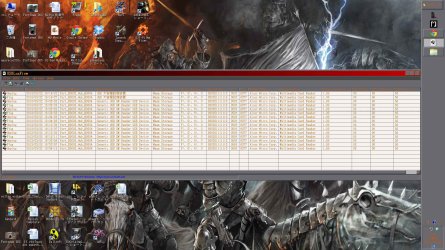
My assumption of this issue is that my USB reader is making a false reading of what ever device that isn't connected. It also seems to affect my PC performance when it happens. I disconnected all of USB devices on my Desktop PC, but it kept making those sounds. I also used this tool called USB Log View to determine what is it trying to read. I tried to disable the device that showed up through usage of Device Manager, but it didn't work. I attached the screenshot so if you can tell anything from it let me know.
 

Attachments
  • Log list.jpg
    Log list.jpg
    253.4 KB · Views: 10

My Computer My Computer

At a glance

Windows 7 Home Premium 64 bitIntel Core i7 CPU 870 @ 2.93Ghz (4 CPUs). ~3....Nvidia GeForce GTX 560 Ti Twin Fronzr II
Computer type
PC/Desktop
OS
Windows 7 Home Premium 64 bit
CPU
Intel Core i7 CPU 870 @ 2.93Ghz (4 CPUs). ~3.1Ghz
Graphics Card(s)
Nvidia GeForce GTX 560 Ti Twin Fronzr II
Antivirus
Microsoft Security Essentials
Browser
Chrome, Mozila Fire Fox, IE
If I were you, I would start by checking all of your drivers and making sure that they are updated, especially the USB drivers. I can't promise that this will fix your issue, but I've seen several people complain about the plug/unplug sound and many of them have been fixed by certain drivers being updated. You should be able to check them for updates within Device Manager. You can also try going to your motherboard's manufacturer's website and downloading them from there.
 

My Computer My Computer

At a glance

Windows 7 Professional x64Intel i5-2310 Sandy Bridge 2.9GHz Quad-core8GB DDR3NVIDIA GeForce GTX 550 Ti
Computer type
PC/Desktop
Computer Manufacturer/Model Number
Custom Build
OS
Windows 7 Professional x64
CPU
Intel i5-2310 Sandy Bridge 2.9GHz Quad-core
Motherboard
Intel 1155 Series
Memory
8GB DDR3
Graphics Card(s)
NVIDIA GeForce GTX 550 Ti
Monitor(s) Displays
Acer G185HVb Black 18.5" 5ms Widescreen LCD Monitor
Screen Resolution
1280 x 1024
Hard Drives
WD 500GB 7200 RPM SATA 6.0GB/s
Case
Cooler Master Storm Scout ATX Mid Tower
Keyboard
Genius LuxeMate i200
Mouse
Logitech G5
Antivirus
Microsoft Security Essentials and Malwarebytes
Browser
Firefox
Do you have a card reader? If so, your card reader is damaged, or there is a card in there that is damaged.
 

My Computer My Computer

At a glance

Windows 8 Pro x64i7 3820 @ 4.68GHzF3-12800CL9D-8GBXL (32GB)GTX 480 SLI
Computer type
PC/Desktop
OS
Windows 8 Pro x64
CPU
i7 3820 @ 4.68GHz
Motherboard
ASUS Rampage IV Extreme RoG BF3
Memory
F3-12800CL9D-8GBXL (32GB)
Graphics Card(s)
GTX 480 SLI
Sound Card
Auzentech X-Fi HomeTheater HD
Monitor(s) Displays
Sony 32V5500
Screen Resolution
1920 x 1080
Hard Drives
LSI MR9260-4i (RAID10):
Toshiba DT01ACA300 x 4
iaStorA:
OCZ Vertex Enterprise 120GB
ST3500320AS 500GB
Intel 520 Series 120GB
PSU
OCZ ZX 1250W
Case
HAF X
Cooling
H80
Keyboard
Cyborg V.7
Mouse
Razer Lachesis 3.5G 5600dpi
Internet Speed
23296kbps ds / 812kbps us ADSL2+
Browser
Mozilla/5.0 (Windows NT 6.3; Win64; x64; rv:32.0) Gecko/2010
Other Info
AverMedia C127 Game Broadcaster HD
Is this like a USB3 card reader connected internally to the 19/20 pin header on the mobo? If so, those are notoriously unreliable connectors. You might try re-routing the internal wiring to guarantee good engagement of the connector.
 

My Computer My Computer

At a glance

W7 Pro, W7 Ult, W7 EnterpriseE1730, Q8400, Q9550, i7-Q3610M, i7-3770K, others
Computer Manufacturer/Model Number
Many. Asus, Asrock, Dell, HP, GigaByte, Jetway
OS
W7 Pro, W7 Ult, W7 Enterprise
CPU
E1730, Q8400, Q9550, i7-Q3610M, i7-3770K, others
Other Info
Untangle x64 on Asrock/Intel with Intel NICs
My assumption of this issue is that my USB reader is making a false reading of what ever device that isn't connected. It also seems to affect my PC performance when it happens. I disconnected all of USB devices on my Desktop PC, but it kept making those sounds. I also used this tool called USB Log View to determine what is it trying to read. I tried to disable the device that showed up through usage of Device Manager, but it didn't work. I attached the screenshot so if you can tell anything from it let me know.

Welcome to Seven Forums nnecron.
As the others have said but my main reason for commenting is cool wallpaper. What is it and where can I get it from? Site prefers you to provide download link.
 

My Computer My Computer

At a glance

Windows 7 x64 Ultimate and numerous virtual m...AMD FX-8350 Vishera 32nm Technology @ 4.2 GHz...G Skill 32.0GB Dual-Channel DDR3 @ 1204MHz (1...EVGA GeForce GTX 960 4GB Super SC ACX 2.0+ wi...
Computer type
PC/Desktop
Computer Manufacturer/Model Number
Bluethunder II
OS
Windows 7 x64 Ultimate and numerous virtual machines
CPU
AMD FX-8350 Vishera 32nm Technology @ 4.2 GHz default
Motherboard
ASUSTeK COMPUTER INC. SABERTOOTH 990FX R2.0 (Socket 942)
Memory
G Skill 32.0GB Dual-Channel DDR3 @ 1204MHz (11-13-13-31)
Graphics Card(s)
EVGA GeForce GTX 960 4GB Super SC ACX 2.0+ with Back Plate
Sound Card
Creative X-Fi Titanium HD Audiophile PCIe
Monitor(s) Displays
LG L227WTG x 3
Screen Resolution
1680 x 1050 16:10
Hard Drives
238GB Samsung850 PRO SATA Disk Device (SSD)
1863GB Seagate ST2000DM 001-1CH164 (SATA)
1397GB Seagate ST1500DL 003-9VT16L(SATA)
466GB Western Digital WDC WD50 03AZEX-00K1GA0 (SATA) x 2
932GB Seagate ST310005 28AS SATA Disk Device (SATA)
PSU
Enermax Revolution87+ 1000 Watts Gold Certified Power Supply
Case
Rocketfish Full Tower
Cooling
Cooler Master Hyper 212 EVO Push Pull 120mm Fans
Keyboard
Logitech K740
Mouse
Logitech G100S Laser LED + Logitech Gamepad F310
Internet Speed
500 mbs down and 30mbs up
Antivirus
Malwarebytes Pro & Avast and MSE on certain Virtual Machines
Browser
Firefox (Main) Chrome, Internet Explorer (Back Up)
Other Info
Logitech X 230 2.1 Stereo System and 5.1 Yamaha RX V2090
B&W DM6 Monitor Speakers + Center and Surround Speakers
Using Mouse Without Borders (Google it)
Back
Top