Solved USB speed changing

Dick H

New member
Member
VIP
Local time
6:55 AM
Messages
102
I thought this had been solved, but it's still a problem.

[FONT=Verdana, Arial, Helvetica, sans-serif][FONT=Verdana, Arial, Helvetica, sans-serif]I have an external hard drive where I store all my photos. My system is Windows 7, 64 bit.

When I plug in my USB external hard drive I get this message:

"This USB device can perform faster if you connect it to a HI speed USB 2.0 port."

As I read somewhere, I went into Device Manager to update the driver. It said, "... best software already installed".

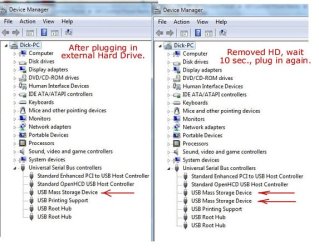
At first, the external hard drive runs very slowly (photos take a long time to load), but if I simply un-plug it then plug it back into the very same USB port, it now works normally. Then, a second "USB Mass Storage Device" appears in Device Mgr.
I've done this numerous times, so it's not just a one-shot thing.

Q. Any ideas about how to fix this?

Here is a screen shot of my Device Mgr. that might help.
http://dickh.zenfolio.com/img/v32/p1035620515-3.jpg
[/FONT]
[/FONT]
 

Attachments

  • p1035620515-3.jpg
    p1035620515-3.jpg
    50 KB · Views: 50

My Computer

OS
Windows 7 Home Premium
I thought this had been solved, but it's still a problem.

[FONT=Verdana, Arial, Helvetica, sans-serif][FONT=Verdana, Arial, Helvetica, sans-serif]I have an external hard drive where I store all my photos. My system is Windows 7, 64 bit.

When I plug in my USB external hard drive I get this message:

"This USB device can perform faster if you connect it to a HI speed USB 2.0 port."

As I read somewhere, I went into Device Manager to update the driver. It said, "... best software already installed".

At first, the external hard drive runs very slowly (photos take a long time to load), but if I simply un-plug it then plug it back into the very same USB port, it now works normally. Then, a second "USB Mass Storage Device" appears in Device Mgr.
I've done this numerous times, so it's not just a one-shot thing.

Q. Any ideas about how to fix this?

Here is a screen shot of my Device Mgr. that might help.
http://dickh.zenfolio.com/img/v32/p1035620515-3.jpg
[/FONT]
[/FONT]

Hmmm. 4 days and 189 views and not even a single idea. Perhaps I didn't explain the problem clearly enough.
Oh, well. I guess I'll just have to keep plugging and re-plugging. :)
 

My Computer

OS
Windows 7 Home Premium
I thought this had been solved, but it's still a problem.

[FONT=Verdana, Arial, Helvetica, sans-serif][FONT=Verdana, Arial, Helvetica, sans-serif]I have an external hard drive where I store all my photos. My system is Windows 7, 64 bit.[/FONT]

[FONT=Verdana, Arial, Helvetica, sans-serif]When I plug in my USB external hard drive I get this message:[/FONT]

[FONT=Verdana, Arial, Helvetica, sans-serif]"This USB device can perform faster if you connect it to a HI speed USB 2.0 port."[/FONT]

[FONT=Verdana, Arial, Helvetica, sans-serif]As I read somewhere, I went into Device Manager to update the driver. It said, "... best software already installed". [/FONT]

[FONT=Verdana, Arial, Helvetica, sans-serif]At first, the external hard drive runs very slowly (photos take a long time to load), but if I simply un-plug it then plug it back into the very same USB port, it now works normally. Then, a second "USB Mass Storage Device" appears in Device Mgr.[/FONT]
[FONT=Verdana, Arial, Helvetica, sans-serif]I've done this numerous times, so it's not just a one-shot thing.[/FONT]

[FONT=Verdana, Arial, Helvetica, sans-serif]Q. Any ideas about how to fix this?[/FONT]

[FONT=Verdana, Arial, Helvetica, sans-serif]Here is a screen shot of my Device Mgr. that might help.[/FONT]
[FONT=Verdana, Arial, Helvetica, sans-serif]http://dickh.zenfolio.com/img/v32/p1035620515-3.jpg[/FONT]
[/FONT]

Hmmm. 4 days and 189 views and not even a single idea. Perhaps I didn't explain the problem clearly enough.
Oh, well. I guess I'll just have to keep plugging and re-plugging. :)

Hey i cant help much with the technicalities of this but i know what you mean about wanting some help,,, I have had this issue with a few usb flash drives, usually when im conecting to a usb hub, i would assume you tried to connect directly to a usb off the motherboard and not through a hub? is it possibly the cable your using too? have you tried multiple cables?
Also i believe that some older drives/usb devices may not be found to be hi-speed causing a slower preformance. There maybe a program somewhere that would allow you to set your own USB ports speeds manually but im not sure.
Good luck with it!!
JRockZ
 

My Computer

Computer type
PC/Desktop
Computer Manufacturer/Model Number
JRockZ
OS
Win 7 64 Ultimate
CPU
AMD 8350 Bulldozer 4ghz
Motherboard
Asus M5a97 R2
Memory
6gb
Graphics Card(s)
ATI Radeon HD 5770 X 2
Sound Card
Board
Monitor(s) Displays
Dual Gateway 19" and 32" TV 3 displays at once :D
Screen Resolution
1440X900
Hard Drives
OCZ Agility SSD Patriot Blaze 120
PSU
750 Watt Thermaltake Tough Power
Case
Diablotek EVO Mid Tower Case CPA-6170 - 8X 120mm case fans
Cooling
Corsair Liquid Cooled
Antivirus
NAV
Browser
Always IE
[/QUOTE]
Hmmm. 4 days and 189 views and not even a single idea. Perhaps I didn't explain the problem clearly enough.
Oh, well. I guess I'll just have to keep plugging and re-plugging. :)[/QUOTE]

I just did a more extensive search and I think the problem is solved.
The answer came from "dunderhead" last May.
"I just right-clicked on Universal Serial Bus controllers and clicked "scan for hardware changes". A couple of seconds later the problem was solved."

I just plugged in my ext. HD and NO MSG. Yeah!
 

My Computer

OS
Windows 7 Home Premium
Back
Top