
USB Storage Device - Enable or Disable Connecting

How to Enable or Disable USB Storage Devices in Windows

   Information
This tutorial will show you how enable or disable USB storage devices for all users in XP, Vista, Windows 7, and Windows 8.

You must be logged in as an administrator to be able to do the steps in this tutorial.

   Note
When disabled (prevented), Windows will no longer allow read and write access to all USB storage devices connected afterwards for all users.

Any USB storage device still connected when set to be disabled will still have read and write access until either the USB storage device is disconnected or you log off, restart, or shut down the computer.

This only affects USB storage devices like a USB flash drive or an external USB hard drive. It does not affect wireless keyboard/mouse USB adapters, wireless USB modems, etc.....


OPTION ONE

To Enable or Disable USB Storage Devices using a REG File Download


1. To Disable USB Storage Devices in Windows
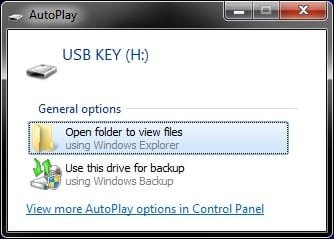
A) If you have not ever already done so, you must connect a USB storage device (ex: USB flash drive) to the computer now, and wait until Windows installs it and displays it in the Computer window with an assigned drive letter, then disconnect it.
NOTE: This only needs to be done once with any USB storage device.
AutoPlay.jpg

Computer.jpg

B) Click/tap on the Download button below to download the file below, and go to step 3 below.
Disable_USB_Storage_Devices.reg

Download


2. To Enable USB Storage Devices in Windows
NOTE: This is the default setting.
A) Click/tap on the Download button below to download the file below, and go to step 3 below.
Enable_USB_Storage_Devices.reg

Download


3. Save the .reg file to your Desktop.

4. Double click/tap on the downloaded .reg file to merge it.

5. If prompted, click/tap on Run, Continue (UAC-Vista) or Yes (UAC-Windows 7/8), Yes, and then OK.

6. When finished, you can delete the downloaded .reg file if you like.


OPTION TWO

To Enable or Disable USB Storage Devices Manually in Registry Edititor


1. If you have not ever already done so, you must connect a USB storage device (ex: USB flash drive) to the computer now, and wait until Windows installs it and displays it in the Computer window with an assigned drive letter, then disconnect it.
NOTE: This only needs to be done once with any USB storage device.
AutoPlay.jpg

Computer.jpg

2. Press the Windows + R keys to open the Run dialog, type regedit, and press Enter.

3. If prompted by UAC, then click/tap on Continue (Vista) or Yes (Windows 7/8).

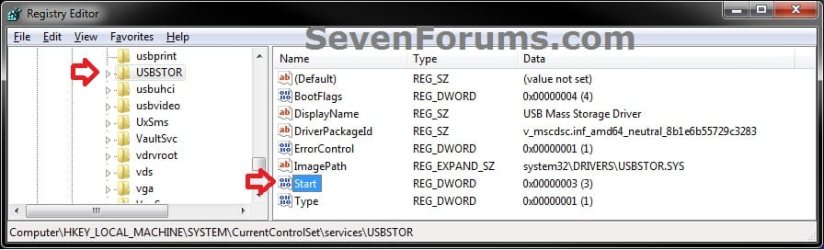
4. In regedit, navigate to the location below. (see screenshot below)
HKEY_LOCAL_MACHINE\SYSTEM\CurrentControlSet\services\USBSTOR
REG-1.jpg
5. To Enable USB Storage Devices in Windows
NOTE: This is the default setting.
A) In the right pane of USBSTOR, double click/tap on Start to modify it. (see screenshot below step 4)

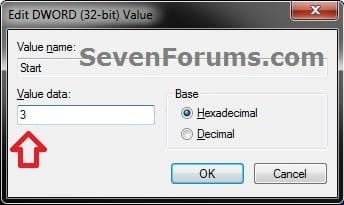
B) Type in 3, click/tap on OK, and go to step 7 below. (see screenshot below)
REG-2.jpg
6. To Disable USB Storage Devices in Windows
A) In the right pane of USBSTOR, double click/tap on Start to modify it. (see screenshot below step 4)

B) Type in 4, click/tap on OK, and go to step 7 below. (see screenshot below step 5B)
7. Close regedit.

That's it,
Shawn


Attachments

Last edited:
Thank you , i really worked.

Thank you very much. It really worked and helped.
 

My Computer My Computer

OS
Windows 7 Professional x64
You're most welcome Shehzad, and welcome to Seven Forums. :)
 

My Computer My Computer

Computer type
PC/Desktop
Computer Manufacturer/Model Number
Self built custom
OS
64-bit Windows 11 Pro for Workstations
CPU
Intel i7-8700K OC'd to 5 GHz
Motherboard
ASUS ROG Maximus XI Formula Z390
Memory
64 GB (4x16GB) G.SKILL TridentZ RGB DDR4 3600 MHz
Graphics Card(s)
ASUS ROG-STRIX-GTX1080TI-O11G-GAMING
Sound Card
Integrated
Monitor(s) Displays
2 x Samsung Odyssey G7 27"
Screen Resolution
2560x1440
Hard Drives
1TB Samsung 990 PRO M.2,
4TB Samsung 990 PRO PRO M.2,
TerraMaster F8 SSD Plus NAS
PSU
Seasonic Prime Titanium 850W
Case
Thermaltake Core P3
Cooling
Corsair Hydro H115i
Keyboard
Logitech wireless K800
Mouse
Logitech MX Master 4
Internet Speed
2 Gb/s Download and 100 Mb/s Upload
Antivirus
Malwarebyte Anti-Malware Premium
Browser
Google Chrome
Other Info
Logitech Z625 speaker system,
Logitech BRIO 4K Pro webcam,
HP Color LaserJet Pro MFP M477fdn,
APC SMART-UPS RT 1000 XL - SURT1000XLI,
Galaxy S23 Plus phone
My PC not recognizes any pendrives, ,,Type in 3, click/tap on OK'' it is done but same. when i connect pendrives pops up error massege.
 

My Computer My Computer

Computer type
PC/Desktop
Computer Manufacturer/Model Number
asus
OS
windows nome premium x86
Motherboard
asus
Memory
2
I tried this on my work PC but it returned an error. May be due to access rights set on the domain.
 

My Computer My Computer

Computer Manufacturer/Model Number
Samsung NP530U4B-S02IN
OS
Windows® 8 Pro (64-bit)
CPU
Intel® Core™ i5 Processor 2467M (1.60GHz, 3MB L3 Cache)
Motherboard
Samsung Electronics
Memory
6GB DDR3 System Memory at 1,333MHz (on BD 4GB + 2GB x 1)
Graphics Card(s)
AMD Radeon™ HD7550M 1GB DDR3 (Ext. Graphic)
Sound Card
Realtek High Definition Audio
Monitor(s) Displays
35.56cm (14.0) SuperBright 300nit HD LED Display
Screen Resolution
1366x768
Hard Drives
1TB S-ATA II Hard Drive (5400RPM) with ExpressCache 16GB SSD
Internet Speed
sucks
Antivirus
Microsoft Security Essentials
Browser
Google Chrome (Sync enabled)
Hello Dinesh,

What error are you getting?

Were you not allowed to do it manually with OPTION TWO?

If not, then yeah they most likely blocked access to Registry Editor, or already set a policy for this.
 

My Computer My Computer

Computer type
PC/Desktop
Computer Manufacturer/Model Number
Self built custom
OS
64-bit Windows 11 Pro for Workstations
CPU
Intel i7-8700K OC'd to 5 GHz
Motherboard
ASUS ROG Maximus XI Formula Z390
Memory
64 GB (4x16GB) G.SKILL TridentZ RGB DDR4 3600 MHz
Graphics Card(s)
ASUS ROG-STRIX-GTX1080TI-O11G-GAMING
Sound Card
Integrated
Monitor(s) Displays
2 x Samsung Odyssey G7 27"
Screen Resolution
2560x1440
Hard Drives
1TB Samsung 990 PRO M.2,
4TB Samsung 990 PRO PRO M.2,
TerraMaster F8 SSD Plus NAS
PSU
Seasonic Prime Titanium 850W
Case
Thermaltake Core P3
Cooling
Corsair Hydro H115i
Keyboard
Logitech wireless K800
Mouse
Logitech MX Master 4
Internet Speed
2 Gb/s Download and 100 Mb/s Upload
Antivirus
Malwarebyte Anti-Malware Premium
Browser
Google Chrome
Other Info
Logitech Z625 speaker system,
Logitech BRIO 4K Pro webcam,
HP Color LaserJet Pro MFP M477fdn,
APC SMART-UPS RT 1000 XL - SURT1000XLI,
Galaxy S23 Plus phone
Hey Shawn, yes I tried option 2 only.
Since all the workstations are managed over the network, it is most probably due to the IT rights set for users.
 

My Computer My Computer

Computer Manufacturer/Model Number
Samsung NP530U4B-S02IN
OS
Windows® 8 Pro (64-bit)
CPU
Intel® Core™ i5 Processor 2467M (1.60GHz, 3MB L3 Cache)
Motherboard
Samsung Electronics
Memory
6GB DDR3 System Memory at 1,333MHz (on BD 4GB + 2GB x 1)
Graphics Card(s)
AMD Radeon™ HD7550M 1GB DDR3 (Ext. Graphic)
Sound Card
Realtek High Definition Audio
Monitor(s) Displays
35.56cm (14.0) SuperBright 300nit HD LED Display
Screen Resolution
1366x768
Hard Drives
1TB S-ATA II Hard Drive (5400RPM) with ExpressCache 16GB SSD
Internet Speed
sucks
Antivirus
Microsoft Security Essentials
Browser
Google Chrome (Sync enabled)
That would be my guess as well.
 

My Computer My Computer

Computer type
PC/Desktop
Computer Manufacturer/Model Number
Self built custom
OS
64-bit Windows 11 Pro for Workstations
CPU
Intel i7-8700K OC'd to 5 GHz
Motherboard
ASUS ROG Maximus XI Formula Z390
Memory
64 GB (4x16GB) G.SKILL TridentZ RGB DDR4 3600 MHz
Graphics Card(s)
ASUS ROG-STRIX-GTX1080TI-O11G-GAMING
Sound Card
Integrated
Monitor(s) Displays
2 x Samsung Odyssey G7 27"
Screen Resolution
2560x1440
Hard Drives
1TB Samsung 990 PRO M.2,
4TB Samsung 990 PRO PRO M.2,
TerraMaster F8 SSD Plus NAS
PSU
Seasonic Prime Titanium 850W
Case
Thermaltake Core P3
Cooling
Corsair Hydro H115i
Keyboard
Logitech wireless K800
Mouse
Logitech MX Master 4
Internet Speed
2 Gb/s Download and 100 Mb/s Upload
Antivirus
Malwarebyte Anti-Malware Premium
Browser
Google Chrome
Other Info
Logitech Z625 speaker system,
Logitech BRIO 4K Pro webcam,
HP Color LaserJet Pro MFP M477fdn,
APC SMART-UPS RT 1000 XL - SURT1000XLI,
Galaxy S23 Plus phone
Hi All,
I want to allow USB Modem and Block Flash Memory at the same time for security Reasons
All users in my company using Windows 7 32 bit
Thanks
 

My Computer My Computer

Computer type
Laptop
Computer Manufacturer/Model Number
DELL
OS
Windows 7 32bit
CPU
core i5
Motherboard
Intel
Memory
4
Graphics Card(s)
N.A
Hard Drives
250
Antivirus
Forefront
Browser
IE
Hello Adwedar, and welcome to Seven Forums.

No worries. This only affects USB storage devices like a USB flash drive or an external USB hard drive. It does not affect wireless keyboard/mouse USB adapters, wireless USB modems, etc.....

You should be able to enable this policy to block USB storage devices, and still have your USB modem work. :)
 

My Computer My Computer

Computer type
PC/Desktop
Computer Manufacturer/Model Number
Self built custom
OS
64-bit Windows 11 Pro for Workstations
CPU
Intel i7-8700K OC'd to 5 GHz
Motherboard
ASUS ROG Maximus XI Formula Z390
Memory
64 GB (4x16GB) G.SKILL TridentZ RGB DDR4 3600 MHz
Graphics Card(s)
ASUS ROG-STRIX-GTX1080TI-O11G-GAMING
Sound Card
Integrated
Monitor(s) Displays
2 x Samsung Odyssey G7 27"
Screen Resolution
2560x1440
Hard Drives
1TB Samsung 990 PRO M.2,
4TB Samsung 990 PRO PRO M.2,
TerraMaster F8 SSD Plus NAS
PSU
Seasonic Prime Titanium 850W
Case
Thermaltake Core P3
Cooling
Corsair Hydro H115i
Keyboard
Logitech wireless K800
Mouse
Logitech MX Master 4
Internet Speed
2 Gb/s Download and 100 Mb/s Upload
Antivirus
Malwarebyte Anti-Malware Premium
Browser
Google Chrome
Other Info
Logitech Z625 speaker system,
Logitech BRIO 4K Pro webcam,
HP Color LaserJet Pro MFP M477fdn,
APC SMART-UPS RT 1000 XL - SURT1000XLI,
Galaxy S23 Plus phone
I registered for SevenForums just to say:

Tank ewe, grassy ass and mare see:geek:
 

My Computer My Computer

Computer type
PC/Desktop
Computer Manufacturer/Model Number
Scrounged Parts
OS
Win 7 Ult, Win 7 Pro, Win 8.1 Ent, Win 8.1 Pro x64 and x86
CPU
x9650 @ 3.80 stable
Motherboard
Gigabyte GA-G41MT-USB3
Memory
G. Skill RipjawsX F3-10666CL9S-4GBXL 8GB
Graphics Card(s)
SAPPHIRE HD 6670 1GB GDDR5
Hard Drives
INTEL SSDSA2CW080G3
ST2000DM001-9YN164
WDC WD30EZRX-00MMMB0
ST95005620AS
Antivirus
Rotates thru Avira, MS, Kaspersky, Trend Micro, Norton
Browser
Tor, Chrome, Firefox, Opera
Back
Top