Solved usb storage devices not working

mkeyes001

New member
Local time
10:27 AM
Messages
11
my work laptop is running windows 7, when I try to install my external HDD via the usb ports I get the pop up that windows is installing the drivers and that it ready to be used. However in my computer the drive is not listed, when I enable the drive from device manager the drive pops up but it inaccessible, then eventually disappears from my computer. I'm not the administrator on the laptop, but my user account had admin rights. For the 30 seconds the drive stays enabled the properties/security tab says a its unable to display owner.

This is also a problem on thumb drives and SD cards, the machine just can't recognize any external HDD's

any help would be awesome
 

My Computer

OS
Windows 7 Ultimate 32 bit
hi,
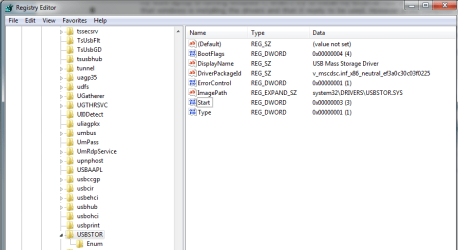
could you going to registry setting, HKEY_LOCAL_MACHINE > SYSTEM > CurrentControlSet > services
and find the usbstor. at there got a binary key start. normally is start > data(3).
 

My Computer

Computer Manufacturer/Model Number
built up
OS
windows 7
CPU
Phenom II AMD Dragon 3.5Ghz
Memory
DDR3 4GB
Graphics Card(s)
ATI Radeon 512Mb
Monitor(s) Displays
HP L1506
Screen Resolution
1152 x 864
Hard Drives
WDC 1 TB SATA-II Green Power
Keyboard
HP wireless keyboard
Mouse
HP Optic
Internet Speed
1GB
registry setting

here it is...set to 3
 

Attachments

  • registry.png
    registry.png
    77.3 KB · Views: 14

My Computer

OS
Windows 7 Ultimate 32 bit

My Computer

Computer Manufacturer/Model Number
built up
OS
windows 7
CPU
Phenom II AMD Dragon 3.5Ghz
Memory
DDR3 4GB
Graphics Card(s)
ATI Radeon 512Mb
Monitor(s) Displays
HP L1506
Screen Resolution
1152 x 864
Hard Drives
WDC 1 TB SATA-II Green Power
Keyboard
HP wireless keyboard
Mouse
HP Optic
Internet Speed
1GB
You said it is your work Laptop. If you are not the owner/administrator, the real administrator might have disabled the use of USB devices. Check with your administrator.
 

My Computer

OS
Windows 7 Home Premium 32 bit
They are present in Device Manager, but none of them are enable. Any attempt to enable them leads to permission errors, except for the SD card, I can access the file in there for about 10 seconds then the card becomes disabled.

The sandisk thumb drive tells me I have been denied permission to access this folder, and to access security tab, but it doesn't stay enabled long enough to make any changes.

The 3rd on is a seagate free agent go drive and I get similar errors, no access to folder.

All 3 of these devices work on my windows 7 desktop so I know nothing is wrong with them hardware related.
 

My Computer

OS
Windows 7 Ultimate 32 bit
You said it is your work Laptop. If you are not the owner/administrator, the real administrator might have disabled the use of USB devices. Check with your administrator.

I was also thinking this, but would this disable all the use of the USB devices? My iphone is recognized and my usb mouse works fine.
 

My Computer

OS
Windows 7 Ultimate 32 bit
usb mouse use different port with the thumb drive.
if you have admin rights on your account, you should able to reset administrator password and try login to that account.
 

My Computer

Computer Manufacturer/Model Number
built up
OS
windows 7
CPU
Phenom II AMD Dragon 3.5Ghz
Memory
DDR3 4GB
Graphics Card(s)
ATI Radeon 512Mb
Monitor(s) Displays
HP L1506
Screen Resolution
1152 x 864
Hard Drives
WDC 1 TB SATA-II Green Power
Keyboard
HP wireless keyboard
Mouse
HP Optic
Internet Speed
1GB
You said it is your work Laptop. If you are not the owner/administrator, the real administrator might have disabled the use of USB devices. Check with your administrator.

I was also thinking this, but would this disable all the use of the USB devices? My iphone is recognized and my usb mouse works fine.

Yep, the administrator can block or unblock any or all the following devices.

  • Mouse devices
  • Disk drives (for example, USB drives and external hard-disk drives)
  • CD ROMs
  • Portable devices (for example, mobile phones, digital cameras and portable media players)
  • Floppy disks
  • Bluetooth devices
  • Images (for example, USB cameras and scanners)
  • Printers
  • Modems
 

My Computer

OS
Windows 7 Home Premium 32 bit
hrmm, well that is probably my issue then. I'll have to ask the admin if this is the case. Thanks for all the info guys.

If I find a resolution I'll post back with any updates.
 

My Computer

OS
Windows 7 Ultimate 32 bit
I did confirm my company has disabled this option on my laptop, which sucks....but oh well
 

My Computer

OS
Windows 7 Ultimate 32 bit
maybe that one is a company rules. :D
 

My Computer

Computer Manufacturer/Model Number
built up
OS
windows 7
CPU
Phenom II AMD Dragon 3.5Ghz
Memory
DDR3 4GB
Graphics Card(s)
ATI Radeon 512Mb
Monitor(s) Displays
HP L1506
Screen Resolution
1152 x 864
Hard Drives
WDC 1 TB SATA-II Green Power
Keyboard
HP wireless keyboard
Mouse
HP Optic
Internet Speed
1GB
Glad that my solution worked - Oh! not solution but intuition. :D
 

My Computer

OS
Windows 7 Home Premium 32 bit
Back
Top