Solved USB Mass Storage devices error 10

ercarlitosg

New member
Local time
5:06 AM
Messages
66
Hello,

I have a notebook which can't recognize any usb mass storage devices, like flash memories or usb hdd, but usb mice and keyboard, usb bluetooth radio works well. I have tried almost everything I found on internet about this problem:

- There isn't any upper nor lower filter
- Tried this post Unable to install any USB devices
- Tried updating chipset driver
- Tried running microsoft hardware fix it

But the problem isn't solved.
If you could point me to any other solution than doing a repair install or similar solution I will be very gratefully.

The system is Windows 7 Professional x86.

Thanks
 

My Computer

Computer type
PC/Desktop
Computer Manufacturer/Model Number
Custom Build
OS
Windows 7 Professional x64
CPU
Intel Core 2 Quad Q6600
Motherboard
P5B-PLUS Vista Edition
Memory
4xKingston Value Ram DDR2 (2GB)
Graphics Card(s)
Geforce GT 210,Geforce 8800GT Alpha Dog Edition [Died :(]
Monitor(s) Displays
Asus VW247H
Screen Resolution
1920x1080
PSU
Coolbox PowerLine F500
Keyboard
Microsoft Wireless Keyboard 3000
Mouse
Microsoft Wireless Mouse 5000
Internet Speed
20Mbps
Antivirus
ESET NOD32 7
Browser
Google Chrome
What brand / model is your notebook?
Open device manager and look for a yellow alert.
Post a snapshot of device manager as an attachment.
 
Last edited:

My Computers

System One System Two

  • Computer type
    PC/Desktop
    Computer Manufacturer/Model Number
    custom build
    OS
    Windows 7 HP 64
    CPU
    i5 6600K - 800MHz to 4200MHz
    Motherboard
    GA-Z170-HD3P
    Memory
    4+4G GSkill DDR4 3000
    Graphics Card(s)
    IG - Intel 530
    Monitor(s) Displays
    Samsung 226BW
    Screen Resolution
    1680x1050
    Hard Drives
    (1) -1 SM951 – 128GB M.2 AHCI PCIe SSD drive for Windows 7 and Lubuntu
    (2) -1 WD SATA 3 - 1T for Data
    (3) -1 WD SATA 3 - 1T for backup
    PSU
    Thermaltake 450W TR2 gold
    Keyboard
    Old and good Chicony mechanical keyboard
    Mouse
    Logitech mX performance - 9 buttons (had to disable some)
    Internet Speed
    500Mb/s
    Browser
    Firefox 64
    Other Info
    TinyWall firewall
  • Computer type
    Laptop
    System Manufacturer/Model Number
    Asus Q550LF
    OS
    Windows 7 Pro
    CPU
    i7-4500U 800MHz to 3.0GHz
    Motherboard
    Asus Q550LF
    Memory
    (4+4)G DDR3 1600
    Graphics Card(s)
    IG intel 4400 + NVIDIA GeForce GT 745M
    Sound Card
    Realtek
    Monitor(s) Displays
    LG Display LP156WF4-SPH1
    Screen Resolution
    1920 x 1080
    Hard Drives
    BX500 120G SSD for Windows and programs +
    1T HDD for data
    Internet Speed
    500 Mb/s
    Browser
    Firefox
    Other Info
    TinyWall firewall
What brand / model is your notebook?
Open device manager and look for a yellow alert.
Post a snapshot of device manager as an attachment.

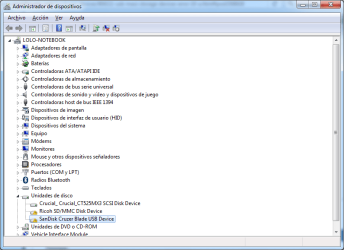
My computer is a HP Pavilion dv6700 Notebook. Here are two screenshot from a usb drive connected that shows the problem.
 

Attachments

  • dvmanager.png
    dvmanager.png
    63.8 KB · Views: 1
  • dvmanager2.png
    dvmanager2.png
    31.5 KB · Views: 44

My Computer

Computer type
PC/Desktop
Computer Manufacturer/Model Number
Custom Build
OS
Windows 7 Professional x64
CPU
Intel Core 2 Quad Q6600
Motherboard
P5B-PLUS Vista Edition
Memory
4xKingston Value Ram DDR2 (2GB)
Graphics Card(s)
Geforce GT 210,Geforce 8800GT Alpha Dog Edition [Died :(]
Monitor(s) Displays
Asus VW247H
Screen Resolution
1920x1080
PSU
Coolbox PowerLine F500
Keyboard
Microsoft Wireless Keyboard 3000
Mouse
Microsoft Wireless Mouse 5000
Internet Speed
20Mbps
Antivirus
ESET NOD32 7
Browser
Google Chrome
You have two drivers missing. Is your Win7 64 or 32?
Right click on the Ricoh, properties - Details - Hardware ID's - Post a screen shot
Do the same for Sandisk.
392656d1476219902-lg-bluetooth-soundbar-recognised-devices-but-will-not-connect-device.jpg

Under USB don't you have a yellow alert?
 

My Computers

System One System Two

  • Computer type
    PC/Desktop
    Computer Manufacturer/Model Number
    custom build
    OS
    Windows 7 HP 64
    CPU
    i5 6600K - 800MHz to 4200MHz
    Motherboard
    GA-Z170-HD3P
    Memory
    4+4G GSkill DDR4 3000
    Graphics Card(s)
    IG - Intel 530
    Monitor(s) Displays
    Samsung 226BW
    Screen Resolution
    1680x1050
    Hard Drives
    (1) -1 SM951 – 128GB M.2 AHCI PCIe SSD drive for Windows 7 and Lubuntu
    (2) -1 WD SATA 3 - 1T for Data
    (3) -1 WD SATA 3 - 1T for backup
    PSU
    Thermaltake 450W TR2 gold
    Keyboard
    Old and good Chicony mechanical keyboard
    Mouse
    Logitech mX performance - 9 buttons (had to disable some)
    Internet Speed
    500Mb/s
    Browser
    Firefox 64
    Other Info
    TinyWall firewall
  • Computer type
    Laptop
    System Manufacturer/Model Number
    Asus Q550LF
    OS
    Windows 7 Pro
    CPU
    i7-4500U 800MHz to 3.0GHz
    Motherboard
    Asus Q550LF
    Memory
    (4+4)G DDR3 1600
    Graphics Card(s)
    IG intel 4400 + NVIDIA GeForce GT 745M
    Sound Card
    Realtek
    Monitor(s) Displays
    LG Display LP156WF4-SPH1
    Screen Resolution
    1920 x 1080
    Hard Drives
    BX500 120G SSD for Windows and programs +
    1T HDD for data
    Internet Speed
    500 Mb/s
    Browser
    Firefox
    Other Info
    TinyWall firewall
You have two drivers missing. Is your Win7 64 or 32?
Right click on the Ricoh, properties - Details - Hardware ID's - Post a screen shot
Do the same for Sandisk.
392656d1476219902-lg-bluetooth-soundbar-recognised-devices-but-will-not-connect-device.jpg

Under USB don't you have a yellow alert?

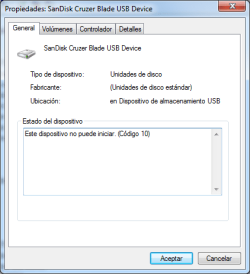
I don't have the PC now but the system is 32 bits and doesn't have any yellow alert under USB Devices. Other usb devices like mice and keyboard works well. The problem is in usb storage devices. In another windows, this time 7 x64 the sandisk drive shows this under hardware id.

Thanks
 

Attachments

  • 2017-01-04 13_36_51-Propiedades_ SanDisk Cruzer Blade USB Device.png
    2017-01-04 13_36_51-Propiedades_ SanDisk Cruzer Blade USB Device.png
    35.3 KB · Views: 41

My Computer

Computer type
PC/Desktop
Computer Manufacturer/Model Number
Custom Build
OS
Windows 7 Professional x64
CPU
Intel Core 2 Quad Q6600
Motherboard
P5B-PLUS Vista Edition
Memory
4xKingston Value Ram DDR2 (2GB)
Graphics Card(s)
Geforce GT 210,Geforce 8800GT Alpha Dog Edition [Died :(]
Monitor(s) Displays
Asus VW247H
Screen Resolution
1920x1080
PSU
Coolbox PowerLine F500
Keyboard
Microsoft Wireless Keyboard 3000
Mouse
Microsoft Wireless Mouse 5000
Internet Speed
20Mbps
Antivirus
ESET NOD32 7
Browser
Google Chrome

My Computers

System One System Two

  • Computer type
    PC/Desktop
    Computer Manufacturer/Model Number
    custom build
    OS
    Windows 7 HP 64
    CPU
    i5 6600K - 800MHz to 4200MHz
    Motherboard
    GA-Z170-HD3P
    Memory
    4+4G GSkill DDR4 3000
    Graphics Card(s)
    IG - Intel 530
    Monitor(s) Displays
    Samsung 226BW
    Screen Resolution
    1680x1050
    Hard Drives
    (1) -1 SM951 – 128GB M.2 AHCI PCIe SSD drive for Windows 7 and Lubuntu
    (2) -1 WD SATA 3 - 1T for Data
    (3) -1 WD SATA 3 - 1T for backup
    PSU
    Thermaltake 450W TR2 gold
    Keyboard
    Old and good Chicony mechanical keyboard
    Mouse
    Logitech mX performance - 9 buttons (had to disable some)
    Internet Speed
    500Mb/s
    Browser
    Firefox 64
    Other Info
    TinyWall firewall
  • Computer type
    Laptop
    System Manufacturer/Model Number
    Asus Q550LF
    OS
    Windows 7 Pro
    CPU
    i7-4500U 800MHz to 3.0GHz
    Motherboard
    Asus Q550LF
    Memory
    (4+4)G DDR3 1600
    Graphics Card(s)
    IG intel 4400 + NVIDIA GeForce GT 745M
    Sound Card
    Realtek
    Monitor(s) Displays
    LG Display LP156WF4-SPH1
    Screen Resolution
    1920 x 1080
    Hard Drives
    BX500 120G SSD for Windows and programs +
    1T HDD for data
    Internet Speed
    500 Mb/s
    Browser
    Firefox
    Other Info
    TinyWall firewall
Those items are supposed to find their own drivers, but they`re not.

Right click on them in Device Manager and choose to update driver, what happens ?
 

My Computer

Computer type
PC/Desktop
Computer Manufacturer/Model Number
Skylake Special #666
OS
Windows 10 Pro x64
CPU
Intel Core i7 6700K
Motherboard
Asus Sabertooth Z170 Mark 1
Memory
GSkill TridentZ RGB 16GB 3600 16-16-16-36
Graphics Card(s)
EVGA GTX 980 Ti SC x2
Sound Card
Realtek High Definition
Monitor(s) Displays
AOC G2460PG
Screen Resolution
1920 x 1080 144Hz
Hard Drives
Samsung 860 Pro 256GB, Seagate Barracuda 4TB x2
PSU
EVGA 1000 P2, EVGA White Custom Braided Cables
Case
Corsair Vengeance C70 Gunmetal Black
Cooling
Corsair H100i v2, Corsair ML120 x2, Thermal Grizzly Kryonaut
Keyboard
Logitech G910 Orion Spectrum
Mouse
Logitech G700s
Internet Speed
Verizon Fios Quantum Gateway 75/75
Antivirus
Windows Defender, Malwarebytes Free 3.8.3
Browser
Chrome
Other Info
Corsair SP120 x4, LG Blu-ray Drive, Durabrand HT-395 100 Watt Dolby Digital Amp, Corsair H2100 Wireless 7.1 Headset
I'm sorry for the late response I have been busy with my studies.

If I choose to update the controller the computer searchs for the driver on windows update and never ends even after 5-6h running.

I have installed the ricoh driver and don't fix anything.

Thanks

EDIT: Problem solved. There was some things that was conflicting on the machine. First I didn't mention two things: this is a machine with specialized software and we moved from a lower capacity Samsung SSD to a bigger one from Crucial. One of the special software the machine has cached the ssd, any change made to system was revoked on restart and this was the cause of not doing anything on the filesystem.Even if I created a txt file on the desktop, it was deleted on restart.

And the second thing this machine has samsung magician rapid mode installed which was incompatible with the crucial ssd and I don't know how it affected the USB, so uninstalling samsung magician and patching the specialized software solved the problem.

Anyway, thanks for all your help
 
Last edited:

My Computer

Computer type
PC/Desktop
Computer Manufacturer/Model Number
Custom Build
OS
Windows 7 Professional x64
CPU
Intel Core 2 Quad Q6600
Motherboard
P5B-PLUS Vista Edition
Memory
4xKingston Value Ram DDR2 (2GB)
Graphics Card(s)
Geforce GT 210,Geforce 8800GT Alpha Dog Edition [Died :(]
Monitor(s) Displays
Asus VW247H
Screen Resolution
1920x1080
PSU
Coolbox PowerLine F500
Keyboard
Microsoft Wireless Keyboard 3000
Mouse
Microsoft Wireless Mouse 5000
Internet Speed
20Mbps
Antivirus
ESET NOD32 7
Browser
Google Chrome
FIXED!! USB Mass Storage Deviice Code 10

I changed out a Samsung SSD for a Kensington SSD. I had Samsung Magician installed, which was causing the conflict. Once SM was uninstalled and a reboot - VOILA!!


THANK YOU!!
 

My Computer

Computer type
Laptop
Computer Manufacturer/Model Number
HP
OS
win 7 64 Home Premium
CPU
i7 5500
Thank you for the feedback.
I have seen many issues with Samsung Magician.
 

My Computers

System One System Two

  • Computer type
    PC/Desktop
    Computer Manufacturer/Model Number
    custom build
    OS
    Windows 7 HP 64
    CPU
    i5 6600K - 800MHz to 4200MHz
    Motherboard
    GA-Z170-HD3P
    Memory
    4+4G GSkill DDR4 3000
    Graphics Card(s)
    IG - Intel 530
    Monitor(s) Displays
    Samsung 226BW
    Screen Resolution
    1680x1050
    Hard Drives
    (1) -1 SM951 – 128GB M.2 AHCI PCIe SSD drive for Windows 7 and Lubuntu
    (2) -1 WD SATA 3 - 1T for Data
    (3) -1 WD SATA 3 - 1T for backup
    PSU
    Thermaltake 450W TR2 gold
    Keyboard
    Old and good Chicony mechanical keyboard
    Mouse
    Logitech mX performance - 9 buttons (had to disable some)
    Internet Speed
    500Mb/s
    Browser
    Firefox 64
    Other Info
    TinyWall firewall
  • Computer type
    Laptop
    System Manufacturer/Model Number
    Asus Q550LF
    OS
    Windows 7 Pro
    CPU
    i7-4500U 800MHz to 3.0GHz
    Motherboard
    Asus Q550LF
    Memory
    (4+4)G DDR3 1600
    Graphics Card(s)
    IG intel 4400 + NVIDIA GeForce GT 745M
    Sound Card
    Realtek
    Monitor(s) Displays
    LG Display LP156WF4-SPH1
    Screen Resolution
    1920 x 1080
    Hard Drives
    BX500 120G SSD for Windows and programs +
    1T HDD for data
    Internet Speed
    500 Mb/s
    Browser
    Firefox
    Other Info
    TinyWall firewall
Back
Top