Hey, I have an interesting problem with SanDisk Cruzer Blade & Edge thumbdrives.
Whenever I put them in my computer, I get the sound that Windows has detected I have plugged something in, but nothing appears.
I go into Computer Management -> Disk Management and they aren't listed at all.
Explorer 'hangs' when I plug it in. If I plug another USB drive that I know works into the computer, there is no sound and nothing is recognised until I unplug the 'faulty' thumb drive.
When I unplug them, something flashes for an instant in My Computer and Windows makes the device removed sound.
This happens with multiple thumb drives... all SanDisk Cruzer Blade & Edge thumbdrives.
Here is the catch... They work perfectly fine in any other computer!
I suspect that as I have used a lot of thumbdrives in this laptop, is there now an overload of sandisk thumbdrives in the memory bank? Not sure if I am barking up the right tree or not.
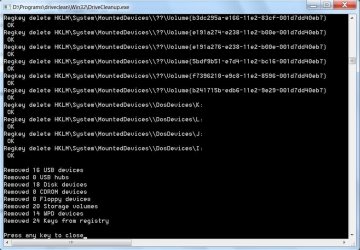
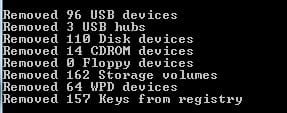
I have attached a screenshot from my registry in case it sheds any light...
Thoughts?
(Thanks in advance)
Whenever I put them in my computer, I get the sound that Windows has detected I have plugged something in, but nothing appears.
I go into Computer Management -> Disk Management and they aren't listed at all.
Explorer 'hangs' when I plug it in. If I plug another USB drive that I know works into the computer, there is no sound and nothing is recognised until I unplug the 'faulty' thumb drive.
When I unplug them, something flashes for an instant in My Computer and Windows makes the device removed sound.
This happens with multiple thumb drives... all SanDisk Cruzer Blade & Edge thumbdrives.
Here is the catch... They work perfectly fine in any other computer!
I suspect that as I have used a lot of thumbdrives in this laptop, is there now an overload of sandisk thumbdrives in the memory bank? Not sure if I am barking up the right tree or not.
I have attached a screenshot from my registry in case it sheds any light...
Thoughts?
(Thanks in advance)
Attachments

My Computer
At a glance
Windows 7 Professional 64bitIntel Core i7 720QM @ 1.60GHz8.0GB Dual-Channel DDR3 @ 533MHz (7-7-7-20)NVIDIA GeForce 310M
- Computer type
- Laptop
- Computer Manufacturer/Model Number
- Toshiba
- OS
- Windows 7 Professional 64bit
- CPU
- Intel Core i7 720QM @ 1.60GHz
- Motherboard
- Toshiba PSAT9U-006002
- Memory
- 8.0GB Dual-Channel DDR3 @ 533MHz (7-7-7-20)
- Graphics Card(s)
- NVIDIA GeForce 310M
- Hard Drives
- 488GB Hitachi HTS545050B9A300 ATA Device
- Browser
- Firefox & Chrome