Usbport.sys causes high DPC over time.

Slappy

New member
Local time
9:34 AM
Messages
19
So here's my problem and i've been looking everywhere for something that might fix this... my machine is running pretty much 24/7 but after about 5 days of uptime my dpc reaches around 12000-14000µs and my sound starts crackling, i've updated all my drivers, i've updated my bios and everything else when using this guide How to Diagnose and Fix High DPC Latency Issues with WPA (Windows Vista/7/8) - Sysnative Forums i found out that what's eating up my latency seems to be usbport.sys however i have found absolutley nothing that might help me solve it. Does anyone have any idea of what to do? If you need more information from me just say so and i'll respond as soon as i see it.
 

My Computer

Computer type
PC/Desktop
OS
Windows 7 Ultimate x64
CPU
Intel Core i7 3770K 3,5Ghz
Motherboard
MSI Z77A-S01
Memory
Corsair 16GB (2x8192MB) CL10 1600MHz VENGEANCE LP
Graphics Card(s)
XFX Radeon HD7950 3072MB Black Edition Dual Fan
Monitor(s) Displays
Acer p223w
Screen Resolution
1680*1050
Hard Drives
2TB Western Digital Caviar Green
1TB Western Digital Caviar Green
Samsung SSD Basic 840-Series 250GB
PSU
be quiet! Pure Power L8 630W
Case
Fractal Design Define R4
Cooling
Corsair Hydro H80i
Keyboard
Logitech Media Keyboard
Mouse
Logitech G500
Internet Speed
24/2
Antivirus
Eset Nod 32 v6
Browser
Firefox
no one who knows what to do?
 

My Computer

Computer type
PC/Desktop
OS
Windows 7 Ultimate x64
CPU
Intel Core i7 3770K 3,5Ghz
Motherboard
MSI Z77A-S01
Memory
Corsair 16GB (2x8192MB) CL10 1600MHz VENGEANCE LP
Graphics Card(s)
XFX Radeon HD7950 3072MB Black Edition Dual Fan
Monitor(s) Displays
Acer p223w
Screen Resolution
1680*1050
Hard Drives
2TB Western Digital Caviar Green
1TB Western Digital Caviar Green
Samsung SSD Basic 840-Series 250GB
PSU
be quiet! Pure Power L8 630W
Case
Fractal Design Define R4
Cooling
Corsair Hydro H80i
Keyboard
Logitech Media Keyboard
Mouse
Logitech G500
Internet Speed
24/2
Antivirus
Eset Nod 32 v6
Browser
Firefox
Slappy,

Welcome to the forums. Please update your specs with the link in my sig. You stated you updated your BIOS, are all your chipset drivers updated too?
 

My Computer

Computer type
PC/Desktop
Computer Manufacturer/Model Number
Dude Build
OS
Windows 10 Pro X64
CPU
Intel(R) Core(TM) i5-3570K CPU OC@ 4.5GHZ Turbo
Motherboard
MSI Z77A-G45 Gaming
Memory
8.00 GB DDR3 1600Mhz
Graphics Card(s)
MSI Gaming X GTX 1070
Sound Card
Realtek High Definition
Monitor(s) Displays
Dell S23O9W, HP L1710
Screen Resolution
DELL-1920 x 1080 HP-1280 x1024
Hard Drives
Crucial m4 256 SSD, WD 7200RPM 500GB WD 1TB
PSU
Seasonic X650 GOLD
Case
Zalman Z12
Cooling
Antec Kuhler 920
Keyboard
Logitech
Mouse
MSI DS100 Interceptor
Internet Speed
50 down and 5 up
Antivirus
MSE
Browser
Chrome, IE 11
Other Info
Logitech X-620 Speakers
Also found this tip in a thread that might help

:ar: Latency
 

My Computer

Computer type
PC/Desktop
Computer Manufacturer/Model Number
Dude Build
OS
Windows 10 Pro X64
CPU
Intel(R) Core(TM) i5-3570K CPU OC@ 4.5GHZ Turbo
Motherboard
MSI Z77A-G45 Gaming
Memory
8.00 GB DDR3 1600Mhz
Graphics Card(s)
MSI Gaming X GTX 1070
Sound Card
Realtek High Definition
Monitor(s) Displays
Dell S23O9W, HP L1710
Screen Resolution
DELL-1920 x 1080 HP-1280 x1024
Hard Drives
Crucial m4 256 SSD, WD 7200RPM 500GB WD 1TB
PSU
Seasonic X650 GOLD
Case
Zalman Z12
Cooling
Antec Kuhler 920
Keyboard
Logitech
Mouse
MSI DS100 Interceptor
Internet Speed
50 down and 5 up
Antivirus
MSE
Browser
Chrome, IE 11
Other Info
Logitech X-620 Speakers
All updated and no that fix does not work already tried it i do know that once i remove the controler that uses the usbport.sys in device manager my dpc drops, however it just takes a couple of days and it's back up again and i'm forced to do a reboot to get the dpc to lower because it keeps building up over a couple of days.
 

My Computer

Computer type
PC/Desktop
OS
Windows 7 Ultimate x64
CPU
Intel Core i7 3770K 3,5Ghz
Motherboard
MSI Z77A-S01
Memory
Corsair 16GB (2x8192MB) CL10 1600MHz VENGEANCE LP
Graphics Card(s)
XFX Radeon HD7950 3072MB Black Edition Dual Fan
Monitor(s) Displays
Acer p223w
Screen Resolution
1680*1050
Hard Drives
2TB Western Digital Caviar Green
1TB Western Digital Caviar Green
Samsung SSD Basic 840-Series 250GB
PSU
be quiet! Pure Power L8 630W
Case
Fractal Design Define R4
Cooling
Corsair Hydro H80i
Keyboard
Logitech Media Keyboard
Mouse
Logitech G500
Internet Speed
24/2
Antivirus
Eset Nod 32 v6
Browser
Firefox
did you try
Click Start --> Search for "Power Options" and open this control panel --> (on default "Balanced (recommended)" is selected) Choose "change plan settings" --> "Change advanced power settings" --> "Processor power management" --> "Minimum processor state" --> change setting to "100%


That is a really good rig you have.
 

My Computer

Computer type
PC/Desktop
Computer Manufacturer/Model Number
Dude Build
OS
Windows 10 Pro X64
CPU
Intel(R) Core(TM) i5-3570K CPU OC@ 4.5GHZ Turbo
Motherboard
MSI Z77A-G45 Gaming
Memory
8.00 GB DDR3 1600Mhz
Graphics Card(s)
MSI Gaming X GTX 1070
Sound Card
Realtek High Definition
Monitor(s) Displays
Dell S23O9W, HP L1710
Screen Resolution
DELL-1920 x 1080 HP-1280 x1024
Hard Drives
Crucial m4 256 SSD, WD 7200RPM 500GB WD 1TB
PSU
Seasonic X650 GOLD
Case
Zalman Z12
Cooling
Antec Kuhler 920
Keyboard
Logitech
Mouse
MSI DS100 Interceptor
Internet Speed
50 down and 5 up
Antivirus
MSE
Browser
Chrome, IE 11
Other Info
Logitech X-620 Speakers

My Computer

Computer type
PC/Desktop
Computer Manufacturer/Model Number
My Own Build
OS
Windows 10 64 bit
CPU
Intel i7 6700K
Motherboard
ASUS ROG Maximus VIII Hero
Memory
16GB Corsair Dominator
Graphics Card(s)
Intel CPU Graphics
Sound Card
RealTek
Monitor(s) Displays
27" Dell S2719dgf
Screen Resolution
2560X1440
Hard Drives
1 TB Samsung 850 EVO SSD for Win 10 Pro
500GB Samsung 850 EVO SSD for Win 10 Insider
2 TB drive for backup
PSU
EVGA Supernova 750G2
Case
BeQuiet Silent Base 600
Cooling
Deepcool Captain 120EX
Keyboard
Microsoft Wireless 2000
Mouse
Microsoft wireless
Internet Speed
100 MB/sec (Cable)
Antivirus
Microsoft Defender and Malwarebytes
Browser
Edge/Firefox
Other Info
Cakewalk (Sonar) by BandLab and Studio One 4.1 Pro recording studio software. MOTU 896Mk3 Hybrid recording interface, Frontier Tranzport wireless control unit, Behringer X-Touch Control Surface.
Five USB connected optical drives for CD Audio production using Nero BurningROM
did you try
Click Start --> Search for "Power Options" and open this control panel --> (on default "Balanced (recommended)" is selected) Choose "change plan settings" --> "Change advanced power settings" --> "Processor power management" --> "Minimum processor state" --> change setting to "100%


That is a really good rig you have.

Yeap i've tried that already and thanks i built it this winter planning on having it lasting me for around 4 years before i'm gonna upgrade it to a better one :P, will probably buy a new GPU before that but other then that it's built to last :) .


Try the resplendence latency check program. It provides a more detailed description of what is happening compared to the DPC Latency Checker.

Resplendence Software - LatencyMon: suitability checker for real-time audio and other tasks

Yeah i have latencymon to and i have tried it, it tells me the same thing as the windows tools and that is that it's usbport.sys that's causing it but not whati's making usbport.sys to cause it.


Also i uploaded the log of latencymon here so you can have a look.

http://slappy.rymdraket.net/pics/Drivers.txt
 

My Computer

Computer type
PC/Desktop
OS
Windows 7 Ultimate x64
CPU
Intel Core i7 3770K 3,5Ghz
Motherboard
MSI Z77A-S01
Memory
Corsair 16GB (2x8192MB) CL10 1600MHz VENGEANCE LP
Graphics Card(s)
XFX Radeon HD7950 3072MB Black Edition Dual Fan
Monitor(s) Displays
Acer p223w
Screen Resolution
1680*1050
Hard Drives
2TB Western Digital Caviar Green
1TB Western Digital Caviar Green
Samsung SSD Basic 840-Series 250GB
PSU
be quiet! Pure Power L8 630W
Case
Fractal Design Define R4
Cooling
Corsair Hydro H80i
Keyboard
Logitech Media Keyboard
Mouse
Logitech G500
Internet Speed
24/2
Antivirus
Eset Nod 32 v6
Browser
Firefox

My Computer

Computer type
PC/Desktop
Computer Manufacturer/Model Number
My Own Build
OS
Windows 10 64 bit
CPU
Intel i7 6700K
Motherboard
ASUS ROG Maximus VIII Hero
Memory
16GB Corsair Dominator
Graphics Card(s)
Intel CPU Graphics
Sound Card
RealTek
Monitor(s) Displays
27" Dell S2719dgf
Screen Resolution
2560X1440
Hard Drives
1 TB Samsung 850 EVO SSD for Win 10 Pro
500GB Samsung 850 EVO SSD for Win 10 Insider
2 TB drive for backup
PSU
EVGA Supernova 750G2
Case
BeQuiet Silent Base 600
Cooling
Deepcool Captain 120EX
Keyboard
Microsoft Wireless 2000
Mouse
Microsoft wireless
Internet Speed
100 MB/sec (Cable)
Antivirus
Microsoft Defender and Malwarebytes
Browser
Edge/Firefox
Other Info
Cakewalk (Sonar) by BandLab and Studio One 4.1 Pro recording studio software. MOTU 896Mk3 Hybrid recording interface, Frontier Tranzport wireless control unit, Behringer X-Touch Control Surface.
Five USB connected optical drives for CD Audio production using Nero BurningROM
Here is one thread on that usbport.sys latency
DPC Latency USBport.sys

Yeah i've checked that to, can't seem to find an answer there either to what is causing it, is there any program out there that can see what software might be using certain drivers, since the dpc builds up over time i don't think it's a faulty driver either since it seems unlikely that it would take days before it reaches the crackling and popping sound that comes from high dpc.
 

My Computer

Computer type
PC/Desktop
OS
Windows 7 Ultimate x64
CPU
Intel Core i7 3770K 3,5Ghz
Motherboard
MSI Z77A-S01
Memory
Corsair 16GB (2x8192MB) CL10 1600MHz VENGEANCE LP
Graphics Card(s)
XFX Radeon HD7950 3072MB Black Edition Dual Fan
Monitor(s) Displays
Acer p223w
Screen Resolution
1680*1050
Hard Drives
2TB Western Digital Caviar Green
1TB Western Digital Caviar Green
Samsung SSD Basic 840-Series 250GB
PSU
be quiet! Pure Power L8 630W
Case
Fractal Design Define R4
Cooling
Corsair Hydro H80i
Keyboard
Logitech Media Keyboard
Mouse
Logitech G500
Internet Speed
24/2
Antivirus
Eset Nod 32 v6
Browser
Firefox
Taking a while (days) before it happens suggests some program or device is not clearing memory or unloading when its not in use.

I don't keep mine powered on overnight so I never get to that point, to see what mine would do. I use my system for my recording studio so I keep an eye on everything, but powering off over night and powering on in the morning there is nothing there.

One thing I see, I see RealTek and I also see Creative (soundblaster). Do you have both a Soundblaster sound card and Realtek or is the Soundblaster just the software enhancement? If you have both an actual soundblaster sound card and realtek, the realtek should be disabled in the BIOS or there will be conflicts and potential sound problems. My recording studio system (what is in My system Specs) motherboard came with the SoundBlaster enhancement. I initially installed it but later uninstalled it as I never used it. If I want "high quality" sound, I just use my recording studio hardware with the PC.

I ran into another (USB) problem with a Logitech/mouse combo that use the Logitech "Unifying" system (bluetooth connections) and had to go back to a wired keyboard and a "standard" wireless mouse. That mostly affected the keyboard but I was having some other flakey problems.

Finally, are you using a wired internet connection or a wi-fi? Wi-fi is a known cause (there are others) of the stuttering, popping crackling of sound.
 

My Computer

Computer type
PC/Desktop
Computer Manufacturer/Model Number
My Own Build
OS
Windows 10 64 bit
CPU
Intel i7 6700K
Motherboard
ASUS ROG Maximus VIII Hero
Memory
16GB Corsair Dominator
Graphics Card(s)
Intel CPU Graphics
Sound Card
RealTek
Monitor(s) Displays
27" Dell S2719dgf
Screen Resolution
2560X1440
Hard Drives
1 TB Samsung 850 EVO SSD for Win 10 Pro
500GB Samsung 850 EVO SSD for Win 10 Insider
2 TB drive for backup
PSU
EVGA Supernova 750G2
Case
BeQuiet Silent Base 600
Cooling
Deepcool Captain 120EX
Keyboard
Microsoft Wireless 2000
Mouse
Microsoft wireless
Internet Speed
100 MB/sec (Cable)
Antivirus
Microsoft Defender and Malwarebytes
Browser
Edge/Firefox
Other Info
Cakewalk (Sonar) by BandLab and Studio One 4.1 Pro recording studio software. MOTU 896Mk3 Hybrid recording interface, Frontier Tranzport wireless control unit, Behringer X-Touch Control Surface.
Five USB connected optical drives for CD Audio production using Nero BurningROM
Taking a while (days) before it happens suggests some program or device is not clearing memory or unloading when its not in use.

I don't keep mine powered on overnight so I never get to that point, to see what mine would do. I use my system for my recording studio so I keep an eye on everything, but powering off over night and powering on in the morning there is nothing there.

One thing I see, I see RealTek and I also see Creative (soundblaster). Do you have both a Soundblaster sound card and Realtek or is the Soundblaster just the software enhancement? If you have both an actual soundblaster sound card and realtek, the realtek should be disabled in the BIOS or there will be conflicts and potential sound problems. My recording studio system (what is in My system Specs) motherboard came with the SoundBlaster enhancement. I initially installed it but later uninstalled it as I never used it. If I want "high quality" sound, I just use my recording studio hardware with the PC.

I ran into another (USB) problem with a Logitech/mouse combo that use the Logitech "Unifying" system (bluetooth connections) and had to go back to a wired keyboard and a "standard" wireless mouse. That mostly affected the keyboard but I was having some other flakey problems.

Finally, are you using a wired internet connection or a wi-fi? Wi-fi is a known cause (there are others) of the stuttering, popping crackling of sound.

Well i do use my comp for some stuff when i'm sleeping so it's pretty much always on, the creative sound blaster is for my world of warcraft headset creative sent me a couple of years ago, it was never the cause of any problems before but since it's wireless the dongle for it does act like a usb sound card but i've tried running the comp without it plugged in to rule it out and even when it's not connected the latency still keeps raising.
 

My Computer

Computer type
PC/Desktop
OS
Windows 7 Ultimate x64
CPU
Intel Core i7 3770K 3,5Ghz
Motherboard
MSI Z77A-S01
Memory
Corsair 16GB (2x8192MB) CL10 1600MHz VENGEANCE LP
Graphics Card(s)
XFX Radeon HD7950 3072MB Black Edition Dual Fan
Monitor(s) Displays
Acer p223w
Screen Resolution
1680*1050
Hard Drives
2TB Western Digital Caviar Green
1TB Western Digital Caviar Green
Samsung SSD Basic 840-Series 250GB
PSU
be quiet! Pure Power L8 630W
Case
Fractal Design Define R4
Cooling
Corsair Hydro H80i
Keyboard
Logitech Media Keyboard
Mouse
Logitech G500
Internet Speed
24/2
Antivirus
Eset Nod 32 v6
Browser
Firefox
What IRQ is the USB on? Is it on a shared IRQ with something else? Doing google searches for your problem I saw one that has the Usbport.sys latency (and audio crackling) that was traced to the shared IRQ.

Another's problem turned out to be the keyboard, etc. So don't leave anything out as a possibility.

The sound is on a shared IRQ with a higher priority device and sometimes that causes audio problems.
 

My Computer

Computer type
PC/Desktop
Computer Manufacturer/Model Number
My Own Build
OS
Windows 10 64 bit
CPU
Intel i7 6700K
Motherboard
ASUS ROG Maximus VIII Hero
Memory
16GB Corsair Dominator
Graphics Card(s)
Intel CPU Graphics
Sound Card
RealTek
Monitor(s) Displays
27" Dell S2719dgf
Screen Resolution
2560X1440
Hard Drives
1 TB Samsung 850 EVO SSD for Win 10 Pro
500GB Samsung 850 EVO SSD for Win 10 Insider
2 TB drive for backup
PSU
EVGA Supernova 750G2
Case
BeQuiet Silent Base 600
Cooling
Deepcool Captain 120EX
Keyboard
Microsoft Wireless 2000
Mouse
Microsoft wireless
Internet Speed
100 MB/sec (Cable)
Antivirus
Microsoft Defender and Malwarebytes
Browser
Edge/Firefox
Other Info
Cakewalk (Sonar) by BandLab and Studio One 4.1 Pro recording studio software. MOTU 896Mk3 Hybrid recording interface, Frontier Tranzport wireless control unit, Behringer X-Touch Control Surface.
Five USB connected optical drives for CD Audio production using Nero BurningROM
What IRQ is the USB on? Is it on a shared IRQ with something else? Doing google searches for your problem I saw one that has the Usbport.sys latency (and audio crackling) that was traced to the shared IRQ.

Another's problem turned out to be the keyboard, etc. So don't leave anything out as a possibility.

The sound is on a shared IRQ with a higher priority device and sometimes that causes audio problems.

I know i've seen IRQ's before but for the life of me i can't seem to find out how the hell i locate them, any tips? :P
 

My Computer

Computer type
PC/Desktop
OS
Windows 7 Ultimate x64
CPU
Intel Core i7 3770K 3,5Ghz
Motherboard
MSI Z77A-S01
Memory
Corsair 16GB (2x8192MB) CL10 1600MHz VENGEANCE LP
Graphics Card(s)
XFX Radeon HD7950 3072MB Black Edition Dual Fan
Monitor(s) Displays
Acer p223w
Screen Resolution
1680*1050
Hard Drives
2TB Western Digital Caviar Green
1TB Western Digital Caviar Green
Samsung SSD Basic 840-Series 250GB
PSU
be quiet! Pure Power L8 630W
Case
Fractal Design Define R4
Cooling
Corsair Hydro H80i
Keyboard
Logitech Media Keyboard
Mouse
Logitech G500
Internet Speed
24/2
Antivirus
Eset Nod 32 v6
Browser
Firefox
Go to the Device Manager then click on View and Resources by Type and finally Interrupt Request (IRQ).

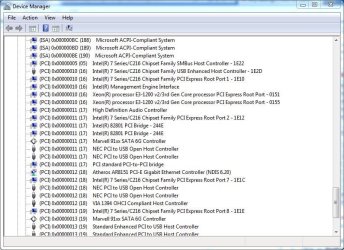
Here is a partial display of mine. Its interesting to note Audio and one USB are both on the same IRQ (17) in my system.
 

Attachments

  • Capture.JPG
    Capture.JPG
    102.3 KB · Views: 6

My Computer

Computer type
PC/Desktop
Computer Manufacturer/Model Number
My Own Build
OS
Windows 10 64 bit
CPU
Intel i7 6700K
Motherboard
ASUS ROG Maximus VIII Hero
Memory
16GB Corsair Dominator
Graphics Card(s)
Intel CPU Graphics
Sound Card
RealTek
Monitor(s) Displays
27" Dell S2719dgf
Screen Resolution
2560X1440
Hard Drives
1 TB Samsung 850 EVO SSD for Win 10 Pro
500GB Samsung 850 EVO SSD for Win 10 Insider
2 TB drive for backup
PSU
EVGA Supernova 750G2
Case
BeQuiet Silent Base 600
Cooling
Deepcool Captain 120EX
Keyboard
Microsoft Wireless 2000
Mouse
Microsoft wireless
Internet Speed
100 MB/sec (Cable)
Antivirus
Microsoft Defender and Malwarebytes
Browser
Edge/Firefox
Other Info
Cakewalk (Sonar) by BandLab and Studio One 4.1 Pro recording studio software. MOTU 896Mk3 Hybrid recording interface, Frontier Tranzport wireless control unit, Behringer X-Touch Control Surface.
Five USB connected optical drives for CD Audio production using Nero BurningROM
Go to the Device Manager then click on View and Resources by Type and finally Interrupt Request (IRQ).

Here is a partial display of mine. Its interesting to note Audio and one USB are both on the same IRQ (17) in my system.

So when checking the IRQ i see that standard enhanced usb controller (what is actually using usbport.sys) shares the same irq with some other stuff however it does not share it with the audio.

irq.png
 

My Computer

Computer type
PC/Desktop
OS
Windows 7 Ultimate x64
CPU
Intel Core i7 3770K 3,5Ghz
Motherboard
MSI Z77A-S01
Memory
Corsair 16GB (2x8192MB) CL10 1600MHz VENGEANCE LP
Graphics Card(s)
XFX Radeon HD7950 3072MB Black Edition Dual Fan
Monitor(s) Displays
Acer p223w
Screen Resolution
1680*1050
Hard Drives
2TB Western Digital Caviar Green
1TB Western Digital Caviar Green
Samsung SSD Basic 840-Series 250GB
PSU
be quiet! Pure Power L8 630W
Case
Fractal Design Define R4
Cooling
Corsair Hydro H80i
Keyboard
Logitech Media Keyboard
Mouse
Logitech G500
Internet Speed
24/2
Antivirus
Eset Nod 32 v6
Browser
Firefox
My enhanced controllers are not on that shared IRQ. There is a way to move that to a different IRQ but I'm not sure how to do it. Something to consider.
 

My Computer

Computer type
PC/Desktop
Computer Manufacturer/Model Number
My Own Build
OS
Windows 10 64 bit
CPU
Intel i7 6700K
Motherboard
ASUS ROG Maximus VIII Hero
Memory
16GB Corsair Dominator
Graphics Card(s)
Intel CPU Graphics
Sound Card
RealTek
Monitor(s) Displays
27" Dell S2719dgf
Screen Resolution
2560X1440
Hard Drives
1 TB Samsung 850 EVO SSD for Win 10 Pro
500GB Samsung 850 EVO SSD for Win 10 Insider
2 TB drive for backup
PSU
EVGA Supernova 750G2
Case
BeQuiet Silent Base 600
Cooling
Deepcool Captain 120EX
Keyboard
Microsoft Wireless 2000
Mouse
Microsoft wireless
Internet Speed
100 MB/sec (Cable)
Antivirus
Microsoft Defender and Malwarebytes
Browser
Edge/Firefox
Other Info
Cakewalk (Sonar) by BandLab and Studio One 4.1 Pro recording studio software. MOTU 896Mk3 Hybrid recording interface, Frontier Tranzport wireless control unit, Behringer X-Touch Control Surface.
Five USB connected optical drives for CD Audio production using Nero BurningROM
My enhanced controllers are not on that shared IRQ. There is a way to move that to a different IRQ but I'm not sure how to do it. Something to consider.

After some research i don't think that the irq is the problem, i've gone over some threads i've found and nothing indicates that irq would be the culprit.
 

My Computer

Computer type
PC/Desktop
OS
Windows 7 Ultimate x64
CPU
Intel Core i7 3770K 3,5Ghz
Motherboard
MSI Z77A-S01
Memory
Corsair 16GB (2x8192MB) CL10 1600MHz VENGEANCE LP
Graphics Card(s)
XFX Radeon HD7950 3072MB Black Edition Dual Fan
Monitor(s) Displays
Acer p223w
Screen Resolution
1680*1050
Hard Drives
2TB Western Digital Caviar Green
1TB Western Digital Caviar Green
Samsung SSD Basic 840-Series 250GB
PSU
be quiet! Pure Power L8 630W
Case
Fractal Design Define R4
Cooling
Corsair Hydro H80i
Keyboard
Logitech Media Keyboard
Mouse
Logitech G500
Internet Speed
24/2
Antivirus
Eset Nod 32 v6
Browser
Firefox
It may not be the actual IRQ but it could be what its being shared with.

But its just a long shot and a thought - and probably off base.

Jack
 

My Computer

Computer type
PC/Desktop
Computer Manufacturer/Model Number
My Own Build
OS
Windows 10 64 bit
CPU
Intel i7 6700K
Motherboard
ASUS ROG Maximus VIII Hero
Memory
16GB Corsair Dominator
Graphics Card(s)
Intel CPU Graphics
Sound Card
RealTek
Monitor(s) Displays
27" Dell S2719dgf
Screen Resolution
2560X1440
Hard Drives
1 TB Samsung 850 EVO SSD for Win 10 Pro
500GB Samsung 850 EVO SSD for Win 10 Insider
2 TB drive for backup
PSU
EVGA Supernova 750G2
Case
BeQuiet Silent Base 600
Cooling
Deepcool Captain 120EX
Keyboard
Microsoft Wireless 2000
Mouse
Microsoft wireless
Internet Speed
100 MB/sec (Cable)
Antivirus
Microsoft Defender and Malwarebytes
Browser
Edge/Firefox
Other Info
Cakewalk (Sonar) by BandLab and Studio One 4.1 Pro recording studio software. MOTU 896Mk3 Hybrid recording interface, Frontier Tranzport wireless control unit, Behringer X-Touch Control Surface.
Five USB connected optical drives for CD Audio production using Nero BurningROM
It may not be the actual IRQ but it could be what its being shared with.

But its just a long shot and a thought - and probably off base.

Jack

Is there any other ideas to how the hell to fix this? It's clear that it's usbport.sys that's acting up however i've been doing alot of research about this and it seems that no one is able to come up with a solution no matter where i look. I've tried uninstalling the shared controller and that did not help and i'm not sure what else to do right now.
 

My Computer

Computer type
PC/Desktop
OS
Windows 7 Ultimate x64
CPU
Intel Core i7 3770K 3,5Ghz
Motherboard
MSI Z77A-S01
Memory
Corsair 16GB (2x8192MB) CL10 1600MHz VENGEANCE LP
Graphics Card(s)
XFX Radeon HD7950 3072MB Black Edition Dual Fan
Monitor(s) Displays
Acer p223w
Screen Resolution
1680*1050
Hard Drives
2TB Western Digital Caviar Green
1TB Western Digital Caviar Green
Samsung SSD Basic 840-Series 250GB
PSU
be quiet! Pure Power L8 630W
Case
Fractal Design Define R4
Cooling
Corsair Hydro H80i
Keyboard
Logitech Media Keyboard
Mouse
Logitech G500
Internet Speed
24/2
Antivirus
Eset Nod 32 v6
Browser
Firefox
Back
Top