Usbport.sys causes high DPC over time.

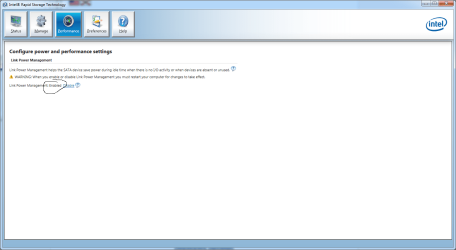
Slappy, are you using Intel RST? Try linking power management in performance tab

rst link.png
 

My Computer My Computer

Computer type
PC/Desktop
Computer Manufacturer/Model Number
Dude Build
OS
Windows 10 Pro X64
CPU
Intel(R) Core(TM) i5-3570K CPU OC@ 4.5GHZ Turbo
Motherboard
MSI Z77A-G45 Gaming
Memory
8.00 GB DDR3 1600Mhz
Graphics Card(s)
MSI Gaming X GTX 1070
Sound Card
Realtek High Definition
Monitor(s) Displays
Dell S23O9W, HP L1710
Screen Resolution
DELL-1920 x 1080 HP-1280 x1024
Hard Drives
Crucial m4 256 SSD, WD 7200RPM 500GB WD 1TB
PSU
Seasonic X650 GOLD
Case
Zalman Z12
Cooling
Antec Kuhler 920
Keyboard
Logitech
Mouse
MSI DS100 Interceptor
Internet Speed
50 down and 5 up
Antivirus
MSE
Browser
Chrome, IE 11
Other Info
Logitech X-620 Speakers
I'm out of suggestions or theories.

Jack
 

My Computer My Computer

Computer type
PC/Desktop
Computer Manufacturer/Model Number
My Own Build
OS
Windows 10 64 bit
CPU
Intel i7 6700K
Motherboard
ASUS ROG Maximus VIII Hero
Memory
16GB Corsair Dominator
Graphics Card(s)
Intel CPU Graphics
Sound Card
RealTek
Monitor(s) Displays
27" Dell S2719dgf
Screen Resolution
2560X1440
Hard Drives
1 TB Samsung 850 EVO SSD for Win 10 Pro
500GB Samsung 850 EVO SSD for Win 10 Insider
2 TB drive for backup
PSU
EVGA Supernova 750G2
Case
BeQuiet Silent Base 600
Cooling
Deepcool Captain 120EX
Keyboard
Microsoft Wireless 2000
Mouse
Microsoft wireless
Internet Speed
100 MB/sec (Cable)
Antivirus
Microsoft Defender and Malwarebytes
Browser
Edge/Firefox
Other Info
Cakewalk (Sonar) by BandLab and Studio One 4.1 Pro recording studio software. MOTU 896Mk3 Hybrid recording interface, Frontier Tranzport wireless control unit, Behringer X-Touch Control Surface.
Five USB connected optical drives for CD Audio production using Nero BurningROM

My Computer My Computer

Computer type
PC/Desktop
Computer Manufacturer/Model Number
Dude Build
OS
Windows 10 Pro X64
CPU
Intel(R) Core(TM) i5-3570K CPU OC@ 4.5GHZ Turbo
Motherboard
MSI Z77A-G45 Gaming
Memory
8.00 GB DDR3 1600Mhz
Graphics Card(s)
MSI Gaming X GTX 1070
Sound Card
Realtek High Definition
Monitor(s) Displays
Dell S23O9W, HP L1710
Screen Resolution
DELL-1920 x 1080 HP-1280 x1024
Hard Drives
Crucial m4 256 SSD, WD 7200RPM 500GB WD 1TB
PSU
Seasonic X650 GOLD
Case
Zalman Z12
Cooling
Antec Kuhler 920
Keyboard
Logitech
Mouse
MSI DS100 Interceptor
Internet Speed
50 down and 5 up
Antivirus
MSE
Browser
Chrome, IE 11
Other Info
Logitech X-620 Speakers
That usbport.sys may not be the problem, just throwing the user off. Latencymon program showed my recording system PC as having several problems that would cause audio problems, but I was not having any problems. DPC latency checker did not show any problems. I had run the Latency mon program just to see what it showed because of discussions on the Sonar recording forum.

Since it happens after the PC has been running for several days suggests one possibility could be a memory leak in a running program.

If it worked OK at one time and now does not and the user can't find the problem it may be time for a "clean" reinstall.
 

My Computer My Computer

Computer type
PC/Desktop
Computer Manufacturer/Model Number
My Own Build
OS
Windows 10 64 bit
CPU
Intel i7 6700K
Motherboard
ASUS ROG Maximus VIII Hero
Memory
16GB Corsair Dominator
Graphics Card(s)
Intel CPU Graphics
Sound Card
RealTek
Monitor(s) Displays
27" Dell S2719dgf
Screen Resolution
2560X1440
Hard Drives
1 TB Samsung 850 EVO SSD for Win 10 Pro
500GB Samsung 850 EVO SSD for Win 10 Insider
2 TB drive for backup
PSU
EVGA Supernova 750G2
Case
BeQuiet Silent Base 600
Cooling
Deepcool Captain 120EX
Keyboard
Microsoft Wireless 2000
Mouse
Microsoft wireless
Internet Speed
100 MB/sec (Cable)
Antivirus
Microsoft Defender and Malwarebytes
Browser
Edge/Firefox
Other Info
Cakewalk (Sonar) by BandLab and Studio One 4.1 Pro recording studio software. MOTU 896Mk3 Hybrid recording interface, Frontier Tranzport wireless control unit, Behringer X-Touch Control Surface.
Five USB connected optical drives for CD Audio production using Nero BurningROM
I think rebooting and not running 5 days straight is your solution. :D

You expect no leaks over a long up time with a version of Windows desktop OS? muhahahahaha :devil:
 

My Computer My Computer

Computer type
PC/Desktop
Computer Manufacturer/Model Number
Self Built Custom
OS
Windows 7 Ultimate Retail Box (64-bit installed) + Service Pack 1
CPU
AMD FX-8350 CPU v1.15 (or 1.0F) BIOS was required!
Motherboard
MSI 890FXA-GD70
Memory
8G CAS-7 G-Skill DDR3 @1333 (2 fours) [mobo nonOC max rec'd]
Graphics Card(s)
Radeon HD 7950 [3 gigs of GDDR5] MSI Twin Frozr model
Sound Card
Realtek High Definition Audio (onboard mobo, ALC-889 chip)
Monitor(s) Displays
2 WS LED Monitors: One LG One Viewsonic
Screen Resolution
1920 by 1080
Hard Drives
SSD for OS: Samsung 840 Pro
SSD for VM and utilities: Adata SX900
7200 RPM SATA HDs for the rest: Hitachi and Seagate
PSU
Corsair TX850 - 850W max, in service since August 2010.
Case
Thermaltake Armor A90
Cooling
Thermaltake Spin Q CPU Cooler, in service since August 2010
Keyboard
Logitech G11
Mouse
Logitech M310 Wireless
Internet Speed
100 Megabit broadband supposedly upgraded from 50 (Cable)
Antivirus
Bitdefender Internet Security 2014 suite
Browser
Pale Moon 64-bit main, also IceDragon, Opera, and Maxthon.
Other Info
CompTIA A+ certified (220-800 series) in July 2013.
Hi guys sorry for my absence, have had problems accessing the site due to dns issues, anyhow i don't think i ever installed intel RST tbh and here's a fun kicker, i'm down from 5 days uptime to around 3 days for the damn dpc, ut seems to get worse and worse and i still can't figure out what the hell is causing it, if i only had some way to see if there's any program that are specificly putting load on certain drivers because that would help alot with diagnostics.


That usbport.sys may not be the problem, just throwing the user off. Latencymon program showed my recording system PC as having several problems that would cause audio problems, but I was not having any problems. DPC latency checker did not show any problems. I had run the Latency mon program just to see what it showed because of discussions on the Sonar recording forum.

Since it happens after the PC has been running for several days suggests one possibility could be a memory leak in a running program.

If it worked OK at one time and now does not and the user can't find the problem it may be time for a "clean" reinstall.

A clean install on a ~4 month old comp does not really seem to be correct... however i do agree with you that there might be a memory leak in a program but how the hell would i get to the bottom of what program it is?
 

My Computer My Computer

Computer type
PC/Desktop
OS
Windows 7 Ultimate x64
CPU
Intel Core i7 3770K 3,5Ghz
Motherboard
MSI Z77A-S01
Memory
Corsair 16GB (2x8192MB) CL10 1600MHz VENGEANCE LP
Graphics Card(s)
XFX Radeon HD7950 3072MB Black Edition Dual Fan
Monitor(s) Displays
Acer p223w
Screen Resolution
1680*1050
Hard Drives
2TB Western Digital Caviar Green
1TB Western Digital Caviar Green
Samsung SSD Basic 840-Series 250GB
PSU
be quiet! Pure Power L8 630W
Case
Fractal Design Define R4
Cooling
Corsair Hydro H80i
Keyboard
Logitech Media Keyboard
Mouse
Logitech G500
Internet Speed
24/2
Antivirus
Eset Nod 32 v6
Browser
Firefox

My Computer My Computer

Computer type
PC/Desktop
Computer Manufacturer/Model Number
Dude Build
OS
Windows 10 Pro X64
CPU
Intel(R) Core(TM) i5-3570K CPU OC@ 4.5GHZ Turbo
Motherboard
MSI Z77A-G45 Gaming
Memory
8.00 GB DDR3 1600Mhz
Graphics Card(s)
MSI Gaming X GTX 1070
Sound Card
Realtek High Definition
Monitor(s) Displays
Dell S23O9W, HP L1710
Screen Resolution
DELL-1920 x 1080 HP-1280 x1024
Hard Drives
Crucial m4 256 SSD, WD 7200RPM 500GB WD 1TB
PSU
Seasonic X650 GOLD
Case
Zalman Z12
Cooling
Antec Kuhler 920
Keyboard
Logitech
Mouse
MSI DS100 Interceptor
Internet Speed
50 down and 5 up
Antivirus
MSE
Browser
Chrome, IE 11
Other Info
Logitech X-620 Speakers
latencymon

Here's my latencymon data, also attatched a txt file for drivers in hope that someone might see something.

_________________________________________________________________________________________________________

CONCLUSION
_________________________________________________________________________________________________________
Your system appears to be having trouble handling real-time audio and other tasks. You are likely to experience buffer underruns appearing as drop outs, clicks or pops. One or more DPC routines that belong to a driver running in your system appear to be executing for too long. At least one detected problem appears to be network related. In case you are using a WLAN adapter, try disabling it to get better results. One problem may be related to power management, disable CPU throttling settings in Control Panel and BIOS setup. Check for BIOS updates.
LatencyMon has been analyzing your system for 0:01:39 (h:mm:ss) on all processors.


_________________________________________________________________________________________________________
SYSTEM INFORMATION
_________________________________________________________________________________________________________
Computer name: SLAPPY-DATOR
OS version: Windows 7 Service Pack 1, 6.1, build: 7601 (x64)
Hardware: MS-7752, MSI, Z77A-S01 (MS-7752)
CPU: GenuineIntel Intel(R) Core(TM) i7-3770K CPU @ 3.50GHz
Logical processors: 8
Processor groups: 1
RAM: 16333 MB total


_________________________________________________________________________________________________________
CPU SPEED
_________________________________________________________________________________________________________
Reported CPU speed: 3500,0 MHz
Measured CPU speed: 2391,0 MHz (approx.)

Note: reported execution times may be calculated based on a fixed reported CPU speed. Disable variable speed settings like Intel Speed Step and AMD Cool N Quiet in the BIOS setup for more accurate results.


_________________________________________________________________________________________________________
MEASURED INTERRUPT TO USER PROCESS LATENCIES
_________________________________________________________________________________________________________
The interrupt to process latency reflects the measured interval that a usermode process needed to respond to a hardware request from the moment the interrupt service routine started execution. This includes the scheduling and execution of a DPC routine, the signaling of an event and the waking up of a usermode thread from an idle wait state in response to that event.

Highest measured interrupt to process latency (µs): 3170,835105
Average measured interrupt to process latency (µs): 2,893994

Highest measured interrupt to DPC latency (µs): 3167,909440
Average measured interrupt to DPC latency (µs): 1,702220


_________________________________________________________________________________________________________
MEASURED SMI, IPI AND CPU STALLS
_________________________________________________________________________________________________________

The SMI, IPI and CPU stalls value represents the highest measured interval that a CPU did not respond while having its maskable interrupts disabled.

Highest measured SMI or CPU stall (µs) 1,170266


_________________________________________________________________________________________________________
REPORTED ISRs
_________________________________________________________________________________________________________
Interrupt service routines are routines installed by the OS and device drivers that execute in response to a hardware interrupt signal.

Highest ISR routine execution time (µs): 67,5260
Driver with highest ISR routine execution time: ataport.SYS - ATAPI Driver Extension, Microsoft Corporation

Highest reported total ISR routine time (%): 0,028606
Driver with highest ISR total time: ataport.SYS - ATAPI Driver Extension, Microsoft Corporation

Total time spent in ISRs (%) 0,037984

ISR count (execution time <250 µs): 140767
ISR count (execution time 250-500 µs): 0
ISR count (execution time 500-999 µs): 0
ISR count (execution time 1000-1999 µs): 0
ISR count (execution time 2000-3999 µs): 0
ISR count (execution time >=4000 µs): 0


_________________________________________________________________________________________________________
REPORTED DPCs
_________________________________________________________________________________________________________
DPC routines are part of the interrupt servicing dispatch mechanism and disable the possibility for a process to utilize the CPU while it is interrupted until the DPC has finished execution.

Highest DPC routine execution time (µs): 3869,971143
Driver with highest DPC routine execution time: USBPORT.SYS - USB 1.1 & 2.0 portdrivrutin, Microsoft Corporation

Highest reported total DPC routine time (%): 0,121646
Driver with highest DPC total execution time: USBPORT.SYS - USB 1.1 & 2.0 portdrivrutin, Microsoft Corporation

Total time spent in DPCs (%) 0,214136

DPC count (execution time <250 µs): 635692
DPC count (execution time 250-500 µs): 0
DPC count (execution time 500-999 µs): 0
DPC count (execution time 1000-1999 µs): 285
DPC count (execution time 2000-3999 µs): 181
DPC count (execution time >=4000 µs): 0


_________________________________________________________________________________________________________
REPORTED HARD PAGEFAULTS
_________________________________________________________________________________________________________
Hard pagefaults are events that get triggered by making use of virtual memory that is not resident in RAM but backed by a memory mapped file on disk. The process of resolving the hard pagefault requires reading in the memory from disk while the process is interrupted and blocked from execution.


Process with highest pagefault count: latmon.exe

Total number of hard pagefaults 17
Hard pagefault count of hardest hit process: 8
Highest hard pagefault resolution time (µs): 332,631429
Total time spent in hard pagefaults (%): 0,000294
Number of processes hit: 4


_________________________________________________________________________________________________________
PER CPU DATA
_________________________________________________________________________________________________________
CPU 0 Interrupt cycle time (s): 2,390774
CPU 0 ISR highest execution time (µs): 67,5260
CPU 0 ISR total execution time (s): 0,302152
CPU 0 ISR count: 140767
CPU 0 DPC highest execution time (µs): 3869,971143
CPU 0 DPC total execution time (s): 1,646014
CPU 0 DPC count: 608365
_________________________________________________________________________________________________________
CPU 1 Interrupt cycle time (s): 0,223695
CPU 1 ISR highest execution time (µs): 0,0
CPU 1 ISR total execution time (s): 0,0
CPU 1 ISR count: 0
CPU 1 DPC highest execution time (µs): 0,0
CPU 1 DPC total execution time (s): 0,0
CPU 1 DPC count: 0
_________________________________________________________________________________________________________
CPU 2 Interrupt cycle time (s): 0,249076
CPU 2 ISR highest execution time (µs): 0,0
CPU 2 ISR total execution time (s): 0,0
CPU 2 ISR count: 0
CPU 2 DPC highest execution time (µs): 66,476571
CPU 2 DPC total execution time (s): 0,012028
CPU 2 DPC count: 6894
_________________________________________________________________________________________________________
CPU 3 Interrupt cycle time (s): 0,221521
CPU 3 ISR highest execution time (µs): 0,0
CPU 3 ISR total execution time (s): 0,0
CPU 3 ISR count: 0
CPU 3 DPC highest execution time (µs): 0,0
CPU 3 DPC total execution time (s): 0,0
CPU 3 DPC count: 0
_________________________________________________________________________________________________________
CPU 4 Interrupt cycle time (s): 0,265636
CPU 4 ISR highest execution time (µs): 0,0
CPU 4 ISR total execution time (s): 0,0
CPU 4 ISR count: 0
CPU 4 DPC highest execution time (µs): 155,395714
CPU 4 DPC total execution time (s): 0,015333
CPU 4 DPC count: 7774
_________________________________________________________________________________________________________
CPU 5 Interrupt cycle time (s): 0,217682
CPU 5 ISR highest execution time (µs): 0,0
CPU 5 ISR total execution time (s): 0,0
CPU 5 ISR count: 0
CPU 5 DPC highest execution time (µs): 0,0
CPU 5 DPC total execution time (s): 0,0
CPU 5 DPC count: 0
_________________________________________________________________________________________________________
CPU 6 Interrupt cycle time (s): 0,282349
CPU 6 ISR highest execution time (µs): 0,0
CPU 6 ISR total execution time (s): 0,0
CPU 6 ISR count: 0
CPU 6 DPC highest execution time (µs): 128,414571
CPU 6 DPC total execution time (s): 0,024865
CPU 6 DPC count: 11085
_________________________________________________________________________________________________________
CPU 7 Interrupt cycle time (s): 0,21860
CPU 7 ISR highest execution time (µs): 0,0
CPU 7 ISR total execution time (s): 0,0
CPU 7 ISR count: 0
CPU 7 DPC highest execution time (µs): 59,3940
CPU 7 DPC total execution time (s): 0,005170
CPU 7 DPC count: 2040
_________________________________________________________________________________________________________
 

Attachments

My Computer My Computer

Computer type
PC/Desktop
OS
Windows 7 Ultimate x64
CPU
Intel Core i7 3770K 3,5Ghz
Motherboard
MSI Z77A-S01
Memory
Corsair 16GB (2x8192MB) CL10 1600MHz VENGEANCE LP
Graphics Card(s)
XFX Radeon HD7950 3072MB Black Edition Dual Fan
Monitor(s) Displays
Acer p223w
Screen Resolution
1680*1050
Hard Drives
2TB Western Digital Caviar Green
1TB Western Digital Caviar Green
Samsung SSD Basic 840-Series 250GB
PSU
be quiet! Pure Power L8 630W
Case
Fractal Design Define R4
Cooling
Corsair Hydro H80i
Keyboard
Logitech Media Keyboard
Mouse
Logitech G500
Internet Speed
24/2
Antivirus
Eset Nod 32 v6
Browser
Firefox
Just here to post a little update, done some more research regarding this problem but nothing has worked so far, the memory leak does not seem to be the problem either seeing as how i have more memory then i can actually use in this setup that i have :/ .
 

My Computer My Computer

Computer type
PC/Desktop
OS
Windows 7 Ultimate x64
CPU
Intel Core i7 3770K 3,5Ghz
Motherboard
MSI Z77A-S01
Memory
Corsair 16GB (2x8192MB) CL10 1600MHz VENGEANCE LP
Graphics Card(s)
XFX Radeon HD7950 3072MB Black Edition Dual Fan
Monitor(s) Displays
Acer p223w
Screen Resolution
1680*1050
Hard Drives
2TB Western Digital Caviar Green
1TB Western Digital Caviar Green
Samsung SSD Basic 840-Series 250GB
PSU
be quiet! Pure Power L8 630W
Case
Fractal Design Define R4
Cooling
Corsair Hydro H80i
Keyboard
Logitech Media Keyboard
Mouse
Logitech G500
Internet Speed
24/2
Antivirus
Eset Nod 32 v6
Browser
Firefox
Slappy, thanks for updating. I wish I knew the answer, hopefully you will get it.
 

My Computer My Computer

Computer type
PC/Desktop
Computer Manufacturer/Model Number
Dude Build
OS
Windows 10 Pro X64
CPU
Intel(R) Core(TM) i5-3570K CPU OC@ 4.5GHZ Turbo
Motherboard
MSI Z77A-G45 Gaming
Memory
8.00 GB DDR3 1600Mhz
Graphics Card(s)
MSI Gaming X GTX 1070
Sound Card
Realtek High Definition
Monitor(s) Displays
Dell S23O9W, HP L1710
Screen Resolution
DELL-1920 x 1080 HP-1280 x1024
Hard Drives
Crucial m4 256 SSD, WD 7200RPM 500GB WD 1TB
PSU
Seasonic X650 GOLD
Case
Zalman Z12
Cooling
Antec Kuhler 920
Keyboard
Logitech
Mouse
MSI DS100 Interceptor
Internet Speed
50 down and 5 up
Antivirus
MSE
Browser
Chrome, IE 11
Other Info
Logitech X-620 Speakers
I'm just gonna pop a quick question, considering that the dpc is increasing over time and never staying stable, is it possible that it's one of microsofts services in services.msc that is causing this? If so does anyone have any idea of what it could be? Reason i'm asking is because i just managed to find out why my battery on my android phone was draining as soon as wifi was on and it was actually caused by a service on my computer that kept sending packets over the router to it and once disabled it sorted my battery drain on my android out to.
 

My Computer My Computer

Computer type
PC/Desktop
OS
Windows 7 Ultimate x64
CPU
Intel Core i7 3770K 3,5Ghz
Motherboard
MSI Z77A-S01
Memory
Corsair 16GB (2x8192MB) CL10 1600MHz VENGEANCE LP
Graphics Card(s)
XFX Radeon HD7950 3072MB Black Edition Dual Fan
Monitor(s) Displays
Acer p223w
Screen Resolution
1680*1050
Hard Drives
2TB Western Digital Caviar Green
1TB Western Digital Caviar Green
Samsung SSD Basic 840-Series 250GB
PSU
be quiet! Pure Power L8 630W
Case
Fractal Design Define R4
Cooling
Corsair Hydro H80i
Keyboard
Logitech Media Keyboard
Mouse
Logitech G500
Internet Speed
24/2
Antivirus
Eset Nod 32 v6
Browser
Firefox
I would more think some non-microsoft driver or application is the problem. The computer I'm on, at my Daughter's, has been on since last Sunday without rebooting and its not experiencing any problems. In fact, they let it on 24/7 and it was only rebooted last Sunday as I did some work on it for them, that required a restart.
 

My Computer My Computer

Computer type
PC/Desktop
Computer Manufacturer/Model Number
My Own Build
OS
Windows 10 64 bit
CPU
Intel i7 6700K
Motherboard
ASUS ROG Maximus VIII Hero
Memory
16GB Corsair Dominator
Graphics Card(s)
Intel CPU Graphics
Sound Card
RealTek
Monitor(s) Displays
27" Dell S2719dgf
Screen Resolution
2560X1440
Hard Drives
1 TB Samsung 850 EVO SSD for Win 10 Pro
500GB Samsung 850 EVO SSD for Win 10 Insider
2 TB drive for backup
PSU
EVGA Supernova 750G2
Case
BeQuiet Silent Base 600
Cooling
Deepcool Captain 120EX
Keyboard
Microsoft Wireless 2000
Mouse
Microsoft wireless
Internet Speed
100 MB/sec (Cable)
Antivirus
Microsoft Defender and Malwarebytes
Browser
Edge/Firefox
Other Info
Cakewalk (Sonar) by BandLab and Studio One 4.1 Pro recording studio software. MOTU 896Mk3 Hybrid recording interface, Frontier Tranzport wireless control unit, Behringer X-Touch Control Surface.
Five USB connected optical drives for CD Audio production using Nero BurningROM
Is there any way to see if a specific driver is used by a specific program?
 

My Computer My Computer

Computer type
PC/Desktop
OS
Windows 7 Ultimate x64
CPU
Intel Core i7 3770K 3,5Ghz
Motherboard
MSI Z77A-S01
Memory
Corsair 16GB (2x8192MB) CL10 1600MHz VENGEANCE LP
Graphics Card(s)
XFX Radeon HD7950 3072MB Black Edition Dual Fan
Monitor(s) Displays
Acer p223w
Screen Resolution
1680*1050
Hard Drives
2TB Western Digital Caviar Green
1TB Western Digital Caviar Green
Samsung SSD Basic 840-Series 250GB
PSU
be quiet! Pure Power L8 630W
Case
Fractal Design Define R4
Cooling
Corsair Hydro H80i
Keyboard
Logitech Media Keyboard
Mouse
Logitech G500
Internet Speed
24/2
Antivirus
Eset Nod 32 v6
Browser
Firefox
Probably is but its beyond me. Would take a software head to figure it out.
 

My Computer My Computer

Computer type
PC/Desktop
Computer Manufacturer/Model Number
My Own Build
OS
Windows 10 64 bit
CPU
Intel i7 6700K
Motherboard
ASUS ROG Maximus VIII Hero
Memory
16GB Corsair Dominator
Graphics Card(s)
Intel CPU Graphics
Sound Card
RealTek
Monitor(s) Displays
27" Dell S2719dgf
Screen Resolution
2560X1440
Hard Drives
1 TB Samsung 850 EVO SSD for Win 10 Pro
500GB Samsung 850 EVO SSD for Win 10 Insider
2 TB drive for backup
PSU
EVGA Supernova 750G2
Case
BeQuiet Silent Base 600
Cooling
Deepcool Captain 120EX
Keyboard
Microsoft Wireless 2000
Mouse
Microsoft wireless
Internet Speed
100 MB/sec (Cable)
Antivirus
Microsoft Defender and Malwarebytes
Browser
Edge/Firefox
Other Info
Cakewalk (Sonar) by BandLab and Studio One 4.1 Pro recording studio software. MOTU 896Mk3 Hybrid recording interface, Frontier Tranzport wireless control unit, Behringer X-Touch Control Surface.
Five USB connected optical drives for CD Audio production using Nero BurningROM
Probably is but its beyond me. Would take a software head to figure it out.

Is there any of those active here on sevenforums? :)
 

My Computer My Computer

Computer type
PC/Desktop
OS
Windows 7 Ultimate x64
CPU
Intel Core i7 3770K 3,5Ghz
Motherboard
MSI Z77A-S01
Memory
Corsair 16GB (2x8192MB) CL10 1600MHz VENGEANCE LP
Graphics Card(s)
XFX Radeon HD7950 3072MB Black Edition Dual Fan
Monitor(s) Displays
Acer p223w
Screen Resolution
1680*1050
Hard Drives
2TB Western Digital Caviar Green
1TB Western Digital Caviar Green
Samsung SSD Basic 840-Series 250GB
PSU
be quiet! Pure Power L8 630W
Case
Fractal Design Define R4
Cooling
Corsair Hydro H80i
Keyboard
Logitech Media Keyboard
Mouse
Logitech G500
Internet Speed
24/2
Antivirus
Eset Nod 32 v6
Browser
Firefox
There are on some of the other forum sections. Maybe "Performance and Maintenance" would be a good section to post the problem in.
 

My Computer My Computer

Computer type
PC/Desktop
Computer Manufacturer/Model Number
My Own Build
OS
Windows 10 64 bit
CPU
Intel i7 6700K
Motherboard
ASUS ROG Maximus VIII Hero
Memory
16GB Corsair Dominator
Graphics Card(s)
Intel CPU Graphics
Sound Card
RealTek
Monitor(s) Displays
27" Dell S2719dgf
Screen Resolution
2560X1440
Hard Drives
1 TB Samsung 850 EVO SSD for Win 10 Pro
500GB Samsung 850 EVO SSD for Win 10 Insider
2 TB drive for backup
PSU
EVGA Supernova 750G2
Case
BeQuiet Silent Base 600
Cooling
Deepcool Captain 120EX
Keyboard
Microsoft Wireless 2000
Mouse
Microsoft wireless
Internet Speed
100 MB/sec (Cable)
Antivirus
Microsoft Defender and Malwarebytes
Browser
Edge/Firefox
Other Info
Cakewalk (Sonar) by BandLab and Studio One 4.1 Pro recording studio software. MOTU 896Mk3 Hybrid recording interface, Frontier Tranzport wireless control unit, Behringer X-Touch Control Surface.
Five USB connected optical drives for CD Audio production using Nero BurningROM
Sorry to necro this thread but I have the same problem and can't seem to pinpoint the culprit. Did anyone ever find a solution? I've tried many different solutions to no avail. I thought it was my usb soundcard, so I plugged my headset directly into my motherboard and uninstalled the driver for the usb soundcard. I also uninstalled my Intel Rapid Storage drivers as well as my Marvell SATA controller drivers, opting to use the windows drivers instead. I disabled all power saving features within windows and then went into the bios and disabled speedstep as well as C1E. All my drivers are up to date, including BIOS. I started noticing this issue about a month ago, it definitely gets worse if I leave my computer running for a day or 2. I'm getting random DPC spikes during regular use of the computer. When the latency increases I start to notice frame rate drops and stuttering during gameplay (World of Warcraft). The only USB devices left are my webcam: Logitech c270, mouse: Logitech g500, and keyboard: Ducky DK9008 Shine 2.

Screenshots:
DPC Latency - Imgur

Edit: After posting this I think I figured it out!

It has to be Corsair Link. My H100i CPU cooler has a USB cable that runs to one of the internal USB ports on the motherboard. The software is terrible, it causes tons of problems, crashes all the time, and is constantly polling system hardware for temperature data. I killed the process and the hardware monitor and the DPC spikes disappeared. Unfortunately I think that the corsair link software is necessary to control the pumps and fans on the H100i...

Corsair Link SW issue with DPC latency - The Corsair Support Forums

Problem Solved:
Corsair Link Software Update Beta Version 2.4.4948 - The Corsair Support Forums

Edit:
The USB soundcard drivers were also causing DPC spikes. When I reinstalled the drivers and soundcard I started getting really bad spikes again (up to 30ms). The headset is a Steelseries 7H USB: SteelSeries North America - SteelSeries 7H USB. The combination of the two was really bad, my computer was running unbearably slow.

E91hWk8.jpg
 
Last edited:

My Computer My Computer

Computer type
PC/Desktop
Computer Manufacturer/Model Number
Pnashty.com
OS
Windows 7 Professional x64
CPU
Intel Core i7 3930k @ 3.2GHz
Motherboard
Asus P9X79 Pro
Memory
32 GB Corsair Vengeance DDR3 1600
Graphics Card(s)
NVIDIA EVGA Geforce GTX 680
Sound Card
Realtek HD Audio
Monitor(s) Displays
2 Samsung Syncmaster 24"
Screen Resolution
1920x1080, 1920x1200
Hard Drives
120GB Corsair Force GT SATA III 6Gb/s SSD
500GB Western Digital VelociRaptor 10,000 RPM HDD
2TB Western Digital Caviar Green Series HDD
PSU
Corsair TX750
Case
Cooler Master HAF X
Cooling
Corsair H100i
Keyboard
Ducky DK9008 Shine 2 Brown Cherry MX Mechanical Keyboard
Mouse
Logitech G500 Wired Laser Gaming Mouse
Internet Speed
http://www.speedtest.net/result/2843030796.png
Antivirus
MSE
Browser
Chrome
Sorry to necro this thread but I have the same problem and can't seem to pinpoint the culprit. Did anyone ever find a solution? I've tried many different solutions to no avail. I thought it was my usb soundcard, so I plugged my headset directly into my motherboard and uninstalled the driver for the usb soundcard. I also uninstalled my Intel Rapid Storage drivers as well as my Marvell SATA controller drivers, opting to use the windows drivers instead. I disabled all power saving features within windows and then went into the bios and disabled speedstep as well as C1E. All my drivers are up to date, including BIOS. I started noticing this issue about a month ago, it definitely gets worse if I leave my computer running for a day or 2. I'm getting random DPC spikes during regular use of the computer. When the latency increases I start to notice frame rate drops and stuttering during gameplay (World of Warcraft). The only USB devices left are my webcam: Logitech c270, mouse: Logitech g500, and keyboard: Ducky DK9008 Shine 2.

Screenshots:
DPC Latency - Imgur

Edit: After posting this I think I figured it out!

It has to be Corsair Link. My H100i CPU cooler has a USB cable that runs to one of the internal USB ports on the motherboard. The software is terrible, it causes tons of problems, crashes all the time, and is constantly polling system hardware for temperature data. I killed the process and the hardware monitor and the DPC spikes disappeared. Unfortunately I think that the corsair link software is necessary to control the pumps and fans on the H100i...

Corsair Link SW issue with DPC latency - The Corsair Support Forums

Problem Solved:
Corsair Link Software Update Beta Version 2.4.4948 - The Corsair Support Forums

Yeah i actually managed to sort it out, i had 2 usb controllers for c216 chipset and after i disabled one of them my dpc problem finally went away.
 

My Computer My Computer

Computer type
PC/Desktop
OS
Windows 7 Ultimate x64
CPU
Intel Core i7 3770K 3,5Ghz
Motherboard
MSI Z77A-S01
Memory
Corsair 16GB (2x8192MB) CL10 1600MHz VENGEANCE LP
Graphics Card(s)
XFX Radeon HD7950 3072MB Black Edition Dual Fan
Monitor(s) Displays
Acer p223w
Screen Resolution
1680*1050
Hard Drives
2TB Western Digital Caviar Green
1TB Western Digital Caviar Green
Samsung SSD Basic 840-Series 250GB
PSU
be quiet! Pure Power L8 630W
Case
Fractal Design Define R4
Cooling
Corsair Hydro H80i
Keyboard
Logitech Media Keyboard
Mouse
Logitech G500
Internet Speed
24/2
Antivirus
Eset Nod 32 v6
Browser
Firefox
Would you be so kind as to describe how to disable your usb controller? thats crazy if you actually figured this out, because I have also been looking all around the web for no solution!
 

My Computer My Computer

Computer type
Laptop
Computer Manufacturer/Model Number
HP
OS
Windows 7 Home Premium 64bit
Would you be so kind as to describe how to disable your usb controller? thats crazy if you actually figured this out, because I have also been looking all around the web for no solution!

Wasn't that hard, however i suffer 2 less usb 2.0 ports (not that i really need the 8 that i have but still) just follow this and you should be fine :) .

Right click My Computer - Manage - Device Manager

In here you will go down to the usb tab, what i did here was basicly right click each one in here, go to properties and after that drivers, in there i pressed more information and found out wich ones contained usbport.sys as a driver, for me it was 2 intel 7 series c216 chipset usb controllers, i disabled one of them and it all went away after that, i've tried updating the chipset drivers over and over but it never helps so i'm just keeping one of them disabled for now.
 

My Computer My Computer

Computer type
PC/Desktop
OS
Windows 7 Ultimate x64
CPU
Intel Core i7 3770K 3,5Ghz
Motherboard
MSI Z77A-S01
Memory
Corsair 16GB (2x8192MB) CL10 1600MHz VENGEANCE LP
Graphics Card(s)
XFX Radeon HD7950 3072MB Black Edition Dual Fan
Monitor(s) Displays
Acer p223w
Screen Resolution
1680*1050
Hard Drives
2TB Western Digital Caviar Green
1TB Western Digital Caviar Green
Samsung SSD Basic 840-Series 250GB
PSU
be quiet! Pure Power L8 630W
Case
Fractal Design Define R4
Cooling
Corsair Hydro H80i
Keyboard
Logitech Media Keyboard
Mouse
Logitech G500
Internet Speed
24/2
Antivirus
Eset Nod 32 v6
Browser
Firefox
Back
Top