use eSATA for external drive?

drpepper

New member
Member
VIP
Local time
6:37 AM
Messages
233
I'm trying to vet my research results before shopping for a purchase. (I'm pretty new at deciphering specs.) The question here is in reference to the tutorial Portable OS - Carry your OS on an External Drive found here: http://www.sevenforums.com/tutorials/276540-portable-os-carry-your-os-external-drive.html

Requirements in the tutorial suggest an external SSD utilizing a USB 3 port. Unfortunately my laptop does not have USB 3. However, I do have an eSata port in addition to the USB 2 ports.

If my research returned me the correct information, these are the maximum speeds for the ports:

  • USB 2.0: 480Mbps
  • USB 3.0: 4.8GBPS
  • eSATA: 5Gbps
If I am connecting the dots right as referenced in the tutorial, using an external SSD w/ eSATA connection would provide me with the best choice for running an OS from an external drive.

Am I missing anything?

Thanks for your guidance.

drpepper


My Computer

Computer type
PC/Desktop
Computer Manufacturer/Model Number
Lenovo 1068AHU B570 (laptop)
OS
Windows 7 Home Premium SP1 64bit
CPU
Intel Core i3
Motherboard
Lenovo Emerald Lake
Memory
8GB DDR3
Graphics Card(s)
Intel HD graphics family
Sound Card
Realtek HD audio
Monitor(s) Displays
ThinkPad Display 1366x768 (15.6")
Hard Drives
WD 320GB WDC WD3200BPVT
Internet Speed
80Kbs maximum -->speed is a misnomer
Other Info
Logitech MK550 wireless mouse/keyboard combo used when at home.
Yes, with USB overheads you will not get 60 MB/s (480 Mbps). You will get 35 MB/s best. These days I would not even consider it for an exernal hard drive.

eSATA, in princple and practice will give you the full bandwidth an external hard drive can deliver. A good eSATA chipset will deliver up to about 250 MB/s in practice - this is limited by SATA 2.0. For a hard drive you should get the maximum rate the hard drive can deliver. If you have an SSD that can do more than 250 MB/s, it will be limited to about 250 MB/s.

It is the best you can do in any case.

You will have to get an external eSATA drive or an eSATA external enclosure to put a drive in.
 

My Computer

Computer type
PC/Desktop
Computer Manufacturer/Model Number
Home built (GeneO industries)/Model 4
OS
Windows 10 Pro. EFI boot partition, full EFI boot
CPU
i7 4770k 4.4GHz (44-44-43-43 turbo) @ 1.248V
Motherboard
ASUS Maximus VI Hero
Memory
16GB (8GBx2) @2200 MHz G.skill Sniper 10-11-10-30-1, 1.6V
Graphics Card(s)
MSI GTX 970 Gaming 4G
Sound Card
Onboard SupremeFX Audio
Monitor(s) Displays
NEC Spectraview 2490WUXi-SV
Screen Resolution
1920 x 1200
Hard Drives
Samsung 850 Pro 256GB (OS), Samsung 2x 128GB 840 Pro SSD in RAID0, 3x WD Blue 6Gb/s 1TB RAID0, WD 2TB Black external USB 3.0, 2TB WD20EARS Green external USB 3.0, 2x 500GB Seagate and 1 750 GB external USB, 1x 350GB external USB3
PSU
Seasonic X-850 (2012 KM3 model)
Case
Fractal Design Define R4
Cooling
NH-D14, NF-F12, NF-A15; NF-P14, NF-P12,NF-A14, S12A PWM
Keyboard
Cooler Master Storm Quickfire Rapid - Brown
Mouse
Logitech G602
Internet Speed
126.4 Mb/s down, 24.3 Mb/s up
Other Info
USB 3.0 x8 , SATA III x8, eSATA, USB 2.0 x6. Samsung DVD R/W drive.

WEI: CPU 7.8, Memory 7.9, Graphics 7.9, Disk 7.9
I am the author of the tutorial you are referring to. Unfortunately this will not work on eSata because VMware Player does not support eSata. That's why eSata is not mentioned in the tutorial. BHut I just now made a Note in the tutorial to make that clear.

You could investigate whether Virtual Box would work, but I have not tried that.

If you are trying that setup, make sure your external disk is an SSD. With the performance of an external HDD you would not be happy. It works, but that is all. And for an SSD, the USB2 port works pretty well too. The mystery is the fast access time of the SSD, NOT the data transfer rate. The OS does relatively few and small I/O operations. So you are not too much bound by the data traffic.
 

My Computer

Computer Manufacturer/Model Number
HP, Dell, Gateway, Toshiba - 4 laptops and 2 desktops
OS
Vista, Windows7, Mint Mate, Zorin, Windows 8
CPU
from 1.6GHz Duo to i7
Monitor(s) Displays
2x HP w2207
Hard Drives
5x HDD, 7x SSD, 12x Externals
Keyboard
with trackball - no mices
Mouse
Trackball mice
Internet Speed
DSL 6000
Thanks to both of you for the replies.

I'll research VirtualBox support (or lack of) for eSATA. I guess that OS updates and other large downloads to the virtual OS would be the major areas where data transfer speeds would be a consideration.

drpepper
 

My Computer

Computer type
PC/Desktop
Computer Manufacturer/Model Number
Lenovo 1068AHU B570 (laptop)
OS
Windows 7 Home Premium SP1 64bit
CPU
Intel Core i3
Motherboard
Lenovo Emerald Lake
Memory
8GB DDR3
Graphics Card(s)
Intel HD graphics family
Sound Card
Realtek HD audio
Monitor(s) Displays
ThinkPad Display 1366x768 (15.6")
Hard Drives
WD 320GB WDC WD3200BPVT
Internet Speed
80Kbs maximum -->speed is a misnomer
Other Info
Logitech MK550 wireless mouse/keyboard combo used when at home.
Thanks to both of you for the replies.

I'll research VirtualBox support (or lack of) for eSATA. I guess that OS updates and other large downloads to the virtual OS would be the major areas where data transfer speeds would be a consideration.

drpepper
Yeah right. But I would not worry about that. If something takes a long time in the virtual system, I just minimize it and do things on the host.
 

My Computer

Computer Manufacturer/Model Number
HP, Dell, Gateway, Toshiba - 4 laptops and 2 desktops
OS
Vista, Windows7, Mint Mate, Zorin, Windows 8
CPU
from 1.6GHz Duo to i7
Monitor(s) Displays
2x HP w2207
Hard Drives
5x HDD, 7x SSD, 12x Externals
Keyboard
with trackball - no mices
Mouse
Trackball mice
Internet Speed
DSL 6000
Thanks for the confirmation. Trying to think beyond step one is one of my learning tools. That is one of the reasons why I am going to begin using virtual machines. I can discover benefits and consequences of changes in a safe environment. Terminal errors can be recovered from more quickly.
 

My Computer

Computer type
PC/Desktop
Computer Manufacturer/Model Number
Lenovo 1068AHU B570 (laptop)
OS
Windows 7 Home Premium SP1 64bit
CPU
Intel Core i3
Motherboard
Lenovo Emerald Lake
Memory
8GB DDR3
Graphics Card(s)
Intel HD graphics family
Sound Card
Realtek HD audio
Monitor(s) Displays
ThinkPad Display 1366x768 (15.6")
Hard Drives
WD 320GB WDC WD3200BPVT
Internet Speed
80Kbs maximum -->speed is a misnomer
Other Info
Logitech MK550 wireless mouse/keyboard combo used when at home.
I am the author of the tutorial you are referring to. Unfortunately this will not work on eSata because VMware Player does not support eSata. That's why eSata is not mentioned in the tutorial. BHut I just now made a Note in the tutorial to make that clear.

You could investigate whether Virtual Box would work, but I have not tried that.

If you are trying that setup, make sure your external disk is an SSD. With the performance of an external HDD you would not be happy. It works, but that is all. And for an SSD, the USB2 port works pretty well too. The mystery is the fast access time of the SSD, NOT the data transfer rate. The OS does relatively few and small I/O operations. So you are not too much bound by the data traffic.

Hi there
VMware workstation release 9 latest build -- I "Think" it supports eSATA now -- I'm not sure as I don't have an eSATA port to test it on -- can you confirm that it DOES or DOES NOT work as I want to start using one of these devices soon.

I have a colleague who seems to think that after installing latest JMicron drivers he could get eSATA working on VMware workstation rel 9.

ftp://driver.jmicron.com.tw/SATA_Contro ... _eSATA.zip


USB3 DOES work BTW (I know the OP doesn't have a USB3 port but just giving this information) however the small self powered USB3 portable disks don't give anything like the speed of a Powered external USB3 drive although a lot better than USB2 disks.

These externally powered USB3 external drives are actually eSata drives with a bit of electronics so they can work through a USB3 port.

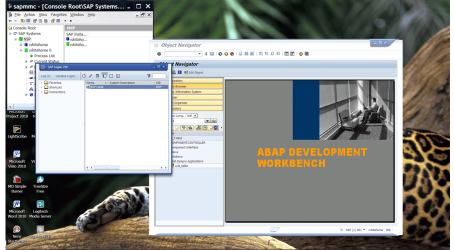
BTW I'm running a test W2K3 SERVER VM from a small self powered USB3 drive with the "MiniSAP" test system on it -- Once the system has booted the response time is actually quite acceptable on the USB3 drive. The boot time and starting the SAP system probably takes the majority of the time -- once its up and running its fine.

enc screenshot -- Virtual W2K3 server running SAP test system ("MiniSAP") on USB3 portable self powered pocket sized passport external HDD.

Cheers
jimbo
 

Attachments

  • sap.png
    sap.png
    239.8 KB · Views: 8
Last edited:

My Computer

Computer type
PC/Desktop
Computer Manufacturer/Model Number
Custom built, several laptops HP/ASUS
OS
Linux CENTOS 7 / various Windows OS'es and servers
CPU
Intel i7 Intel i5
Memory
8GB, 16GB
Graphics Card(s)
On Motherboard
Sound Card
Realtek HD audio
Monitor(s) Displays
Apple Cinema display, Samsung LCD
Screen Resolution
1920 X 1080
Hard Drives
4 X 1TB SATA
Mouse
Toshiba wireless laser
Internet Speed
> 20MB up
Problem is that I am using VMware Player which is free. The VMware workstation release 9 costs $249.
 

My Computer

Computer Manufacturer/Model Number
HP, Dell, Gateway, Toshiba - 4 laptops and 2 desktops
OS
Vista, Windows7, Mint Mate, Zorin, Windows 8
CPU
from 1.6GHz Duo to i7
Monitor(s) Displays
2x HP w2207
Hard Drives
5x HDD, 7x SSD, 12x Externals
Keyboard
with trackball - no mices
Mouse
Trackball mice
Internet Speed
DSL 6000
Reading through the whs Tutorial again I have the understanding that the software mentioned are free and legal.
Do I have the proper understanding?
 

My Computer

Computer type
PC/Desktop
Computer Manufacturer/Model Number
Home made Desktop
OS
Windows 10 Pro. 64/ version 1709 Windows 7 Pro/64
CPU
Intel i7-6800K @ 4.3
Motherboard
ASUS X-99 Deluxe II
Memory
Corsair Platinum 16 gig @2400
Graphics Card(s)
EVGA GTX 1070 OC
Monitor(s) Displays
Asus 27" LED LCD/VE278Q
Screen Resolution
1920-1080 or 1280-720 HDMI
Hard Drives
INTEL SSD 730-240 Gb Sata 3.0/
PSU
EVGA Platium 1200W
Case
Phanteks Luxe Tempered Glass 8 fans/ one radiator
Cooling
XSPC/ Water Cooled CPU
Keyboard
Das 4 Professional
Mouse
Logitech M705/MX Anywhere 2-S
Internet Speed
100 mbits
Antivirus
Microsoft Security Essentials/ Malwarebytes Premium 3.0/ SAS
Browser
I.E. 11 default/Firefox/ ISP Time Warner Cable/Spectrum
Other Info
LG BluRay Burner/
Sound system-KLipsch-THX/
Icy Dock ssd Hot Swap bays.
Reading through the whs Tutorial again I have the understanding that the software mentioned are free and legal.
Do I have the proper understanding?
Absolutely. I would never use illegal stuff and if it costs money, I mention it. But all that software is free and legal (Mint Mate and VMware Player)
 

My Computer

Computer Manufacturer/Model Number
HP, Dell, Gateway, Toshiba - 4 laptops and 2 desktops
OS
Vista, Windows7, Mint Mate, Zorin, Windows 8
CPU
from 1.6GHz Duo to i7
Monitor(s) Displays
2x HP w2207
Hard Drives
5x HDD, 7x SSD, 12x Externals
Keyboard
with trackball - no mices
Mouse
Trackball mice
Internet Speed
DSL 6000
I just went through this and the thing that bothered me a little was the inability of eSATA ports to power the drive. You have to use a DC adapter or a Y USB cable. There are few reports that the Y setup will not power all drives too. I finally went with an enclosure that had USB 3.0, eSATA, a Y cable and a DC adapter. Works nice so far.....
 

My Computer

Computer Manufacturer/Model Number
HB
OS
W7x64 Ult.
CPU
i7 975
Motherboard
P6T7 SC
Memory
12GB Corsair Dom
Graphics Card(s)
Evga GTX285
Sound Card
OB
Monitor(s) Displays
HP LP2475
Screen Resolution
1920x1200
Hard Drives
Velociraptors Raid0 BU
Crucial M4 OS
WD RE4 Data
PSU
PC Power & Cooling 950
Case
Chieftec Bravo
Cooling
Air 6 GentleTyphoon
Keyboard
Logitech Illuminated
Mouse
Logitech MX518
True, eSATA is only a data transfer port/cable. USB has a +5VDC included.
 

My Computer

Computer type
PC/Desktop
Computer Manufacturer/Model Number
Home Built Desktop By DataTech
OS
Windows 7 Ultimate X64 SP1
CPU
Intel i5-2550K, Differing ~4.4-4.8GHz No built in GPU
Motherboard
ASUS P8Z68-V PRO/GEN3
Memory
16GB G.Skill Sniper 1866MHz @ 2133MHz 2x8GB
Graphics Card(s)
ASUS GTX650TIB-DC2OC-2GD5, (650TI Boost)
Sound Card
Onboard Realtek 5-1
Monitor(s) Displays
Samsung P2570HD
Screen Resolution
1920x1080
Hard Drives
Samsung 840 Pro 256GB SSD for OS, 500GB Seagate Constellation (Enterprise drive) for Data
PSU
Corsair HX650W
Case
Inwin Dragon Rider
Cooling
Hyper 212 EVO w/two Noctua fans, push-pull, @1300 RPM
Keyboard
E-Z Eyes, bright yellow keys with large characters
Mouse
steelseries SENSEI Laser Pro Gaming
Internet Speed
48-51Mbs Mbs down, 11 Mbs up Xfinity Cable
Antivirus
Norton Internet Security 2013
Browser
IE 10, Opera, Pale Moon if needed
Other Info
4 case fans, LG BluRay-RE, ASUS DVD-RW, Mr. Fusion power supply, 1.21 gigawatts.
True, eSATA is only a data transfer port/cable. USB has a +5VDC included.

There is powered eSATA spec, but unfortunately it hasn't been adopted widely.

drpepper, sounds good. Which enclosure? I had been keeping my eye out for a USB 3.0 and eSATA combo, but after a while gave up.
 

My Computer

Computer type
PC/Desktop
Computer Manufacturer/Model Number
Home built (GeneO industries)/Model 4
OS
Windows 10 Pro. EFI boot partition, full EFI boot
CPU
i7 4770k 4.4GHz (44-44-43-43 turbo) @ 1.248V
Motherboard
ASUS Maximus VI Hero
Memory
16GB (8GBx2) @2200 MHz G.skill Sniper 10-11-10-30-1, 1.6V
Graphics Card(s)
MSI GTX 970 Gaming 4G
Sound Card
Onboard SupremeFX Audio
Monitor(s) Displays
NEC Spectraview 2490WUXi-SV
Screen Resolution
1920 x 1200
Hard Drives
Samsung 850 Pro 256GB (OS), Samsung 2x 128GB 840 Pro SSD in RAID0, 3x WD Blue 6Gb/s 1TB RAID0, WD 2TB Black external USB 3.0, 2TB WD20EARS Green external USB 3.0, 2x 500GB Seagate and 1 750 GB external USB, 1x 350GB external USB3
PSU
Seasonic X-850 (2012 KM3 model)
Case
Fractal Design Define R4
Cooling
NH-D14, NF-F12, NF-A15; NF-P14, NF-P12,NF-A14, S12A PWM
Keyboard
Cooler Master Storm Quickfire Rapid - Brown
Mouse
Logitech G602
Internet Speed
126.4 Mb/s down, 24.3 Mb/s up
Other Info
USB 3.0 x8 , SATA III x8, eSATA, USB 2.0 x6. Samsung DVD R/W drive.

WEI: CPU 7.8, Memory 7.9, Graphics 7.9, Disk 7.9
I have only seen eSata/USB2 and USB3/USB2 combos.
 

My Computer

Computer Manufacturer/Model Number
HP, Dell, Gateway, Toshiba - 4 laptops and 2 desktops
OS
Vista, Windows7, Mint Mate, Zorin, Windows 8
CPU
from 1.6GHz Duo to i7
Monitor(s) Displays
2x HP w2207
Hard Drives
5x HDD, 7x SSD, 12x Externals
Keyboard
with trackball - no mices
Mouse
Trackball mice
Internet Speed
DSL 6000
I got mine from Oyen....39.99 on Amazon.....Small, meant for 2.5, very complete.....They also have a version with just USB 3.0 and another with USB 3.0 and Firewire. I now think of it as a giant flash drive,,,,,,
 

My Computer

Computer Manufacturer/Model Number
HB
OS
W7x64 Ult.
CPU
i7 975
Motherboard
P6T7 SC
Memory
12GB Corsair Dom
Graphics Card(s)
Evga GTX285
Sound Card
OB
Monitor(s) Displays
HP LP2475
Screen Resolution
1920x1200
Hard Drives
Velociraptors Raid0 BU
Crucial M4 OS
WD RE4 Data
PSU
PC Power & Cooling 950
Case
Chieftec Bravo
Cooling
Air 6 GentleTyphoon
Keyboard
Logitech Illuminated
Mouse
Logitech MX518
Speaking of Giant flash drive - I put a SSD into an enclosed 2.5" USB3 caddy and run Windows 8, Mint Mate and Zorin (all under VMware Player) from there. It is really fast.

Usually I prefer open 2.5"/3.5" enclocures of which I have a few in various combinations (no Firewire though)
 

My Computer

Computer Manufacturer/Model Number
HP, Dell, Gateway, Toshiba - 4 laptops and 2 desktops
OS
Vista, Windows7, Mint Mate, Zorin, Windows 8
CPU
from 1.6GHz Duo to i7
Monitor(s) Displays
2x HP w2207
Hard Drives
5x HDD, 7x SSD, 12x Externals
Keyboard
with trackball - no mices
Mouse
Trackball mice
Internet Speed
DSL 6000
Good point. I was concerned about cooling too. The Oyen has one end perforated and fins on the bottom.....? I'll never really know if it helps but I can tell myself that I tried.....
 

My Computer

Computer Manufacturer/Model Number
HB
OS
W7x64 Ult.
CPU
i7 975
Motherboard
P6T7 SC
Memory
12GB Corsair Dom
Graphics Card(s)
Evga GTX285
Sound Card
OB
Monitor(s) Displays
HP LP2475
Screen Resolution
1920x1200
Hard Drives
Velociraptors Raid0 BU
Crucial M4 OS
WD RE4 Data
PSU
PC Power & Cooling 950
Case
Chieftec Bravo
Cooling
Air 6 GentleTyphoon
Keyboard
Logitech Illuminated
Mouse
Logitech MX518
Good point. I was concerned about cooling too. The Oyen has one end perforated and fins on the bottom.....? I'll never really know if it helps but I can tell myself that I tried.....
For an SSD I need no cooling. It produces no heat. But in the open caddies I use 2.5" and 3'5" HDDs and they get warm.
 

My Computer

Computer Manufacturer/Model Number
HP, Dell, Gateway, Toshiba - 4 laptops and 2 desktops
OS
Vista, Windows7, Mint Mate, Zorin, Windows 8
CPU
from 1.6GHz Duo to i7
Monitor(s) Displays
2x HP w2207
Hard Drives
5x HDD, 7x SSD, 12x Externals
Keyboard
with trackball - no mices
Mouse
Trackball mice
Internet Speed
DSL 6000
Back
Top