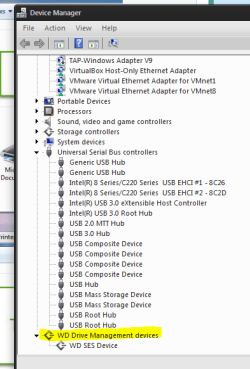
I would run
WD Data Lifeguard Diagnostic and see if that WD Elements is recognized and if it passes both the quick and the extended tests. This should render the drive safe to use and exclude it as the potential cause of the problem.
Done, but the drive doesn't show up in the list.
Just to be on the safe side I'd try another USB cable and all the ports on the laptop and see if the drive pops up anywhere.
Done, no change. Keep in mind that both drive and cable are working fine on my HP
Di you have all your latest OS and driver updates?
Yes for the OS and driver but it appears no for the BIOS, see below
I would recommend backing up the data from the drive just to be on the safe side!
Actually it is my drive for doing back up. I had to purchase an enclosure and use and old drive to keep up doing my backup, but still I would like to go to the bottom of this issue.
Can u go into the bios and list which version it is? On the ThinkPad.
BIOS Update Bootable CD for Windows 8 (32-bit, 64-bit), 7 (32-bit, 64-bit), Vista (32-bit, 64-bit), XP - ThinkPad T420, T420i - Lenovo Support (US) there is a chart on this page.
Indeed I do not have the latest BIOS but I read the text version of the changes and I don't see any major change between current version 1.48 and mine 1.46
Edit: also when you plug in the drive do you hear and feel it get power and spin up?
Yes I do hear the power and the spin up (and also I see the light at the back is on).
Edit: An extra step I tried today was disabling the BIOS Security Chip (as described
here) but no change
This is by BIOS:
My current's BIOS settings are as this:
Microsoft (R) Windows Script Host Version 5.8
Copyright (C) Microsoft Corporation. All rights reserved.
WakeOnLAN
current setting = ACOnly
possible settings = Disable,ACOnly,ACandBattery,Enable
EthernetLANOptionROM
current setting = Enable
possible settings = Disable,Enable
USBBIOSSupport
current setting = Enable
possible settings = Disable,Enable
AlwaysOnUSB
current setting = Enable
possible settings = Disable,Enable
TrackPoint
current setting = Automatic
possible settings = Disable,Automatic
TouchPad
current setting = Automatic
possible settings = Disable,Automatic
FnCtrlKeySwap
current setting = Disable
possible settings = Disable,Enable
FnKeyLock
current setting = Disable
possible settings = Disable,Enable
ThinkPadNumLock
current setting = Independent
possible settings = Independent,Synchronized
PowerOnNumLock
current setting = Auto
possible settings = Auto,On,Off
BootDisplayDevice
current setting = LCD
possible settings = LCD,VGA,Digital,Digital1onDock,Digital2onDock
GraphicsDevice
current setting = IntegratedGfx
possible settings = IntegratedGfx,DiscreteGfx,SwitchableGfx
OsDetectionForSwitchableGraphics
current setting = Disable
possible settings = Disable,Enable
SpeedStep
current setting = Enable
possible settings = Disable,Enable
AdaptiveThermalManagementAC
current setting = MaximizePerformance
possible settings = MaximizePerformance,Balanced
AdaptiveThermalManagementBattery
current setting = Balanced
possible settings = MaximizePerformance,Balanced
CDROMSpeed
current setting = Normal
possible settings = High,Normal,Silent
CPUPowerManagement
current setting = Automatic
possible settings = Disable,Automatic
PCIExpressPowerManagement
current setting = Automatic
possible settings = Disable,Automatic
OnByAcAttach
current setting = Disable
possible settings = Disable,Enable
PowerControlBeep
current setting = Enable
possible settings = Disable,Enable
LowBatteryAlarm
current setting = Enable
possible settings = Disable,Enable
PasswordBeep
current setting = Disable
possible settings = Disable,Enable
KeyboardBeep
current setting = Enable
possible settings = Disable,Enable
SATAControllerMode
current setting = AHCI
possible settings = Compatibility,AHCI
CoreMultiProcessing
current setting = Enable
possible settings = Disable,Enable
HyperThreadingTechnology
current setting = Enable
possible settings = Disable,Enable
AMTControl
current setting = Enable
possible settings = Disable,Enable
HardwarePasswordManager
current setting = Enable
possible settings = Disable,Enable
LockBIOSSetting
current setting = Disable
possible settings = Disable,Enable
MinimumPasswordLength
current setting = Disable
possible settings = Disable,4,5,6,7,8,9,10,11,12
BIOSPasswordAtUnattendedBoot
current setting = Enable
possible settings = Disable,Enable
BIOSPasswordAtReboot
current setting = Disable
possible settings = Disable,Enable
FingerprintPredesktopAuthentication
current setting = Enable
possible settings = Disable,Enable
FingerprintReaderPriority
current setting = External
possible settings = External,InternalOnly
FingerprintSecurityMode
current setting = Normal
possible settings = Normal,High
FingerprintPasswordAuthentication
current setting = Enable
possible settings = Disable,Enable
SecurityChip
current setting = Active (<---- this is the one I changed to Inactive and Disable)
possible settings = Active,Inactive,Disable
TXTFeature
current setting = Disable
possible settings = Disable,Enable
BIOSUpdateByEndUsers
current setting = Enable
possible settings = Disable,Enable
FlashOverLAN
current setting = Enable
possible settings = Disable,Enable
DataExecutionPrevention
current setting = Enable
possible settings = Disable,Enable
VirtualizationTechnology
current setting = Disable
possible settings = Disable,Enable
VTdFeature
current setting = Disable
possible settings = Disable,Enable
EthernetLANAccess
current setting = Enable
possible settings = Disable,Enable
WirelessLANAccess
current setting = Enable
possible settings = Disable,Enable
WiMAXAccess
current setting = Enable
possible settings = Disable,Enable
WirelessWANAccess
current setting = Enable
possible settings = Disable,Enable
BluetoothAccess
current setting = Enable
possible settings = Disable,Enable
ModemAccess
current setting = Enable
possible settings = Disable,Enable
USBPortAccess
current setting = Enable
possible settings = Disable,Enable
IEEE1394Access
current setting = Enable
possible settings = Disable,Enable
ExpressCardAccess
current setting = Enable
possible settings = Disable,Enable
UltrabayAccess
current setting = Enable
possible settings = Disable,Enable
eSATAPortAccess
current setting = Enable
possible settings = Disable,Enable
MemoryCardSlotAccess
current setting = Enable
possible settings = Disable,Enable
SmartCardSlotAccess
current setting = Enable
possible settings = Disable,Enable
IntegratedCameraAccess
current setting = Enable
possible settings = Disable,Enable
MicrophoneAccess
current setting = Enable
possible settings = Disable,Enable
FingerprintReaderAccess
current setting = Enable
possible settings = Disable,Enable
ATpModuleActivation
current setting = Enable
possible settings = Disable,Enable,Disable
ComputraceModuleActivation
current setting = Enable
possible settings = Disable,Enable,Disable
BootMode
current setting = Quick
possible settings = Quick,Diagnostics
StartupOptionKeys
current setting = Enable
possible settings = Disable,Enable
BootDeviceListF12Option
current setting = Enable
possible settings = Disable,Enable
BootOrder
current setting = HDD0:ATAPICD0:USBHDD:USBFDD:HDD2:HDD1

CILAN:ATAPICD1:ATAPICD2:HDD3:HDD4
possible settings = HDD0,HDD1,HDD2,HDD3,HDD4,PCILAN,ATAPICD0,ATAPICD1,ATAPICD2,USBFDD,USBCD,USBHDD,OtherHDD,OtherCD,NODEV
NetworkBoot
current setting = PCILAN
possible settings = HDD0,HDD1,HDD2,HDD3,HDD4,PCILAN,ATAPICD0,ATAPICD1,ATAPICD2,USBFDD,USBCD,USBHDD,OtherHDD,OtherCD,NODEV
BootOrderLock
current setting = Disable
possible settings = Disable,Enable
ReserveMemoryForUEFIBootManager
current setting = Enable
possible settings = Disable,Enable