Used system recovery disks purchased from ACER not working

Are installation disks and the recovery disks the same thing? I only have the Acer recovery disks, I never received a windows 7 installation disk on either of the computers it was already installed when purchased. I only have the OEM product code, which won't allow me to download the windows operating system from microsoft.
 

My Computer My Computer

At a glance

windows 7 home premium
Computer type
Laptop
Computer Manufacturer/Model Number
Acer/Aspire 7741Z-4633
OS
windows 7 home premium
OK Maxseven, is a hard drive specific for the manufacturer? Or can I pull a hard drive out of another laptop a gateway and use that one. Sorry, I just don't know, I am really not trying to be difficult.
So long as the hard drive physically fits, and has enough capacity for your needs, it should work.

Like I said, I've not used Acer's recovery disks but I'd assume that one of the first things it will do is look at your HDD and say "I've got to blast-away everything on it to do this recovery. Are you OK with that?" ie. it will want to re-format your hard drive.

BTW I hope that your Windows Product Key/Label is visible on the underside of your laptop as you will need that to re-install Windows.

EDIT: You just said you have the code so it oughta work. Worth a try anyway. Yes you said you had multiple disks (DVDs?) so I'm quite sure Windows is on these--Back to Just As Shipped!
 

My Computer My Computer

At a glance

Windows 7 Professional 64bitIntel Core i7 4600M @ 2.90GHz16.0GB Dual-Channel DDR3 @ 797MHz (11-11-11-28)Intel HD Graphics 4600 (Dell) 2048MB ATI AMD ...
Computer type
Laptop
Computer Manufacturer/Model Number
Dell Latitude E6540 Laptop
OS
Windows 7 Professional 64bit
CPU
Intel Core i7 4600M @ 2.90GHz
Motherboard
Dell Inc. 0CYT5F (SOCKET 0)
Memory
16.0GB Dual-Channel DDR3 @ 797MHz (11-11-11-28)
Graphics Card(s)
Intel HD Graphics 4600 (Dell) 2048MB ATI AMD Radeon HD 8790M
Sound Card
Realtek High Definition Audio
Monitor(s) Displays
HP ZR30w (2560x1600@60Hz)
Hard Drives
256GB LITEONIT LMT-256M6M-41 mm SATA (SSD)
1TB Samsung SSD 860 EVO mSATA SATA (SSD)
2TB USB 3.0 USB Device
115GB SanDisk Ultra Fit USB
Other Info
Multiple Dell E-Port Plus II Port Replicator/Docking Stations 0Y72NH USB 3.0 + 130W AC Adapters
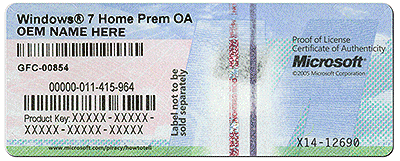
The product key for your system should be on the COA sticker on your system. It looks something like this:


coa-stickers.gif


The Acer recovery discs should be usable for a fresh installation. But to be sure I suggest to ask Acer.
 

My Computer My Computer

At a glance

Vista, Windows7, Mint Mate, Zorin, Windows 8from 1.6GHz Duo to i7
Computer Manufacturer/Model Number
HP, Dell, Gateway, Toshiba - 4 laptops and 2 desktops
OS
Vista, Windows7, Mint Mate, Zorin, Windows 8
CPU
from 1.6GHz Duo to i7
Monitor(s) Displays
2x HP w2207
Hard Drives
5x HDD, 7x SSD, 12x Externals
Keyboard
with trackball - no mices
Mouse
Trackball mice
Internet Speed
DSL 6000
Burn it to cd/dvd. Boot it up. Lots of repair tools on there, plus you can see your drive.
 
Last edited:

My Computers My Computers

  • At a glance

    7 X64i5 84002x8gb 3200mhz
    Computer type
    PC/Desktop
    OS
    7 X64
    CPU
    i5 8400
    Motherboard
    gigabyte b365m ds3h
    Memory
    2x8gb 3200mhz
    Hard Drives
    various
    PSU
    pure power 11 400w cm
    Case
    Coolermaster
    Cooling
    cryorig m9i
  • At a glance

    7x64g54008gb ddr4 2400
    Computer type
    PC/Desktop
    OS
    7x64
    CPU
    g5400
    Motherboard
    ga b365m ds3h
    Memory
    8gb ddr4 2400
    PSU
    xfx pro 450w
@ WHS,
they will if he uses Acer HP image.
He wont even have to use the sticker code

Roy
 

My Computer My Computer

At a glance

W7 home premium 32bit/W7HP 64bit/w10 tp insid...E5300 dual core3gbNvidia Geforce 7100 Nforce 630i
Computer type
PC/Desktop
Computer Manufacturer/Model Number
medionl/Aspire 6930G/acer x55a
OS
W7 home premium 32bit/W7HP 64bit/w10 tp insider ring
CPU
E5300 dual core
Motherboard
medion MS7366
Memory
3gb
Graphics Card(s)
Nvidia Geforce 7100 Nforce 630i
Monitor(s) Displays
avixc
Internet Speed
n (isp resticted to 72)
Antivirus
mse/pands
Browser
palemoon
Other Info
Belkin Fd7050 n USB using Railink RT2870 drivers, more upto date
haha, ok, I'm a girl lol. And you are not going to believe this. I took the hard drive out of a compaq presario and I put it into the Acer, then I put the first disk in from Acer. You were right Maxseven, the hard drive must have been bad. The screen that is coming up looks like the one that was on the compaq. How do I make it back to acer?
Thank you, thank you, thank you, thank all of you for your help. OK so now I can use the recovery disks to make it back to factory settings correct?
 

My Computer My Computer

At a glance

windows 7 home premium
Computer type
Laptop
Computer Manufacturer/Model Number
Acer/Aspire 7741Z-4633
OS
windows 7 home premium
It appears to be loading all the drivers from the acer recovery disk
 

My Computer My Computer

At a glance

windows 7 home premium
Computer type
Laptop
Computer Manufacturer/Model Number
Acer/Aspire 7741Z-4633
OS
windows 7 home premium
COOOL,
with luck it should auto activate as well.

Roy
 

My Computer My Computer

At a glance

W7 home premium 32bit/W7HP 64bit/w10 tp insid...E5300 dual core3gbNvidia Geforce 7100 Nforce 630i
Computer type
PC/Desktop
Computer Manufacturer/Model Number
medionl/Aspire 6930G/acer x55a
OS
W7 home premium 32bit/W7HP 64bit/w10 tp insider ring
CPU
E5300 dual core
Motherboard
medion MS7366
Memory
3gb
Graphics Card(s)
Nvidia Geforce 7100 Nforce 630i
Monitor(s) Displays
avixc
Internet Speed
n (isp resticted to 72)
Antivirus
mse/pands
Browser
palemoon
Other Info
Belkin Fd7050 n USB using Railink RT2870 drivers, more upto date
Thank you so much to
WHS, Maxseven, Torchwood, and SIW2. I appreciate all of the advice and helpful tips to get this thing back and running. I really cannot thank you enough for your patience dealing with a person with VERY limited computer skills. Thank you for taking the time out of your day to help me. Now, I won't be angry at work tomorrow.
Alexa
 

My Computer My Computer

At a glance

windows 7 home premium
Computer type
Laptop
Computer Manufacturer/Model Number
Acer/Aspire 7741Z-4633
OS
windows 7 home premium
ok, maybe I spoke too soon. After I put the hard drive in I started to run the recovery disks from Acer. I changed the boot drive to the CD/DVD and everything appeared to be going smoothly. As it was loading the information after the partition and new hard drive were recognized (on the other HD nothing was showing) I thought it was smooth sailing. Then after loading the image file, It stopped and said that one of the images couldn't be loaded onto the HD, and when I clicked cancel, it took me to a DOS screen and then said that the BOOTMGR wasn't found. I attempted to do it again with the recovery disks and it stopped and the same screen saying that the same image file couldn't be downloaded to the HD. I am at a loss, any suggestions would be greatly appreciate. I have school today, but will be in around 7pm Eastern Time. I would love to see what you all come up with, because I have no idea.
Thanks for everything so far,
Alexa
 

My Computer My Computer

At a glance

windows 7 home premium
Computer type
Laptop
Computer Manufacturer/Model Number
Acer/Aspire 7741Z-4633
OS
windows 7 home premium
Then after loading the image file, It stopped and said that one of the images couldn't be loaded onto the HD
Unless someone here has used Acer recovery disks (I have not) it will be hard for us to imagine what is happening. Have you tried to find an Acer support forum to discuss this?

In the alternative you might try posting a few screen shots to show exactly what you are seeing when you boot from DVD, ending with the "can't load image" screen of course.

Otherwise the only thing I can think of is a long shot: that the disk drive you swiped out of the Compaq is too small for Acer's process. But even 40GB should be enough--I think I have a 40GB SSD in my Acer netbook running W7HP x64.
 

My Computer My Computer

At a glance

Windows 7 Professional 64bitIntel Core i7 4600M @ 2.90GHz16.0GB Dual-Channel DDR3 @ 797MHz (11-11-11-28)Intel HD Graphics 4600 (Dell) 2048MB ATI AMD ...
Computer type
Laptop
Computer Manufacturer/Model Number
Dell Latitude E6540 Laptop
OS
Windows 7 Professional 64bit
CPU
Intel Core i7 4600M @ 2.90GHz
Motherboard
Dell Inc. 0CYT5F (SOCKET 0)
Memory
16.0GB Dual-Channel DDR3 @ 797MHz (11-11-11-28)
Graphics Card(s)
Intel HD Graphics 4600 (Dell) 2048MB ATI AMD Radeon HD 8790M
Sound Card
Realtek High Definition Audio
Monitor(s) Displays
HP ZR30w (2560x1600@60Hz)
Hard Drives
256GB LITEONIT LMT-256M6M-41 mm SATA (SSD)
1TB Samsung SSD 860 EVO mSATA SATA (SSD)
2TB USB 3.0 USB Device
115GB SanDisk Ultra Fit USB
Other Info
Multiple Dell E-Port Plus II Port Replicator/Docking Stations 0Y72NH USB 3.0 + 130W AC Adapters
Back
Top