User Account Control - UAC - Change Notification Settings

How to Change UAC Notification Settings in Windows 7


   Information
When turned on, User Account Control helps prevent potentially harmful programs from making changes to your computer in Windows 7 by notifying and asking you for permission before letting the program run or install.

This will show you how to change the User Account Control (UAC) for when to be notified about changes to your computer.

You must be logged in as an administrator to be able to do the steps in this tutorial.


   Note
For more detailed information about UAC, see:
Standard Account:
A standard user account lets a person use most of the capabilities of the computer, but permission from an administrator is required if you want to make changes that affect other users or the security of the computer.
When you use a standard account, you can use most programs that are installed on the computer, but you can't install or uninstall software and hardware, delete files that are required for the computer to work, or change settings on the computer that affect other users. If you're using a standard account, some programs might require you to provide an administrator password before you can perform certain tasks.
Administrator Account:
An administrator account is a user account that lets you make changes that will affect other users. Administrators can change security settings, install software and hardware, and access all files on the computer. Administrators can also make changes to other user accounts.
When you set up Windows, you'll be required to create a user account. This account is an administrator account that allows you to set up your computer and install any programs that you would like to use.
To help make the computer more secure, this administrator account may be asked with a UAC prompt to provide their password or confirmation before allowed to make changes that affect other users, or when running anything elevated (Run as Administrator) since running elevated will allow it to have access to the entire computer.
   Warning
Turning off UAC by setting it to the lowest bottom level of "Never notify" will also disable Protected Mode in Internet Explorer.

This means that you will not be able to have 64-bit IE10 unless you leave UAC turned on.

   Tip
If you set UAC to "Never notify" to be disabled, then you could rebuild the icon cache afterwards to remove the UAC shield overlay icon on applications and shortcuts that required elevation to run.


OPTION ONE

Change UAC Setting through User Accounts


1. Open the Control Panel (icons view).

2. Click on the User Accounts icon.

3. Click on the Change User Account Control settings link. (See screenshot below)
User_Accounts.jpg
4. If prompted by UAC, click on Yes to approve.

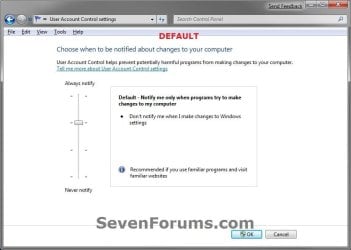
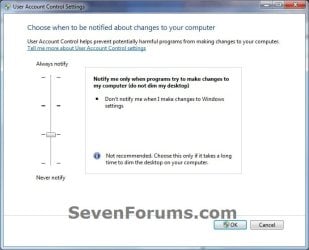
5. Adjust the slider to the level of protection of how much you want to be notified from UAC. (See screenshots below)

6. Click on OK when done.
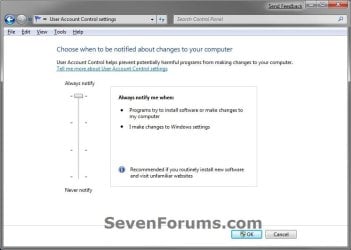
UAC_Level-1_Always_Notify.jpg
UAC_Level-2_Default.jpg
UAC_Level-3_No_Dim.jpg
UAC_Level-4_Never_Notify.jpg
7. If prompted by UAC, click on Yes to approve.

8. If you have just turned UAC off, then you will need to click on restart the computer, or manually restart the computer, to apply the changes. (See screenshot below)
NOTE: Simply turning on UAC or changing the UAC level without turning it off will not require a restart.

Turn_Off.jpg


OPTION TWO

Change UAC Settings Using a REG File Download


1. To Have UAC Always Notify You
NOTE: This is level 1. See the first screenshot under step 6 in METHOD ONE. This will notify you of all changes made by programs to your computer, and changes you make to Windows 7 settings.
A) Click on the Download button below to download the file below.
UAC_Level-1.reg


Download


B) Go to step 5.
2. To Have the Default UAC Notification
NOTE: This is level 2. See the second screenshot under step 6 in METHOD ONE. This will only notify you when programs try to make changes to your computer, and not when you make changes to Windows 7 settings.
A) Click on the Download button below to download the file below.
UAC_Level-2_Default.reg

Download


B) Go to step 5.
3. To Have UAC Notify without Dimming Desktop
NOTE: This is level 3. See the third screenshot under step 6 in METHOD ONE. This will only notify you when programs try to make changes to your computer without dimming the desktop, and not when you make changes to Windows 7 settings.
A) Click on the Download button below to download the file below.
UAC_Level-3_No_Dim.reg

Download


B) Go to step 5.
4. To Turn Off UAC Notifications Completely to "Never notify"
NOTE: This is level 4. See the fourth screenshot under step 6 in METHOD ONE. This will disable (turn off) UAC completely. You will not be notified of any changes made by programs to your computer, or that you make to Windows 7 settings.
A) Click on the Download button below to download the file below.
UAC_Level-4.reg

Download


5. Save the .reg file to your desktop.

6. Right click on the downloaded .reg file, and click on Merge.

7. If prompted, click on Run, Yes (UAC), Yes, and OK when prompted.

8. Restart the computer to apply the changes to UAC.

9. When done, you can delete the downloaded .reg file if you like.

That's it,
Shawn


Attachments

Last edited:
I had a trojan a while ago that disabled UAC. Now I don't get the prompt window for anything. Even if I do run as administrator. I use standard, but know admin pass. I cant access the control panel, and the file gave me this error. "Cannot import c:\users\username\desktop\UAC_Level-1.reg: Not all data was succesfully written to the registry. Some keys are open by the system or other processes" Please help, I need to be prompted for admin password to... well, do anything.

Hello Konlo, and welcome to Seven Forums.

Are you able to use Option One to set your UAC settings to "Always notify" in Option One instead of using the .reg file?

Personally, when it comes to viruses or Trojans, I prefer to clean install.
 
Last edited:

My Computer

Computer type
PC/Desktop
Computer Manufacturer/Model Number
Self built custom
OS
64-bit Windows 11 Pro for Workstations
CPU
Intel i7-8700K OC'd to 5 GHz
Motherboard
ASUS ROG Maximus XI Formula Z390
Memory
64 GB (4x16GB) G.SKILL TridentZ RGB DDR4 3600 MHz
Graphics Card(s)
ASUS ROG-STRIX-GTX1080TI-O11G-GAMING
Sound Card
Integrated
Monitor(s) Displays
2 x Samsung Odyssey G7 27"
Screen Resolution
2560x1440
Hard Drives
1TB Samsung 990 PRO M.2,
4TB Samsung 990 PRO PRO M.2,
TerraMaster F8 SSD Plus NAS
PSU
Seasonic Prime Titanium 850W
Case
Thermaltake Core P3
Cooling
Corsair Hydro H115i
Keyboard
Logitech wireless K800
Mouse
Logitech MX Master 4
Internet Speed
2 Gb/s Download and 100 Mb/s Upload
Antivirus
Malwarebyte Anti-Malware Premium
Browser
Google Chrome
Other Info
Logitech Z625 speaker system,
Logitech BRIO 4K Pro webcam,
HP Color LaserJet Pro MFP M477fdn,
APC SMART-UPS RT 1000 XL - SURT1000XLI,
Galaxy S23 Plus phone
No, I cant open/use anything that requires admin abilities. And this Trojan was a few months ago. Norton AntiVirus had a delayed response which allowed it to turn off UAC, but it was caught in time. I don't have a system restore save from before that trojan, so I cant wipe it clean.
 

My Computer

Computer type
PC/Desktop
OS
7, 64 bit
Is this for a PC that came preinstalled with Windows 7, or one you installed Windows 7 on?
 

My Computer

Computer type
PC/Desktop
Computer Manufacturer/Model Number
Self built custom
OS
64-bit Windows 11 Pro for Workstations
CPU
Intel i7-8700K OC'd to 5 GHz
Motherboard
ASUS ROG Maximus XI Formula Z390
Memory
64 GB (4x16GB) G.SKILL TridentZ RGB DDR4 3600 MHz
Graphics Card(s)
ASUS ROG-STRIX-GTX1080TI-O11G-GAMING
Sound Card
Integrated
Monitor(s) Displays
2 x Samsung Odyssey G7 27"
Screen Resolution
2560x1440
Hard Drives
1TB Samsung 990 PRO M.2,
4TB Samsung 990 PRO PRO M.2,
TerraMaster F8 SSD Plus NAS
PSU
Seasonic Prime Titanium 850W
Case
Thermaltake Core P3
Cooling
Corsair Hydro H115i
Keyboard
Logitech wireless K800
Mouse
Logitech MX Master 4
Internet Speed
2 Gb/s Download and 100 Mb/s Upload
Antivirus
Malwarebyte Anti-Malware Premium
Browser
Google Chrome
Other Info
Logitech Z625 speaker system,
Logitech BRIO 4K Pro webcam,
HP Color LaserJet Pro MFP M477fdn,
APC SMART-UPS RT 1000 XL - SURT1000XLI,
Galaxy S23 Plus phone
I installed win 7 on. It used to have Vista i think. Whichever one came before 7
 

My Computer

Computer type
PC/Desktop
OS
7, 64 bit

My Computer

Computer type
PC/Desktop
Computer Manufacturer/Model Number
Self built custom
OS
64-bit Windows 11 Pro for Workstations
CPU
Intel i7-8700K OC'd to 5 GHz
Motherboard
ASUS ROG Maximus XI Formula Z390
Memory
64 GB (4x16GB) G.SKILL TridentZ RGB DDR4 3600 MHz
Graphics Card(s)
ASUS ROG-STRIX-GTX1080TI-O11G-GAMING
Sound Card
Integrated
Monitor(s) Displays
2 x Samsung Odyssey G7 27"
Screen Resolution
2560x1440
Hard Drives
1TB Samsung 990 PRO M.2,
4TB Samsung 990 PRO PRO M.2,
TerraMaster F8 SSD Plus NAS
PSU
Seasonic Prime Titanium 850W
Case
Thermaltake Core P3
Cooling
Corsair Hydro H115i
Keyboard
Logitech wireless K800
Mouse
Logitech MX Master 4
Internet Speed
2 Gb/s Download and 100 Mb/s Upload
Antivirus
Malwarebyte Anti-Malware Premium
Browser
Google Chrome
Other Info
Logitech Z625 speaker system,
Logitech BRIO 4K Pro webcam,
HP Color LaserJet Pro MFP M477fdn,
APC SMART-UPS RT 1000 XL - SURT1000XLI,
Galaxy S23 Plus phone
I have standard account, I cant do all of that. The virus is not there anymore, the only problem I have is that the UAC prompt does not appear, is there a fix?
 

My Computer

Computer type
PC/Desktop
OS
7, 64 bit
You would need to have an administrator account.

Did you still have a Windows 7 installation disc when you installed Windows originally?
 

My Computer

Computer type
PC/Desktop
Computer Manufacturer/Model Number
Self built custom
OS
64-bit Windows 11 Pro for Workstations
CPU
Intel i7-8700K OC'd to 5 GHz
Motherboard
ASUS ROG Maximus XI Formula Z390
Memory
64 GB (4x16GB) G.SKILL TridentZ RGB DDR4 3600 MHz
Graphics Card(s)
ASUS ROG-STRIX-GTX1080TI-O11G-GAMING
Sound Card
Integrated
Monitor(s) Displays
2 x Samsung Odyssey G7 27"
Screen Resolution
2560x1440
Hard Drives
1TB Samsung 990 PRO M.2,
4TB Samsung 990 PRO PRO M.2,
TerraMaster F8 SSD Plus NAS
PSU
Seasonic Prime Titanium 850W
Case
Thermaltake Core P3
Cooling
Corsair Hydro H115i
Keyboard
Logitech wireless K800
Mouse
Logitech MX Master 4
Internet Speed
2 Gb/s Download and 100 Mb/s Upload
Antivirus
Malwarebyte Anti-Malware Premium
Browser
Google Chrome
Other Info
Logitech Z625 speaker system,
Logitech BRIO 4K Pro webcam,
HP Color LaserJet Pro MFP M477fdn,
APC SMART-UPS RT 1000 XL - SURT1000XLI,
Galaxy S23 Plus phone
No, all I am wondering is if there is a way for a standard user to turn UAC on to always notify. I don't want to re-install windows, or backup my files, I just want to know if there is a way to turn UAC on again.
 

My Computer

Computer type
PC/Desktop
OS
7, 64 bit
Another idea: I have the standard admin account, if you know a default password or a way to get into that account I could change UAC
 

My Computer

Computer type
PC/Desktop
OS
7, 64 bit
How does it work if you sign in to your administrator account, and set UAC to "Always Notify" (top level)?
 

My Computer

Computer type
PC/Desktop
Computer Manufacturer/Model Number
Self built custom
OS
64-bit Windows 11 Pro for Workstations
CPU
Intel i7-8700K OC'd to 5 GHz
Motherboard
ASUS ROG Maximus XI Formula Z390
Memory
64 GB (4x16GB) G.SKILL TridentZ RGB DDR4 3600 MHz
Graphics Card(s)
ASUS ROG-STRIX-GTX1080TI-O11G-GAMING
Sound Card
Integrated
Monitor(s) Displays
2 x Samsung Odyssey G7 27"
Screen Resolution
2560x1440
Hard Drives
1TB Samsung 990 PRO M.2,
4TB Samsung 990 PRO PRO M.2,
TerraMaster F8 SSD Plus NAS
PSU
Seasonic Prime Titanium 850W
Case
Thermaltake Core P3
Cooling
Corsair Hydro H115i
Keyboard
Logitech wireless K800
Mouse
Logitech MX Master 4
Internet Speed
2 Gb/s Download and 100 Mb/s Upload
Antivirus
Malwarebyte Anti-Malware Premium
Browser
Google Chrome
Other Info
Logitech Z625 speaker system,
Logitech BRIO 4K Pro webcam,
HP Color LaserJet Pro MFP M477fdn,
APC SMART-UPS RT 1000 XL - SURT1000XLI,
Galaxy S23 Plus phone
I would think that I might be able to up my account to admin, or that UAC is for all accounts?
 

My Computer

Computer type
PC/Desktop
OS
7, 64 bit
Only an administrator can do that. If that's not an option for you, then you may need to reinstall.
 

My Computer

Computer type
PC/Desktop
Computer Manufacturer/Model Number
Self built custom
OS
64-bit Windows 11 Pro for Workstations
CPU
Intel i7-8700K OC'd to 5 GHz
Motherboard
ASUS ROG Maximus XI Formula Z390
Memory
64 GB (4x16GB) G.SKILL TridentZ RGB DDR4 3600 MHz
Graphics Card(s)
ASUS ROG-STRIX-GTX1080TI-O11G-GAMING
Sound Card
Integrated
Monitor(s) Displays
2 x Samsung Odyssey G7 27"
Screen Resolution
2560x1440
Hard Drives
1TB Samsung 990 PRO M.2,
4TB Samsung 990 PRO PRO M.2,
TerraMaster F8 SSD Plus NAS
PSU
Seasonic Prime Titanium 850W
Case
Thermaltake Core P3
Cooling
Corsair Hydro H115i
Keyboard
Logitech wireless K800
Mouse
Logitech MX Master 4
Internet Speed
2 Gb/s Download and 100 Mb/s Upload
Antivirus
Malwarebyte Anti-Malware Premium
Browser
Google Chrome
Other Info
Logitech Z625 speaker system,
Logitech BRIO 4K Pro webcam,
HP Color LaserJet Pro MFP M477fdn,
APC SMART-UPS RT 1000 XL - SURT1000XLI,
Galaxy S23 Plus phone
I had a trojan a while ago that disabled UAC. Now I don't get the prompt window for anything. Even if I do run as administrator. I use standard, but know admin pass. I cant access the control panel, and the file gave me this error. "Cannot import c:\users\username\desktop\UAC_Level-1.reg: Not all data was succesfully written to the registry. Some keys are open by the system or other processes" Please help, I need to be prompted for admin password to... well, do anything.


Please post in the security/malware removal forum here:

System Security - Windows 7 Help Forums

Please include a new thread there explaining your issue in as much detail as possible. We will be happy to help.
 

My Computer

Computer type
PC/Desktop
Computer Manufacturer/Model Number
Custom Built
OS
Windows 10 Pro
CPU
AMD Ryzen 5 2400G Processor with Radeon RX Vega 11 Graphics
Motherboard
ASRock X470 Master SLI/AC AM4 AMD Promontory X470 SATA 6Gb/s
Memory
G.SKILL Ripjaws V Series 16GB (2 x 8GB) 288-Pin DDR4 SDRAM D
Graphics Card(s)
2047MB NVIDIA GeForce GTX 1060 6GB (EVGA)
Sound Card
Motherboard Built in
Monitor(s) Displays
Acer R240HY bidx 23.8-Inch IPS HDMI DVI VGA (1920 x 1080) Wi
Screen Resolution
1920 x 1080
Hard Drives
1TB Sandisk SSD PLUS (Main drive)
500 GB Seagate 7200 RPM (Games)
500 GB Western Digital 7200 RPM (Virtual Machines)
PSU
CORSAIR TX Series TX650M 650W 80+ Gold Modular Power Supply
Case
CORSAIR CARBIDE SPEC-02 Mid-Tower Gaming Case, Red LED Fan
Cooling
220mm, two 120mm, and four 60mm fans
Keyboard
Wired Dell keyboard
Mouse
Wireless Logitech mouse
Internet Speed
250mb down, 30mb up
Antivirus
Panda Cloud Antivirus
Browser
Chrome-ish x64
Other Info
Your awesome for reading this.
Disable secure desktop & maintain highest security rating

Of the 4 or so [.reg file] configuration options given here, none of them seem to have both the secure desktop off while maintaining UAC's security rating at its highest level, which is not only possible but surely preferable for most users.

This configuration works best if your user is a member of the Administrators group, in which case UAC prompts are predictable and unobtrusive (one extra click to perform an administrative action).

Now I don't know if my registry settings will work with all versions of Windows 7, but I don't see why they wouldn't.

==============================
Windows Registry Editor Version 5.00

[HKEY_LOCAL_MACHINE\SOFTWARE\Microsoft\Windows\CurrentVersion\Policies\System]
"ConsentPromptBehaviorAdmin"=dword:00000004
"ConsentPromptBehaviorUser"=dword:00000003
"PromptOnSecureDesktop"=dword:00000000
==============================

I think those are the only relevant ones in this context.


As an administrator if you click on "Administrator Tools" for instance, your consent will be prompted for, without any switching of desktops. So it is instant and amounts to a single (and expected) extra confirmation click.

Your overall security rating goes up to level 4 while UAC prompts are predictable and unobtrusive. For instance I have a quick launch icon for an administrator-level command prompt. To open it up requires two clicks (basically one to launch and another "are you sure?"). Additionally, the UAC prompt not centered on some dark desktop, but appears right beside the icon I just clicked. Not annoying at all.

But now, see that's still a level 4 security rating config because you don't NEED the secure desktop when all administrative actions require confirmation. And I only use the control panel every now and again. For other administrative things I have my quicklaunch to "Admin: cmd.exe" (You can use "taskbar quicklaunch" or start menu "pinned links" in a similar way).

- Alan
 
Last edited:

My Computer

Computer type
PC/Desktop
Computer Manufacturer/Model Number
Acer
OS
Windows 7 Ultimate 32 bit
CPU
Pentium P6200 dual core@1GHz
Motherboard
Acer Aspire 5742Z
Memory
2 Gig
Graphics Card(s)
Intel
Hard Drives
1
Antivirus
MS Security Essentials
Browser
Chrome
Hello Alan, and welcome to Seven Forums. :)

The .reg files in this tutorial are only to make the same default settings from the UI.

The tutorial below for the dimmed secure desktop mode can be set in addition with it.

User Account Control (UAC) - Blacking Out of Screen
 

My Computer

Computer type
PC/Desktop
Computer Manufacturer/Model Number
Self built custom
OS
64-bit Windows 11 Pro for Workstations
CPU
Intel i7-8700K OC'd to 5 GHz
Motherboard
ASUS ROG Maximus XI Formula Z390
Memory
64 GB (4x16GB) G.SKILL TridentZ RGB DDR4 3600 MHz
Graphics Card(s)
ASUS ROG-STRIX-GTX1080TI-O11G-GAMING
Sound Card
Integrated
Monitor(s) Displays
2 x Samsung Odyssey G7 27"
Screen Resolution
2560x1440
Hard Drives
1TB Samsung 990 PRO M.2,
4TB Samsung 990 PRO PRO M.2,
TerraMaster F8 SSD Plus NAS
PSU
Seasonic Prime Titanium 850W
Case
Thermaltake Core P3
Cooling
Corsair Hydro H115i
Keyboard
Logitech wireless K800
Mouse
Logitech MX Master 4
Internet Speed
2 Gb/s Download and 100 Mb/s Upload
Antivirus
Malwarebyte Anti-Malware Premium
Browser
Google Chrome
Other Info
Logitech Z625 speaker system,
Logitech BRIO 4K Pro webcam,
HP Color LaserJet Pro MFP M477fdn,
APC SMART-UPS RT 1000 XL - SURT1000XLI,
Galaxy S23 Plus phone
Well maybe I missed something because I looked at that tutorial prior to making my post, just to be sure, and (correct me if I am wrong) but the overall security rating after making those changes is only at level 2 instead of level 4 where it should be.

- Alan

P.S. Oh, and thanks for welcoming me in! :)
 
Last edited:

My Computer

Computer type
PC/Desktop
Computer Manufacturer/Model Number
Acer
OS
Windows 7 Ultimate 32 bit
CPU
Pentium P6200 dual core@1GHz
Motherboard
Acer Aspire 5742Z
Memory
2 Gig
Graphics Card(s)
Intel
Hard Drives
1
Antivirus
MS Security Essentials
Browser
Chrome

My Computer

Computer type
PC/Desktop
Computer Manufacturer/Model Number
Self built custom
OS
64-bit Windows 11 Pro for Workstations
CPU
Intel i7-8700K OC'd to 5 GHz
Motherboard
ASUS ROG Maximus XI Formula Z390
Memory
64 GB (4x16GB) G.SKILL TridentZ RGB DDR4 3600 MHz
Graphics Card(s)
ASUS ROG-STRIX-GTX1080TI-O11G-GAMING
Sound Card
Integrated
Monitor(s) Displays
2 x Samsung Odyssey G7 27"
Screen Resolution
2560x1440
Hard Drives
1TB Samsung 990 PRO M.2,
4TB Samsung 990 PRO PRO M.2,
TerraMaster F8 SSD Plus NAS
PSU
Seasonic Prime Titanium 850W
Case
Thermaltake Core P3
Cooling
Corsair Hydro H115i
Keyboard
Logitech wireless K800
Mouse
Logitech MX Master 4
Internet Speed
2 Gb/s Download and 100 Mb/s Upload
Antivirus
Malwarebyte Anti-Malware Premium
Browser
Google Chrome
Other Info
Logitech Z625 speaker system,
Logitech BRIO 4K Pro webcam,
HP Color LaserJet Pro MFP M477fdn,
APC SMART-UPS RT 1000 XL - SURT1000XLI,
Galaxy S23 Plus phone
Just to be sure, assuming you have Local Security Policy manager on your system, this image shows my setup which is the one I actually prefer even though it happens to push my overall security status to the highest level:

17e4c4e0d11644d8a4512957992048dd.png


I will definitely turn off the auto-detection of install programs and prompt bug (ie. feature) I just discovered taking that screenshot ... but that's only because I can. The average user will not know how to do it and will, very unfortunately, become habituated to allowing "God Mode" for all software installations.

Well I shouldn't say "all". In fact I just compiled an installer using Inno Setup and it does not use, require nor invoke God Mode prior to installation.

Works great!

- Alan
 

My Computer

Computer type
PC/Desktop
Computer Manufacturer/Model Number
Acer
OS
Windows 7 Ultimate 32 bit
CPU
Pentium P6200 dual core@1GHz
Motherboard
Acer Aspire 5742Z
Memory
2 Gig
Graphics Card(s)
Intel
Hard Drives
1
Antivirus
MS Security Essentials
Browser
Chrome
The one you have circled in green is to enable/disable giving a UAC prompt when users try to install a program that requires elevation to do so.

Of course, the downside to being logged in to an account that has been elevated without any restrictions is that anything that runs (ex: malware in the background) will also have the same unrestricted access to everything on the PC. You'll never know since you don't get any prompts by UAC for your approval when anything tries to run or open anything that requires elevated rights.
 
Last edited:

My Computer

Computer type
PC/Desktop
Computer Manufacturer/Model Number
Self built custom
OS
64-bit Windows 11 Pro for Workstations
CPU
Intel i7-8700K OC'd to 5 GHz
Motherboard
ASUS ROG Maximus XI Formula Z390
Memory
64 GB (4x16GB) G.SKILL TridentZ RGB DDR4 3600 MHz
Graphics Card(s)
ASUS ROG-STRIX-GTX1080TI-O11G-GAMING
Sound Card
Integrated
Monitor(s) Displays
2 x Samsung Odyssey G7 27"
Screen Resolution
2560x1440
Hard Drives
1TB Samsung 990 PRO M.2,
4TB Samsung 990 PRO PRO M.2,
TerraMaster F8 SSD Plus NAS
PSU
Seasonic Prime Titanium 850W
Case
Thermaltake Core P3
Cooling
Corsair Hydro H115i
Keyboard
Logitech wireless K800
Mouse
Logitech MX Master 4
Internet Speed
2 Gb/s Download and 100 Mb/s Upload
Antivirus
Malwarebyte Anti-Malware Premium
Browser
Google Chrome
Other Info
Logitech Z625 speaker system,
Logitech BRIO 4K Pro webcam,
HP Color LaserJet Pro MFP M477fdn,
APC SMART-UPS RT 1000 XL - SURT1000XLI,
Galaxy S23 Plus phone
You are right, I tried it and it didn't help. In fact that's only part of what I wanted disabled. There's a very strange bug that exists in Win 7 and I'm not sure if it's new or nobody noticed. And that's the following:

Take *any* program (particularly one that is not an install program and rename it so that the word "setup" appears in the file name. For example hellosetupworld.exe for *any* program (except a real installer).

If you do that a little shield appears with the program's icon and when you try to run what would otherwise be an innocuous unit test that tries (and would normally fail) to make some global system change, instead you get the UAC prompt for which you will click yes (ever clicked no?) and it will have acquired Admin access to your system and install a rootkit or whatever it wants to do. Trusted Installer is more on the level of NT Authority System than a regular old Administrator.

- Alan
 

My Computer

Computer type
PC/Desktop
Computer Manufacturer/Model Number
Acer
OS
Windows 7 Ultimate 32 bit
CPU
Pentium P6200 dual core@1GHz
Motherboard
Acer Aspire 5742Z
Memory
2 Gig
Graphics Card(s)
Intel
Hard Drives
1
Antivirus
MS Security Essentials
Browser
Chrome
Back
Top