User Account Control - UAC - Change Notification Settings

How to Change UAC Notification Settings in Windows 7


   Information
When turned on, User Account Control helps prevent potentially harmful programs from making changes to your computer in Windows 7 by notifying and asking you for permission before letting the program run or install.

This will show you how to change the User Account Control (UAC) for when to be notified about changes to your computer.

You must be logged in as an administrator to be able to do the steps in this tutorial.


   Note
For more detailed information about UAC, see:
Standard Account:
A standard user account lets a person use most of the capabilities of the computer, but permission from an administrator is required if you want to make changes that affect other users or the security of the computer.
When you use a standard account, you can use most programs that are installed on the computer, but you can't install or uninstall software and hardware, delete files that are required for the computer to work, or change settings on the computer that affect other users. If you're using a standard account, some programs might require you to provide an administrator password before you can perform certain tasks.
Administrator Account:
An administrator account is a user account that lets you make changes that will affect other users. Administrators can change security settings, install software and hardware, and access all files on the computer. Administrators can also make changes to other user accounts.
When you set up Windows, you'll be required to create a user account. This account is an administrator account that allows you to set up your computer and install any programs that you would like to use.
To help make the computer more secure, this administrator account may be asked with a UAC prompt to provide their password or confirmation before allowed to make changes that affect other users, or when running anything elevated (Run as Administrator) since running elevated will allow it to have access to the entire computer.
   Warning
Turning off UAC by setting it to the lowest bottom level of "Never notify" will also disable Protected Mode in Internet Explorer.

This means that you will not be able to have 64-bit IE10 unless you leave UAC turned on.

   Tip
If you set UAC to "Never notify" to be disabled, then you could rebuild the icon cache afterwards to remove the UAC shield overlay icon on applications and shortcuts that required elevation to run.


OPTION ONE

Change UAC Setting through User Accounts


1. Open the Control Panel (icons view).

2. Click on the User Accounts icon.

3. Click on the Change User Account Control settings link. (See screenshot below)
User_Accounts.jpg
4. If prompted by UAC, click on Yes to approve.

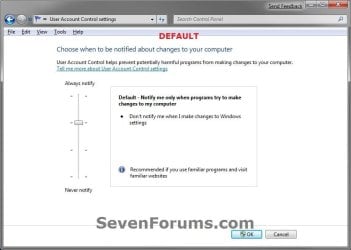
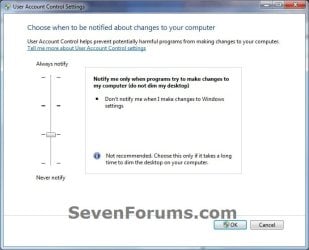
5. Adjust the slider to the level of protection of how much you want to be notified from UAC. (See screenshots below)

6. Click on OK when done.
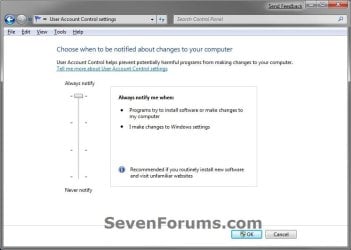
UAC_Level-1_Always_Notify.jpg
UAC_Level-2_Default.jpg
UAC_Level-3_No_Dim.jpg
UAC_Level-4_Never_Notify.jpg
7. If prompted by UAC, click on Yes to approve.

8. If you have just turned UAC off, then you will need to click on restart the computer, or manually restart the computer, to apply the changes. (See screenshot below)
NOTE: Simply turning on UAC or changing the UAC level without turning it off will not require a restart.

Turn_Off.jpg


OPTION TWO

Change UAC Settings Using a REG File Download


1. To Have UAC Always Notify You
NOTE: This is level 1. See the first screenshot under step 6 in METHOD ONE. This will notify you of all changes made by programs to your computer, and changes you make to Windows 7 settings.
A) Click on the Download button below to download the file below.
UAC_Level-1.reg


Download


B) Go to step 5.
2. To Have the Default UAC Notification
NOTE: This is level 2. See the second screenshot under step 6 in METHOD ONE. This will only notify you when programs try to make changes to your computer, and not when you make changes to Windows 7 settings.
A) Click on the Download button below to download the file below.
UAC_Level-2_Default.reg

Download


B) Go to step 5.
3. To Have UAC Notify without Dimming Desktop
NOTE: This is level 3. See the third screenshot under step 6 in METHOD ONE. This will only notify you when programs try to make changes to your computer without dimming the desktop, and not when you make changes to Windows 7 settings.
A) Click on the Download button below to download the file below.
UAC_Level-3_No_Dim.reg

Download


B) Go to step 5.
4. To Turn Off UAC Notifications Completely to "Never notify"
NOTE: This is level 4. See the fourth screenshot under step 6 in METHOD ONE. This will disable (turn off) UAC completely. You will not be notified of any changes made by programs to your computer, or that you make to Windows 7 settings.
A) Click on the Download button below to download the file below.
UAC_Level-4.reg

Download


5. Save the .reg file to your desktop.

6. Right click on the downloaded .reg file, and click on Merge.

7. If prompted, click on Run, Yes (UAC), Yes, and OK when prompted.

8. Restart the computer to apply the changes to UAC.

9. When done, you can delete the downloaded .reg file if you like.

That's it,
Shawn


Attachments

Last edited:
You are right, I tried it and it didn't help. In fact that's only part of what I wanted disabled. There's a very strange bug that exists in Win 7 and I'm not sure if it's new or nobody noticed. And that's the following:

Take *any* program (particularly one that is not an install program and rename it so that the word "setup" appears in the file name. For example hellosetupworld.exe for *any* program (except a real installer).

If you do that a little shield appears with the program's icon and when you try to run what would otherwise be an innocuous unit test that tries (and would normally fail) to make some global system change, instead you get the UAC prompt for which you will click yes (ever clicked no?) and it will have acquired Admin access to your system and install a rootkit or whatever it wants to do. Trusted Installer is more on the level of NT Authority System than a regular old Administrator.

- Alan

The shield overlay on the icon would just mean that the program requires elevated rights to run/open and that you will get a UAC prompt if you click on it.

If you click on "No" for a UAC prompt, it will just close not allow the item to open.
 
Last edited:

My Computer

Computer type
PC/Desktop
Computer Manufacturer/Model Number
Self built custom
OS
64-bit Windows 11 Pro for Workstations
CPU
Intel i7-8700K OC'd to 5 GHz
Motherboard
ASUS ROG Maximus XI Formula Z390
Memory
64 GB (4x16GB) G.SKILL TridentZ RGB DDR4 3600 MHz
Graphics Card(s)
ASUS ROG-STRIX-GTX1080TI-O11G-GAMING
Sound Card
Integrated
Monitor(s) Displays
2 x Samsung Odyssey G7 27"
Screen Resolution
2560x1440
Hard Drives
1TB Samsung 990 PRO M.2,
4TB Samsung 990 PRO PRO M.2,
TerraMaster F8 SSD Plus NAS
PSU
Seasonic Prime Titanium 850W
Case
Thermaltake Core P3
Cooling
Corsair Hydro H115i
Keyboard
Logitech wireless K800
Mouse
Logitech MX Master 4
Internet Speed
2 Gb/s Download and 100 Mb/s Upload
Antivirus
Malwarebyte Anti-Malware Premium
Browser
Google Chrome
Other Info
Logitech Z625 speaker system,
Logitech BRIO 4K Pro webcam,
HP Color LaserJet Pro MFP M477fdn,
APC SMART-UPS RT 1000 XL - SURT1000XLI,
Galaxy S23 Plus phone
I think you misunderstood me. It happens only with certain programs and I don't know the criteria. Probably just that it be a console program.

Try this:

1. Copy %SystemRoot%\System32\debug.exe to some temporary directory.
2. Run the program and quit.
3. Rename it to asetup.exe
4. Run it again and you will get the privilege escalation prompt.

But that's a 16 bit program so you're going to think it has to do with that. But it doesn't. Same thing happens with SOME Win32 console applications. I have to find an example that I didn't compile myself to prove it!

Okay, I found one you might have. pkzipc.exe

That's a Win32 program. For one thing, all the examples I've tried didn't have an icon. Let me try 7z.exe

Okay, 7z.exe does it. And also another console application I have that has an icon does it.

Okay now, this part is interesting. pslist.exe which is a console application without an icon does NOT exhibit the behavior. Call it setup.exe and it does not acquire a shield. So I'm guessing it has to do with digital signatures.

Finally, I tried Win32 application, SUBSYSTEM:WINDOWS (not console) with icon, renamed to setup.exe and it acquirres a shield. Definitely it is a bug related to digital signatures.
 
Last edited:

My Computer

Computer type
PC/Desktop
Computer Manufacturer/Model Number
Acer
OS
Windows 7 Ultimate 32 bit
CPU
Pentium P6200 dual core@1GHz
Motherboard
Acer Aspire 5742Z
Memory
2 Gig
Graphics Card(s)
Intel
Hard Drives
1
Antivirus
MS Security Essentials
Browser
Chrome
I'm afraid that I don't know why it behaves that way either when doing that. You would think that only files that require elevation to run would get the UAC shield overlay on their icons. :confused:
 

My Computer

Computer type
PC/Desktop
Computer Manufacturer/Model Number
Self built custom
OS
64-bit Windows 11 Pro for Workstations
CPU
Intel i7-8700K OC'd to 5 GHz
Motherboard
ASUS ROG Maximus XI Formula Z390
Memory
64 GB (4x16GB) G.SKILL TridentZ RGB DDR4 3600 MHz
Graphics Card(s)
ASUS ROG-STRIX-GTX1080TI-O11G-GAMING
Sound Card
Integrated
Monitor(s) Displays
2 x Samsung Odyssey G7 27"
Screen Resolution
2560x1440
Hard Drives
1TB Samsung 990 PRO M.2,
4TB Samsung 990 PRO PRO M.2,
TerraMaster F8 SSD Plus NAS
PSU
Seasonic Prime Titanium 850W
Case
Thermaltake Core P3
Cooling
Corsair Hydro H115i
Keyboard
Logitech wireless K800
Mouse
Logitech MX Master 4
Internet Speed
2 Gb/s Download and 100 Mb/s Upload
Antivirus
Malwarebyte Anti-Malware Premium
Browser
Google Chrome
Other Info
Logitech Z625 speaker system,
Logitech BRIO 4K Pro webcam,
HP Color LaserJet Pro MFP M477fdn,
APC SMART-UPS RT 1000 XL - SURT1000XLI,
Galaxy S23 Plus phone
It's definitely a bug. Probably with one of the policy manager's handling of digital signatures for installation programs. It is also a very serious security vulnerability.

The whole UAC prompt "idea" is already a serious security vulnerability. You only need to think for a minute to see why:

1. If a process is untrusted the user is presented with a choice of either:
  1. Abort the process all together.
  2. Hand over full administrative rights to the untrusted program.

And this ultimatum is presented before anything is known about what the program intends to do. Neither of those choices are of any use if you want to install a program safely.

I want to respond "No, I don't want to let it run with rights akin to NT Authority System, I want to let it run normally with normal access rights." If the program requires privilege escalation the system will (and it knows it will) prompt me during the install process. It could even tell me why it needs a privilege boost. If it's to create and write to a directory under Program Files, I'll OK that and ONLY that until it asks me again. If it wants to change global registry settings it could tell me in detail what settings will be changed.

I may or may not approve, but at each step I will only grant approval for the action requested. Not every possible action that can be performed on my system including reformatting the hard drive. That's just ludicrous. Right? But that's what that prompt is asking you allow a program to do because it is untrusted ?!?!? How does that make any sense?

- Alan
 

My Computer

Computer type
PC/Desktop
Computer Manufacturer/Model Number
Acer
OS
Windows 7 Ultimate 32 bit
CPU
Pentium P6200 dual core@1GHz
Motherboard
Acer Aspire 5742Z
Memory
2 Gig
Graphics Card(s)
Intel
Hard Drives
1
Antivirus
MS Security Essentials
Browser
Chrome
@alacarre

The problem with that argument is your not thinking about the average user or developers. They would have constant annoyance every time they go to install a program to be prompted multiple times.
A standard user would not even know or understand what program files even is. A majority of them barely read the prompt as it is now. Being prompted more would just annoy them to the point they would get so frustrated and get something else. (As in a mac) OR worse, click yes or every pop up they see, as they think its just interfering with their work.

The other problem with your argument is your choices could easily break the program. If a program needs certain files in certain places and its written to expect them there, you could easily break the application by denying something it needs. Which is a major headache on developers.

For example:

This is exactly why Android for example does not give a choice on what permissions are allowed for apps. Its these are the permissions it wants, ether approve all or deny all. You cannot pick certain ones. For example, a contact application that helps manage people contacts would need to be able to have read and write permissions on the contact layer. But, if people denied that permission, IT would break the entire application. Then you would have idiots screaming to the developer that the app is broke and to fix it, when they themselves are the one that broke it!

Sure, I would like to see a option someday that offers a advanced mode of UAC or something, but in the end the best you can do it set it to always notify. That makes it more like vista UAC structure. I won't deny its not a vulnerability, it is. The problem comes into play where they need to balance security with prompts. If you want the best security, use Linux. Not windows. But even then, Linux is not foolproof. Unfortunately nothing is.

Having said all that, there are third party applications like win patrol that can and will give you constant alerts about every bleeping thing that happens on your pc and for you to approve it all.

So if you do want that option, its there and available.

In the end though, security is a myth. You can lock all your doors and go crazy on security software, but there is always a way for a determined soul. Best to follow the best practices and have a backup.


Side note: You could try telling Microsoft about the problem you discovered.
http://technet.microsoft.com/en-us/security/ff852094.aspx
 
Last edited:

My Computer

Computer type
PC/Desktop
Computer Manufacturer/Model Number
Custom Built
OS
Windows 10 Pro
CPU
AMD Ryzen 5 2400G Processor with Radeon RX Vega 11 Graphics
Motherboard
ASRock X470 Master SLI/AC AM4 AMD Promontory X470 SATA 6Gb/s
Memory
G.SKILL Ripjaws V Series 16GB (2 x 8GB) 288-Pin DDR4 SDRAM D
Graphics Card(s)
2047MB NVIDIA GeForce GTX 1060 6GB (EVGA)
Sound Card
Motherboard Built in
Monitor(s) Displays
Acer R240HY bidx 23.8-Inch IPS HDMI DVI VGA (1920 x 1080) Wi
Screen Resolution
1920 x 1080
Hard Drives
1TB Sandisk SSD PLUS (Main drive)
500 GB Seagate 7200 RPM (Games)
500 GB Western Digital 7200 RPM (Virtual Machines)
PSU
CORSAIR TX Series TX650M 650W 80+ Gold Modular Power Supply
Case
CORSAIR CARBIDE SPEC-02 Mid-Tower Gaming Case, Red LED Fan
Cooling
220mm, two 120mm, and four 60mm fans
Keyboard
Wired Dell keyboard
Mouse
Wireless Logitech mouse
Internet Speed
250mb down, 30mb up
Antivirus
Panda Cloud Antivirus
Browser
Chrome-ish x64
Other Info
Your awesome for reading this.
@alacarre

The problem with that argument is your not thinking about the average user or developers. They would have constant annoyance every time they go to install a program to be prompted multiple times.

Maybe you've misunderstood what I said. It is the average user that I have in mind, not the expert user. My concern is that there are far too many of these "special permission" prompts already and, in terms of security, the OS should be designed to reduce these sorts of prompts to the bare minimum or else they (the prompts) lose their effectiveness. That is, I'm trying to make your point so I don't understand how you would have a problem with that.

The other problem with your argument is your choices could easily break the program. If a program needs certain files in certain places and its written to expect them there, you could easily break the application by denying something it needs. Which is a major headache on developers.

Actually I haven't made an argument that enforces that scenario. Yes, being prompted on specific administrative actions could and would have that effect with certain programs. It becomes the developer's responsibility then, to make sure that such resources are actually needed. I cannot remember ever writing a piece of software that required administrative privileges, either for install or execution. Also keep in mind that on systems with UAC (particularly Windows 7) there is a user-specific analogue for almost every single "global" system resource and if your program is designed to use those resources they would be where they'd normally be and their usage would be transparent to your application.

This is exactly why Android for example does not give a choice on what permissions are allowed for apps. Its these are the permissions it wants, ether approve all or deny all. You cannot pick certain ones. For example, a contact application that helps manage people contacts would need to be able to have read and write permissions on the contact layer. But, if people denied that permission, IT would break the entire application. Then you would have idiots screaming to the developer that the app is broke and to fix it, when they themselves are the one that broke it!

Heh... well of course I would deny that one out of hand. I will counter that example with one of my own, from only last week:

I visited a website that had a blog. I wanted to post a reply to the blog, just as I'm doing now. At one point (after posting the reply) the webpage came up with its own prompt asking me if it could have access to public data about myself. So this is a question coming from the website, not from the system, so it didn't really need to ask any questions; in theory it could have just gone ahead and done what it did without my consent. That's what I thought anyway ... so I agreed.

A few minutes later I realized my mistake: What I just explained above. It did not need special approval so why the question? If the data is public, then I've already made it available and hence I'd been duped into agreeing to something else. Something more than what was asked for. Immediately I changed my account password.

A few hours later I get an SMS from Google about a blocked login attempt on my account using my password from a location in Spain.

But see ... (of course it might not have been that particular website but I checked online and that was the only site I'd visited recently [apart from my usual ones] and the only one that had asked for some kind of special permission having to do with my account - they were also known to use 3rd party services that would at best be described as "shady") ... anyway, see granting special access really did require my approval. That's why I realized I'd made a mistake (unfortunately too late) but I might have realized that before agreeing were I not presented with so many of these types of prompts in similar contexts.

Sure, I would like to see a option someday that offers a advanced mode of UAC or something, but in the end the best you can do it set it to always notify. That makes it more like vista UAC structure. I won't deny its not a vulnerability, it is. The problem comes into play where they need to balance security with prompts. If you want the best security, use Linux. Not windows. But even then, Linux is not foolproof. Unfortunately nothing is.

Windows NT has one of the tightest security systems in the world. It is a "C2 level" security system as outlined and used by the US Department of Defense. The problem, and I agree with you, is that even the best security system in the world is defenseless against the "fool". Users need to be trained (by experience, not actual training!) to be surprised when special permissions are asked for. The jerk reaction should be to deny, not grant. Developers need to ensure their products can install and run properly with non-administrative privileges to ensure that no unnecessary prompting occurs. And that's not hard to do. I even have an example I just made the other day which would be perfect except for the idiotic setting that all downloaded files are immediately marked as untrusted. So there's a special prompt. Mind you, that prompt is not for special administrative privileges, but who can tell the difference? So the user is still being trained that approval is always required.

- Alan
 

My Computer

Computer type
PC/Desktop
Computer Manufacturer/Model Number
Acer
OS
Windows 7 Ultimate 32 bit
CPU
Pentium P6200 dual core@1GHz
Motherboard
Acer Aspire 5742Z
Memory
2 Gig
Graphics Card(s)
Intel
Hard Drives
1
Antivirus
MS Security Essentials
Browser
Chrome
is there anyway to disable uac for specific .bat files that i have made?
 

My Computer

Computer type
PC/Desktop
OS
Windows 7 Home Premium 64bit
CPU
Intel Core i5 4670K Quad Core Retail CPU (Socket 1150, 3.40G
Motherboard
MSI Z87-GD65-GAMING ATX Motherboard (Intel Z87, 4x DDR3, DVI
Memory
DDR3 HyperX Beast Desktop Memory Kit (2 x 4GB)+(2 x 4GB)
Graphics Card(s)
Palit Nvidia GeForce GTX 770 2GB GDDR5 Jetstream x2 via sli
Monitor(s) Displays
BenQ GL2450HM 24-inch + ASUS VG248QE 24 inch 144hz
Hard Drives
3 x WD 1TB 3.5 inch Internal Hard Drive - Caviar Blue
1 x Samsung 840 EVO 250GB 2.5 inch Basic SATA Solid State Drive
PSU
Corsair CP-9020062-UK RM Series RM1000 80 Plus Gold 1000W
Case
Fractal Design Define R4 PC Case - Black/Pearl
Cooling
Cooler Master Hyper 212 EVO (120mm) + 3 x 140mm Corsair Air
Keyboard
Razer BlackWidow Ultimate 2013 Elite Mechanical With Light
Mouse
Razer Naga Hex Edition Laser 5600dpi Expert MOBA Action RPG
Antivirus
avg
Browser
firefox and google crome

My Computer

Computer type
PC/Desktop
Computer Manufacturer/Model Number
Self built custom
OS
64-bit Windows 11 Pro for Workstations
CPU
Intel i7-8700K OC'd to 5 GHz
Motherboard
ASUS ROG Maximus XI Formula Z390
Memory
64 GB (4x16GB) G.SKILL TridentZ RGB DDR4 3600 MHz
Graphics Card(s)
ASUS ROG-STRIX-GTX1080TI-O11G-GAMING
Sound Card
Integrated
Monitor(s) Displays
2 x Samsung Odyssey G7 27"
Screen Resolution
2560x1440
Hard Drives
1TB Samsung 990 PRO M.2,
4TB Samsung 990 PRO PRO M.2,
TerraMaster F8 SSD Plus NAS
PSU
Seasonic Prime Titanium 850W
Case
Thermaltake Core P3
Cooling
Corsair Hydro H115i
Keyboard
Logitech wireless K800
Mouse
Logitech MX Master 4
Internet Speed
2 Gb/s Download and 100 Mb/s Upload
Antivirus
Malwarebyte Anti-Malware Premium
Browser
Google Chrome
Other Info
Logitech Z625 speaker system,
Logitech BRIO 4K Pro webcam,
HP Color LaserJet Pro MFP M477fdn,
APC SMART-UPS RT 1000 XL - SURT1000XLI,
Galaxy S23 Plus phone
I'm afraid that I don't know why it behaves that way either when doing that. You would think that only files that require elevation to run would get the UAC shield overlay on their icons. :confused:

I discovered why it behaves this way, and that the behaviour can be disabled using the Local Security Settings manager (run "secpol.msc" from the run menu or command prompt etc.)

Once the security policy manager comes up, select "[Local Policies]/[Security/Options]" and scroll down to the bottom of the list and then up arrow about 5 times.


The option is called:
"Detect application installations and prompt for elevation" (default = Enabled)


Disable that setting and you won't get promoted on the basis of file name. A non-setup program will not bring up a UAC prompt and you can go ahead and run those installers with Standard user rights. Many applications will install perfectly and run perfectly fine without Administrator privileges. Even applications that require the use and installation of COM objects will install correctly and run correctly for the user account wherein it was installed ONLY.

COM objects will be installed in the registry under these keys:


1. HKEY_CURRENT_USER\Software\Classes\CLSID,
2. HKEY_CURRENT_USER\Software\Classes\Interface
3. HKEY_CURRENT_USER\Software\Classes\Typelib


And hence will not be accessible to other users on your machine and will not be granted administrator rights.

- Alan
 

My Computer

Computer type
PC/Desktop
Computer Manufacturer/Model Number
Acer
OS
Windows 7 Ultimate 32 bit
CPU
Pentium P6200 dual core@1GHz
Motherboard
Acer Aspire 5742Z
Memory
2 Gig
Graphics Card(s)
Intel
Hard Drives
1
Antivirus
MS Security Essentials
Browser
Chrome
Hello Alan,

I tested with that secpol disabled, and I still get prompted by UAC, and still have get UAC shield on old or newly created elevated program shortcut icons.

Whether it's an elevated program (ex: DeviceProperties.exe) or installer (ex: IconViewer) , UAC still prompts me.
 

My Computer

Computer type
PC/Desktop
Computer Manufacturer/Model Number
Self built custom
OS
64-bit Windows 11 Pro for Workstations
CPU
Intel i7-8700K OC'd to 5 GHz
Motherboard
ASUS ROG Maximus XI Formula Z390
Memory
64 GB (4x16GB) G.SKILL TridentZ RGB DDR4 3600 MHz
Graphics Card(s)
ASUS ROG-STRIX-GTX1080TI-O11G-GAMING
Sound Card
Integrated
Monitor(s) Displays
2 x Samsung Odyssey G7 27"
Screen Resolution
2560x1440
Hard Drives
1TB Samsung 990 PRO M.2,
4TB Samsung 990 PRO PRO M.2,
TerraMaster F8 SSD Plus NAS
PSU
Seasonic Prime Titanium 850W
Case
Thermaltake Core P3
Cooling
Corsair Hydro H115i
Keyboard
Logitech wireless K800
Mouse
Logitech MX Master 4
Internet Speed
2 Gb/s Download and 100 Mb/s Upload
Antivirus
Malwarebyte Anti-Malware Premium
Browser
Google Chrome
Other Info
Logitech Z625 speaker system,
Logitech BRIO 4K Pro webcam,
HP Color LaserJet Pro MFP M477fdn,
APC SMART-UPS RT 1000 XL - SURT1000XLI,
Galaxy S23 Plus phone
Hello Alan,

I tested with that secpol disabled, and I still get prompted by UAC, and still have get UAC shield on old or newly created elevated program shortcut icons.

Whether it's an elevated program (ex: DeviceProperties.exe) or installer (ex: IconViewer) , UAC still prompts me.

I may have missed the lead up to your question.

If the program is an actual install program then you will get prompted (that "setup" information is contained in the program's manifest, not in its name). The list of names that are auto-identified as installers is in the registry somewhere. Just search for the string "setup.exe" and you'll find one or more settings.

Also anything ".msi" will initiate and execute the "installer services" (there are two of them) which can elevate a lowly installer exe to "Act As System" (TCB) access.

That, by the way, can be disabled by removing all permissions from a file called WUDFHost.exe (Windows Universal Device Foundation Host I think, but I can't look at it right now).

Many programs take advantage of WUDFHost, through a component-based setup scheme called "ComSysApp" (Component As System Application) that allows user mode programs to install device drivers on the fly. Microsoft does it all the time.

And some not so trustworthy installers have copied Microsoft's example to give themselves NT AUTHORITY SYSTEM access during the setup phase. All you need to do is say "yes" at the UAC prompt. The Freemake company is one example I know of which does that and installs for itself eternal system level access via components for use when needed.

- Alan
 

My Computer

Computer type
PC/Desktop
Computer Manufacturer/Model Number
Acer
OS
Windows 7 Ultimate 32 bit
CPU
Pentium P6200 dual core@1GHz
Motherboard
Acer Aspire 5742Z
Memory
2 Gig
Graphics Card(s)
Intel
Hard Drives
1
Antivirus
MS Security Essentials
Browser
Chrome
Ah, ok.
 

My Computer

Computer type
PC/Desktop
Computer Manufacturer/Model Number
Self built custom
OS
64-bit Windows 11 Pro for Workstations
CPU
Intel i7-8700K OC'd to 5 GHz
Motherboard
ASUS ROG Maximus XI Formula Z390
Memory
64 GB (4x16GB) G.SKILL TridentZ RGB DDR4 3600 MHz
Graphics Card(s)
ASUS ROG-STRIX-GTX1080TI-O11G-GAMING
Sound Card
Integrated
Monitor(s) Displays
2 x Samsung Odyssey G7 27"
Screen Resolution
2560x1440
Hard Drives
1TB Samsung 990 PRO M.2,
4TB Samsung 990 PRO PRO M.2,
TerraMaster F8 SSD Plus NAS
PSU
Seasonic Prime Titanium 850W
Case
Thermaltake Core P3
Cooling
Corsair Hydro H115i
Keyboard
Logitech wireless K800
Mouse
Logitech MX Master 4
Internet Speed
2 Gb/s Download and 100 Mb/s Upload
Antivirus
Malwarebyte Anti-Malware Premium
Browser
Google Chrome
Other Info
Logitech Z625 speaker system,
Logitech BRIO 4K Pro webcam,
HP Color LaserJet Pro MFP M477fdn,
APC SMART-UPS RT 1000 XL - SURT1000XLI,
Galaxy S23 Plus phone
Back
Top