User Account Corrupted

GoreTan

New member
Local time
4:03 AM
Messages
7
Location
Athens, GA
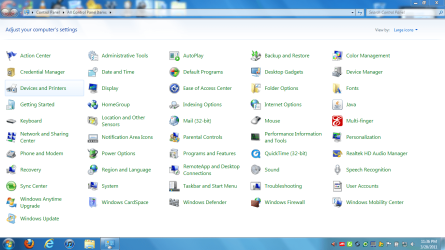
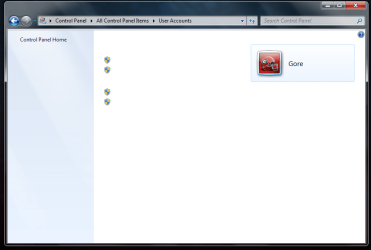
PC's been acting wierd lately...did some snooping and found out that my user accounts icon is missing. Dunno what's up, when I click on it it doesn't display any options...refer to images. I'm thinking I might be infected with a virus...or is this a bigger problem?
 

Attachments
  • Wierd.PNG
    Wierd.PNG
    63.4 KB · Views: 39
  • User Accounts.PNG
    User Accounts.PNG
    99.2 KB · Views: 24

My Computer

Computer Manufacturer/Model Number
Asus N61J Laptop
OS
Windows 7 64-bit Home Premium
CPU
Intel Core i7-720QM
Motherboard
N/A
Memory
4GB DDR3
Graphics Card(s)
ATI Radeon 5730 Mobile
Sound Card
N/A
Monitor(s) Displays
1366 x 768
Hard Drives
300GB @ 7200RPM
PSU
N/A
Case
N/A
Cooling
Stock
Keyboard
Stock
Mouse
Gigabyte
Internet Speed
1 MB/S
Hi Goretan and welcome to the forums. would be worth doing a scan with your AV program and Malwarebytes Anti-malware. If they don't come up with anything, open a command prompt by typing "cmd" in the run box and when it is available type in sfc /scannow and hit return. This will check your system files for you.
 
Last edited by a moderator:

My Computer

OS
win7
Hi Goretan and welcome to the forums. would be worth doing a scan with your AV program and Malwarebytes Anti-malware. If they don't come up with anything, open a command prompt by typing "cmd" in the run box and when it is available type in sfc /scannow and hit return. This will check your system files for you.

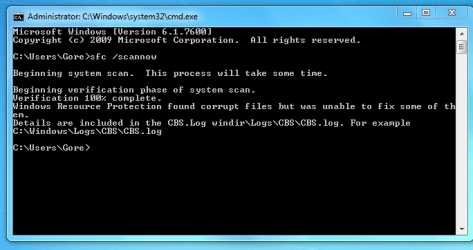
hey. thanks for helping me. yea i did the cmd / scannow and this is the result. how do i fix that?
 

Attachments

  • File Scan.PNG
    File Scan.PNG
    16.5 KB · Views: 70

My Computer

Computer Manufacturer/Model Number
Asus N61J Laptop
OS
Windows 7 64-bit Home Premium
CPU
Intel Core i7-720QM
Motherboard
N/A
Memory
4GB DDR3
Graphics Card(s)
ATI Radeon 5730 Mobile
Sound Card
N/A
Monitor(s) Displays
1366 x 768
Hard Drives
300GB @ 7200RPM
PSU
N/A
Case
N/A
Cooling
Stock
Keyboard
Stock
Mouse
Gigabyte
Internet Speed
1 MB/S
Go to the log file and see what it says for more info. Let us know what it says then we can suggest a remedy.
 

My Computer

OS
win7
Go to the log file and see what it says for more info. Let us know what it says then we can suggest a remedy.

I probably should of done that last post, lol. The log file is 16mbs, and thats ridiculous, so I couldn't upload it directly. here is a link to the log file though. thanks for helping my by the way. i really appreciate it.

CBS.log
 

My Computer

Computer Manufacturer/Model Number
Asus N61J Laptop
OS
Windows 7 64-bit Home Premium
CPU
Intel Core i7-720QM
Motherboard
N/A
Memory
4GB DDR3
Graphics Card(s)
ATI Radeon 5730 Mobile
Sound Card
N/A
Monitor(s) Displays
1366 x 768
Hard Drives
300GB @ 7200RPM
PSU
N/A
Case
N/A
Cooling
Stock
Keyboard
Stock
Mouse
Gigabyte
Internet Speed
1 MB/S

My Computer

Computer type
PC/Desktop
Computer Manufacturer/Model Number
Custom Built
OS
Windows 10 Pro x64, Windows 8.1 Pro x64, Windows 7 Ultimate x64 SP1,
CPU
INTEL i9-7920X LGA 2066
Motherboard
Gigabyte X299-WU8 F3
Memory
64 GB (4 X 16 GB) G-Skill V Series DDR4 3200 Quad Channel
Graphics Card(s)
EVGA GTX 1060 SC 3 GB
Sound Card
Realtek Onboard ALC1220
Monitor(s) Displays
2 x Samsung S27E310
Screen Resolution
1920x1080
Hard Drives
Samsung 2 x 970 EVO Plus 500 GB NVMe
1 x 6TB WD 6003FZBX SATA
1 x 6TB WD 60EFRX SATA
12 x 3TB WD 30EFRX SATA
PSU
Seasonic X-1050
Case
Thermaltake Armor+
Cooling
Corsair H80i V2 Liquid AOI Cooler
Keyboard
Logitech G510s
Mouse
Logitech MX Master 2S
Internet Speed
200 Mb/s
Antivirus
ESET NOD32 13.1
Browser
EDGE (Dev, Canary, Beta), Chrome
Other Info
ASUS RT-AC68U router
Malwarebytes 4.0.4

My Computer

Computer Manufacturer/Model Number
Asus N61J Laptop
OS
Windows 7 64-bit Home Premium
CPU
Intel Core i7-720QM
Motherboard
N/A
Memory
4GB DDR3
Graphics Card(s)
ATI Radeon 5730 Mobile
Sound Card
N/A
Monitor(s) Displays
1366 x 768
Hard Drives
300GB @ 7200RPM
PSU
N/A
Case
N/A
Cooling
Stock
Keyboard
Stock
Mouse
Gigabyte
Internet Speed
1 MB/S

My Computer

Computer type
PC/Desktop
Computer Manufacturer/Model Number
Custom Built
OS
Windows 10 Pro x64, Windows 8.1 Pro x64, Windows 7 Ultimate x64 SP1,
CPU
INTEL i9-7920X LGA 2066
Motherboard
Gigabyte X299-WU8 F3
Memory
64 GB (4 X 16 GB) G-Skill V Series DDR4 3200 Quad Channel
Graphics Card(s)
EVGA GTX 1060 SC 3 GB
Sound Card
Realtek Onboard ALC1220
Monitor(s) Displays
2 x Samsung S27E310
Screen Resolution
1920x1080
Hard Drives
Samsung 2 x 970 EVO Plus 500 GB NVMe
1 x 6TB WD 6003FZBX SATA
1 x 6TB WD 60EFRX SATA
12 x 3TB WD 30EFRX SATA
PSU
Seasonic X-1050
Case
Thermaltake Armor+
Cooling
Corsair H80i V2 Liquid AOI Cooler
Keyboard
Logitech G510s
Mouse
Logitech MX Master 2S
Internet Speed
200 Mb/s
Antivirus
ESET NOD32 13.1
Browser
EDGE (Dev, Canary, Beta), Chrome
Other Info
ASUS RT-AC68U router
Malwarebytes 4.0.4
It ends up being a file of 267 KB.

There are a large number of files that it says are corrupt.

Can you perform a system restore to a point before all this happened? Tha would be the easiest.

Else you might try a repair install.

http://www.sevenforums.com/tutorials/3413-repair-install.html

How did those files get corrupt in the first place?

Sadly, all my system restores were lost, should of been more careful with keeping some.

I don't have a Windows 7 disc for repair install.

Any other options?
 

My Computer

Computer Manufacturer/Model Number
Asus N61J Laptop
OS
Windows 7 64-bit Home Premium
CPU
Intel Core i7-720QM
Motherboard
N/A
Memory
4GB DDR3
Graphics Card(s)
ATI Radeon 5730 Mobile
Sound Card
N/A
Monitor(s) Displays
1366 x 768
Hard Drives
300GB @ 7200RPM
PSU
N/A
Case
N/A
Cooling
Stock
Keyboard
Stock
Mouse
Gigabyte
Internet Speed
1 MB/S
Hi Gortan. Sorry to hear that you have some issues. While I do not have a solution for your specific problem I would recommend the following if you have not already done so.

Burn a complete set of Recovery DVD's (usually 3 to 5) using the on board ASUS programs. Burn a System Repair cd - Control Panel, Backup & Restore, Create System Repair disc. You may need some/all of these in the future.

There are two ways to restore your lappy to Factory or (Out of the box condition)
1. is to get into the System Restore Options on your ASUS at boot time. The second option is to use the Factory Restore DVD's mentioned above.

It is a shame, but in my experience with Lap Tops, there is no Repair Install. It's a full Factory Restore or nothing. Certainly before going this route, backup all your data and be prepared to reload all your programs.

Regards
JohnnyA
 

My Computer

Computer Manufacturer/Model Number
Toshiba C650
OS
Windows Home Premium 64bit
CPU
T61-- 2.0ghz
Motherboard
Toshiba
Memory
4 GB
Graphics Card(s)
On board
Sound Card
On board
Monitor(s) Displays
15.6"
Hard Drives
500 GB
Hi Gortan. Sorry to hear that you have some issues. While I do not have a solution for your specific problem I would recommend the following if you have not already done so.

Burn a complete set of Recovery DVD's (usually 3 to 5) using the on board ASUS programs. Burn a System Repair cd - Control Panel, Backup & Restore, Create System Repair disc. You may need some/all of these in the future.

There are two ways to restore your lappy to Factory or (Out of the box condition)
1. is to get into the System Restore Options on your ASUS at boot time. The second option is to use the Factory Restore DVD's mentioned above.

It is a shame, but in my experience with Lap Tops, there is no Repair Install. It's a full Factory Restore or nothing. Certainly before going this route, backup all your data and be prepared to reload all your programs.

Regards
JohnnyA

Yeah, I can restore my laptop through a recovery drive. It's just I want to know how I those files got corrupted. I haven't touched them.
 

My Computer

Computer Manufacturer/Model Number
Asus N61J Laptop
OS
Windows 7 64-bit Home Premium
CPU
Intel Core i7-720QM
Motherboard
N/A
Memory
4GB DDR3
Graphics Card(s)
ATI Radeon 5730 Mobile
Sound Card
N/A
Monitor(s) Displays
1366 x 768
Hard Drives
300GB @ 7200RPM
PSU
N/A
Case
N/A
Cooling
Stock
Keyboard
Stock
Mouse
Gigabyte
Internet Speed
1 MB/S
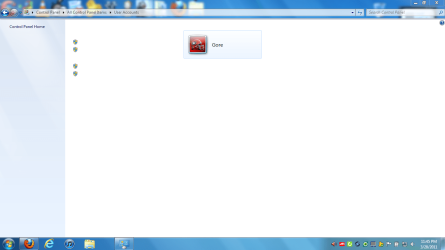
I was trying to create a guest account, and this is what I got when I opened the user account settings in the control panel. I can't access anything. WTF?
 

Attachments

  • User Accounts.PNG
    User Accounts.PNG
    32 KB · Views: 11

My Computer

Computer Manufacturer/Model Number
Asus N61J Laptop
OS
Windows 7 64-bit Home Premium
CPU
Intel Core i7-720QM
Motherboard
N/A
Memory
4GB DDR3
Graphics Card(s)
ATI Radeon 5730 Mobile
Sound Card
N/A
Monitor(s) Displays
1366 x 768
Hard Drives
300GB @ 7200RPM
PSU
N/A
Case
N/A
Cooling
Stock
Keyboard
Stock
Mouse
Gigabyte
Internet Speed
1 MB/S
Back
Top