I purchased a new Dell 1764 Win 7 Professional about 2-weeks ago and have been learning how to use Win 7 - I consider myself an old XP guy!
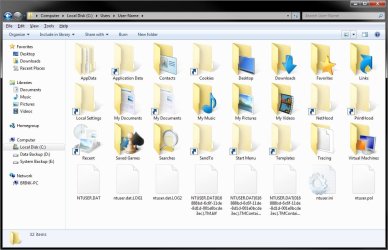
I was in the windows explorer to see who was listed inder the Users directory where I found a directory with my name on it. I double clicked and noted the contents of the directory was the same as in XP. I clicked on the Local Settings directory (I temporarily turned off the "hide protected operating system files" option to see if contents was the same) and got a message that access was denied. I was told by a tech that this was normal in Win 7 in order to stop people from changing options, etc. which could cause problems.
My question is this - was the tech correct by saying it was locked for protection? If the answer is yes, then who can access the directory? (I have system administrator rights.
Pierre
I was in the windows explorer to see who was listed inder the Users directory where I found a directory with my name on it. I double clicked and noted the contents of the directory was the same as in XP. I clicked on the Local Settings directory (I temporarily turned off the "hide protected operating system files" option to see if contents was the same) and got a message that access was denied. I was told by a tech that this was normal in Win 7 in order to stop people from changing options, etc. which could cause problems.
My question is this - was the tech correct by saying it was locked for protection? If the answer is yes, then who can access the directory? (I have system administrator rights.
Pierre
My Computer
- Computer Manufacturer/Model Number
- Dell Inspiron 1764
- OS
- Windows 7 Professional
- CPU
- Intel Core j3 330M
- Memory
- 4GB
- Graphics Card(s)
- Intel HD Graphics