User accounts I didn't create showing up

AA37

New member
Local time
6:26 PM
Messages
3
I recently discovered two new user accounts on my computer and no idea how they got there. They have weird names - A65AECA2A06F4887AB01 and AE2640E6361B4955B852. They are standard users and it appears they were created 4 minutes ago. I use Norton 360 and I do not use wifi. I do virtually no downloads and rarely accept attachments from anyone. I'm on Windows 7. These accounts show up under control panel but if you try to switch users, only my administrative and non-admin accounts show up. How can I understand where these accounts came from?
 

My Computer My Computer

OS
Windows 7 64 bit
Hi,

A few questions:

1. Can you correlate the appearance of these accounts to anything in particular that you did recently on your system?

2. Are you able to delete these accounts? Try that, then reboot your system and see if they appear.

3. Is your Norton360 up-to-date?

Please do the following:

1. Click Start :orb:
2. In the search box, type event viewer
3. From the list that appears, click on View Event Logs
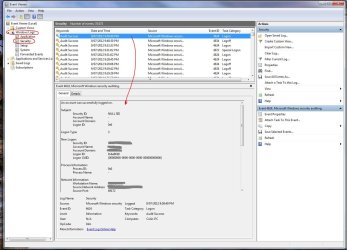
4. In the explorer column on the left, select Windows Logs, and then Security.
5. Find the recent Event ID's, and in the Window below that, see if you can find the strange looking user accounts. Post any information on them that you find.

Example shown below.

Regards,
Golden
 

Attachments

  • Capture.JPG
    Capture.JPG
    150.3 KB · Views: 22

My Computer My Computer

Computer type
PC/Desktop
Computer Manufacturer/Model Number
Golden Mk. I.4
OS
Windows 10 Pro x64 ; Xubuntu x64
CPU
Intel i7 860 @ 2.80 GHz O/C'ed to 4.0GHz
Motherboard
Gigabyte P55A-UD3R Rev.1. Award BIOS F13
Memory
16GB Corsair Vengance DDR3 @ 661 MHz Dual Channel (9-9-9-24)
Graphics Card(s)
EVGA NVidia GTX 560 1024MB
Sound Card
Realtek Integrated
Monitor(s) Displays
Dual Samsung SyncMaster 2494HS
Screen Resolution
1920*1080 and 1920*1080
Hard Drives
1*Samsung 840 EVO 120GB SSD;
1*OCZ Vertex 2 60GB SSD;
2*Samsung F3 SpinPoint 1TB in RAID0;
1*Samsung F1 SpinPoint 1TB;
2*Western Digital 1TB External USB 3.0
1*Western Digital 500GB External USB 3.0
1*Seagate 500GB External USB 2.0
PSU
Thermaltake ToughPower QFan 750W
Case
Thermaltake Element S VK60001W2Z
Cooling
Corsair H60 Water Cooling, 2*230mm and 2*80mm case fans
Keyboard
Logitech G110
Mouse
Logitech MX518
Ok so I did learn a few interesting things as I went back and studied this further. The two mysterious user accounts only show up under Parental Controls. They are standard user, password protected accounts. For the life of me, I can't figure out how they got there. Nobody uses this computer except for me. Looking through the event logs but don't see anything as of yet. To what extent, if any, does that change the calculus that they are only under parental controls?

Oh my Norton 360 is up to date. Thanks!
 

My Computer My Computer

OS
Windows 7 64 bit

My Computer My Computer

Computer type
PC/Desktop
Computer Manufacturer/Model Number
Golden Mk. I.4
OS
Windows 10 Pro x64 ; Xubuntu x64
CPU
Intel i7 860 @ 2.80 GHz O/C'ed to 4.0GHz
Motherboard
Gigabyte P55A-UD3R Rev.1. Award BIOS F13
Memory
16GB Corsair Vengance DDR3 @ 661 MHz Dual Channel (9-9-9-24)
Graphics Card(s)
EVGA NVidia GTX 560 1024MB
Sound Card
Realtek Integrated
Monitor(s) Displays
Dual Samsung SyncMaster 2494HS
Screen Resolution
1920*1080 and 1920*1080
Hard Drives
1*Samsung 840 EVO 120GB SSD;
1*OCZ Vertex 2 60GB SSD;
2*Samsung F3 SpinPoint 1TB in RAID0;
1*Samsung F1 SpinPoint 1TB;
2*Western Digital 1TB External USB 3.0
1*Western Digital 500GB External USB 3.0
1*Seagate 500GB External USB 2.0
PSU
Thermaltake ToughPower QFan 750W
Case
Thermaltake Element S VK60001W2Z
Cooling
Corsair H60 Water Cooling, 2*230mm and 2*80mm case fans
Keyboard
Logitech G110
Mouse
Logitech MX518
How do you determine which programs can create user accounts? Better yet, how do you block all from being able to do this?

These accounts show up under parental controls - how do I get rid of them?
 

My Computer My Computer

OS
Windows 7 64 bit
Back
Top