Solved user info remains after wiping hard drive

dustman

dustman
Member
Local time
1:15 PM
Messages
30
Location
Indianapolis
Hello, all,

I am very confused at this point. I own 2 Dell XPS 8000 computers. One recently laid down. I bought an identical computer on ebay. It looks great. I immediately wiped the hard drive with the free edition of Active Kill Disk. It worked perfectly. I then installed my legally purchased Windows 7 Home Premium disk, (usable as long as another instance is not running, which it isn't, as the original computer is out). While installing the Windows OS, I was never asked for my activation key, which I had ready. I discovered the computer was still registered to the original owner, with THEIR activation key (which I have) and all of their personal data and settings were still there. They were also listed under user account as the administrator. I had gone online to reload my antivirus. Is it possible going on the net allowed the data back in? I have contacted the manufacturer of Active Kill Disk asking if the pro (pay) version would prevent this problem. Never heard back from them.

What is going on? How do I fix this?

Any help would be greatly appreciated,

dustman
 

My Computer My Computer

At a glance

windows 7 Ultimate, 64 bitIntel i71 TBGeForce GT 240
Computer type
PC/Desktop
Computer Manufacturer/Model Number
Dell XPS 8000 (3 identical desktops)
OS
windows 7 Ultimate, 64 bit
CPU
Intel i7
Memory
1 TB
Graphics Card(s)
GeForce GT 240
Sound Card
Sound blaster
Monitor(s) Displays
24" HP Brightview
Hard Drives
1TB sata
Mouse
Microsoft Ergonomic Natural
Antivirus
AVG,, & Malwarebytes
Browser
Google Chrome
Strange, where did you get the disk from again? I've never personally heard of this happening to anyone. The only thing I can think of, which is a Win8 thing I believe, is that you can transfer settings from other PC's connected to the same network, if you login with the same email address.

I would simply format the disk during the installation process and that should ensure that no settings are left over.

Also, make sure the HD you are trying to install on is the only hard drive or usb connected to the PC.

http://www.sevenforums.com/tutorials/1649-clean-install-windows-7-a.html
 

My Computer My Computer

At a glance

Dual Boot: Windows 8.1 & Server 2012r2 VMs: K...A10 7700 Kavari SteamRoller8GB DDR3 SDRAM PC3-85001024MB ATI AMD Radeon R7 Graphics
Computer type
PC/Desktop
Computer Manufacturer/Model Number
Custom
OS
Dual Boot: Windows 8.1 & Server 2012r2 VMs: Kali Linux, Backbox, Matriux, Windows 8.1
CPU
A10 7700 Kavari SteamRoller
Motherboard
ASUS A88XM-PLUS (FM2+ )
Memory
8GB DDR3 SDRAM PC3-8500
Graphics Card(s)
1024MB ATI AMD Radeon R7 Graphics
Sound Card
Realtek High Definition Audio
Monitor(s) Displays
Samsung
Hard Drives
SSD Crucial 120gb
WD VelociRaptor 1tb
PSU
Rosewill Gaming 650w
Case
Rosewill Galaxy 2
Internet Speed
55/12
Antivirus
Malwarebytes, MSE, SAS
Browser
FireFox, Chrome
Hello, Gator,

Thanks for the response! The Windows 7 disk is the one I purchased with the computer brand new from Best Buys. that is the computer that recently died. That Windows 7 disk is legit and I have the key. That's what I installed (after I wiped the HD) and I was never asked for my activation key. When I started the computer up, the original owner was still the administrator, including all of his settings. I bought this computer on ebay from Back-in-Use, a non-profit organization that refurbishes and sells computers for the disabled. They were very open, no secrecy. I just don't get this.

dustman
 

My Computer My Computer

At a glance

windows 7 Ultimate, 64 bitIntel i71 TBGeForce GT 240
Computer type
PC/Desktop
Computer Manufacturer/Model Number
Dell XPS 8000 (3 identical desktops)
OS
windows 7 Ultimate, 64 bit
CPU
Intel i7
Memory
1 TB
Graphics Card(s)
GeForce GT 240
Sound Card
Sound blaster
Monitor(s) Displays
24" HP Brightview
Hard Drives
1TB sata
Mouse
Microsoft Ergonomic Natural
Antivirus
AVG,, & Malwarebytes
Browser
Google Chrome
Hi dustman,

Your experience is quite interesting and surprising.

On the face of it, it appears that active@kill disk did not really wipe it. Can you please point me to the actual download site, which one you downloaded, and how you ran it?

And your Windows 7 install could have as well been a repair install - just a wild guess. May be off the mark by a 1000 fathoms.:)

From what I understand the used DELL XPS 8000 is still running on the previous user's name. Right?

What edition and bit of Windows is it running? Windows XP/7 ___________ Edition . __bit? How did you get the activation key for it?

Can you please post a screenshot of Windows Disk Management ?

From thereon let us see whether we can catch up, wipe your HDD and install Windows 7.

Just for information:

1. What died in your dead Dell XPS?

2. Did it not come with OEM installed Windows? What OS and bit version?

3. Why did you buy a retail version of Windows 7 Home Premium? ( I presume it to be a retail version, correct me if you had bought a OEM edition)

Of course, I shall be back only after about 10-12 hours since bed time is fast approaching but no bar if others could catch up on it and resolve your problem when I sleep. :)
 

My Computer My Computer

At a glance

Windows 7 Home Premium 32 bit
OS
Windows 7 Home Premium 32 bit
This too; is a odd one for me too. Ive never heard of this happening before as usually; as long as you have a legit version of windows; which you said you do; usually it will ask for your activation key upon installation to activate it. Maybe if you do try the paid version of that disk wipe program it will actually do a complete wipe of the drive. Short of that; I would see if there is any way to completely reformat the drive which in theory should wipe out everything allowing you to start over.
 

My Computer My Computer

At a glance

Windows 7 ultimate 64-bitIntel I7 2600K 3.4ghzCorsair 16gb ddr3 1600mhzNvidia Geforce gt 430
Computer type
PC/Desktop
Computer Manufacturer/Model Number
custom built
OS
Windows 7 ultimate 64-bit
CPU
Intel I7 2600K 3.4ghz
Motherboard
Asus Evo P8P67
Memory
Corsair 16gb ddr3 1600mhz
Graphics Card(s)
Nvidia Geforce gt 430
Sound Card
Sound Blaster Titanium x-fi pci express
Monitor(s) Displays
Dell E198WFP
Hard Drives
1 western digital 2TB drive.
PSU
Antec 1200 watt
Case
Inwin Dragon Rider
Cooling
6 case supplied cooling fans
Keyboard
logitech mk700
Mouse
logitech m705
Internet Speed
25-50mbps download; 10mbps upload(i think)
Antivirus
avg free 2014
Browser
mozilla firefox
Other Info
Also have a pretty bad speaker setup which is a klipsch promedia 5.1 surround speaker setup with huge subwoofer and lg blu ray player/writer. Also a hp officejet pro 8600 plus wireless all in one and a logitech s7500 webcam.
Thanks all! Here are the particulars asked for:

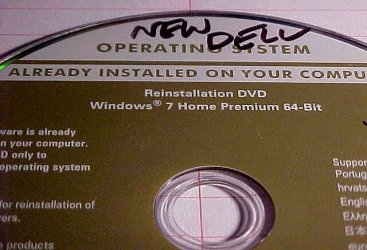
I think I have attached the pic of my original valid Windows 7 Home Premium disc. I bought 2 identical Dell XPS Studio 8000 desktops the same day from Best Buys. The one I use most quit working after making a lot of noise (probably power supply and other stuff). The easiest thing (I thought) would be to buy an identical Dell XPS Studio 8000 on ebay. I bought it, wiped the hard drive (I have an Active Kill Disk disk that has always worked perfectly), using all zeros (this is the free version). Everything was blank. I put in my legit Windows 7 Home Premium disc, and reloaded Windows 7 (not a repair, but a clean install). It worked, but never prompted me for my activation key (which I had ready). When Windows started up, the previous owner was the administrator, and listed under User accounts. All of his settings were also there. I contacted The manufacturer of Active Kill Disk (he is in Canada), and left a message asking if I bought the paid version, it would do the job correctly. He has not replied. I will reconnect the computer and get a screen shot of the Windows Disk management. One other thing, all 3 computers were supposed to have Dell INVIDIA GeForce GTS 240 graphics cards. Diagnosis showed that in both of my original computers, but in the new one, he claimed the GeForce drive was in it, but diagnostics showed STANDARD VGA DISPLAY and many of the windows screen resolution andc color changes and Aero features cannot work. I get error messages that the drivers are insufficient to perform those tasks. The GeForce is not a standard VGA display, it is a higher end gaming graphics card. The seller is swearing that is the right card. I don't think it is.


dustman
 

Attachments

  • MVC-001S.JPG
    MVC-001S.JPG
    49.5 KB · Views: 35

My Computer My Computer

At a glance

windows 7 Ultimate, 64 bitIntel i71 TBGeForce GT 240
Computer type
PC/Desktop
Computer Manufacturer/Model Number
Dell XPS 8000 (3 identical desktops)
OS
windows 7 Ultimate, 64 bit
CPU
Intel i7
Memory
1 TB
Graphics Card(s)
GeForce GT 240
Sound Card
Sound blaster
Monitor(s) Displays
24" HP Brightview
Hard Drives
1TB sata
Mouse
Microsoft Ergonomic Natural
Antivirus
AVG,, & Malwarebytes
Browser
Google Chrome
That disk does a Clean Reinstall and self activates, only extra is Dell branding.

All that's needed is to Delete all partitions during the booted reinstall, creating and formatting new as desired. This is pictured in Steps 7 and 8 of http://www.sevenforums.com/tutorials/1649-clean-install-windows-7-a.html. You either didn't do an install or did it to another partition or hard drive.

You don't need Active kill disk which is overkill. Wiping the disk is only needed for installation problems and then just the simple Diskpart Clean Command
done from the installer's Command Line, then shut the command box and click Install Now.

We can probably spot what happened if you post a screenshot of http://www.sevenforums.com/tutorials/274797-disk-management-post-screen-capture-image.html

Follow these steps to do a perfect http://www.sevenforums.com/tutorials/219487-clean-reinstall-factory-oem-windows-7-a.html#post1839164. If you really didn't wipe the disk yet then I'd test if Bootable Disgnostcs still runs from F12 at boot, save the Utility partition as written in the Special Note for Dell Owners at end.
 
Last edited:
OK dustman,

You still did not answer my question:

From what I understand the used DELL XPS 8000 is still running on the previous user's name. Right?

What edition and bit of Windows is it running? Windows XP/7 ___________ Edition . __bit? How did you get the activation key for it?

As far as the Windows Installation media you have , it is a DELL OEM installation DVD.

It is nothing but a regular Windows 7 Installation media with OEM activation built in.

When you do a clean install with it, it will auto activate with OEM-SLP (System Locked Preinstallation) Key - provided it came preinstalled with that edition of Windows.

(As a matter of fact, if you had purchased DELL machines and registered your purchase giving the service tag etc., you are entitled to get the OEM installation Disk free of cost by making an onsite request. You need not have purchased it.)

That key will be the same for all DELL machines that come preinstalled with Windows 7 Home Premium and since it is already there in the OEM installation media, you need not input it.

What all you have to do now:

Download the drivers for your DELL XPS model from DELL Website and keep it ready.

Format your drive with Partition Wizard Home Edition boot CD version. Partition it as you may like with sufficient space allocated for the System partition.( If you want to wipe the HDD do it with the same Partition Wizard before formatting but I think it is not necessary..)

Do a clean install with the DELL media on the system partition. Install the drivers.

Done..

(The DELL OEM-SLP key for Windows 7 Home Premium is 6RBBT-F8VPQ-QCPVQ-KHRB8-RMV82. That is the key on my DELL Machine. It will also be the same key on all your DELL machines with Windows 7 Home Premium - 32bit or 64 bit.)
 
Last edited:

My Computer My Computer

At a glance

Windows 7 Home Premium 32 bit
OS
Windows 7 Home Premium 32 bit
Hello again, my friend! I am running a 64 bit version of Windows 7 Home Premium edition. I don't see anything on the disk that indicates an edition number. Where would I find that? And yes, the previous owner is Back-in-Use and he is still listed as the administrator. It even gives his net connections. I had done a complete wipe of the HDD, and when I reloaded windows, it never asked for my key, nor did it offer me a chance to partition. It just loaded Windows.Another funny thing, I also have the Dell Drivers disk that came with my original computers. Whe I had put it iin the one I bought on ebay, it refused to load the drivers, saying this is NOT a Dell computer. Program will close. No matter how you slice it, it is certainly a Dell! Go figure!

dustman
 

My Computer My Computer

At a glance

windows 7 Ultimate, 64 bitIntel i71 TBGeForce GT 240
Computer type
PC/Desktop
Computer Manufacturer/Model Number
Dell XPS 8000 (3 identical desktops)
OS
windows 7 Ultimate, 64 bit
CPU
Intel i7
Memory
1 TB
Graphics Card(s)
GeForce GT 240
Sound Card
Sound blaster
Monitor(s) Displays
24" HP Brightview
Hard Drives
1TB sata
Mouse
Microsoft Ergonomic Natural
Antivirus
AVG,, & Malwarebytes
Browser
Google Chrome
You do not need the drivers disk or to download any drivers as they are provided by Win7 during installl or will be installed from Windows Update after install.

Be sure to enable Automatically deliver drivers via Windows Update (Step 3) then Check for Updates, install all Important and Optional Updates, with requested reboots, until no more are offered when you go back to Check for Updates.

Only after all Updates are installed should you import any drivers from the Dell Support Downloads webpage for your tag number, not the drivers disk which is dated as soon as its pressed.

Other tips here to get and keep a perfect http://www.sevenforums.com/tutorials/219487-clean-reinstall-factory-oem-windows-7-a.html#post1839164 have been used by over a million consumers without a single complaint.
 
Last edited:
Hello again, my friend! I am running a 64 bit version of Windows 7 Home Premium edition. I don't see anything on the disk that indicates an edition number. Where would I find that? And yes, the previous owner is Back-in-Use and he is still listed as the administrator. It even gives his net connections. I had done a complete wipe of the HDD, and when I reloaded windows, it never asked for my key, nor did it offer me a chance to partition. It just loaded Windows.Another funny thing, I also have the Dell Drivers disk that came with my original computers. Whe I had put it iin the one I bought on ebay, it refused to load the drivers, saying this is NOT a Dell computer. Program will close. No matter how you slice it, it is certainly a Dell! Go figure!

dustman

Hi,

There is no point in repeating the same thing again and again without answering any questions raised or carrying out the suggestions.

Please answer the questions point by point :

1. Is your ebay purchased used DELL XPS 8000, running Windows 7 Home Premium 64 Bit? Yes/No

2. Is the Windows Product Key of that machine is 6RBBT-F8VPQ-QCPVQ-KHRB8-RMV82 ? Yes/No

3. Does that system show that it is activated? Yes/No (you can check it with Control Panel > All Control Panel Items > System. At the bottom of that screen you may see " Windows is activated " and below that the product ID XXXXX-OEM-8992687-00095 )

If the answers to all the above questions is Yes, you have a genuine DELL System with a valid SLIC Table in the Bios and your system will auto activate when you do a clean install with the DELL OEM Reinstallation DVD you have.

( I always prefer to format the drive beforehand, I always prefer to have the drivers downloaded from the Dell website, install those after the Windows installation is complete, take a backup when everything shows OK in the Device Manager and then only connect to the internet and allow windows to update .. That is how I had done my clean install with the DELL OEM installation Disk.)

Since it is a desktop, it may be possible to remove any video card plugged in, if the system originally had one such video card. It is for you to check . Most people use Speccy to determine the system content. You may run Speccy on your system and compare it with the one run on purchased system and check for a 1:1 compliance. You may also check the display adapter in both the systems with Device Manager.

The part No of the DELL OEM Reinsatallaion DVD Windows 7 Home Premium which I received from DELL and indicated at the bottom of the DVD is P/N :00WK4. Check that your DVD has that P/N at the bottom.
While you could have got it for free directly from DELL, other dealers might have sourced it from DELL or replicate it and sell it for a price.
 
Last edited:

My Computer My Computer

At a glance

Windows 7 Home Premium 32 bit
OS
Windows 7 Home Premium 32 bit
Thank you all for your help! I repeated the HDD erase with Active Kill Disk and it worked this time.

Thank you all again,

dustman
 

My Computer My Computer

At a glance

windows 7 Ultimate, 64 bitIntel i71 TBGeForce GT 240
Computer type
PC/Desktop
Computer Manufacturer/Model Number
Dell XPS 8000 (3 identical desktops)
OS
windows 7 Ultimate, 64 bit
CPU
Intel i7
Memory
1 TB
Graphics Card(s)
GeForce GT 240
Sound Card
Sound blaster
Monitor(s) Displays
24" HP Brightview
Hard Drives
1TB sata
Mouse
Microsoft Ergonomic Natural
Antivirus
AVG,, & Malwarebytes
Browser
Google Chrome
Good. As I said in post #4 - On the face of it, it appears that active@kill disk did not really wipe it. Can you please point me to the actual download site, which one you downloaded, and how you ran it?

And you did not answer that question at all for us to really come to that conclusion.

And all throughout this thread you have persistently overlooked to answer any queries raised.

In any case, all is well that ends well and if all the conditions mentioned in my post #11 have been met and true, then you should have no difficulty in clean installing with the OEM Reinstallation Disk.

But please remember that it will auto-activate with the product Key 6RBBT-F8VPQ-QCPVQ-KHRB8-RMV82 and don't come back with another thread saying it did not ask me to activate it at all. :)

Have a good day.
 

My Computer My Computer

At a glance

Windows 7 Home Premium 32 bit
OS
Windows 7 Home Premium 32 bit
Hi, Jumanji,

You are obviously much more knowedgable than I am about computers. I didn't know exactly how to answer many of the questios. Example: I have run Windows Easy Transfer several times before, no problems. Now I am mired trying to find out DNS suffixs, domains, workgroups, and such. No solution I have found online works. I have recently upgraded my main system to Windows Ultimate, and my new/used computer to windows Professional. Now I can't transfer my filess.This is driving me nuts. What system are you currently using?

I am not trying to be rude or unresponsive, I just don't have the answers. I don't even know how to do a screenshot. I have to take pics of my screen (very fuzzy) with a camera, and load it on Photobucket and try to get an URL. Usually that doesn't work either, and I have to just upload a jpeg from my computer. I kow a lot about some things and nothing about others. And I truly appreciate the help from everybody. I just can't keep up with it all working full time. My beautiful wife has suffered a stroke, is legally blind, can barely walk, and has congestive heart failure. I have to take care of her and it just doesn't leave me much time to get on the computer. But I find myself having to spend hours trying to find solutions to these computer nightmares. Please don't give up on me.

Thanks,


dustman
 

My Computer My Computer

At a glance

windows 7 Ultimate, 64 bitIntel i71 TBGeForce GT 240
Computer type
PC/Desktop
Computer Manufacturer/Model Number
Dell XPS 8000 (3 identical desktops)
OS
windows 7 Ultimate, 64 bit
CPU
Intel i7
Memory
1 TB
Graphics Card(s)
GeForce GT 240
Sound Card
Sound blaster
Monitor(s) Displays
24" HP Brightview
Hard Drives
1TB sata
Mouse
Microsoft Ergonomic Natural
Antivirus
AVG,, & Malwarebytes
Browser
Google Chrome
Thanks, Gregrocker,

I will see what I can do.

dustman
 

My Computer My Computer

At a glance

windows 7 Ultimate, 64 bitIntel i71 TBGeForce GT 240
Computer type
PC/Desktop
Computer Manufacturer/Model Number
Dell XPS 8000 (3 identical desktops)
OS
windows 7 Ultimate, 64 bit
CPU
Intel i7
Memory
1 TB
Graphics Card(s)
GeForce GT 240
Sound Card
Sound blaster
Monitor(s) Displays
24" HP Brightview
Hard Drives
1TB sata
Mouse
Microsoft Ergonomic Natural
Antivirus
AVG,, & Malwarebytes
Browser
Google Chrome
Back
Top