
Hello,
I am new to this forum, I am not novice when it comes to computers, but I am not an expert either so if and when you are helping me, I would truly appreciate a detailed approach.
I had problems restarting my computer after it crashed.
At the time of the crash, I was transferring some large files to my back-up external hard drive while also exporting some photos from Adobe Lightroom (4.4).
The computer's screen was dark and it was not responsive to any key stroke or mouse moves. I gave it a good 15mn, tried it again, still no response. I tried to restart the system and it was just getting to a blank screen where I could see the mouse cursor (the arrow) and I was able to move the mouse around, but nothing else was working.
I tried to start it in the Safe Mode, and it gave me an error message along the lines of "Your operating system cannot load" or "Your computer cannot start"... I am sorry, I cannot remember it exactly.
I used the boot flash drive it came with it. Although I tried to back up the files and settings using the built in options, it failed. Nevertheless, I was able to reinstall the operating system, I completely gave up on the hopes of recovering the files. When the OS was reinstalled, I saw that it did not reformat the drive (which I was hopeful as it did not give that option). I was able to locate all my files and saw that the previous user information was there.
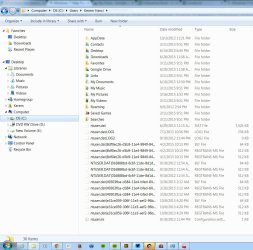
Figure-1.jpg is what I see on the explorer window. As you can see "Kerem" is there, that is the "new" user created during the OS re-install.
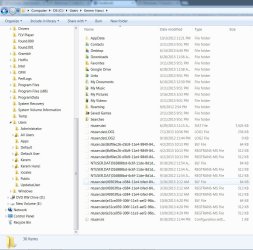
Figure-2.jpg shows you what I have under the User folder in the OS drive. "Kerem Hanci" is my older user name before the crash. All my files, settings etc. are there.
Now when I try to start certain installed programs; some work and some don't.
For instance, one program gives me the following message:
"Problem with Shortcut
This action is only valid for products that re currently installed."
Another one tells me that the program needs to be downloaded and installed.
My concern is that all of the files of these programs are in the Program Files folder, but when I go to Control Panel in order to uninstall them and reinstall them, these programs are not on the list.
I must say that I also did try System Restore before I reinstalled the OS, but it told me there were no saved restore points (which is also weird as I usually save them regularly).
I am absolutely at a loss here and I would truly appreciate your assistance and help!
I am new to this forum, I am not novice when it comes to computers, but I am not an expert either so if and when you are helping me, I would truly appreciate a detailed approach.
I had problems restarting my computer after it crashed.
At the time of the crash, I was transferring some large files to my back-up external hard drive while also exporting some photos from Adobe Lightroom (4.4).
The computer's screen was dark and it was not responsive to any key stroke or mouse moves. I gave it a good 15mn, tried it again, still no response. I tried to restart the system and it was just getting to a blank screen where I could see the mouse cursor (the arrow) and I was able to move the mouse around, but nothing else was working.
I tried to start it in the Safe Mode, and it gave me an error message along the lines of "Your operating system cannot load" or "Your computer cannot start"... I am sorry, I cannot remember it exactly.
I used the boot flash drive it came with it. Although I tried to back up the files and settings using the built in options, it failed. Nevertheless, I was able to reinstall the operating system, I completely gave up on the hopes of recovering the files. When the OS was reinstalled, I saw that it did not reformat the drive (which I was hopeful as it did not give that option). I was able to locate all my files and saw that the previous user information was there.
Figure-1.jpg is what I see on the explorer window. As you can see "Kerem" is there, that is the "new" user created during the OS re-install.
Figure-2.jpg shows you what I have under the User folder in the OS drive. "Kerem Hanci" is my older user name before the crash. All my files, settings etc. are there.
Now when I try to start certain installed programs; some work and some don't.
For instance, one program gives me the following message:
"Problem with Shortcut
This action is only valid for products that re currently installed."
Another one tells me that the program needs to be downloaded and installed.
My concern is that all of the files of these programs are in the Program Files folder, but when I go to Control Panel in order to uninstall them and reinstall them, these programs are not on the list.
I must say that I also did try System Restore before I reinstalled the OS, but it told me there were no saved restore points (which is also weird as I usually save them regularly).
I am absolutely at a loss here and I would truly appreciate your assistance and help!
Attachments
My Computer
At a glance
7 Home Premium 64Intel Core i7-3610QM @2.30GHz8GBIntel HD Graphics 4000 / NVIDIA GeForce GT 650M
- Computer type
- Laptop
- Computer Manufacturer/Model Number
- Dell
- OS
- 7 Home Premium 64
- CPU
- Intel Core i7-3610QM @2.30GHz
- Motherboard
- ACPI x-64 based
- Memory
- 8GB
- Graphics Card(s)
- Intel HD Graphics 4000 / NVIDIA GeForce GT 650M
- Hard Drives
- 2SZWAJC0966427
FFS
- Browser
- Chrome Version 43.0.2357.130 m


