User Profile Folder - Change User Account Folder Name

How to Change the User Folder Name of a User Profile in Windows 7


   Information
Normally, you could change your account name in User Accounts from the Control Panel (icons view), but that still would not change your accoun's user profile folder name in C:\Users.

This will show you how to change your account name and change the user profile folder name of any user account, including the built-in Administrator account (if enabled), in Windows 7 without losing anything in that user account. This will affect the user account's name for the C:\Users\(user-name) folder, Start Menu, Log on screen, Welcome screen, security permissions, etc......

You must be logged in as an administrator, and is a different account than the account you are changing the name of to be able to do this tutorial.

   Warning
Since editing a user profile and the registry can mess up Windows 7 if a mistake is made, it is highly advisable to create a restore point before doing this tutorial. This way if you make a mistake, you will be able to simply do a system restore to select and go back to this restore point to undo the mistake.


Here's How:

1. Log on to the user account (ex: Old Name) that you want to change the name of.

2. Save the current theme (ex: Old Name) for this user account. (see screenshot below)
NOTE: This is so that you will be able to change the theme back to this current theme in step 21 below later if you like.
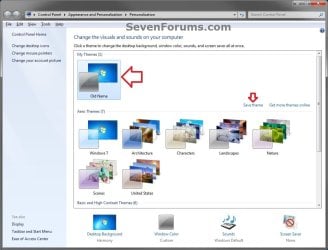
Save_Theme.jpg
3. If you have any files or folders in your C:\Users\(user-name) profile folder that are set to be shared, then you will need to temporarily set them to not be shared for now. After you finish renaming the user profile folder name, you could set them to be shared again in step 23 below.

4. Log off the user account that you want to change the name of. (see screenshot below)
NOTE: If you do not have another administrator account to use, then create a new administrator account first, then log off. When finished with the tutorial, you can delete this newly created account.
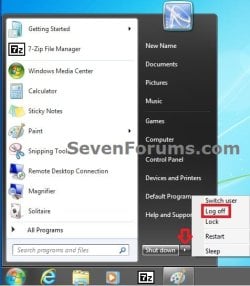
Log_Off.jpg
5. Log on to an administrator account that is not the user account that you want to change the name of.

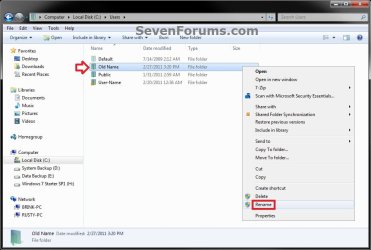
6. Open Windows Explorer, navigate to C:\Users, open the Users folder, right click on the user profile folder (ex: Old Name) that you want to change the name of, and click on Rename. (see screenshot below)
Step1.jpg
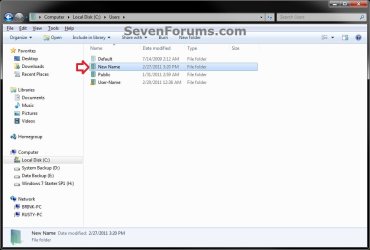
7. Type in the name (ex: New Name) that you want this user account's folder to have now and press Enter. Close the Windows Explorer window. (see screenshot below)
NOTE: If you are not able to rename the user folder for some reason (ex: in use), then boot into Safe Mode and try again.
Step2.jpg
8. If prompted, click on Continue and Yes (UAC) to approve renaming the user folder.

9. Open the Start Menu, and type regedit in the search box and press Enter.

10. If prompted by UAC, then click on Yes.

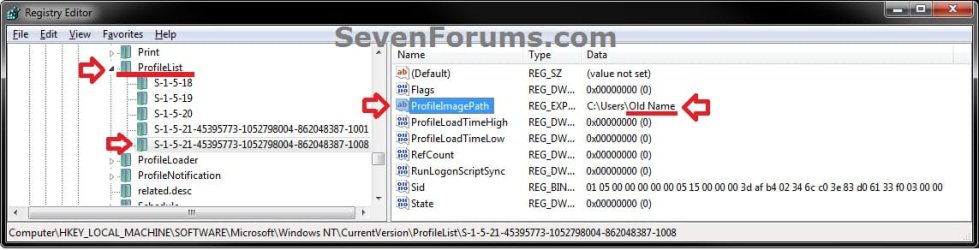
11. In regedit, navigate to the location below. (see screenshot below)

Code:
HKEY_LOCAL_MACHINE\SOFTWARE\Microsoft\Windows NT\CurrentVersion\ProfileList
Step3.jpg
12. In the left pane of regedit, expand Profilelist, and select each long number S-1-5-.... key one by one until your see the user account name (ex: Old Name) that you want to change the name of included in the Data column of ProfileImagePath in the right pane. (see screenshot above)

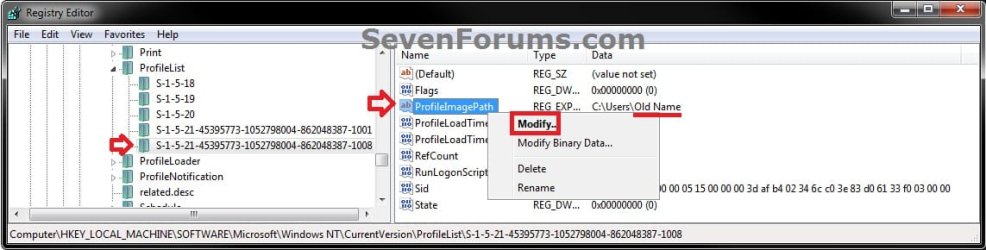
13. In the right pane of the long number S-1-5-.... key for the user account (ex: Old Name) that you want to change the name of, right click on ProfileImagePath, and click on Modify. (see screenshot below.
Step6.jpg
14. Change only the name (ex: Old Name) in the full path to the name (ex: New Name) that you want for the user account, and click on OK. (see screenshot below)
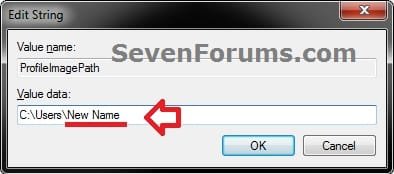
Step5.jpg
15. Close regedit.

16. Press the Windows + R keys to open the Run dialog, type netplwiz, and click on OK. (see screenshot below)
netplwiz-1.jpg
17. Check the Users must enter a user name and password to use this computer box, select the user account's old name (ex: Old Name), and click on the Properties button. (see screenshot below)
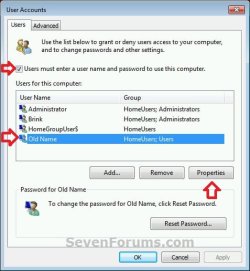
netplwiz-2.jpg
18. Change both the User name and Full name to the same new name (ex: New Name) from step 7 above, and click on OK. (see screenshot below)
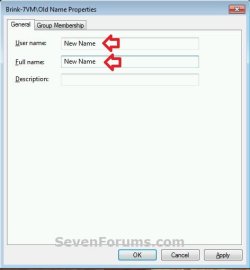
netplwiz-3.jpg
19. Click on OK, and Restart the computer to apply. (see screenshot below step 17)

20. Log on to the now completely renamed user account (ex: New Name) from step 1 above.

21. When you log on to the renamed user account (ex: New Name) for the first time, you will notice that the desktop background wallpaper is now solid black. This is normal. Change the theme from the black Unsaved Theme to the theme (ex: Old Name) that you saved in step 2 above to restore the saved theme. (see screenshot below)
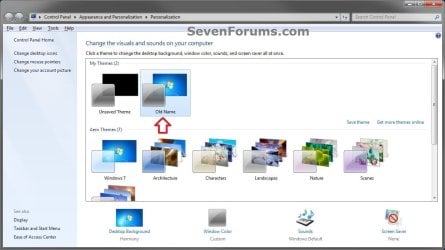
Theme-2.jpg
22. If you had to create a new administrator account at step 4 above to do this tutorial with, then you can now delete this newly created account if you like. This is not the New Name account.

23. If you had to set files to not be shared in step 3 above, then you can set them to be shared again if you like.

24. If you had Windows set to automatically log on to a user account at startup, then you can set that while logged on to an administrator account again if you like.


That's it,
Shawn


Last edited:
  • Like
Reactions: Arc
Brink,

Thank you! It seemed to work without a hitch. I wanted to add, that while still in the newly created account (the one used to make the changes to the built-in admin account), I went to: Control Panel\All Control Panel Items\Administrative Tools\, launched Local Security Policy, and then browsed to Local Policies\Security Options and changed the built-in admin name there IN ADDITION to the instructions you provided.

Now, it appears as though even the security permissions have been updated with the name change. I no longer see any instance of the old "Administrator" name which was used by default for the built-in admin account!

Can you verify that this was alright to do? I may have found a step that allows for complete name change of the built-in admin account, with no instances of the old name remaining! Perhaps this step could be added to the tutorial you showed me as an optional final step?
 

My Computer

OS
WINDOWS 7 ULTIMATE X64
Brent,

I'll add that option to the tutorial for the built-in Admistrator account. To bad that not all editions of Windows 7 will be able to do that option though.
 

My Computer

Computer type
PC/Desktop
Computer Manufacturer/Model Number
Self built custom
OS
64-bit Windows 11 Pro for Workstations
CPU
Intel i7-8700K OC'd to 5 GHz
Motherboard
ASUS ROG Maximus XI Formula Z390
Memory
64 GB (4x16GB) G.SKILL TridentZ RGB DDR4 3600 MHz
Graphics Card(s)
ASUS ROG-STRIX-GTX1080TI-O11G-GAMING
Sound Card
Integrated
Monitor(s) Displays
2 x Samsung Odyssey G7 27"
Screen Resolution
2560x1440
Hard Drives
1TB Samsung 990 PRO M.2,
4TB Samsung 990 PRO PRO M.2,
TerraMaster F8 SSD Plus NAS
PSU
Seasonic Prime Titanium 850W
Case
Thermaltake Core P3
Cooling
Corsair Hydro H115i
Keyboard
Logitech wireless K800
Mouse
Logitech MX Master 4
Internet Speed
2 Gb/s Download and 100 Mb/s Upload
Antivirus
Malwarebyte Anti-Malware Premium
Browser
Google Chrome
Other Info
Logitech Z625 speaker system,
Logitech BRIO 4K Pro webcam,
HP Color LaserJet Pro MFP M477fdn,
APC SMART-UPS RT 1000 XL - SURT1000XLI,
Galaxy S23 Plus phone
Hi,
I tried following this tutorial, but when I got to Step 7 (renaming the user account folder from a different user account with administrator settings) an error message comes up saying that the action can't be completed because the folder or a file in it is open in another program. I restarted the computer and logged on directly into the new account, but I still get the same message.

Same problem here. Pulled hair, disconnected LAN, etc. No go. I finally booted to Safe Mode and was able to change the name with no problems. Good thing for me because this is a computer that I ordered for my wife. BUT, the builder put my name in as the owner/administrator. She was upset that her name wasn't listed as the owner/administrator.

Thanks for the tutorial, Jim
 

My Computer

Computer Manufacturer/Model Number
Puget Custom Computers
OS
Windows 7 Professional 64bit SP1
CPU
Intel Core i7 QUAD CORE 930 2.8 GHz
Motherboard
Asus P6X58D Premium
Memory
Kingston DDR3-1333 6GB
Graphics Card(s)
XFX Radeon HD 5700 1GB
Sound Card
On Board
Monitor(s) Displays
Samsung SyncMaster 226 BW
Screen Resolution
1680x1050
Hard Drives
2 Western Digital Cavier Blue 500GB
PSU
Antec CP-850 850 Watt
Case
Antec P183
Cooling
Gelid Tranquillo
Keyboard
Microsoft Wirelsss 3000
Mouse
Kensington Expert Mouse K64325
Internet Speed
20 Mbps
You're welcome Jim. Thank you for posting back with your findings and results. I added a note under step 7 for this to help others that may have the same issue as you did. :)
 

My Computer

Computer type
PC/Desktop
Computer Manufacturer/Model Number
Self built custom
OS
64-bit Windows 11 Pro for Workstations
CPU
Intel i7-8700K OC'd to 5 GHz
Motherboard
ASUS ROG Maximus XI Formula Z390
Memory
64 GB (4x16GB) G.SKILL TridentZ RGB DDR4 3600 MHz
Graphics Card(s)
ASUS ROG-STRIX-GTX1080TI-O11G-GAMING
Sound Card
Integrated
Monitor(s) Displays
2 x Samsung Odyssey G7 27"
Screen Resolution
2560x1440
Hard Drives
1TB Samsung 990 PRO M.2,
4TB Samsung 990 PRO PRO M.2,
TerraMaster F8 SSD Plus NAS
PSU
Seasonic Prime Titanium 850W
Case
Thermaltake Core P3
Cooling
Corsair Hydro H115i
Keyboard
Logitech wireless K800
Mouse
Logitech MX Master 4
Internet Speed
2 Gb/s Download and 100 Mb/s Upload
Antivirus
Malwarebyte Anti-Malware Premium
Browser
Google Chrome
Other Info
Logitech Z625 speaker system,
Logitech BRIO 4K Pro webcam,
HP Color LaserJet Pro MFP M477fdn,
APC SMART-UPS RT 1000 XL - SURT1000XLI,
Galaxy S23 Plus phone
Here is another update. I notice that the old user name is still shown in a few places. For instance, if I open Task Manager, the old user name is still shown as the "User Name".

Thanks for any additional help, Jim
 

My Computer

Computer Manufacturer/Model Number
Puget Custom Computers
OS
Windows 7 Professional 64bit SP1
CPU
Intel Core i7 QUAD CORE 930 2.8 GHz
Motherboard
Asus P6X58D Premium
Memory
Kingston DDR3-1333 6GB
Graphics Card(s)
XFX Radeon HD 5700 1GB
Sound Card
On Board
Monitor(s) Displays
Samsung SyncMaster 226 BW
Screen Resolution
1680x1050
Hard Drives
2 Western Digital Cavier Blue 500GB
PSU
Antec CP-850 850 Watt
Case
Antec P183
Cooling
Gelid Tranquillo
Keyboard
Microsoft Wirelsss 3000
Mouse
Kensington Expert Mouse K64325
Internet Speed
20 Mbps
Thank you for the update Jim. :)
 

My Computer

Computer type
PC/Desktop
Computer Manufacturer/Model Number
Self built custom
OS
64-bit Windows 11 Pro for Workstations
CPU
Intel i7-8700K OC'd to 5 GHz
Motherboard
ASUS ROG Maximus XI Formula Z390
Memory
64 GB (4x16GB) G.SKILL TridentZ RGB DDR4 3600 MHz
Graphics Card(s)
ASUS ROG-STRIX-GTX1080TI-O11G-GAMING
Sound Card
Integrated
Monitor(s) Displays
2 x Samsung Odyssey G7 27"
Screen Resolution
2560x1440
Hard Drives
1TB Samsung 990 PRO M.2,
4TB Samsung 990 PRO PRO M.2,
TerraMaster F8 SSD Plus NAS
PSU
Seasonic Prime Titanium 850W
Case
Thermaltake Core P3
Cooling
Corsair Hydro H115i
Keyboard
Logitech wireless K800
Mouse
Logitech MX Master 4
Internet Speed
2 Gb/s Download and 100 Mb/s Upload
Antivirus
Malwarebyte Anti-Malware Premium
Browser
Google Chrome
Other Info
Logitech Z625 speaker system,
Logitech BRIO 4K Pro webcam,
HP Color LaserJet Pro MFP M477fdn,
APC SMART-UPS RT 1000 XL - SURT1000XLI,
Galaxy S23 Plus phone
locked out!

Hi all,

Don't know if this thread is still active, but would really appreciate some help!

I initially changed the name of my Admin account through the Start Menu control panel shortcut.

Then, I went through registry editor and (I think) changed the right file (from the old username to the new one)

However, I'm now locked out of the system - every time I try to log on, I get a message along the lines of 'Profile manager failed login, access denied'

What have I done wrong?!

If necessary/easier, I can restore my system: I created a backup and system image a few hours before.

Thanks in advance
 

My Computer

Computer Manufacturer/Model Number
Acer Aspire 5741
OS
Windows 7 Home Premium 64-bit
Hello Gussy,

Yep, it sounds like you didn't use the proper steps in the tutorial to change the name of the user account. It's a good thing that you created a system image. Yes, you could do a system image recovery at boot to restore your system back to how it was when the image was created. :)

If this was for the built-in Administrator account instead of just a normal administratror user account, then you would want to use the tutorial below to change it's name instead.

http://www.sevenforums.com/tutorials/7417-built-administrator-account-change-name.html

Hope this helps,
Shawn
 

My Computer

Computer type
PC/Desktop
Computer Manufacturer/Model Number
Self built custom
OS
64-bit Windows 11 Pro for Workstations
CPU
Intel i7-8700K OC'd to 5 GHz
Motherboard
ASUS ROG Maximus XI Formula Z390
Memory
64 GB (4x16GB) G.SKILL TridentZ RGB DDR4 3600 MHz
Graphics Card(s)
ASUS ROG-STRIX-GTX1080TI-O11G-GAMING
Sound Card
Integrated
Monitor(s) Displays
2 x Samsung Odyssey G7 27"
Screen Resolution
2560x1440
Hard Drives
1TB Samsung 990 PRO M.2,
4TB Samsung 990 PRO PRO M.2,
TerraMaster F8 SSD Plus NAS
PSU
Seasonic Prime Titanium 850W
Case
Thermaltake Core P3
Cooling
Corsair Hydro H115i
Keyboard
Logitech wireless K800
Mouse
Logitech MX Master 4
Internet Speed
2 Gb/s Download and 100 Mb/s Upload
Antivirus
Malwarebyte Anti-Malware Premium
Browser
Google Chrome
Other Info
Logitech Z625 speaker system,
Logitech BRIO 4K Pro webcam,
HP Color LaserJet Pro MFP M477fdn,
APC SMART-UPS RT 1000 XL - SURT1000XLI,
Galaxy S23 Plus phone
Hi Brink,

Thanks for the reply!

I tried restoring the system from an image: it was successful, except the issue doesn't seem to be totally sorted - I could log on to the built-in administrator account, but seemingly only with a temp profile.

I've created a new admin user, and am currently copying all the original user's files across (I was told to avoid copying the ntuser.dat and ntuser.dat.log and ntuser.ini files, but they didn't seem to be there; that's possibly part of the problem?)

I'll give this a go and see if the problem will be sorted, of not, I figure I damn always do another system restore!

But one Q: am I likely to have problems given I'm creating the new user account from a 'temp' profile?

Thanks again Shawn,

Angus
 

My Computer

Computer Manufacturer/Model Number
Acer Aspire 5741
OS
Windows 7 Home Premium 64-bit
Angus,

You could have issues, but just to be safe, I would recommend to backup anything that you didn't want to lose while you have access to them. This way if it all goes south, you would only lose a bit of time reinstalling instead of losing your data.

The nt files are hidden by default, so you would see them unless you set to show hidden system files.
 

My Computer

Computer type
PC/Desktop
Computer Manufacturer/Model Number
Self built custom
OS
64-bit Windows 11 Pro for Workstations
CPU
Intel i7-8700K OC'd to 5 GHz
Motherboard
ASUS ROG Maximus XI Formula Z390
Memory
64 GB (4x16GB) G.SKILL TridentZ RGB DDR4 3600 MHz
Graphics Card(s)
ASUS ROG-STRIX-GTX1080TI-O11G-GAMING
Sound Card
Integrated
Monitor(s) Displays
2 x Samsung Odyssey G7 27"
Screen Resolution
2560x1440
Hard Drives
1TB Samsung 990 PRO M.2,
4TB Samsung 990 PRO PRO M.2,
TerraMaster F8 SSD Plus NAS
PSU
Seasonic Prime Titanium 850W
Case
Thermaltake Core P3
Cooling
Corsair Hydro H115i
Keyboard
Logitech wireless K800
Mouse
Logitech MX Master 4
Internet Speed
2 Gb/s Download and 100 Mb/s Upload
Antivirus
Malwarebyte Anti-Malware Premium
Browser
Google Chrome
Other Info
Logitech Z625 speaker system,
Logitech BRIO 4K Pro webcam,
HP Color LaserJet Pro MFP M477fdn,
APC SMART-UPS RT 1000 XL - SURT1000XLI,
Galaxy S23 Plus phone
Brink

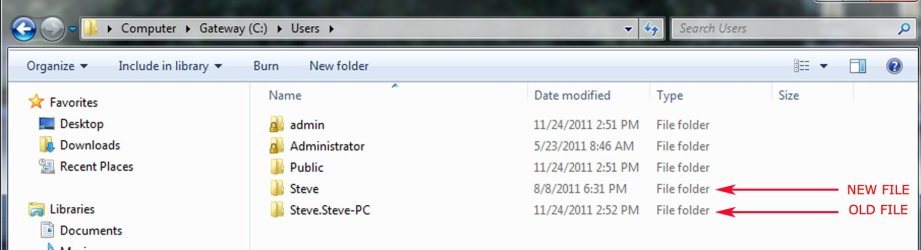
I went through the procedure and when I renamed the folder it created a new folder with the correct name. My desktop now boots to that folder. However, the old-name folder is still on the computer, along with the 'public' and two admin folders.

I went to safe mode in one admin folder and my newly named folder and deleted the public and old-name folders, but when I reboot to the new-name folder the old-name and public folders are still listed under users. :confused:

Any ideas on how to get rid of those uneeded folders?
 

My Computer

Computer Manufacturer/Model Number
Gateway
OS
Windows 7 Home Premium
CPU
Pentium Dual Core
Memory
6 GB
Hello Steve,

It sounds like you may have either made a mistake or missed a step somewhere. Double check while trying again to see if it may work for you this time. It sounds like you may not have changed the entries in the registry.

The C:\Users\Public folders are not part of the user account, so that is normal that they will still be there. These are just public folders shared by all users.
 

My Computer

Computer type
PC/Desktop
Computer Manufacturer/Model Number
Self built custom
OS
64-bit Windows 11 Pro for Workstations
CPU
Intel i7-8700K OC'd to 5 GHz
Motherboard
ASUS ROG Maximus XI Formula Z390
Memory
64 GB (4x16GB) G.SKILL TridentZ RGB DDR4 3600 MHz
Graphics Card(s)
ASUS ROG-STRIX-GTX1080TI-O11G-GAMING
Sound Card
Integrated
Monitor(s) Displays
2 x Samsung Odyssey G7 27"
Screen Resolution
2560x1440
Hard Drives
1TB Samsung 990 PRO M.2,
4TB Samsung 990 PRO PRO M.2,
TerraMaster F8 SSD Plus NAS
PSU
Seasonic Prime Titanium 850W
Case
Thermaltake Core P3
Cooling
Corsair Hydro H115i
Keyboard
Logitech wireless K800
Mouse
Logitech MX Master 4
Internet Speed
2 Gb/s Download and 100 Mb/s Upload
Antivirus
Malwarebyte Anti-Malware Premium
Browser
Google Chrome
Other Info
Logitech Z625 speaker system,
Logitech BRIO 4K Pro webcam,
HP Color LaserJet Pro MFP M477fdn,
APC SMART-UPS RT 1000 XL - SURT1000XLI,
Galaxy S23 Plus phone
Hello Steve,

It sounds like you may have either made a mistake or missed a step somewhere. Double check while trying again to see if it may work for you this time. It sounds like you may not have changed the entries in the registry.

The C:\Users\Public folders are not part of the user account, so that is normal that they will still be there. These are just public folders shared by all users.

Hi Brink

I went back over and checked - I'm thinking that I didn't miss a step.

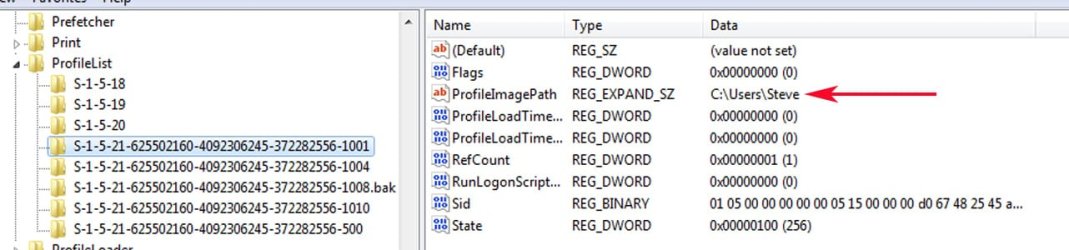
I've posted screen shots showing the change I made in the registry, the user names that are still in my C drive, and the account name.

The account name has always been Steve -is it possible that may be the problem?
 

Attachments

  • registry.jpg
    registry.jpg
    74.6 KB · Views: 232
  • accounts.jpg
    accounts.jpg
    72.6 KB · Views: 262
  • USERS.jpg
    USERS.jpg
    82.7 KB · Views: 312

My Computer

Computer Manufacturer/Model Number
Gateway
OS
Windows 7 Home Premium
CPU
Pentium Dual Core
Memory
6 GB
Is this a local user account, and not part of a domain?

If this is just a local user account, then check each long number S-1-5-.... key in the registry to see if there is one for C:\Users\Steve.Steve-PC. If so delete the S-1-5-.... key for it and the Steve.Steve-PC folder.

To be safe, create a restore point before doing this.
 

My Computer

Computer type
PC/Desktop
Computer Manufacturer/Model Number
Self built custom
OS
64-bit Windows 11 Pro for Workstations
CPU
Intel i7-8700K OC'd to 5 GHz
Motherboard
ASUS ROG Maximus XI Formula Z390
Memory
64 GB (4x16GB) G.SKILL TridentZ RGB DDR4 3600 MHz
Graphics Card(s)
ASUS ROG-STRIX-GTX1080TI-O11G-GAMING
Sound Card
Integrated
Monitor(s) Displays
2 x Samsung Odyssey G7 27"
Screen Resolution
2560x1440
Hard Drives
1TB Samsung 990 PRO M.2,
4TB Samsung 990 PRO PRO M.2,
TerraMaster F8 SSD Plus NAS
PSU
Seasonic Prime Titanium 850W
Case
Thermaltake Core P3
Cooling
Corsair Hydro H115i
Keyboard
Logitech wireless K800
Mouse
Logitech MX Master 4
Internet Speed
2 Gb/s Download and 100 Mb/s Upload
Antivirus
Malwarebyte Anti-Malware Premium
Browser
Google Chrome
Other Info
Logitech Z625 speaker system,
Logitech BRIO 4K Pro webcam,
HP Color LaserJet Pro MFP M477fdn,
APC SMART-UPS RT 1000 XL - SURT1000XLI,
Galaxy S23 Plus phone
It's just the local user account on my home desktop. The S-1-5 thread now named Steve was the Steve.Steve-PC thread. Should I delete that one and the Steve.Steve-PC folder?

Thanks
 

My Computer

Computer Manufacturer/Model Number
Gateway
OS
Windows 7 Home Premium
CPU
Pentium Dual Core
Memory
6 GB
No, do not delete the one with Steve, that is for your current account. Check to see if there may be another one listed with Steve.Steve-PC instead.
 

My Computer

Computer type
PC/Desktop
Computer Manufacturer/Model Number
Self built custom
OS
64-bit Windows 11 Pro for Workstations
CPU
Intel i7-8700K OC'd to 5 GHz
Motherboard
ASUS ROG Maximus XI Formula Z390
Memory
64 GB (4x16GB) G.SKILL TridentZ RGB DDR4 3600 MHz
Graphics Card(s)
ASUS ROG-STRIX-GTX1080TI-O11G-GAMING
Sound Card
Integrated
Monitor(s) Displays
2 x Samsung Odyssey G7 27"
Screen Resolution
2560x1440
Hard Drives
1TB Samsung 990 PRO M.2,
4TB Samsung 990 PRO PRO M.2,
TerraMaster F8 SSD Plus NAS
PSU
Seasonic Prime Titanium 850W
Case
Thermaltake Core P3
Cooling
Corsair Hydro H115i
Keyboard
Logitech wireless K800
Mouse
Logitech MX Master 4
Internet Speed
2 Gb/s Download and 100 Mb/s Upload
Antivirus
Malwarebyte Anti-Malware Premium
Browser
Google Chrome
Other Info
Logitech Z625 speaker system,
Logitech BRIO 4K Pro webcam,
HP Color LaserJet Pro MFP M477fdn,
APC SMART-UPS RT 1000 XL - SURT1000XLI,
Galaxy S23 Plus phone
No, do not delete the one with Steve, that is for your current account. Check to see if there may be another one listed with Steve.Steve-PC instead.

Brink

There are three threads in regedit -- Steve (renamed from Steve.Steve-PC), admin and Administrator.

Here's what is odd. I booted into safe mode, logged in as admin and deleted the Steve.Steve-PC user folder. Then I logged as Steve in safe mode, checked the user profiles and Steve.Steve-PC was not there.

I rebooted normally, logged in as Steve, and there is the Steve.Steve-PC user folder :cry:

It's not a real big deal, but it's frustrating that I/we can't figure out how to remove the folder. :D
 

My Computer

Computer Manufacturer/Model Number
Gateway
OS
Windows 7 Home Premium
CPU
Pentium Dual Core
Memory
6 GB
Steve,

It appears that it got corrupted. I would recommend to create a new administrator account to use instead to be on the safe side. Afterwards, copy what you want (Start Menu shortcuts, files in user folders, etc....) from the old account into the new one, then delete the old user account after everything checks out. :(
 

My Computer

Computer type
PC/Desktop
Computer Manufacturer/Model Number
Self built custom
OS
64-bit Windows 11 Pro for Workstations
CPU
Intel i7-8700K OC'd to 5 GHz
Motherboard
ASUS ROG Maximus XI Formula Z390
Memory
64 GB (4x16GB) G.SKILL TridentZ RGB DDR4 3600 MHz
Graphics Card(s)
ASUS ROG-STRIX-GTX1080TI-O11G-GAMING
Sound Card
Integrated
Monitor(s) Displays
2 x Samsung Odyssey G7 27"
Screen Resolution
2560x1440
Hard Drives
1TB Samsung 990 PRO M.2,
4TB Samsung 990 PRO PRO M.2,
TerraMaster F8 SSD Plus NAS
PSU
Seasonic Prime Titanium 850W
Case
Thermaltake Core P3
Cooling
Corsair Hydro H115i
Keyboard
Logitech wireless K800
Mouse
Logitech MX Master 4
Internet Speed
2 Gb/s Download and 100 Mb/s Upload
Antivirus
Malwarebyte Anti-Malware Premium
Browser
Google Chrome
Other Info
Logitech Z625 speaker system,
Logitech BRIO 4K Pro webcam,
HP Color LaserJet Pro MFP M477fdn,
APC SMART-UPS RT 1000 XL - SURT1000XLI,
Galaxy S23 Plus phone
Brink

Thanks for the help - I've got the issue solved now.
 

My Computer

Computer Manufacturer/Model Number
Gateway
OS
Windows 7 Home Premium
CPU
Pentium Dual Core
Memory
6 GB
You're most welcome Steve. I'm happy to hear that you got it sorted. :)
 

My Computer

Computer type
PC/Desktop
Computer Manufacturer/Model Number
Self built custom
OS
64-bit Windows 11 Pro for Workstations
CPU
Intel i7-8700K OC'd to 5 GHz
Motherboard
ASUS ROG Maximus XI Formula Z390
Memory
64 GB (4x16GB) G.SKILL TridentZ RGB DDR4 3600 MHz
Graphics Card(s)
ASUS ROG-STRIX-GTX1080TI-O11G-GAMING
Sound Card
Integrated
Monitor(s) Displays
2 x Samsung Odyssey G7 27"
Screen Resolution
2560x1440
Hard Drives
1TB Samsung 990 PRO M.2,
4TB Samsung 990 PRO PRO M.2,
TerraMaster F8 SSD Plus NAS
PSU
Seasonic Prime Titanium 850W
Case
Thermaltake Core P3
Cooling
Corsair Hydro H115i
Keyboard
Logitech wireless K800
Mouse
Logitech MX Master 4
Internet Speed
2 Gb/s Download and 100 Mb/s Upload
Antivirus
Malwarebyte Anti-Malware Premium
Browser
Google Chrome
Other Info
Logitech Z625 speaker system,
Logitech BRIO 4K Pro webcam,
HP Color LaserJet Pro MFP M477fdn,
APC SMART-UPS RT 1000 XL - SURT1000XLI,
Galaxy S23 Plus phone
Back
Top