User profile zapped, all files saved in c:\users

jfranzreb

New member
Local time
12:51 AM
Messages
17
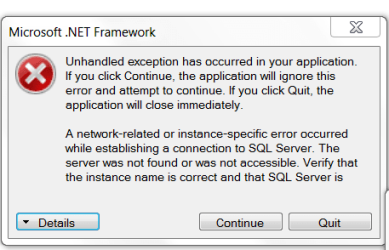
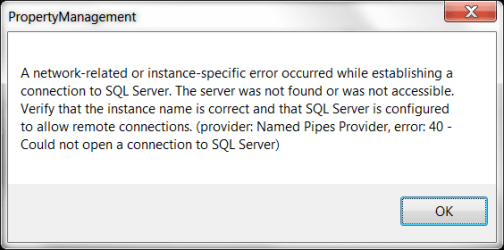
Ok, this is a weird one. A user sent me the errors attached and she said they just came in like a flurry and she couldn't get rid of them. I instructed her to reboot. When she did, her desktop, my docs, my pictures, etc. were gone.

I worked with her this morning and found her files in her c:\users\username folder. My Docs is synced to OneDrive so that's good but My Pics aren't (yet). Why would the desktop, etc. be empty yet they be stored in their actual location?

I wish I could find it, but there was an error where she couldn't log into the computer. I was able to get in via safe mode and get her files moved over but this one is totally different from that time. I mention this as I'm hoping this is the last time this happens.

What else do you need from me to put pieces together for it?
 

Attachments
  • Sharon1.png
    Sharon1.png
    10.3 KB · Views: 18
  • Sharon2.png
    Sharon2.png
    9.7 KB · Views: 18

My Computer My Computer

Computer type
Laptop
OS
Windows 7 Pro x64
What are you using a SQL server for?
 

My Computer My Computer

Computer type
PC/Desktop
OS
win 8 32 bit
This Property Management program is an in-house built app. I'm not familiar with it but I'm guessing it accesses some of our databases. The strange thing is that the user said she wasn't using it at the time. She was at home and you have to be on VPN to access it.
 

My Computer My Computer

Computer type
Laptop
OS
Windows 7 Pro x64
I grabbed some info from her Event Viewer:
Event filter with query "SELECT * FROM __InstanceModificationEvent WITHIN 60 WHERE TargetInstance ISA "Win32_Processor" AND TargetInstance.LoadPercentage > 99" could not be reactivated in namespace "//./root/CIMV2" because of error 0x80041003. Events cannot be delivered through this filter until the problem is corrected.

event id 10

~~~~~~~~~~~~~~

Windows was unable to load the registry. This problem is often caused by insufficient memory or insufficient security rights.

DETAIL - The process cannot access the file because it is being used by another process.
for C:\Users\s.simunaci\ntuser.dat

event id 1508

~~~~~~~~~~~~~

Windows cannot load the locally stored profile. Possible causes of this error include insufficient security rights or a corrupt local profile.

DETAIL - The process cannot access the file because it is being used by another process.

event id 1502

~~~~~~~~~~~~~~~~~~~~~~~

Windows has backed up this user profile. Windows will automatically try to use the backup profile the next time this user logs on.

event id 1515

~~~~~~~~~~~~~~~~~~~~~~~

Windows cannot find the local profile and is logging you on with a temporary profile. Changes you make to this profile will be lost when you log off.

event id 1511

~~~~~~~~~~~

I also just rebooted, logged in as her and it loaded her profile cleanly. Hmmmmm
 

My Computer My Computer

Computer type
Laptop
OS
Windows 7 Pro x64
Back
Top