
Shadowjump
New member
- Local time
- 10:26 PM
- Messages
- 3
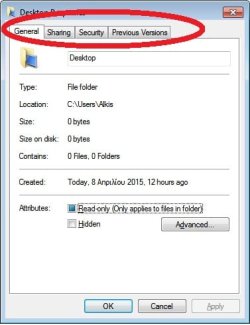
Hello. My computer has a weird problem and keeps deleting at random (it could be after 1,2,3,etc restarts), the registry folder HKEY_CURRENT_USER\Software\Microsoft\Windows\CurrentVersion\Explorer\User Shell Folders and it reverts back to its default paths. The folders are missing from the default path, C:/Users/"UserName". Only Contacts, Desktop and Favorites are there and when I right click at them, the Location tab is missing. Also, if I click Start and go to Documents for example and try and paste something in there I get this error: Unable to create the file xxxx, File System Error (512).
It also resets the registry part that keeps stuff like, view settings (list, icons, etc) and the taskbar (for example show Downloads, Videos, Run command)
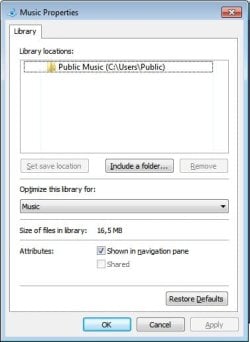
I have attached 3 images with the problem.
Thank you.
It also resets the registry part that keeps stuff like, view settings (list, icons, etc) and the taskbar (for example show Downloads, Videos, Run command)
I have attached 3 images with the problem.
Thank you.
Attachments

My Computer
- Computer type
- PC/Desktop
- Computer Manufacturer/Model Number
- Custom Build
- OS
- Windows 7 Ultimate x64
- CPU
- Intel Core i7 950
- Motherboard
- Gigabyte G1.Assassin
- Memory
- 24GB DDR3 1600MHz Corsair Vengeance
- Graphics Card(s)
- AMD Radeon HD7970 CrossFire
- Hard Drives
- OCZ Vertex 3 120GB x2 Raid0
Samsung SpinPoint F3 x2 Raid0
- Antivirus
- Kaspersky Antivirus
- Browser
- Chrome


