Using 2 screens simultaneously

Tijs67

New member
Local time
12:22 AM
Messages
2
I’m using W7 Professional x64

My graphics card is a Gainward Radeon HD 4850 512MB
My monitor is a Dell 2007WFP
My tv is a Pioneer plasma KRP-500M

My problem:

I have tried to connect my tv via DVI-D to my graphics card. When the pc monitor is active and I activate my tv to the pc-input, the only thing I see on my tv is the desktop screen with no information at all (no shortcuts, no windows buttons).

When I disconnect my pc-monitor, the tv works well and I can control the pc watching my tv (all the screens and shortcuts are visible).

So my question is how I can make both screens work at the same time, so both screens are connected and on both screens I can see all the actions I execute.

I have downloaded and installed the latest drivers.
Via the ATI Control center I can switch between the 2 screens. But that’s not want I want, I want to use them simultaneously.
 

My Computer

OS
Windows 7 Professional x64
Hi, welcome to the forums :)

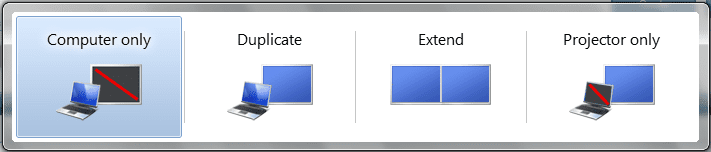
What you're describing is the 'Extended Desktop' whish just adds extra width to the existing screens. If you press Win+P and select 'Duplicate' does it solve the issue?

Capture.PNG


OS
 

My Computer

Computer Manufacturer/Model Number
Compaq Desktop
OS
Windows 7 Ultimate x64
CPU
AMD Sempron Dual Core
Memory
3GB
Graphics Card(s)
NVIDIA GeForce 6150SE nForce 430
Screen Resolution
1024x768
Hard Drives
150GB Sata
A handy trick of the 'Extended Desktop' is you can click & drag applications accross to the other screen. For example, Running media player/center and moving it accross so you can still use your internet browser on your computer while viewing on the other screen :)
 

My Computer

Computer Manufacturer/Model Number
Compaq Desktop
OS
Windows 7 Ultimate x64
CPU
AMD Sempron Dual Core
Memory
3GB
Graphics Card(s)
NVIDIA GeForce 6150SE nForce 430
Screen Resolution
1024x768
Hard Drives
150GB Sata
Hi, welcome to the forums :)

What you're describing is the 'Extended Desktop' whish just adds extra width to the existing screens. If you press Win+P and select 'Duplicate' does it solve the issue?

View attachment 109876


OS

Technically, it adds extra desktop space since you can put the other screens on top or bottom as well, adding extra height. ;)
 

My Computer

Computer Manufacturer/Model Number
HAL-9000
OS
Windows 7 Ultimate 64bit
CPU
Intel i7 3770K
Motherboard
Asus Sabertooth Z77
Memory
16GB DDR3 1333 Corsair XMS3
Graphics Card(s)
XFX HD6950 2GB EyeFinity
Sound Card
Logitech G35 & Sennheiser PC135 & VIA HD
Monitor(s) Displays
23" HP 2310e, 23" Samsung B2230, 21.5" Viewsonic
Screen Resolution
5760x1080
Hard Drives
16TB of Storage
128GB & 256GB Crucial M4 SSD's, 2X 1TB WD Black, 3x 2TB WD, 3x 2TB Samsung F4, 1.5TB Seagate, WD 500GB,
PSU
Antec True Power New 650watt
Case
Cooler Master HAF-932
Cooling
Corsair H60 Hydro Cooler, 3x 230mm Fans, 2x120mm Fan
Keyboard
Logitech G15 and G13
Mouse
Logitech G700 Gaming Mouse
Internet Speed
50/10 Mbit
Other Info
Speakers : Alesis M1 Active Mk2 Studio Monitors , APC RS 1200 UPS, HP 4500DN Color Laser, HP P1006 mono Laser, Kodak 8500 Dye-Sub, Epson 1280 inkjet, Epson Worforce 610 MFC
Thats all you'll need..Follow their advice and you should be fine..

And welcome to the forums!!:thumbsup:
 

My Computer

Computer Manufacturer/Model Number
Custom
OS
Windows 7 Ultimate 32bit
CPU
INTEL Pentium4 3.2ghz(QuadCore MonthEnd!!!)
Motherboard
Asus P5QL-EM
Memory
2gb kingston DDR2 800
Graphics Card(s)
hd powercolour 5570 512MB
Sound Card
8ch onboard
Monitor(s) Displays
21" Samsung
Screen Resolution
Change alot
Hard Drives
samsung 500GB 7200rpm
PSU
Sparta 500w
Case
Alienware
Cooling
Aero cooling
Keyboard
Microsoft Multi-Media
Mouse
Scorpion 3000dpi
Internet Speed
none
Other Info
Xforce-5 5.1 Surround
Thank you guys, the Win+P works, great!

One last question, when I choose Duplicate, the tv screen is not fully filled. On the left and right side, I have a black stripe of aprroximately 7 cm.

When I choose only the tv screen as output, the tv screen is fully filled.

Any idea how that can be?
 

My Computer

OS
Windows 7 Professional x64
Thank you guys, the Win+P works, great!

One last question, when I choose Duplicate, the tv screen is not fully filled. On the left and right side, I have a black stripe of aprroximately 7 cm.

When I choose only the tv screen as output, the tv screen is fully filled.

Any idea how that can be?
The TV has a higher resolution than the monitor. When you clone the screens, they must be exactly the same. Therefore, it must use the lowest resolution.

I would recommend leaving it on extend if you want full use of the TV. You could also change it so that the TV is your main monitor, and you won't technically need the smaller monitor.

~Lordbob
 

My Computer

Computer Manufacturer/Model Number
Hera
OS
Windows 7 Ultimate x64, Mint 9
CPU
Intel i5-2500k
Motherboard
ASUS P8P67 Pro
Memory
2x 4Gb Corsair VENGEANCE DDR3-1600
Graphics Card(s)
NVidia GeForce N260GTX Twin Frozr
Sound Card
Realtek HD OnBoard Audio
Monitor(s) Displays
ASUS 24" Monitor
Screen Resolution
1920x1080
Hard Drives
G.SKILL Phoenix Series 60GB SATA II MLC Internal Solid State Drive (SSD)
SAMSUNG Spinpoint F3R 1TB 7200 RPM 32MB Cache SATA II
PSU
Cooler Master Real Power Pro 750W
Case
Cooler Master Haf 932
Cooling
Fans
Keyboard
Razer Tarantula
Mouse
Razer Lachesis
Internet Speed
not fast enough
Back
Top