
Using Diskpart

Bare Foot Kid

R.I.P. August 13th 2014
SF Team
Local time
1:38 AM
Messages
22,809
Location
The Lowcountry
Hello everyone.


What I would like is to do is a "secure erase" (write zeroes) to a partition of a HDD before a clean install of Windows 7. If I were to boot to a http://www.sevenforums.com/tutorials/682-command-prompt-startup.html?ltr=C would the series of commands in the snip below secure erase (zero) the partition; then I could clean install Windows 7 to that same partition.

Does a full format do a secure erase to the partition? I don't really want to use a 3rd party prog. to do it if Diskpart will.

I hope y'all understand what I'm asking.
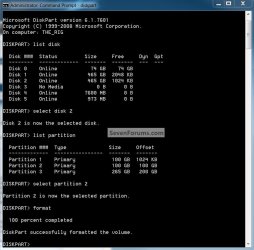
Format2.jpg
 

My Computer

Computer Manufacturer/Model Number
* BFK Customs *
OS
W 7 64-bit Ultimate
CPU
Intel Q9550 Yorkfield
Motherboard
ASUS P5Q Pro
Memory
8GB Dominator 8500C5D
Graphics Card(s)
ATI : XFX 5870
Sound Card
Realtek HD Audio 7-1
Monitor(s) Displays
1x 47" LCD HDMI & 3x 26" LCD HDMI
Screen Resolution
1920x1080P & 1920x1200
Hard Drives
1x 80GB Intel X25-M G2 SSD : 1x 500GB & 1x 640GB WD Caviar Black(s)
PSU
Corsair 620HX
Case
Cooler Master RC-690
Cooling
Tuniq Tower 120, 2x 140mm and 3x 120mm case fans
Keyboard
Microsoft 500
Mouse
Razer Diamondback 3G
Internet Speed
14 Mb/s
Other Info
1x Koutech 3Gb/s SATA HDD Hot Swap Rack
Hello Ted,

You can use the Clean All command to "secure erase" a hard drive to completely wipe it clean. :)

Hope this helps,
Shawn
 

My Computer

Computer type
PC/Desktop
Computer Manufacturer/Model Number
Self built custom
OS
64-bit Windows 11 Pro for Workstations
CPU
Intel i7-8700K OC'd to 5 GHz
Motherboard
ASUS ROG Maximus XI Formula Z390
Memory
64 GB (4x16GB) G.SKILL TridentZ RGB DDR4 3600 MHz
Graphics Card(s)
ASUS ROG-STRIX-GTX1080TI-O11G-GAMING
Sound Card
Integrated
Monitor(s) Displays
2 x Samsung Odyssey G7 27"
Screen Resolution
2560x1440
Hard Drives
1TB Samsung 990 PRO M.2,
4TB Samsung 990 PRO PRO M.2,
TerraMaster F8 SSD Plus NAS
PSU
Seasonic Prime Titanium 850W
Case
Thermaltake Core P3
Cooling
Corsair Hydro H115i
Keyboard
Logitech wireless K800
Mouse
Logitech MX Master 4
Internet Speed
2 Gb/s Download and 100 Mb/s Upload
Antivirus
Malwarebyte Anti-Malware Premium
Browser
Google Chrome
Other Info
Logitech Z625 speaker system,
Logitech BRIO 4K Pro webcam,
HP Color LaserJet Pro MFP M477fdn,
APC SMART-UPS RT 1000 XL - SURT1000XLI,
Galaxy S23 Plus phone
Hello Brink.

Thanks for the reply.


I've been experimenting with that and a "clean" and a "clean all" command remove the partition structure from the HDD and make it "unallocated" space and I don't want that to happen, I want to do a secure erase to a partition on a HDD with data on other partitions on the HDD and not lose that data.
 

My Computer

Computer Manufacturer/Model Number
* BFK Customs *
OS
W 7 64-bit Ultimate
CPU
Intel Q9550 Yorkfield
Motherboard
ASUS P5Q Pro
Memory
8GB Dominator 8500C5D
Graphics Card(s)
ATI : XFX 5870
Sound Card
Realtek HD Audio 7-1
Monitor(s) Displays
1x 47" LCD HDMI & 3x 26" LCD HDMI
Screen Resolution
1920x1080P & 1920x1200
Hard Drives
1x 80GB Intel X25-M G2 SSD : 1x 500GB & 1x 640GB WD Caviar Black(s)
PSU
Corsair 620HX
Case
Cooler Master RC-690
Cooling
Tuniq Tower 120, 2x 140mm and 3x 120mm case fans
Keyboard
Microsoft 500
Mouse
Razer Diamondback 3G
Internet Speed
14 Mb/s
Other Info
1x Koutech 3Gb/s SATA HDD Hot Swap Rack
While the "format" command is not as a "secure erase" as using the "Clean All" command, if you "format" and install Windows on top of it, it should pretty much wipe out any traces of data that was on the HDD.


Quick Format - only rewrites the boot record of the media and makes the whole space available for writing data. Althought physically, previous data is still present, only marked as free space.

Full Format - formats everything as well as test (dskchk) each sector for Read/Write problems. Sectors with problems are marked as bad. Since it tests every sector, depending on the hard drive size and computer speed may take many minutes or hours to do.
 

My Computer

Computer type
PC/Desktop
Computer Manufacturer/Model Number
Self built custom
OS
64-bit Windows 11 Pro for Workstations
CPU
Intel i7-8700K OC'd to 5 GHz
Motherboard
ASUS ROG Maximus XI Formula Z390
Memory
64 GB (4x16GB) G.SKILL TridentZ RGB DDR4 3600 MHz
Graphics Card(s)
ASUS ROG-STRIX-GTX1080TI-O11G-GAMING
Sound Card
Integrated
Monitor(s) Displays
2 x Samsung Odyssey G7 27"
Screen Resolution
2560x1440
Hard Drives
1TB Samsung 990 PRO M.2,
4TB Samsung 990 PRO PRO M.2,
TerraMaster F8 SSD Plus NAS
PSU
Seasonic Prime Titanium 850W
Case
Thermaltake Core P3
Cooling
Corsair Hydro H115i
Keyboard
Logitech wireless K800
Mouse
Logitech MX Master 4
Internet Speed
2 Gb/s Download and 100 Mb/s Upload
Antivirus
Malwarebyte Anti-Malware Premium
Browser
Google Chrome
Other Info
Logitech Z625 speaker system,
Logitech BRIO 4K Pro webcam,
HP Color LaserJet Pro MFP M477fdn,
APC SMART-UPS RT 1000 XL - SURT1000XLI,
Galaxy S23 Plus phone
So any data on the partition would be pretty much un-recoverable after a full format and a clean install?


Thank you Shawn. :)
 

My Computer

Computer Manufacturer/Model Number
* BFK Customs *
OS
W 7 64-bit Ultimate
CPU
Intel Q9550 Yorkfield
Motherboard
ASUS P5Q Pro
Memory
8GB Dominator 8500C5D
Graphics Card(s)
ATI : XFX 5870
Sound Card
Realtek HD Audio 7-1
Monitor(s) Displays
1x 47" LCD HDMI & 3x 26" LCD HDMI
Screen Resolution
1920x1080P & 1920x1200
Hard Drives
1x 80GB Intel X25-M G2 SSD : 1x 500GB & 1x 640GB WD Caviar Black(s)
PSU
Corsair 620HX
Case
Cooler Master RC-690
Cooling
Tuniq Tower 120, 2x 140mm and 3x 120mm case fans
Keyboard
Microsoft 500
Mouse
Razer Diamondback 3G
Internet Speed
14 Mb/s
Other Info
1x Koutech 3Gb/s SATA HDD Hot Swap Rack
I'm sure that the government will still have a way to recover some data from it if push came to shove, but it would be practically unrecoverable for your average joe.

If you truly need it wiped cleaned, then it's either the "Clean All" command, or a 3rd party disk scrubbing program with several passes that would need to be used to do so.
 

My Computer

Computer type
PC/Desktop
Computer Manufacturer/Model Number
Self built custom
OS
64-bit Windows 11 Pro for Workstations
CPU
Intel i7-8700K OC'd to 5 GHz
Motherboard
ASUS ROG Maximus XI Formula Z390
Memory
64 GB (4x16GB) G.SKILL TridentZ RGB DDR4 3600 MHz
Graphics Card(s)
ASUS ROG-STRIX-GTX1080TI-O11G-GAMING
Sound Card
Integrated
Monitor(s) Displays
2 x Samsung Odyssey G7 27"
Screen Resolution
2560x1440
Hard Drives
1TB Samsung 990 PRO M.2,
4TB Samsung 990 PRO PRO M.2,
TerraMaster F8 SSD Plus NAS
PSU
Seasonic Prime Titanium 850W
Case
Thermaltake Core P3
Cooling
Corsair Hydro H115i
Keyboard
Logitech wireless K800
Mouse
Logitech MX Master 4
Internet Speed
2 Gb/s Download and 100 Mb/s Upload
Antivirus
Malwarebyte Anti-Malware Premium
Browser
Google Chrome
Other Info
Logitech Z625 speaker system,
Logitech BRIO 4K Pro webcam,
HP Color LaserJet Pro MFP M477fdn,
APC SMART-UPS RT 1000 XL - SURT1000XLI,
Galaxy S23 Plus phone
I realized after I posted that that I was making it sound as though I have "stuff" I want hidden, I don't, I just want a clean slate when I do clean installs from now on.


Thank you very much Shawn. :)

I also want to say "thank you" to Jonathan_King for his help with this also.
 

My Computer

Computer Manufacturer/Model Number
* BFK Customs *
OS
W 7 64-bit Ultimate
CPU
Intel Q9550 Yorkfield
Motherboard
ASUS P5Q Pro
Memory
8GB Dominator 8500C5D
Graphics Card(s)
ATI : XFX 5870
Sound Card
Realtek HD Audio 7-1
Monitor(s) Displays
1x 47" LCD HDMI & 3x 26" LCD HDMI
Screen Resolution
1920x1080P & 1920x1200
Hard Drives
1x 80GB Intel X25-M G2 SSD : 1x 500GB & 1x 640GB WD Caviar Black(s)
PSU
Corsair 620HX
Case
Cooler Master RC-690
Cooling
Tuniq Tower 120, 2x 140mm and 3x 120mm case fans
Keyboard
Microsoft 500
Mouse
Razer Diamondback 3G
Internet Speed
14 Mb/s
Other Info
1x Koutech 3Gb/s SATA HDD Hot Swap Rack
You don't have to be a criminal or a spy to want a truly clean drive

There is a little known command built into all modern drives firmware.....

CMRR - Secure Erase

HDDerase.exe is a DOS-based utility that securely erases "sanitizes" all data
on ATA hard disk drives in Intel architecture computers (PCs). It offers the
option to run the drive internal secure erase command, security erase unit,
based on the ATA specification by the T13 technical committee.
This does not work on USB or SCSI drives.

It has been my understanding over the years of researching that the following refers to Bad Sectors as well..

Q: What is the difference between secure erase and enhanced secure erase?

A: Secure erase overwrites all user data areas with binary zeroes. Enhanced
secure erase writes predetermined data patterns (set by the manufacturer) to
all user data areas, including sectors that are no longer in use due to
reallocation. ***NOTE: the enhanced secure erase option is not supported by
all ATA drives.
No other software or method will also erase data on bad sectors.

So even if you erase a drive of data. Any data that was written to a sector that has
been marked bad can be recovered using exotic lab techniques for data recovery.

There are many devices now that are certified and can claim full certification for
things like HIPAA and other very sensitives data erasure needs that only use the
Internal Wipe Command to completely erase all data from a drive that could be
re-used in any capacity.
Which makes the Internal Wipe Command very favorable for anyone who is about to trash,
or resell a system that they may not want sensitive data to be recovered from.

Keep in mind that this is a full disk erasure.
 

My Computer

Computer Manufacturer/Model Number
Self Built
OS
Win 7 Ultimate 32bit
CPU
C2D E6600 2.4Ghz
Motherboard
Intel D965WH
Memory
4G Kingston KHX5400D2
Graphics Card(s)
EVGA GTX 570 HD SC (012-P3-1573-KR)
Sound Card
On-Board
Monitor(s) Displays
Samsung 226BW
Screen Resolution
1680 x 1050
Hard Drives
2 x 250 Seagate Barracuda
2 x 500 Seagate Barracuda (Raid1)
PSU
Corsair TX750W
Case
In-Win C589
Cooling
Stock Intel Cooling
Tepid:

Sounds interesting. Have you actually used this app? I have downloaded it, but gone no further.

It appears that the EXE file is actually called hdderase.exe rather than Secure Erase?

I guess you have to burn it to a bootable CDR and then boot from it.

Any issues and do you have an estimate of how long this takes to run on a 1 TB drive scheduled for disposal?

Barefoot Kid:

Here are the commands I use with Diskpart, after hitting Shift F10 during setup:

list disk (to show the ID number of the hard disk to partition, normally Disk 0)

select disk 0 (change 0 to another number if applicable)

clean

create partition primary size=80000 (create a partition with 80 GB space; to use the entire disk as one partition, omit the “size=value” parameter switch; use a similar command to create more partitions if needed or create in Windows 7 after installation)

select partition 1

active

format fs=ntfs quick

exit
 

My Computer

Computer type
PC/Desktop
Computer Manufacturer/Model Number
Ignatz Special; 4 speed manual gearbox; factory air conditioning; one of one
OS
Windows 7 Home Premium SP1, 64-bit
CPU
Intel Skylake i5-6600K, not overclocked
Motherboard
AsRock Z170M Extreme 4, micro ATX
Memory
8 GB HyperX DDR4-2666 (2 x 4 GB)
Graphics Card(s)
none; graphics are integrated on CPU
Sound Card
onboard: Realtek ALC1150; external: USB Behringer UF0-202
Monitor(s) Displays
Dell S2340M 23 inch IPS
Screen Resolution
1600 x 900
Hard Drives
System: Crucial MX100 series SSD, 128 GB;
Data: Samsung Spinpoint 103SJ, 1 TB;
Backup: WD Caviar Green WD30EZRX-00D8PB0, 3 TB
PSU
Rosewill SilentNight 500 watt fanless, semi-modular
Case
Antec Solo II
Cooling
Noctua NH-U12S; Noctua F12 intake, Noctua S12A exhaust
Keyboard
Microsoft 200 6JH-00001 USB
Mouse
Dell or Microsoft optical wired; USB
Antivirus
Microsoft Security Essentials and Malwarebytes Premium
Browser
Pale Moon
Other Info
All fans PWM; speeds at idle: CPU circa 500 rpm; intake circa 600 rpm; exhaust circa 600 rpm; CPU temps 27 idle and 47 C load in a warm room (27 C/81 F) when running Intel Extreme Tuning Utility stress test.
Hello Ignatzatsonic,

The data on the HDD is not written over using the clean or format quick command. It is only marked as being deleted and can be written over when new data is written/saved to the HDD next. You would have to use the clean all command for a secure erase to have all the data written over with 0's on the HDD instead though.

http://www.sevenforums.com/tutorials/52129-disk-clean-clean-all-diskpart-command.html
 

My Computer

Computer type
PC/Desktop
Computer Manufacturer/Model Number
Self built custom
OS
64-bit Windows 11 Pro for Workstations
CPU
Intel i7-8700K OC'd to 5 GHz
Motherboard
ASUS ROG Maximus XI Formula Z390
Memory
64 GB (4x16GB) G.SKILL TridentZ RGB DDR4 3600 MHz
Graphics Card(s)
ASUS ROG-STRIX-GTX1080TI-O11G-GAMING
Sound Card
Integrated
Monitor(s) Displays
2 x Samsung Odyssey G7 27"
Screen Resolution
2560x1440
Hard Drives
1TB Samsung 990 PRO M.2,
4TB Samsung 990 PRO PRO M.2,
TerraMaster F8 SSD Plus NAS
PSU
Seasonic Prime Titanium 850W
Case
Thermaltake Core P3
Cooling
Corsair Hydro H115i
Keyboard
Logitech wireless K800
Mouse
Logitech MX Master 4
Internet Speed
2 Gb/s Download and 100 Mb/s Upload
Antivirus
Malwarebyte Anti-Malware Premium
Browser
Google Chrome
Other Info
Logitech Z625 speaker system,
Logitech BRIO 4K Pro webcam,
HP Color LaserJet Pro MFP M477fdn,
APC SMART-UPS RT 1000 XL - SURT1000XLI,
Galaxy S23 Plus phone
Hello everyone.
What I would like is to do is a "secure erase" (write zeroes) to a partition of a HDD before a clean install of Windows 7.

Ok, having looked at the fist part of this thread, I can chip in a little information for you...

Simply this... "Format" is not "Erase"... Even a long format which can take hours to finish is only a surface scan done in READ mode, while this will map bad sectors out of the $Bitmap file in NTFS it will neither fix bad sectors nor erase any pre-existing data.

You will need a 3rd party program to "Zero fill" your drive... Google is your friend... there are lots of them.

However... If you are just doing a clean install, format is plenty good. Yes there's still going to be recoverable data on the drive but that data is neither listed in any directory nor indexed in the Bitmap or MFT records... so as far as windows is concerned it's working on a brand new disk.

The reason old data is not reset to some predetermined value is simply that it's a waste of time. If you had to write zeros on a drive before you could write new data (like they had to do with old magnetic core memory) the process would take *at least* twice as long. With a hard disk you just ignore the old stuff and write over top of it... and that's plenty good enough.

The only time I'd recommend a zero fill is if the drive is leaving your possession with "confidential" data on it... Your financials, medicals or (heaven forbid) something illegal....
 

My Computer

Computer Manufacturer/Model Number
Homebrew
OS
XP Pro SP3 X86 / Win7 Pro X86
CPU
Amd 64 x2 4200 (2.4ghz)
Motherboard
Asus M2N-MX SE Plus
Memory
Kingston DDR2 800 2gb
Graphics Card(s)
Nvidia GF-8400
Sound Card
Realtek on Motherboard
Monitor(s) Displays
Acer x-193bw
Screen Resolution
1440 x 900
Hard Drives
Western Digital 500g
PSU
350watt In-Win
Case
In-Win
Cooling
Air
Keyboard
yes
Mouse
yes
Internet Speed
5mpbs
Other Info
Also ASRock ION 330 as HTPC (on XP).
Acer Aspire as GP netbook (on XP).
Brink:

Thanks for that clarification.

I guess a person may as well use "clean all" every time rather than "clean" for the sake of security. No harm done other than more time taken.


I gather "full format" is no more secure than "format"?

I assume "Clean all" is the only command available at a prompt in Windows 7 natively that will write zeroes and can write zeroes to C if you boot from the Windows 7 DVD?.

Do "clean all" and "full format" differ significantly in how long either would take to run on a 1 TB drive?
 

My Computer

Computer type
PC/Desktop
Computer Manufacturer/Model Number
Ignatz Special; 4 speed manual gearbox; factory air conditioning; one of one
OS
Windows 7 Home Premium SP1, 64-bit
CPU
Intel Skylake i5-6600K, not overclocked
Motherboard
AsRock Z170M Extreme 4, micro ATX
Memory
8 GB HyperX DDR4-2666 (2 x 4 GB)
Graphics Card(s)
none; graphics are integrated on CPU
Sound Card
onboard: Realtek ALC1150; external: USB Behringer UF0-202
Monitor(s) Displays
Dell S2340M 23 inch IPS
Screen Resolution
1600 x 900
Hard Drives
System: Crucial MX100 series SSD, 128 GB;
Data: Samsung Spinpoint 103SJ, 1 TB;
Backup: WD Caviar Green WD30EZRX-00D8PB0, 3 TB
PSU
Rosewill SilentNight 500 watt fanless, semi-modular
Case
Antec Solo II
Cooling
Noctua NH-U12S; Noctua F12 intake, Noctua S12A exhaust
Keyboard
Microsoft 200 6JH-00001 USB
Mouse
Dell or Microsoft optical wired; USB
Antivirus
Microsoft Security Essentials and Malwarebytes Premium
Browser
Pale Moon
Other Info
All fans PWM; speeds at idle: CPU circa 500 rpm; intake circa 600 rpm; exhaust circa 600 rpm; CPU temps 27 idle and 47 C load in a warm room (27 C/81 F) when running Intel Extreme Tuning Utility stress test.
Nar, format doesn't actualy erase (write over) the data but just marks them as deleted instead. That's why you may sometimes be able to use a data recovery program to recover data that has been deleted or formatted if it has not been writen over yet.

The Clean all will write over all data on the HDD for a secure erase.

A "full format" (regular format) will do this instead: Differences between a Quick format and a regular format during a "clean" installation of Windows XP

I'm not sure how long it will take, but I would imagine that would take a bit for a 1TB drive to run a "clean all" on.
 
Last edited:

My Computer

Computer type
PC/Desktop
Computer Manufacturer/Model Number
Self built custom
OS
64-bit Windows 11 Pro for Workstations
CPU
Intel i7-8700K OC'd to 5 GHz
Motherboard
ASUS ROG Maximus XI Formula Z390
Memory
64 GB (4x16GB) G.SKILL TridentZ RGB DDR4 3600 MHz
Graphics Card(s)
ASUS ROG-STRIX-GTX1080TI-O11G-GAMING
Sound Card
Integrated
Monitor(s) Displays
2 x Samsung Odyssey G7 27"
Screen Resolution
2560x1440
Hard Drives
1TB Samsung 990 PRO M.2,
4TB Samsung 990 PRO PRO M.2,
TerraMaster F8 SSD Plus NAS
PSU
Seasonic Prime Titanium 850W
Case
Thermaltake Core P3
Cooling
Corsair Hydro H115i
Keyboard
Logitech wireless K800
Mouse
Logitech MX Master 4
Internet Speed
2 Gb/s Download and 100 Mb/s Upload
Antivirus
Malwarebyte Anti-Malware Premium
Browser
Google Chrome
Other Info
Logitech Z625 speaker system,
Logitech BRIO 4K Pro webcam,
HP Color LaserJet Pro MFP M477fdn,
APC SMART-UPS RT 1000 XL - SURT1000XLI,
Galaxy S23 Plus phone
Yes I have used HDDErase which is the application that calls the internal wipe command of the firmware.
There is no direct route to this command other than using hdderase, and I think a very small (like one other) number of applications that can access this command.

There are some caveates to using it, and yes, you can render a drive useless. Which I have done a couple times. But, if everything goes well, you can be assured that (again, to the best of my knowledge, from the research that I did a couple years ago) all data, including bad sectors are wiped clean.

I have not used it in a long time, but I am pretty sure this Internal Wipe Command is still on every drive sold today.

How to REALLY erase a hard drive - Update | Storage Bits | ZDNet.com

What is Secure Erase?
Secure Erase is built into all ATA-compliant disks drives since 2001. This functionality is recognized by the US Government’s National Institute of Standards and Technologies (NIST) as equivalent to magnetically wiping a drive (degaussing) or physically destroying it. NIST also rates the secure erase commands as more secure than external host-based drive wiping utilities such as Boot and Nuke. Secure Erase complies with HIPAA, Personal Information Protection and Electronic Documents Act (PIPEDA), the Gramm-Leach-Bliley Act (GLBA), and California Senate Bill 1386 for data destruction.
Doing a Zero Fill can be used and is good for the average joe that doesn't really care about wether or not data can be retrieved,but just wants to be secure in the knowledge that most people can't recover the data. Someone getting a hold of a drive that knows what they are doing could still get pieces of data from the drive. Trust me I have researched this.

There are articals out there that talk about even being able to recover data from a shredded drive. Meaning they put the drive through a shredder and grind it down. This is a bit over kill but it has been done according to articles I have read. Or at least theorized. It has been a while since I read anything on this. I did research cause a company I was working for was looking into HIPAA re-certification of HDD's used in the medical field. So they could either resell them or reuse them in other areas of the company. Trust me it is a bigger deal than you think in the medical field for HIPAA among other areas that control sensitive data.

You get hacker eddie that knows how to recover data and a zero wiped drive can give up juicy data.

It all depends on how concerned you are about the data on your drive.

i just put the Internal Wipe command info out here as just that, knowledge, to be taken and researched on further by those interested.
 

My Computer

Computer Manufacturer/Model Number
Self Built
OS
Win 7 Ultimate 32bit
CPU
C2D E6600 2.4Ghz
Motherboard
Intel D965WH
Memory
4G Kingston KHX5400D2
Graphics Card(s)
EVGA GTX 570 HD SC (012-P3-1573-KR)
Sound Card
On-Board
Monitor(s) Displays
Samsung 226BW
Screen Resolution
1680 x 1050
Hard Drives
2 x 250 Seagate Barracuda
2 x 500 Seagate Barracuda (Raid1)
PSU
Corsair TX750W
Case
In-Win C589
Cooling
Stock Intel Cooling
I want to thank you all for the information.
 

My Computer

Computer Manufacturer/Model Number
* BFK Customs *
OS
W 7 64-bit Ultimate
CPU
Intel Q9550 Yorkfield
Motherboard
ASUS P5Q Pro
Memory
8GB Dominator 8500C5D
Graphics Card(s)
ATI : XFX 5870
Sound Card
Realtek HD Audio 7-1
Monitor(s) Displays
1x 47" LCD HDMI & 3x 26" LCD HDMI
Screen Resolution
1920x1080P & 1920x1200
Hard Drives
1x 80GB Intel X25-M G2 SSD : 1x 500GB & 1x 640GB WD Caviar Black(s)
PSU
Corsair 620HX
Case
Cooler Master RC-690
Cooling
Tuniq Tower 120, 2x 140mm and 3x 120mm case fans
Keyboard
Microsoft 500
Mouse
Razer Diamondback 3G
Internet Speed
14 Mb/s
Other Info
1x Koutech 3Gb/s SATA HDD Hot Swap Rack
Back
Top