Using heaps of ram

win7jak

New member
Local time
10:07 AM
Messages
29
Location
Australia
Hi. I'm new to win7. A friend installed win7 pro 32bit a few days ago and I've been installing and refining programs. Mus say I was pleasantly surprised how fast it installed. Way faster that xp:party:

A downside - I notice it is using an alarming amount of ram on startup and when all is stable - 600mb. That is before any apps have been started. Now that I have started Firefox and this forum we are up to 670mb.

This is verified in Task Manager.
Got any isea's on how to reduce this amount or is this the norm for win7 pro.
 

My Computer

Computer type
PC/Desktop
Computer Manufacturer/Model Number
custom build
OS
Windows 7 Ultimate Service Pack 1
CPU
Intel Core i5 2500K @ 3.30GHz Sandy Bridge 32nm
Motherboard
ASUSTeK P8Z68-V LX (LGA1155)
Memory
8.00GB Dual-Channel DDR3 @ 668MHz (9-9-9-24)
Graphics Card(s)
1023MB NVIDIA GeForce GTX 550 Ti
Sound Card
Realtek High Definition Audio
Monitor(s) Displays
AOC 2416 (1920x1200 pixels); Dell E193FP (1280x1024 pixels)
Screen Resolution
1920x1200
Hard Drives
Boot - ST3200822AS ATA Device
Seagate Barracuda 2 terra SATA II
WD 1 Terra SATA II
WD 640Mb SATA II
Cooling
550 watt output
Keyboard
Ms
Mouse
Dell (old)
Internet Speed
slow
Antivirus
Comodo Internet Securitry 2013
Browser
Firefox 22 (Eng)
You need to see if it is really *used*, of if Windows is just caching. Open resmon (start > resmon.exe) and switch to the memory tab - this will actually give you an accurate indication of used vs standby vs free. Windows 7 is not like XP, in that it'll precache all kinds of things it expects you to use in RAM (superfetch), and will learn over time the best way to do this. This cache can be removed (and will be by the memory manager) if other things need the RAM, of course, but Windows tries to do the best job it can to put things in RAM it expects you to use at some point, so if there's free RAM, it will cache things. Assuming you don't have a memory leak on a newly installed system, this is likely superfetch doing it's job and nothing to be alarmed about (this is a common post by folks new to Win7, by the way).
 

My Computer

Computer type
PC/Desktop
Computer Manufacturer/Model Number
Custom
OS
Windows 10 Pro x64
CPU
Intel Core i7 4790K @ 4.5GHz
Motherboard
Asus Maximus Hero VII
Memory
32GB DDR3
Graphics Card(s)
Nvidia GeForce GTX970
Sound Card
Realtek HD Audio
Screen Resolution
1920x1200
Hard Drives
1x Samsung 250GB SSD
4x WD RE 2TB (RAIDZ)
PSU
Corsair AX760i
Case
Fractal Design Define R4
Cooling
Noctua NH-D15
Don't worry about memory usage. It takes care of itself. Until there is a high level of Page Fault activity and the computer is actually sufficating from lack of memory is when you start worrying about these things. However, when that time comes around I can tell you what will cause it. An application you installed, in most cases the security (antivirus) software you use.
 

My Computer

Computer type
PC/Desktop
Computer Manufacturer/Model Number
Alienware Aurora ALX R4
OS
Windows 10 Pro (x64)
CPU
Intel Core i7-3930K (3.2GHz - 4.5GHz)
Motherboard
Alienware Aurora-R4 x79
Memory
4x Samsung 4GB PC3-12800 DDR3 (16GB 1600MHz)
Graphics Card(s)
Nvidia Geforce GTX 690
Sound Card
SteelSeries Siberia Elite
Monitor(s) Displays
Dell UltraSharp U3011
Screen Resolution
2560x1600
Hard Drives
Samsung 850 Pro 256 GB, Seagate 1TB Desktop Hybrid HDD, 2x Western Digital 4TB Green HDD
PSU
875W Some Dell PSU <.<
Case
Alienware Aurora ALX
Cooling
Custom Liquid Cooling (EK CPU & GPU blocks) dual EK 480RAD
Keyboard
Logitech G710+ Mechanical
Mouse
Logitech G700s
Internet Speed
Verizon Fios (50 mbps average)
Other Info
Server: Intel NUC D54250WYK: i5-4250U, 16GB, 256 GB mSATA, Windows Server 2012 R2
You are lucky - 600 MBs is on the low side. I am currently at 1.360 MBs and all I do is work on the Forum with IE. If I were you, I would not worry. What do you want to do with all the RAM - save it for a rainy day?? - LOL. The best place to see how RAM is being used is in the Resource Monitor > Memory tab. The color bar is very telling. Everything in blue (light or dark) on that bar is "available".
 

My Computer

Computer Manufacturer/Model Number
HP, Dell, Gateway, Toshiba - 4 laptops and 2 desktops
OS
Vista, Windows7, Mint Mate, Zorin, Windows 8
CPU
from 1.6GHz Duo to i7
Monitor(s) Displays
2x HP w2207
Hard Drives
5x HDD, 7x SSD, 12x Externals
Keyboard
with trackball - no mices
Mouse
Trackball mice
Internet Speed
DSL 6000
You are lucky - 600 MBs is on the low side. I am currently at 1.360 MBs and all I do is work on the Forum with IE. If I were you, I would not worry. What do you want to do with all the RAM - save it for a rainy day?? - LOL. The best place to see how RAM is being used is in the Resource Monitor > Memory tab. The color bar is very telling. Everything in blue (light or dark) on that bar is "available".


Ditto here too, I seem to use about the 1600mb (roughly) and i have firefox, itunes, steam, rainmeter and what not running. 600mb's i think a lot of people might be jealous of that low amount being used.

Lucky
 

My Computer

Computer Manufacturer/Model Number
The HAFmeister (Custom)
OS
Windows 7 Ultimate x64 RTM + SP1
CPU
Intel Core i7 950 3.06GHZ (OC'd to 3.99Ghz)
Motherboard
Asus Rampage III Extreme x58 SATA 6GB & USB 3.0
Memory
6GB OCZ Reaper HPC Edition PC3-16000 (set 1606Mhz 8-8-8-26)
Graphics Card(s)
EVGA Nvidia Geforce GTX 570
Sound Card
Creative SB X-Fi Titanium Fatal1ty Professional Series
Monitor(s) Displays
Samsung SM2433BW 24" Widescreen Monitor
Screen Resolution
1920x1200
Hard Drives
Western Digital Caviar Black 500GB 32Mb Buffer SATA II
Western Digital Caviar Black 750GB 32Mb Buffer SATA II
Western Digital Caviar Blue 500GB 16Mb Buffer SATA II
Western Digital My Book Essential Edition 750GB USB
Samsung Spinpoint 2TB SATA II
PSU
Thermaltake Toughpower 1200w (Modular)
Case
CoolerMaster HAF-932
Cooling
Zalman Reserator XT and ZM-WB5 Plus - GPU uses Stock coolers
Keyboard
Logitech G510
Mouse
Logitech G9 Gaming Mouse
Internet Speed
3MB Profile - 350-400kbs (Real-Speed)
Other Info
IcyBox Hot-Swap Bay,
Logitech G27 Steering Wheel,
Xbox 360 Wirless Elite Controller with Microsoft Reciever and
Play & Charge Kit,
Belkin USB Wireless Adaptor,
GAME Generic Controller (Playstation Looky-Likey),
Epson SX125 All-in-One.
The idle amount of RAM depends on how much you have.
I have 2 GBs on mine and it rest around 600 MB.
 

My Computer

Computer type
PC/Desktop
Computer Manufacturer/Model Number
Alienware Aurora ALX R4
OS
Windows 10 Pro (x64)
CPU
Intel Core i7-3930K (3.2GHz - 4.5GHz)
Motherboard
Alienware Aurora-R4 x79
Memory
4x Samsung 4GB PC3-12800 DDR3 (16GB 1600MHz)
Graphics Card(s)
Nvidia Geforce GTX 690
Sound Card
SteelSeries Siberia Elite
Monitor(s) Displays
Dell UltraSharp U3011
Screen Resolution
2560x1600
Hard Drives
Samsung 850 Pro 256 GB, Seagate 1TB Desktop Hybrid HDD, 2x Western Digital 4TB Green HDD
PSU
875W Some Dell PSU <.<
Case
Alienware Aurora ALX
Cooling
Custom Liquid Cooling (EK CPU & GPU blocks) dual EK 480RAD
Keyboard
Logitech G710+ Mechanical
Mouse
Logitech G700s
Internet Speed
Verizon Fios (50 mbps average)
Other Info
Server: Intel NUC D54250WYK: i5-4250U, 16GB, 256 GB mSATA, Windows Server 2012 R2
Unused RAM is wasted RAM. The key is that the RAM is "available" which means the OS can use it for other things like opening applications, etc. Looking at my box, with 8GB of RAM, there is only 700MB free...but 2.8GB is cached and 3.5GB is available. And the primary reason my RAM usage is so high is that I have Server 2008 running virtually.
 

My Computer

Computer Manufacturer/Model Number
Self-Built in July 2009
OS
Windows 7 Ultimate x64
CPU
Intel Q9550 2.83Ghz OC'd to 3.40Ghz
Motherboard
Gigabyte GA-EP45-UD3R rev. 1.1, F12 BIOS
Memory
8GB G.Skill PI DDR2-800, 4-4-4-12 timings
Graphics Card(s)
EVGA 1280MB Nvidia GeForce GTX570
Sound Card
Realtek ALC899A 8 channel onboard audio
Monitor(s) Displays
23" Acer x233H
Screen Resolution
1920x1080
Hard Drives
Intel X25-M 80GB Gen 2 SSD
Western Digital 1TB Caviar Black, 32MB cache. WD1001FALS
PSU
Corsair 620HX modular
Case
Antec P182
Cooling
stock
Keyboard
ABS M1 Mechanical
Mouse
Logitech G9 Laser Mouse
Internet Speed
15/2 cable modem
Other Info
Windows and Linux enthusiast. Logitech G35 Headset.
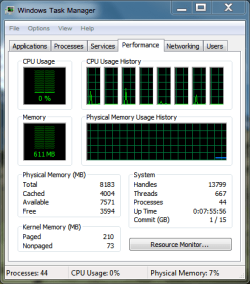
My Win 7 desktop used to run at around 600 MB of RAM too, but as I began to add and use more programs that amount grew and its now at 1.37 GB as I type this.

~Maxx~
.
da59fa57.png
 

Attachments

  • TM 611.PNG
    TM 611.PNG
    14.8 KB · Views: 6

My Computer

Computer Manufacturer/Model Number
HP HPE 270f
OS
Windows 7 x64 Home Premium
CPU
Intel Core i7 930 @ 2.8 Ghz Socket 1366 LGA
Motherboard
Pegatron Truckee v1.04E41
Memory
8 GB 1366 Mhz DDR3 (PC3-10700) RAM
Graphics Card(s)
ATI Radeon 5770 1 GB DDR5 RAM
Sound Card
Realtech High Definition
Monitor(s) Displays
32" Sony Bravia
Screen Resolution
1366 X 768
Hard Drives
Intel 25nm 120 GB Series 320 SSD HD Tune- 265 MBps Read/ 130 MBps Write

LaCie 1TB + 1TB RAID 0 eSATA Drive HD Tune- 160 MBps Read/ 90 MBps Write
Keyboard
Logitech Illuminated
Mouse
Logitech MX Revolution
Internet Speed
36.4 Mbps Maximum on a 37 Mbps Motorola SB501 Modem
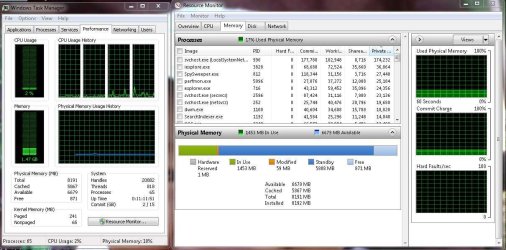
This is my make -up
 

Attachments

  • resourse2.jpg
    resourse2.jpg
    119.3 KB · Views: 37

My Computer

Computer type
PC/Desktop
Computer Manufacturer/Model Number
CoreI7-6700K MrFingerIII Special Builds
OS
Windows 10 Home Premium 64bit sp1
CPU
Intel I7-6700K @ 4.6 Ghz 1.344 volts everyday OC
Motherboard
Asrock Fatality K6 Z170 Socket 1151
Memory
32GB G-Skill TridentZ 3200mhz 16-18-18-38 DDR4
Graphics Card(s)
Sli Gigabyte Windforce GTX 980 G1
Sound Card
AC97 Creative Rage Tactic 3D Headphones Bluetooth
Monitor(s) Displays
27" Asus ROG Swift PG278Q G-Sync 48" Vizio Smart HD TV
Screen Resolution
2560x1440p 27"- 48" Currently Gaming at 2560x1440p Res 2K
Hard Drives
250GB Samsung Evo840SSD Seagate baracuda 500 GB WD Mybook 500Gb 1TB Seagate Barracuda
PSU
HX1050w Corsair Silver 80plus certified crosfire/sli
Case
Enthod Pro Full Tower
Cooling
Corsair H110i GT 280 mm High Performance WaterBlock
Keyboard
Logitech wireless keyboard
Mouse
Logitech wireless mouse
Internet Speed
Cox Cable 100+ mb
Antivirus
WebRoot Spysweeper with Antivirus
Browser
IE-10, Chrome, Opera
Other Info
My Other Rig is a AMD FX8320E @4.6Ghz 16GB Ballistic Sport Ram
Mobo Asrock Fatality 990FX 120GB OCZ SSD 1TB Seagate Barracuda Corsair H75 Cooling PSU Corsair CX750
GPU GTX Gigabyte 970G1
Hey thanks everyone. I'm so pleased to hear from you all and to hear your comments and thoughts.

It still concerns me that the system will pre-allocate ram. Does that mean I dont have access to that ram other than for what "it" expects i will use it for?. I use the system for photography and video editing and I need heaps of ram for that. So whats the score about the pre allocation? Is it waiting to be used by any program that fires up or set aside for a program it expects to use it. What if the anticipated prog dosn't use the ram? Sorry to be a bore.
 

My Computer

Computer type
PC/Desktop
Computer Manufacturer/Model Number
custom build
OS
Windows 7 Ultimate Service Pack 1
CPU
Intel Core i5 2500K @ 3.30GHz Sandy Bridge 32nm
Motherboard
ASUSTeK P8Z68-V LX (LGA1155)
Memory
8.00GB Dual-Channel DDR3 @ 668MHz (9-9-9-24)
Graphics Card(s)
1023MB NVIDIA GeForce GTX 550 Ti
Sound Card
Realtek High Definition Audio
Monitor(s) Displays
AOC 2416 (1920x1200 pixels); Dell E193FP (1280x1024 pixels)
Screen Resolution
1920x1200
Hard Drives
Boot - ST3200822AS ATA Device
Seagate Barracuda 2 terra SATA II
WD 1 Terra SATA II
WD 640Mb SATA II
Cooling
550 watt output
Keyboard
Ms
Mouse
Dell (old)
Internet Speed
slow
Antivirus
Comodo Internet Securitry 2013
Browser
Firefox 22 (Eng)
What specific problems are you actually having??
 

My Computer

Computer type
PC/Desktop
Computer Manufacturer/Model Number
LENOVO K450 @3.0GHZ
OS
64-bit Windows 8.1 Pro
CPU
Core(TM) i5 CPU 4330 Haswell @ 3.20GHz
Motherboard
LENOVO
Memory
12.00 GB
Graphics Card(s)
Intel(R) HD Graphics
Sound Card
Intel HD integtrated
Monitor(s) Displays
HP 25' ISP Monitor
Screen Resolution
1900/1020
Hard Drives
(1) ST1000DM003-1CH162 (2) Generic STORAGE DEVICE USB Device (3) Generic STORAGE DEVICE USB Device
Internet Speed
100mb down/10mb up
If you are referring to the cache as "preallocated" RAM, then you are right. That cache (the dark blue in Process Monitor) is indeed always available. If one of your programs needs that RAM, the cache will be purged to the extent additional RAM is needed for an active program.
 

My Computer

Computer Manufacturer/Model Number
HP, Dell, Gateway, Toshiba - 4 laptops and 2 desktops
OS
Vista, Windows7, Mint Mate, Zorin, Windows 8
CPU
from 1.6GHz Duo to i7
Monitor(s) Displays
2x HP w2207
Hard Drives
5x HDD, 7x SSD, 12x Externals
Keyboard
with trackball - no mices
Mouse
Trackball mice
Internet Speed
DSL 6000
Hey thanks everyone. I'm so pleased to hear from you all and to hear your comments and thoughts.

It still concerns me that the system will pre-allocate ram. Does that mean I dont have access to that ram other than for what "it" expects i will use it for?. I use the system for photography and video editing and I need heaps of ram for that. So whats the score about the pre allocation? Is it waiting to be used by any program that fires up or set aside for a program it expects to use it. What if the anticipated prog dosn't use the ram? Sorry to be a bore.

It's a cache, pure and simple. If you have other apps that need it, Windows will get out of the way and let your apps use the RAM - however, it is actively trying to learn how you use your system, so that it can actually cache what you do use regularly, in that cache. It isn't something you will ever need to worry about - superfetch cache is just that, a cache. It will only use memory for superfetch if there are no other demands for that memory - if there ever is a demand for it, superfetch gets out of the way (assuming the demand isn't for data actually in the superfetch cache, which over time should be less and less common a scenario).
 

My Computer

Computer type
PC/Desktop
Computer Manufacturer/Model Number
Custom
OS
Windows 10 Pro x64
CPU
Intel Core i7 4790K @ 4.5GHz
Motherboard
Asus Maximus Hero VII
Memory
32GB DDR3
Graphics Card(s)
Nvidia GeForce GTX970
Sound Card
Realtek HD Audio
Screen Resolution
1920x1200
Hard Drives
1x Samsung 250GB SSD
4x WD RE 2TB (RAIDZ)
PSU
Corsair AX760i
Case
Fractal Design Define R4
Cooling
Noctua NH-D15
Yes, a friend of mine told me about this and I wasn't really too alarmed. She informed me in the case of the x64 side, the OS would take literally half of it and cache it. I actually was more concerned with how much in general was actually used and considered the Cached part as a silly Virtual Ram Disk being used as Virtual memory (Yes, it sounds silly, but when you think about it... Using RAM as a virtual disk, then in turn, using it as Virtual Ram...) Could be a hack way of trying to make use of the unused RAM and improve memory usage performance as virtual ram by writing to the virtual ram disk.
 

My Computer

Computer Manufacturer/Model Number
Alienware Area 51 Desktop and Dell Inspirion 17R (N7010)
OS
Windows 7 Ultimate x64 and Home Premium x64
CPU
Intel i7 960 (3.2 GHz Quad Core)
Motherboard
Alienware Intel based X58
Memory
12 Gigs (Triple Channel)
Graphics Card(s)
Alienware OEM nVidia GTX 560 Ti (1.25 Gig)
Sound Card
Creative Labs X-Fi Titanium
Monitor(s) Displays
Samsung PX2370 LED 23" Monitor
Screen Resolution
1920x1080
Hard Drives
2 320 Gig SATA in Raid 1 Configuration (System/App)
1 1 Tera SATA (Games)
1 1 Tera SATA (Data/Music/Videos)
PSU
750 Watt Power Supply
Case
Alienware Area 51 Desktop
Cooling
Liquid Cooled
Keyboard
Logitech G510
Mouse
Microsoft Trackball Explorer
Internet Speed
Cable
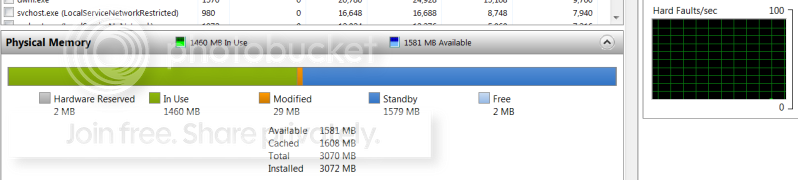
You are much better off to let Suprfetch manage it. And the amount of the cached RAM depends on how many program instances yo had opened previously - so it is completely dynamic. There is no set number. Here is an example of what I consider optimal - all RAM is being used:

2010-05-02_194339.png
 

My Computer

Computer Manufacturer/Model Number
HP, Dell, Gateway, Toshiba - 4 laptops and 2 desktops
OS
Vista, Windows7, Mint Mate, Zorin, Windows 8
CPU
from 1.6GHz Duo to i7
Monitor(s) Displays
2x HP w2207
Hard Drives
5x HDD, 7x SSD, 12x Externals
Keyboard
with trackball - no mices
Mouse
Trackball mice
Internet Speed
DSL 6000
As I understand the cached RAM is always available should the system need it and that the allocation is as transparent as if it were free.

~Maxx~
.
da59fa57.png
 

My Computer

Computer Manufacturer/Model Number
HP HPE 270f
OS
Windows 7 x64 Home Premium
CPU
Intel Core i7 930 @ 2.8 Ghz Socket 1366 LGA
Motherboard
Pegatron Truckee v1.04E41
Memory
8 GB 1366 Mhz DDR3 (PC3-10700) RAM
Graphics Card(s)
ATI Radeon 5770 1 GB DDR5 RAM
Sound Card
Realtech High Definition
Monitor(s) Displays
32" Sony Bravia
Screen Resolution
1366 X 768
Hard Drives
Intel 25nm 120 GB Series 320 SSD HD Tune- 265 MBps Read/ 130 MBps Write

LaCie 1TB + 1TB RAID 0 eSATA Drive HD Tune- 160 MBps Read/ 90 MBps Write
Keyboard
Logitech Illuminated
Mouse
Logitech MX Revolution
Internet Speed
36.4 Mbps Maximum on a 37 Mbps Motorola SB501 Modem
Here is an example of what I consider optimal - all RAM is being used:

2010-05-02_194339.png

My Vista computer which has 3 GB of RAM does much the same thing as far as allocating RAM right down to the last few MB, but my Win 7 computer has 8 GB of RAM installed and since I'm running the same programs it caches about that same amount of RAM leaving 4-5 GB of RAM free.

~Maxx~
 

My Computer

Computer Manufacturer/Model Number
HP HPE 270f
OS
Windows 7 x64 Home Premium
CPU
Intel Core i7 930 @ 2.8 Ghz Socket 1366 LGA
Motherboard
Pegatron Truckee v1.04E41
Memory
8 GB 1366 Mhz DDR3 (PC3-10700) RAM
Graphics Card(s)
ATI Radeon 5770 1 GB DDR5 RAM
Sound Card
Realtech High Definition
Monitor(s) Displays
32" Sony Bravia
Screen Resolution
1366 X 768
Hard Drives
Intel 25nm 120 GB Series 320 SSD HD Tune- 265 MBps Read/ 130 MBps Write

LaCie 1TB + 1TB RAID 0 eSATA Drive HD Tune- 160 MBps Read/ 90 MBps Write
Keyboard
Logitech Illuminated
Mouse
Logitech MX Revolution
Internet Speed
36.4 Mbps Maximum on a 37 Mbps Motorola SB501 Modem
Maxxwire, What you observe is normal. If you always run the same "pattern", the cache will be similar. It will only vary and grow when you start a great variety of programs and change the LOR (location of reference) all the time.
Check the cache in the morning after system start and then again at night before shutdown - you will already see a considerable difference in cache size (provided you have done many different things during the day - surfing all day with the IE will not show that pattern).
 

My Computer

Computer Manufacturer/Model Number
HP, Dell, Gateway, Toshiba - 4 laptops and 2 desktops
OS
Vista, Windows7, Mint Mate, Zorin, Windows 8
CPU
from 1.6GHz Duo to i7
Monitor(s) Displays
2x HP w2207
Hard Drives
5x HDD, 7x SSD, 12x Externals
Keyboard
with trackball - no mices
Mouse
Trackball mice
Internet Speed
DSL 6000
Check the cache in the morning after system start and then again at night before shutdown - you will already see a considerable difference in cache size (provided you have done many different things during the day - surfing all day with the IE will not show that pattern).

I just took a screenshot and I'll check it again before I shut the computer down and note the difference. Please pardon me but I haven't used IE in years why will IE not show this pattern?

~Maxx~
.
da59fa57.png
 

My Computer

Computer Manufacturer/Model Number
HP HPE 270f
OS
Windows 7 x64 Home Premium
CPU
Intel Core i7 930 @ 2.8 Ghz Socket 1366 LGA
Motherboard
Pegatron Truckee v1.04E41
Memory
8 GB 1366 Mhz DDR3 (PC3-10700) RAM
Graphics Card(s)
ATI Radeon 5770 1 GB DDR5 RAM
Sound Card
Realtech High Definition
Monitor(s) Displays
32" Sony Bravia
Screen Resolution
1366 X 768
Hard Drives
Intel 25nm 120 GB Series 320 SSD HD Tune- 265 MBps Read/ 130 MBps Write

LaCie 1TB + 1TB RAID 0 eSATA Drive HD Tune- 160 MBps Read/ 90 MBps Write
Keyboard
Logitech Illuminated
Mouse
Logitech MX Revolution
Internet Speed
36.4 Mbps Maximum on a 37 Mbps Motorola SB501 Modem
Check the cache in the morning after system start and then again at night before shutdown - you will already see a considerable difference in cache size (provided you have done many different things during the day - surfing all day with the IE will not show that pattern).

I just took a screenshot and I'll check it again before I shut the computer down and note the difference. Please pardon me but I haven't used IE in years why will IE not show this pattern?

~Maxx~
.
da59fa57.png
I just took IE to stand for a browser - any browser. It was not supposed to be IE specific.
 

My Computer

Computer Manufacturer/Model Number
HP, Dell, Gateway, Toshiba - 4 laptops and 2 desktops
OS
Vista, Windows7, Mint Mate, Zorin, Windows 8
CPU
from 1.6GHz Duo to i7
Monitor(s) Displays
2x HP w2207
Hard Drives
5x HDD, 7x SSD, 12x Externals
Keyboard
with trackball - no mices
Mouse
Trackball mice
Internet Speed
DSL 6000
Back
Top