
Using old drive in new computer

I guess my original idea is becoming more needed, sticking this hard drive into a computer that is more "modern". I have such a machine, it had 7 on it that apparently was bootlegged, I got the machine in a trade and the harddrive crapped out within a week of plugging it in. As best I remember it is either an ACER or ASUS
 

Attachments
  • wei.jpg
    wei.jpg
    58.6 KB · Views: 0

My Computer

Computer type
PC/Desktop
Computer Manufacturer/Model Number
compaq
OS
7 home premium 32 bit
CPU
AMD Athlon LE1640
Memory
2g
Friend has one of these cards, is it a worthwhile upgrade fro me, at $25?
XFX ATI Radeon HD 1GB DDR2 SDRAM
HD-465X-ZDFC

It's a "better" card than you have now. Scoring 263 on the Passmark benchmark.

But it's anyone's guess as to whether it will improve your performance noticeably on your CAD/CAM programs.
Those programs may be highly dependent on CPU power and not so dependent on graphics.

Every dime you spend on what you have is money you could spend on a legit upgrade. I hate to see you buy more low end stuff on nothing but speculation that it will help enough to be worthwhile.

We still have no idea how much CPU or graphics horsepower is required for your chosen programs. Maybe you can make a noticeable difference for say $75 or $100 and maybe not.
 

My Computer

Computer type
PC/Desktop
Computer Manufacturer/Model Number
Ignatz Special; 4 speed manual gearbox; factory air conditioning; one of one
OS
Windows 7 Home Premium SP1, 64-bit
CPU
Intel Skylake i5-6600K, not overclocked
Motherboard
AsRock Z170M Extreme 4, micro ATX
Memory
8 GB HyperX DDR4-2666 (2 x 4 GB)
Graphics Card(s)
none; graphics are integrated on CPU
Sound Card
onboard: Realtek ALC1150; external: USB Behringer UF0-202
Monitor(s) Displays
Dell S2340M 23 inch IPS
Screen Resolution
1600 x 900
Hard Drives
System: Crucial MX100 series SSD, 128 GB;
Data: Samsung Spinpoint 103SJ, 1 TB;
Backup: WD Caviar Green WD30EZRX-00D8PB0, 3 TB
PSU
Rosewill SilentNight 500 watt fanless, semi-modular
Case
Antec Solo II
Cooling
Noctua NH-U12S; Noctua F12 intake, Noctua S12A exhaust
Keyboard
Microsoft 200 6JH-00001 USB
Mouse
Dell or Microsoft optical wired; USB
Antivirus
Microsoft Security Essentials and Malwarebytes Premium
Browser
Pale Moon
Other Info
All fans PWM; speeds at idle: CPU circa 500 rpm; intake circa 600 rpm; exhaust circa 600 rpm; CPU temps 27 idle and 47 C load in a warm room (27 C/81 F) when running Intel Extreme Tuning Utility stress test.
I guess my original idea is becoming more needed, sticking this hard drive into a computer that is more "modern". I have such a machine, it had 7 on it that apparently was bootlegged, I got the machine in a trade and the harddrive crapped out within a week of plugging it in. As best I remember it is either an ACER or ASUS

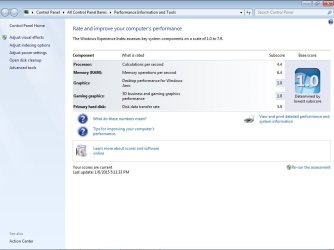
What PC is represented by this Windows Experience Index picture?

The more modern Acer/Asus?

Or the old one that you are upgrading with the new processor you just bought?

That Windows test is nearly useless at any rate.
 

My Computer

Computer type
PC/Desktop
Computer Manufacturer/Model Number
Ignatz Special; 4 speed manual gearbox; factory air conditioning; one of one
OS
Windows 7 Home Premium SP1, 64-bit
CPU
Intel Skylake i5-6600K, not overclocked
Motherboard
AsRock Z170M Extreme 4, micro ATX
Memory
8 GB HyperX DDR4-2666 (2 x 4 GB)
Graphics Card(s)
none; graphics are integrated on CPU
Sound Card
onboard: Realtek ALC1150; external: USB Behringer UF0-202
Monitor(s) Displays
Dell S2340M 23 inch IPS
Screen Resolution
1600 x 900
Hard Drives
System: Crucial MX100 series SSD, 128 GB;
Data: Samsung Spinpoint 103SJ, 1 TB;
Backup: WD Caviar Green WD30EZRX-00D8PB0, 3 TB
PSU
Rosewill SilentNight 500 watt fanless, semi-modular
Case
Antec Solo II
Cooling
Noctua NH-U12S; Noctua F12 intake, Noctua S12A exhaust
Keyboard
Microsoft 200 6JH-00001 USB
Mouse
Dell or Microsoft optical wired; USB
Antivirus
Microsoft Security Essentials and Malwarebytes Premium
Browser
Pale Moon
Other Info
All fans PWM; speeds at idle: CPU circa 500 rpm; intake circa 600 rpm; exhaust circa 600 rpm; CPU temps 27 idle and 47 C load in a warm room (27 C/81 F) when running Intel Extreme Tuning Utility stress test.
that is screen shot from one I am ready to throw out the window! I was ask to provide a W.E.I., I did a search and this is what I found, had it do a current update. Is this not what I was ask to show?
 

My Computer

Computer type
PC/Desktop
Computer Manufacturer/Model Number
compaq
OS
7 home premium 32 bit
CPU
AMD Athlon LE1640
Memory
2g
that is screen shot from one I am ready to throw out the window! I was ask to provide a W.E.I., I did a search and this is what I found, had it do a current update. Is this not what I was ask to show?

It is what you were asked to show.

But it doesn't tell us much we didn't already know.

You have an antique. Maybe you can upgrade the antique cheaply and make a noticeable difference. Maybe not.

The WEI doesn't answer the question. It's still speculation because we DON'T know how much power you need to run those specific programs reasonably well.

You are still limited to 4 GB of RAM. You are still limited to minor upgrades in the processor and video card.
 

My Computer

Computer type
PC/Desktop
Computer Manufacturer/Model Number
Ignatz Special; 4 speed manual gearbox; factory air conditioning; one of one
OS
Windows 7 Home Premium SP1, 64-bit
CPU
Intel Skylake i5-6600K, not overclocked
Motherboard
AsRock Z170M Extreme 4, micro ATX
Memory
8 GB HyperX DDR4-2666 (2 x 4 GB)
Graphics Card(s)
none; graphics are integrated on CPU
Sound Card
onboard: Realtek ALC1150; external: USB Behringer UF0-202
Monitor(s) Displays
Dell S2340M 23 inch IPS
Screen Resolution
1600 x 900
Hard Drives
System: Crucial MX100 series SSD, 128 GB;
Data: Samsung Spinpoint 103SJ, 1 TB;
Backup: WD Caviar Green WD30EZRX-00D8PB0, 3 TB
PSU
Rosewill SilentNight 500 watt fanless, semi-modular
Case
Antec Solo II
Cooling
Noctua NH-U12S; Noctua F12 intake, Noctua S12A exhaust
Keyboard
Microsoft 200 6JH-00001 USB
Mouse
Dell or Microsoft optical wired; USB
Antivirus
Microsoft Security Essentials and Malwarebytes Premium
Browser
Pale Moon
Other Info
All fans PWM; speeds at idle: CPU circa 500 rpm; intake circa 600 rpm; exhaust circa 600 rpm; CPU temps 27 idle and 47 C load in a warm room (27 C/81 F) when running Intel Extreme Tuning Utility stress test.
Regardless of what ignatz says, the WEI is not useless and tells me alot.

Your video score is 1.0 which is terrible, a 3 would be better, a 5 would be much better, and a 7.9, well... the best.

Anything you can do to improve that number is gonna make the pc better.

The cpu score is mediocre, when you add the cpu you said you bought, that score should go up too.

If you need a better Power supply, then get a better power supply, you can always keep it to use in the future.

Let`s help the OP to upgrade what he has on what he can afford until he buys a new pc.

Bob, maybe you could email ignatz a list of the software you need to run and he can research what`s needed to run it effectively :)
 

My Computer

Computer type
PC/Desktop
Computer Manufacturer/Model Number
Skylake Special #666
OS
Windows 10 Pro x64
CPU
Intel Core i7 6700K
Motherboard
Asus Sabertooth Z170 Mark 1
Memory
GSkill TridentZ RGB 16GB 3600 16-16-16-36
Graphics Card(s)
EVGA GTX 980 Ti SC x2
Sound Card
Realtek High Definition
Monitor(s) Displays
AOC G2460PG
Screen Resolution
1920 x 1080 144Hz
Hard Drives
Samsung 860 Pro 256GB, Seagate Barracuda 4TB x2
PSU
EVGA 1000 P2, EVGA White Custom Braided Cables
Case
Corsair Vengeance C70 Gunmetal Black
Cooling
Corsair H100i v2, Corsair ML120 x2, Thermal Grizzly Kryonaut
Keyboard
Logitech G910 Orion Spectrum
Mouse
Logitech G700s
Internet Speed
Verizon Fios Quantum Gateway 75/75
Antivirus
Windows Defender, Malwarebytes Free 3.8.3
Browser
Chrome
Other Info
Corsair SP120 x4, LG Blu-ray Drive, Durabrand HT-395 100 Watt Dolby Digital Amp, Corsair H2100 Wireless 7.1 Headset
I think by now you realize that this system is no good for your CAD/CAM application - and little tweaks here and there are not going to suffice. If I were you I would get a decent modern box or stop with the CAD/CAM. Desktops are not cheap these days (as compared to laptops) but the price of Caviar went up too. :D
 

My Computer

Computer Manufacturer/Model Number
HP, Dell, Gateway, Toshiba - 4 laptops and 2 desktops
OS
Vista, Windows7, Mint Mate, Zorin, Windows 8
CPU
from 1.6GHz Duo to i7
Monitor(s) Displays
2x HP w2207
Hard Drives
5x HDD, 7x SSD, 12x Externals
Keyboard
with trackball - no mices
Mouse
Trackball mice
Internet Speed
DSL 6000
here are the minimum specs for the program i am running, looks to me to be well within the machine capabilities;
Minimum Specifications
32 or 64-bit Intel Pentium 4 processor (2 GHz or faster), Intel Xeon, Intel Core, AMD Athlon 64, AMD Opteron, AMD Phemnom or later, in single, dual or quad core versions
2 GB for Windows Vista/Windows 7 and 4GB for 64-bit operating systems
10 GB free disk space for the OneCNC installation
Graphics card
CDROM or Internet connection for installing the software and for updating the software
Graphics Card
OpenGL compliant - Minimum 128 MB memory for wire frame or express systems - Minimum 256 MB memory for solid model systems
We recommend NVIDIA graphics cards or equivalent and that the latest driver for the card is installed.
17" Colour monitor (1280 x 1024 screen resolution)
Mouse including wheel (Intellimouse)
SpaceMouse/SpaceBall (optional)
Internet Explorer 6 or above
Internet connection for license activation/updates
USB port for the OneCNC software security key (dongle)
 

My Computer

Computer type
PC/Desktop
Computer Manufacturer/Model Number
compaq
OS
7 home premium 32 bit
CPU
AMD Athlon LE1640
Memory
2g
If I were to just toss the machine and keep the hard drive with all my programs and info, can I just purchase another machine without a drive, and install this? If feasible, what, currently is on the market that would be at least 3 times the minimum requirements for my program.
WHM; I just paid over $3k for the program, not using it is not an option
 

My Computer

Computer type
PC/Desktop
Computer Manufacturer/Model Number
compaq
OS
7 home premium 32 bit
CPU
AMD Athlon LE1640
Memory
2g
If I were to just toss the machine and keep the hard drive with all my programs and info, can I just purchase another machine without a drive, and install this? If feasible, what, currently is on the market that would be at least 3 times the minimum requirements for my program.
WHM; I just paid over $3k for the program, not using it is not an option
This is a difficult proposition but with a lot of work it could be done. It would be easier to reinstall the program on the new system. Find the product key with Belarc Advisor and get the installation .exe of the program.
 

My Computer

Computer Manufacturer/Model Number
HP, Dell, Gateway, Toshiba - 4 laptops and 2 desktops
OS
Vista, Windows7, Mint Mate, Zorin, Windows 8
CPU
from 1.6GHz Duo to i7
Monitor(s) Displays
2x HP w2207
Hard Drives
5x HDD, 7x SSD, 12x Externals
Keyboard
with trackball - no mices
Mouse
Trackball mice
Internet Speed
DSL 6000
I ran that this afternoon before I left, I already knew the key to the 7 that is on that machine.
I guess I'm just beating my head and avoiding the inevitable, drives with windows 7 just cannot be swapped like the older XP and such, or am I missing an explanation that isn't being said?
 

My Computer

Computer type
PC/Desktop
Computer Manufacturer/Model Number
compaq
OS
7 home premium 32 bit
CPU
AMD Athlon LE1640
Memory
2g
Boy now I'm confused.
You put a $3000.00 CAD program on a $50.00 computer.

Those specs you posted don't work in the real world.

The things I have learned about CAD programs to get them to work like a $3000.00 program should work you will need at lease a Quad Core cpu. High end Video card or two. All the ram you can stick on the motherboard.
No less that 16 gigs.
 

My Computer

Computer type
PC/Desktop
Computer Manufacturer/Model Number
Home made Desktop
OS
Windows 10 Pro. 64/ version 1709 Windows 7 Pro/64
CPU
Intel i7-6800K @ 4.3
Motherboard
ASUS X-99 Deluxe II
Memory
Corsair Platinum 16 gig @2400
Graphics Card(s)
EVGA GTX 1070 OC
Monitor(s) Displays
Asus 27" LED LCD/VE278Q
Screen Resolution
1920-1080 or 1280-720 HDMI
Hard Drives
INTEL SSD 730-240 Gb Sata 3.0/
PSU
EVGA Platium 1200W
Case
Phanteks Luxe Tempered Glass 8 fans/ one radiator
Cooling
XSPC/ Water Cooled CPU
Keyboard
Das 4 Professional
Mouse
Logitech M705/MX Anywhere 2-S
Internet Speed
100 mbits
Antivirus
Microsoft Security Essentials/ Malwarebytes Premium 3.0/ SAS
Browser
I.E. 11 default/Firefox/ ISP Time Warner Cable/Spectrum
Other Info
LG BluRay Burner/
Sound system-KLipsch-THX/
Icy Dock ssd Hot Swap bays.
Gregrocker can help you to put the hard drive on a new machine.
 

My Computer

Computer type
PC/Desktop
Computer Manufacturer/Model Number
Skylake Special #666
OS
Windows 10 Pro x64
CPU
Intel Core i7 6700K
Motherboard
Asus Sabertooth Z170 Mark 1
Memory
GSkill TridentZ RGB 16GB 3600 16-16-16-36
Graphics Card(s)
EVGA GTX 980 Ti SC x2
Sound Card
Realtek High Definition
Monitor(s) Displays
AOC G2460PG
Screen Resolution
1920 x 1080 144Hz
Hard Drives
Samsung 860 Pro 256GB, Seagate Barracuda 4TB x2
PSU
EVGA 1000 P2, EVGA White Custom Braided Cables
Case
Corsair Vengeance C70 Gunmetal Black
Cooling
Corsair H100i v2, Corsair ML120 x2, Thermal Grizzly Kryonaut
Keyboard
Logitech G910 Orion Spectrum
Mouse
Logitech G700s
Internet Speed
Verizon Fios Quantum Gateway 75/75
Antivirus
Windows Defender, Malwarebytes Free 3.8.3
Browser
Chrome
Other Info
Corsair SP120 x4, LG Blu-ray Drive, Durabrand HT-395 100 Watt Dolby Digital Amp, Corsair H2100 Wireless 7.1 Headset
It's probably an IDE disk, the kind the Romans used. :roflmao:
 

My Computer

Computer Manufacturer/Model Number
HP, Dell, Gateway, Toshiba - 4 laptops and 2 desktops
OS
Vista, Windows7, Mint Mate, Zorin, Windows 8
CPU
from 1.6GHz Duo to i7
Monitor(s) Displays
2x HP w2207
Hard Drives
5x HDD, 7x SSD, 12x Externals
Keyboard
with trackball - no mices
Mouse
Trackball mice
Internet Speed
DSL 6000
Here is just one website that will give a good idea what the minimum requirement are. It also depends on what the CAD program is being used and what kind of work it's going to be used for. A $3000.00 CAD program will probable chew up all the laptop you can install it on.
What ever the CAD Program is being used I would suggest doing a lot of research.
What computer it can run on will probable be a lot different from a computer it will run well on.

http://www.nwtc.edu/academics/degrees/manufacturing/Documents/Software%20Install%20Instructions/Choosing%20a%20Laptop%20or%20PC%20for%20Autocad%20and%20Revit.pdf
 

My Computer

Computer type
PC/Desktop
Computer Manufacturer/Model Number
Home made Desktop
OS
Windows 10 Pro. 64/ version 1709 Windows 7 Pro/64
CPU
Intel i7-6800K @ 4.3
Motherboard
ASUS X-99 Deluxe II
Memory
Corsair Platinum 16 gig @2400
Graphics Card(s)
EVGA GTX 1070 OC
Monitor(s) Displays
Asus 27" LED LCD/VE278Q
Screen Resolution
1920-1080 or 1280-720 HDMI
Hard Drives
INTEL SSD 730-240 Gb Sata 3.0/
PSU
EVGA Platium 1200W
Case
Phanteks Luxe Tempered Glass 8 fans/ one radiator
Cooling
XSPC/ Water Cooled CPU
Keyboard
Das 4 Professional
Mouse
Logitech M705/MX Anywhere 2-S
Internet Speed
100 mbits
Antivirus
Microsoft Security Essentials/ Malwarebytes Premium 3.0/ SAS
Browser
I.E. 11 default/Firefox/ ISP Time Warner Cable/Spectrum
Other Info
LG BluRay Burner/
Sound system-KLipsch-THX/
Icy Dock ssd Hot Swap bays.
Laybackbear, whether those specs suit you or not it is what ONECNC provided when i ask for them. I could not imagine they are less savvy than you concerning their program
 

My Computer

Computer type
PC/Desktop
Computer Manufacturer/Model Number
compaq
OS
7 home premium 32 bit
CPU
AMD Athlon LE1640
Memory
2g
thank you for the link for recommended desktop for your students, I will use that as a guide for obtaining a more modern machine.
I have a laptop that does more than adequately meet the req but I would rather muddle along as best I can until cash is in hand in a few weeks to buy what you recommend, I know if I carry the laptop into the shop it'll get killed by falling or having something fall on it
 

My Computer

Computer type
PC/Desktop
Computer Manufacturer/Model Number
compaq
OS
7 home premium 32 bit
CPU
AMD Athlon LE1640
Memory
2g
Laybackbear, whether those specs suit you or not it is what ONECNC provided when i ask for them. I could not imagine they are less savvy than you concerning their program

Question then - why does your program not run as expected. If the requirements are met, it should run like on rails.
 

My Computer

Computer Manufacturer/Model Number
HP, Dell, Gateway, Toshiba - 4 laptops and 2 desktops
OS
Vista, Windows7, Mint Mate, Zorin, Windows 8
CPU
from 1.6GHz Duo to i7
Monitor(s) Displays
2x HP w2207
Hard Drives
5x HDD, 7x SSD, 12x Externals
Keyboard
with trackball - no mices
Mouse
Trackball mice
Internet Speed
DSL 6000
I would love to know that too. As directed earlier I apparently have a lame video card with no where near the needed power, or power supply going soft when ask to work hard? I had actually rigged a harness to plug into the power supply to monitor the output voltage when it is taxed hard but thought it was a waste of time, at the time. Now I wonder again about that
 

My Computer

Computer type
PC/Desktop
Computer Manufacturer/Model Number
compaq
OS
7 home premium 32 bit
CPU
AMD Athlon LE1640
Memory
2g
What I said was.

What computer it can run on will probable be a lot different from a computer it will run well on.
 

My Computer

Computer type
PC/Desktop
Computer Manufacturer/Model Number
Home made Desktop
OS
Windows 10 Pro. 64/ version 1709 Windows 7 Pro/64
CPU
Intel i7-6800K @ 4.3
Motherboard
ASUS X-99 Deluxe II
Memory
Corsair Platinum 16 gig @2400
Graphics Card(s)
EVGA GTX 1070 OC
Monitor(s) Displays
Asus 27" LED LCD/VE278Q
Screen Resolution
1920-1080 or 1280-720 HDMI
Hard Drives
INTEL SSD 730-240 Gb Sata 3.0/
PSU
EVGA Platium 1200W
Case
Phanteks Luxe Tempered Glass 8 fans/ one radiator
Cooling
XSPC/ Water Cooled CPU
Keyboard
Das 4 Professional
Mouse
Logitech M705/MX Anywhere 2-S
Internet Speed
100 mbits
Antivirus
Microsoft Security Essentials/ Malwarebytes Premium 3.0/ SAS
Browser
I.E. 11 default/Firefox/ ISP Time Warner Cable/Spectrum
Other Info
LG BluRay Burner/
Sound system-KLipsch-THX/
Icy Dock ssd Hot Swap bays.
Back
Top