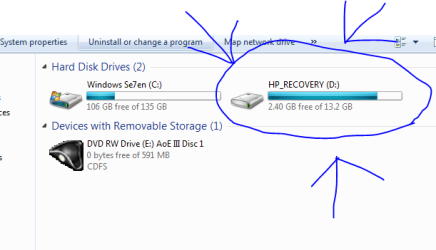
Hey all, I've gotta question I installed my W7 over my Windows Vista (Yay!!) And In my Windows Vista, There was a certain partition of space put aside(its my recovery partition) it came with my computer when i got it. And i wanna "insert" a Windows Seven recovery thing-in a sense into it... lemme post a screen.. lol.
That D: came with my laptop, and i now wanna delete it, then make a recovery disk for my windows 7.... but i dont wanna have to use an actual CD.... know what im saying?
My Computer
At a glance
7 x64/ Back-Track 4Intel Core 2 Duo CPU 8300@ 2.4 Ghz4096 MB DDR2Nvidia 8400M GS
Computer Manufacturer/Model Number
HP dv6000t CTO Entertainment Lappy |My Desktop @ Bottom
OS
7 x64/ Back-Track 4
CPU
Intel Core 2 Duo CPU 8300@ 2.4 Ghz
Motherboard
HP's Own
Memory
4096 MB DDR2
Graphics Card(s)
Nvidia 8400M GS
Sound Card
Altec Lansing (The usual on Laptops )
Monitor(s) Displays
Laptop Screen. 17' Wide.
Screen Resolution
1280 x 800
Hard Drives
150 GB HDD.
Cooling
2 External Fans, Undervolted, Coolant
Keyboard
Norm. Cheap Random Keyboard
Mouse
Norm. Cheap Random Mouse
Other Info
This is my Homemade Desktop :)
HDD: Western Digital Caviar Blue 320GB 16MB 7200RPM SATA2
And more to come in a bit! :D
If you format the partition you can copy/move the backup data (may need to format the partition first)
If you ever needed to, Using the Windows 7 DVD (booted) you can use the restore option in 'Advanced Recovery Options' to restore from the image you copied/saved onto the blank partition.
I've not tried it though so wouldn't know 100%. You will however need to 'Upgrade' and not 'Clean Install' in order to utilize the OEM Restoration Tools
mmmmm..... Because im very Anti-using a CD-ROm/Usb or anything like that Ah well.... i can always do another fresh install of my lappy :0 Thanks for help m8!
My Computer
At a glance
7 x64/ Back-Track 4Intel Core 2 Duo CPU 8300@ 2.4 Ghz4096 MB DDR2Nvidia 8400M GS
Computer Manufacturer/Model Number
HP dv6000t CTO Entertainment Lappy |My Desktop @ Bottom
OS
7 x64/ Back-Track 4
CPU
Intel Core 2 Duo CPU 8300@ 2.4 Ghz
Motherboard
HP's Own
Memory
4096 MB DDR2
Graphics Card(s)
Nvidia 8400M GS
Sound Card
Altec Lansing (The usual on Laptops )
Monitor(s) Displays
Laptop Screen. 17' Wide.
Screen Resolution
1280 x 800
Hard Drives
150 GB HDD.
Cooling
2 External Fans, Undervolted, Coolant
Keyboard
Norm. Cheap Random Keyboard
Mouse
Norm. Cheap Random Mouse
Other Info
This is my Homemade Desktop :)
HDD: Western Digital Caviar Blue 320GB 16MB 7200RPM SATA2
And more to come in a bit! :D


 I installed my W7 over my Windows Vista
  (Yay!!) And In my Windows Vista, There was a certain partition of space put aside(its my recovery partition) it came with my computer when i got it. And i wanna "insert" a Windows Seven recovery thing-in a sense into it... lemme post a screen.. lol.