
N1njaCab00se
New member
- Local time
- 9:45 AM
- Messages
- 1
Hopefully I'm in the right place.
I'm trying to use my Turtle Beach Ear Force PX4 headset through Bluetooth to voice chat through Discord.
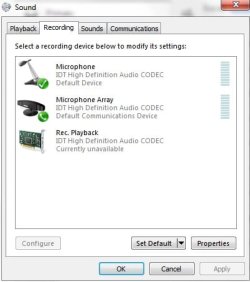
However, in following the steps from their support site where it says, "On the Recording tab, right-click your Bluetooth device, and choose "Set as Default Device"", there's no option for Bluetooth.
Is there a way to add a Bluetooth option to this list that I've uploaded? If so, is there a link that I can follow, or is anyone on here able to give me steps on how to do it?
Any help is greatly appreciated.
I'm trying to use my Turtle Beach Ear Force PX4 headset through Bluetooth to voice chat through Discord.
However, in following the steps from their support site where it says, "On the Recording tab, right-click your Bluetooth device, and choose "Set as Default Device"", there's no option for Bluetooth.
Is there a way to add a Bluetooth option to this list that I've uploaded? If so, is there a link that I can follow, or is anyone on here able to give me steps on how to do it?
Any help is greatly appreciated.
Attachments
My Computer
- Computer type
- PC/Desktop
- Computer Manufacturer/Model Number
- Alienware
- OS
- 64-bit Windows 7 Home Premium
- Browser
- Google Chrome


