Utilising SSD and Raid in the same system...

Good4you

New member
Local time
7:02 AM
Messages
1
Hello there Peeps!

Intel Quad-core Dell Precision T5400 currently running 32bit windows 7 needs an upgrade to 64bit so as to utilise more memory.

We were thinking of installing the Windows 7 64 bit drive C: on a 128 gig SSD for speed and then installing two-disk sata raid behind that as drive D with two 1TB drives - CAN THIS BE DONE?

Would be very happy if this was the case!

Rgds,

Francois & Sam.
 

My Computer My Computer

Computer type
PC/Desktop
Computer Manufacturer/Model Number
Dell Precision T5400
OS
Windows 7 32 bit
CPU
Quadcore Xeon E5420 @ 2.5 Ghz
Memory
A lot more than 4 gig!
Graphics Card(s)
Business orientated
Hard Drives
Various
RAID is possible but I would not normally recommend it.

Be aware that there are 2 types of RAID possible with 2 drives. Specifying RAID without the type is meaningless.

RAID 0: The purpose is performance. But while the benchmarks can be quite impressive the benefits in the real world tend to be more modest. There are some serious implications, like if one drive fails you loose everything. There are more besides. Generally RAID 0 is more trouble than it is worth.

RAID 1: All data is written to both drives. This provides redundancy so that if one drive fails you can continue operating and replace the drive at a more convenient time. This is a big deal on a busy server, not so much on a desktop. The downside of RAID 1 is cost, requiring 2 drives to provide the storage space of 1. This is NOT a backup solution. Use it as such to the peril of your data.

There are other types of RAID but they require more than 2 drives. They all have their advantages and disadvantage.

Many people rush into RAID without understanding the implications and only find out later it is not what they expected.
 

My Computer My Computer

Computer type
PC/Desktop
Computer Manufacturer/Model Number
HP
OS
Windows 7 Pro 64 bit
CPU
Xeon W3520
Memory
8 GB
Graphics Card(s)
Nvidia Geforce 210
I've run RAID0 with ssd's and hdd's. You get impressive benchmarks. I agree with lmiller that it's generally more trouble than it's worth. that said I do run my OS on a single ssd and storage on a pair of Raptors in RAID0, the Raptors can achieve close to ssd performance.
 

My Computer My Computer

Computer type
PC/Desktop
Computer Manufacturer/Model Number
Custom, Dell and Lenono LT's
OS
Win8/8.1,Win7-U64, Vista U64, uncounted Linux distor's
CPU
AMD and Intell, 9590, 8350, i5 3570k
Motherboard
CFVFZ, GA990FXA, Z77e-itx
Memory
Corsair G Skill
Graphics Card(s)
Crossfired Sapphire HD 7950 Vapor-X, ASUS R9 280X TOP
Sound Card
Realtek ALC889
Monitor(s) Displays
ViewSonic VX2770SMH 27" / ViewSonic VX2433 LCD 24"
Screen Resolution
1080i HD
Hard Drives
Samsung SSD 840 Pro
OCZ Agility 3's
OCZ Vector's
WD's Blue, red, green, Velociraptors
Seagate USB3 & Hybrid's
ASUS Blu-Ray
ASUS DVD
PSU
Corsair AX1200i, Seasonice 850 Gold
Case
Cooler Master HAF 922 & HAF 932, Lian Li Train case.
Cooling
Air, Glacer 240L expanded, custom EK loop with duel D5's
Keyboard
Microsoft SideWinder X4 USB Keyboard / Logitech 250 PS2
Mouse
Logitech G500 / MS wireless 5000
Internet Speed
Best of 5ms / 75+ dn / 12+ up More or less.
Antivirus
MS esentials-MalwareBytes
Browser
Firefox Chromebook
From post #3
Raptors can achieve close to ssd performance

I don't think so.
 

My Computer My Computer

Computer type
PC/Desktop
Computer Manufacturer/Model Number
Home made Desktop
OS
Windows 10 Pro. 64/ version 1709 Windows 7 Pro/64
CPU
Intel i7-6800K @ 4.3
Motherboard
ASUS X-99 Deluxe II
Memory
Corsair Platinum 16 gig @2400
Graphics Card(s)
EVGA GTX 1070 OC
Monitor(s) Displays
Asus 27" LED LCD/VE278Q
Screen Resolution
1920-1080 or 1280-720 HDMI
Hard Drives
INTEL SSD 730-240 Gb Sata 3.0/
PSU
EVGA Platium 1200W
Case
Phanteks Luxe Tempered Glass 8 fans/ one radiator
Cooling
XSPC/ Water Cooled CPU
Keyboard
Das 4 Professional
Mouse
Logitech M705/MX Anywhere 2-S
Internet Speed
100 mbits
Antivirus
Microsoft Security Essentials/ Malwarebytes Premium 3.0/ SAS
Browser
I.E. 11 default/Firefox/ ISP Time Warner Cable/Spectrum
Other Info
LG BluRay Burner/
Sound system-KLipsch-THX/
Icy Dock ssd Hot Swap bays.
Raptor HDs with RAID 0 can achieve a high transfer rate but will still not match an SSD. But the real advantage of an SSD is the very low seek time, if that term even has a meaning to an SSD. A good HD seek time will be in the order of 10ms while a high end server HD might be about 4 ms. Over the years seek times of conventional hard drives have slowly dropped but with the laws of physics being what they are there isn't much more that can be done. Seek time for an SSD will typically be <.1ms. Under real world conditions with a modern OS seek time will be far more important.

Edit: It should also be mentioned that SSDs have some advantages other than performance. These include lower power consumption and heat, much greater resistance to mechanical shock, and overall reliability, although there is still much to be done with the latter.
 

My Computer My Computer

Computer type
PC/Desktop
Computer Manufacturer/Model Number
HP
OS
Windows 7 Pro 64 bit
CPU
Xeon W3520
Memory
8 GB
Graphics Card(s)
Nvidia Geforce 210
From post #3
Raptors can achieve close to ssd performance
I don't think so.

Think again.
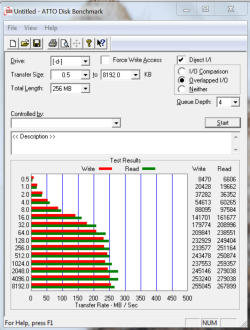
Pretty fast for a spinner, 255mbs and 267mbs compared to a Vector at 295/298mbs

hddtest01.PNG

You can raid0 ssd's and get some crazy bench marks but I everyday use I think it felt a bit slower. I replaced the 2 vectors I had in the box with a Seagate 600 480gb (389/397mbs). It appears to preform as well as my 840 Pro.

Edit: It should also be mentioned that SSDs have some advantages other than performance. These include lower power consumption and heat, much greater resistance to mechanical shock, and overall reliability, although there is still much to be done with the latter.

Heat is a big difference in my boxes. SSD's run 2C above ambient and the spinners are 10-12C with the Raptors and 6-8C with lower rpm models.
 

My Computer My Computer

Computer type
PC/Desktop
Computer Manufacturer/Model Number
Custom, Dell and Lenono LT's
OS
Win8/8.1,Win7-U64, Vista U64, uncounted Linux distor's
CPU
AMD and Intell, 9590, 8350, i5 3570k
Motherboard
CFVFZ, GA990FXA, Z77e-itx
Memory
Corsair G Skill
Graphics Card(s)
Crossfired Sapphire HD 7950 Vapor-X, ASUS R9 280X TOP
Sound Card
Realtek ALC889
Monitor(s) Displays
ViewSonic VX2770SMH 27" / ViewSonic VX2433 LCD 24"
Screen Resolution
1080i HD
Hard Drives
Samsung SSD 840 Pro
OCZ Agility 3's
OCZ Vector's
WD's Blue, red, green, Velociraptors
Seagate USB3 & Hybrid's
ASUS Blu-Ray
ASUS DVD
PSU
Corsair AX1200i, Seasonice 850 Gold
Case
Cooler Master HAF 922 & HAF 932, Lian Li Train case.
Cooling
Air, Glacer 240L expanded, custom EK loop with duel D5's
Keyboard
Microsoft SideWinder X4 USB Keyboard / Logitech 250 PS2
Mouse
Logitech G500 / MS wireless 5000
Internet Speed
Best of 5ms / 75+ dn / 12+ up More or less.
Antivirus
MS esentials-MalwareBytes
Browser
Firefox Chromebook
The benchmark numbers are impressive. But as I said in my post #5 transfer rate has little relevance to real world performance. Conventional drives spend most of their time waiting for the drive head to move to the correct track and the for the platter to rotate to the desired sectors. Only then can data transfer begin. During transfer of any significant amount of data there will be many such delays. Some hypothetical drive could have virtually infinite transfer rate but this would mean little to real world performance.

Having no moving parts seek time for SSDs is very small and rotational delay is a meaningless concept. When data is requested from the drive transfer can begin almost immediately and can proceed with only very short interruptions.

People are often overly influenced by transfer rate benchmarks because they are easily understood. On the other hand seek times (what really matters) are almost ignored because they are more difficult to understand. That is unfortunate.
 

My Computer My Computer

Computer type
PC/Desktop
Computer Manufacturer/Model Number
HP
OS
Windows 7 Pro 64 bit
CPU
Xeon W3520
Memory
8 GB
Graphics Card(s)
Nvidia Geforce 210
Here is my bench test. Get one and use it. You will want more of them; they are habit forming. End of test.
 

My Computer My Computer

Computer type
PC/Desktop
Computer Manufacturer/Model Number
Home made Desktop
OS
Windows 10 Pro. 64/ version 1709 Windows 7 Pro/64
CPU
Intel i7-6800K @ 4.3
Motherboard
ASUS X-99 Deluxe II
Memory
Corsair Platinum 16 gig @2400
Graphics Card(s)
EVGA GTX 1070 OC
Monitor(s) Displays
Asus 27" LED LCD/VE278Q
Screen Resolution
1920-1080 or 1280-720 HDMI
Hard Drives
INTEL SSD 730-240 Gb Sata 3.0/
PSU
EVGA Platium 1200W
Case
Phanteks Luxe Tempered Glass 8 fans/ one radiator
Cooling
XSPC/ Water Cooled CPU
Keyboard
Das 4 Professional
Mouse
Logitech M705/MX Anywhere 2-S
Internet Speed
100 mbits
Antivirus
Microsoft Security Essentials/ Malwarebytes Premium 3.0/ SAS
Browser
I.E. 11 default/Firefox/ ISP Time Warner Cable/Spectrum
Other Info
LG BluRay Burner/
Sound system-KLipsch-THX/
Icy Dock ssd Hot Swap bays.
The benchmark numbers are impressive. But as I said in my post #5 transfer rate has little relevance to real world performance. Conventional drives spend most of their time waiting for the drive head to move to the correct track and the for the platter to rotate to the desired sectors. Only then can data transfer begin. During transfer of any significant amount of data there will be many such delays. Some hypothetical drive could have virtually infinite transfer rate but this would mean little to real world performance.

Having no moving parts seek time for SSDs is very small and rotational delay is a meaningless concept. When data is requested from the drive transfer can begin almost immediately and can proceed with only very short interruptions.

People are often overly influenced by transfer rate benchmarks because they are easily understood. On the other hand seek times (what really matters) are almost ignored because they are more difficult to understand. That is unfortunate.


Thank you Capt Obvious, one question, have you every worked with a fast raid0 and large files, as in gigabytes of video?
 

My Computer My Computer

Computer type
PC/Desktop
Computer Manufacturer/Model Number
Custom, Dell and Lenono LT's
OS
Win8/8.1,Win7-U64, Vista U64, uncounted Linux distor's
CPU
AMD and Intell, 9590, 8350, i5 3570k
Motherboard
CFVFZ, GA990FXA, Z77e-itx
Memory
Corsair G Skill
Graphics Card(s)
Crossfired Sapphire HD 7950 Vapor-X, ASUS R9 280X TOP
Sound Card
Realtek ALC889
Monitor(s) Displays
ViewSonic VX2770SMH 27" / ViewSonic VX2433 LCD 24"
Screen Resolution
1080i HD
Hard Drives
Samsung SSD 840 Pro
OCZ Agility 3's
OCZ Vector's
WD's Blue, red, green, Velociraptors
Seagate USB3 & Hybrid's
ASUS Blu-Ray
ASUS DVD
PSU
Corsair AX1200i, Seasonice 850 Gold
Case
Cooler Master HAF 922 & HAF 932, Lian Li Train case.
Cooling
Air, Glacer 240L expanded, custom EK loop with duel D5's
Keyboard
Microsoft SideWinder X4 USB Keyboard / Logitech 250 PS2
Mouse
Logitech G500 / MS wireless 5000
Internet Speed
Best of 5ms / 75+ dn / 12+ up More or less.
Antivirus
MS esentials-MalwareBytes
Browser
Firefox Chromebook
   Warning
Let's tone it down.


He owns an ssd, so I am sure he sees the benefits of both.

Raid and ssd both have great benefits. I think we can safely leave it at that.
 

My Computer My Computer

Computer type
PC/Desktop
Computer Manufacturer/Model Number
Custom Built
OS
Windows 10 Pro
CPU
AMD Ryzen 5 2400G Processor with Radeon RX Vega 11 Graphics
Motherboard
ASRock X470 Master SLI/AC AM4 AMD Promontory X470 SATA 6Gb/s
Memory
G.SKILL Ripjaws V Series 16GB (2 x 8GB) 288-Pin DDR4 SDRAM D
Graphics Card(s)
2047MB NVIDIA GeForce GTX 1060 6GB (EVGA)
Sound Card
Motherboard Built in
Monitor(s) Displays
Acer R240HY bidx 23.8-Inch IPS HDMI DVI VGA (1920 x 1080) Wi
Screen Resolution
1920 x 1080
Hard Drives
1TB Sandisk SSD PLUS (Main drive)
500 GB Seagate 7200 RPM (Games)
500 GB Western Digital 7200 RPM (Virtual Machines)
PSU
CORSAIR TX Series TX650M 650W 80+ Gold Modular Power Supply
Case
CORSAIR CARBIDE SPEC-02 Mid-Tower Gaming Case, Red LED Fan
Cooling
220mm, two 120mm, and four 60mm fans
Keyboard
Wired Dell keyboard
Mouse
Wireless Logitech mouse
Internet Speed
250mb down, 30mb up
Antivirus
Panda Cloud Antivirus
Browser
Chrome-ish x64
Other Info
Your awesome for reading this.
I have has raptors in raid0, Older ssd's in raid0 and now a Samsung 840 pro which is way faster than either by itself. The newer crop of SSD controllers are way more desirable even in single configuration....If your looking for redundancy you may just wish to backup your data. Simplicity is a good thing.
 

My Computer My Computer

Computer type
PC/Desktop
Computer Manufacturer/Model Number
Custom Build
OS
Win 10 Pro
CPU
E3-1230 V2
Motherboard
Asus P8Z77 LX
Memory
2 X 4gb Samsung Green Wonder Ram
Graphics Card(s)
Diamond HD7970
Sound Card
ALC892 8-Channel High Definition
Monitor(s) Displays
ASUS VN247/Sanyo 42 1080p LCD
Screen Resolution
1920x1080
Hard Drives
Sandisk Extreme II 240GB SSD/
1 X WD 1 TB Black Spinner
PSU
OCZ 600W Mod X Stream Modular
Case
Lian Li Pc7b-modded
Cooling
H100
Keyboard
Saitek Eclipse KYB
Mouse
Logitech G400
Internet Speed
90Mb D/L 15Mb upload
Antivirus
Webroot Secure Anywhere Endpoint Protection
Browser
Cyberfox/Chrome
Other Info
Logitech 5500 Speakers 5.1 / sOME kiND OF rUSSIAN TURNTABLE
Some say IT HAS BLOOD ON IT FETUS OIL,EWWWW DIAPHRAGM LIKERS
Back
Top