CalypsoArt
New member
- Local time
- 5:23 AM
- Messages
- 35
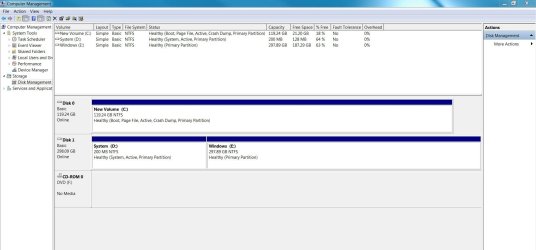
Here's the situation. I have a 17" Sager laptop with two hard drives set up with dual boot. The first drive is the OEM drive that came in the laptop and Win7. After I installed my work software, and made sure the machine was stable, I used the computer in this configuration for a few months. I then decided to set up dual boot using a Crucial SSD drive with Win7 in the vacant 2nd hard drive bay. This allowed me to work from the old drive while I organized the SSD with my work software. (AutoCad, Rhino, etc) and made sure it was stable. After the SSD setup, it became my primary drive, and I never used the OEM drive again.
Now, with Win 10 about to be released, I was thinking about removing the idle l OEM drive and adding a new SSD and Win 10. (This would let me keep working from the Win7 SSD) However, If I remember correctly, the dual boot information (Boot Manager?) is on the original drive. Wouldn't removing that drive also disable the current Win 7 SSD?
It has been about 3 years since I dug into a computer and much has changed. I'm hoping someone here can give me info, suggestions, or even a step by step procedure to get this right.
thanks in advance.
Now, with Win 10 about to be released, I was thinking about removing the idle l OEM drive and adding a new SSD and Win 10. (This would let me keep working from the Win7 SSD) However, If I remember correctly, the dual boot information (Boot Manager?) is on the original drive. Wouldn't removing that drive also disable the current Win 7 SSD?
It has been about 3 years since I dug into a computer and much has changed. I'm hoping someone here can give me info, suggestions, or even a step by step procedure to get this right.
thanks in advance.
My Computer
At a glance
Win 7 professional 64i7 8204gbnVidia GTX285m
- Computer Manufacturer/Model Number
- Sager/Midern
- OS
- Win 7 professional 64
- CPU
- i7 820
- Memory
- 4gb
- Graphics Card(s)
- nVidia GTX285m
- Monitor(s) Displays
- 17.3"