Variable SLEEP behavior.

bilvihur

New member
Member
Local time
3:51 AM
Messages
32
Running Win 7 Home Premium on a custom desktop, all updates applied. Regardless of what happens to be running at the time, when I issue the SLEEP command at night, the HD stops spinning, the monitor goes dark, and the power light starts blinking. Then the following morning:
1) 5% of the time, power light will be blinking, one press of the power-on button will start the HD, I'll hear the ext speaker crackle, and the monitor will come on with last night's screens, ALL within 10-15 sec.
2) 15% of the time, the power light will be solid, the HD spinning, and moving the mouse will display the screen, just like it never went to sleep at all!
3) 80% of the time, the power light will be blinking, I'll press the power-on button, and WAIT 90 sec for the monitor to come on with last night's screen? I can boot in less time than that!
I can't relate the behavior to anything I'm doing at this end.
Any suggestions?
Thanks.:confused:
 

My Computer

Computer type
PC/Desktop
Computer Manufacturer/Model Number
Custom Build
OS
Windows 7 Home Premium 64-bit SP1
CPU
AMD Phenom II X2 550 Callisto
Motherboard
MSI 970A-G46
Memory
8.00GB Dual-Channel DDR3 @ 805MHz (9-9-9-24)
Graphics Card(s)
MSI GT210
Monitor(s) Displays
Acer X193W+ (1680x1050@59Hz)
Screen Resolution
1680x1050 pixels
Hard Drives
298GB Seagate ST3320620AS ATA Device (SATA)
932GB Hitachi HDS721010CLA332 ATA Device (SATA)
932GB Seagate ST31000528AS ATA Device (SATA)
PSU
ANTEC|EA650 RT
Case
ANTEC|THREE HUNDRED BK
Antivirus
Avast
Browser
Chrome
Hello Bilvihur,

What power plan are you currently using? If you don't know that, you can check it by following steps 1 to 3 shown below; please report this back.
And in the Power Plan settings, what is the "turn off hard disk" feature set to? You can check this by following steps 1 to 6 shown below.

To change that feature, please follow these steps and see if the problem persists;

http://www.sevenforums.com/tutorials/140592-hard-drive-turn-off-hard-disk-after-idle-never.html


  1. Click on the
    orb.png
    .
  2. In the Search programs and files
    search_icon.png
    bar, type "Power plan", and click on Choose a power plan.
  3. Click on Change plan settings from whichever power plan you are using.
  4. In the menu, click on Change advanced power settings.
  5. In the menu that will open, please double click on ➢Hard disk.
  6. Click on ➢Turn off hard disk after.
  7. You can change this setting to Never so that your hard disk will not turn off again when your computer goes to sleep.
  8. After changing the option, click on Apply, and then click on OK.
  9. Please reboot your machine after this.


Good luck and keep us posted,
Nommy
 
Last edited by a moderator:

My Computer

Computer type
Laptop
Computer Manufacturer/Model Number
Dell Inspiron 5547
OS
Microsoft Windows 8.1 64-bit Professional
CPU
Intel(R) Core(TM) i7-4510U CPU @ 2.00GHz
Motherboard
Dell Inc. 08KNCD
Memory
8.00 GB (2 x 4.00 GB)
Graphics Card(s)
AMD Radeon R7 M265
Screen Resolution
1366 x 768 x 4294967296 colors
Hard Drives
(1) 1TB ST1000LM024 HN-M101MBB (2) 2TB Western Digital external hard drive (3) 500GB Packard Bell external hard drive
Mouse
Corsair Vengeance M60
Antivirus
Windows Defender & Malwarebytes
Browser
Firefox, Chromium
Other Info
+ Acer TravelMate 7730G with 32bit Ubuntu 14.04 LTS Trusty Tahr.
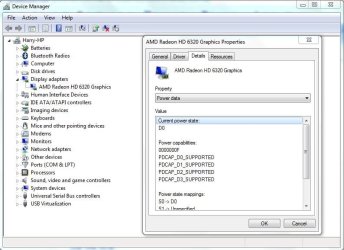
Just to add, different drivers and devices support different power states.

Power States.JPG
 

My Computer

Computer type
Laptop
Remember this is a desktop, not running on a battery. The power plan is set to balanced. By definition: When a PC enters sleep mode, it saves electricity by shutting down most of its components. But it uses some power to keep Windows, running programs, and data in RAM, allowing it to wake up almost instantly. I want the HD to power down when the sleep cmd is executed. I just want the machine to wake up quickly.
How can I determine whether device drivers may be causing the problem? SLEEP behavior is variable even though I haven't changed any of them.
 

My Computer

Computer type
PC/Desktop
Computer Manufacturer/Model Number
Custom Build
OS
Windows 7 Home Premium 64-bit SP1
CPU
AMD Phenom II X2 550 Callisto
Motherboard
MSI 970A-G46
Memory
8.00GB Dual-Channel DDR3 @ 805MHz (9-9-9-24)
Graphics Card(s)
MSI GT210
Monitor(s) Displays
Acer X193W+ (1680x1050@59Hz)
Screen Resolution
1680x1050 pixels
Hard Drives
298GB Seagate ST3320620AS ATA Device (SATA)
932GB Hitachi HDS721010CLA332 ATA Device (SATA)
932GB Seagate ST31000528AS ATA Device (SATA)
PSU
ANTEC|EA650 RT
Case
ANTEC|THREE HUNDRED BK
Antivirus
Avast
Browser
Chrome
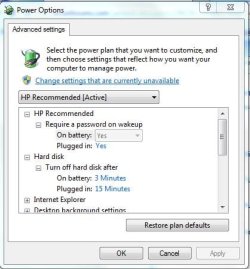
HDD Sleep.JPG

You can make the HDD power down further, but you can't choose which hardware components go to sleep, and which one's don't.

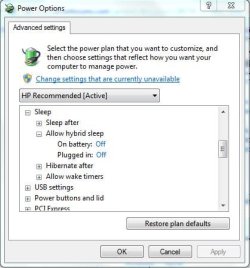
You could try Hybrid Sleep, it should be enabled by default for desktops, and uses the S4 and S3 power states, the processor will be turned off and a hibernation file will be created, but it will wake up much faster than a standard hibernation.

HS.JPG
 

My Computer

Computer type
Laptop
My Power Options - Sleep don't include Hybrid Sleep options.
 

My Computer

Computer type
PC/Desktop
Computer Manufacturer/Model Number
Custom Build
OS
Windows 7 Home Premium 64-bit SP1
CPU
AMD Phenom II X2 550 Callisto
Motherboard
MSI 970A-G46
Memory
8.00GB Dual-Channel DDR3 @ 805MHz (9-9-9-24)
Graphics Card(s)
MSI GT210
Monitor(s) Displays
Acer X193W+ (1680x1050@59Hz)
Screen Resolution
1680x1050 pixels
Hard Drives
298GB Seagate ST3320620AS ATA Device (SATA)
932GB Hitachi HDS721010CLA332 ATA Device (SATA)
932GB Seagate ST31000528AS ATA Device (SATA)
PSU
ANTEC|EA650 RT
Case
ANTEC|THREE HUNDRED BK
Antivirus
Avast
Browser
Chrome
They should, did select the Advanced Power Options?


  1. Start :orb:
  2. Control Panel
  3. Power Options (Small Icons view)
  4. Change Plan Settings
  5. Change Advanced Power Settings
 

My Computer

Computer type
Laptop
Nope. All I see is Sleep After, and Allow Wake Timers.
 

My Computer

Computer type
PC/Desktop
Computer Manufacturer/Model Number
Custom Build
OS
Windows 7 Home Premium 64-bit SP1
CPU
AMD Phenom II X2 550 Callisto
Motherboard
MSI 970A-G46
Memory
8.00GB Dual-Channel DDR3 @ 805MHz (9-9-9-24)
Graphics Card(s)
MSI GT210
Monitor(s) Displays
Acer X193W+ (1680x1050@59Hz)
Screen Resolution
1680x1050 pixels
Hard Drives
298GB Seagate ST3320620AS ATA Device (SATA)
932GB Hitachi HDS721010CLA332 ATA Device (SATA)
932GB Seagate ST31000528AS ATA Device (SATA)
PSU
ANTEC|EA650 RT
Case
ANTEC|THREE HUNDRED BK
Antivirus
Avast
Browser
Chrome

My Computer

Computer type
PC/Desktop
Computer Manufacturer/Model Number
home built
OS
Multi-Boot W7_Pro_x64 W8.1_Pro_x64 W10_Pro_x64 +Linux_VMs +Chromium_VM
CPU
AMD Athlon II x4 620
Motherboard
Gigabyte GA-MA785G-UD3H
Memory
6GB GSkill DDR2 800
Graphics Card(s)
AMD 4670 GPU + AMD 4200 IGP
Sound Card
on board Realtek ALC889A
Monitor(s) Displays
RCA 40" LCD TV, Insignia 32" LCD TV, HP 15" LCD monitor
Screen Resolution
1680 x 1050
Hard Drives
OCZ Vertex 3 120GB,
Samsung F3 1TB (3),
Several others - WD, Seagate, Hitachi, ...
PSU
Corsair 500 W
Case
Rosewill mid tower
Cooling
CM 90mm rifle
Keyboard
Gyration wireless, Logitech wireless, Dell USB wired
Mouse
Gyration wireless, Logitech wireless, V7 USB wired
Internet Speed
Spectrum - 100Mbps D / 10Mbps U
Antivirus
Avast, MBAM3, EMET, WinPatrol
Browser
Pale Moon, Firefox, IE
Other Info
2 multi-boot PC's
Mainly HTPC/Office/Gen purpose (no gaming).
Trendnet USB KVM.
LG DVD burner/Blue Ray Player.
Tray system for removable SATA backup drives.

Not currently OCd, under-volted.
I use Hybrid sleep, rarely re-boot or shutdown.

Hauppauge HD-PVR, Avermedia PCIe TV Tuner, Hauppauge PCI TV Tuner.
No, it wasn't. But I think we're getting away from the original problem, which is "Why doesn't the SLEEP command perform in a consistent manner?" That is, storing data in RAM, and allowing wake-up quickly.
 

My Computer

Computer type
PC/Desktop
Computer Manufacturer/Model Number
Custom Build
OS
Windows 7 Home Premium 64-bit SP1
CPU
AMD Phenom II X2 550 Callisto
Motherboard
MSI 970A-G46
Memory
8.00GB Dual-Channel DDR3 @ 805MHz (9-9-9-24)
Graphics Card(s)
MSI GT210
Monitor(s) Displays
Acer X193W+ (1680x1050@59Hz)
Screen Resolution
1680x1050 pixels
Hard Drives
298GB Seagate ST3320620AS ATA Device (SATA)
932GB Hitachi HDS721010CLA332 ATA Device (SATA)
932GB Seagate ST31000528AS ATA Device (SATA)
PSU
ANTEC|EA650 RT
Case
ANTEC|THREE HUNDRED BK
Antivirus
Avast
Browser
Chrome
It depends what settings you have enabled, and what do you define as slow?

I would enable the recommend settings for Sleep by reading this - http://www.sevenforums.com/tutorials/778-power-plan-settings-change.html

This may also help - http://www.sevenforums.com/tutorials/292971-pcie-link-state-power-management-turn-off-windows.html

Update your System Specifications with Speccy, and then copy this information into your System Specifications: Go to your UserCP, and then select Edit System Spec in the left pane. Copy the information from Speccy into the required fields. These System Specifications will then follow your every post.
 

My Computer

Computer type
Laptop
The reason I asked if you have hibernate enabled, is that if is not enabled, Hybrid sleep is not available (displayed).
Guess I should have made that clear when I asked the question.

The video driver can cause sleep problems.
You can try updating your video driver to see if that helps with this issue.
Sometimes even an older driver works better than a newer driver.

Here is a tutorial you can go through to see if anything in here helps find the cause of your issue.
Power Options and Sleep Mode Problems

Here is another tutorial (by cluberti) that may help.
If you do get a trace, you probably will need to ask cluberti to help with analyzing the trace results.
http://www.sevenforums.com/tutorial...up-shutdown-sleep-hibernate-reboot-trace.html
 

My Computer

Computer type
PC/Desktop
Computer Manufacturer/Model Number
home built
OS
Multi-Boot W7_Pro_x64 W8.1_Pro_x64 W10_Pro_x64 +Linux_VMs +Chromium_VM
CPU
AMD Athlon II x4 620
Motherboard
Gigabyte GA-MA785G-UD3H
Memory
6GB GSkill DDR2 800
Graphics Card(s)
AMD 4670 GPU + AMD 4200 IGP
Sound Card
on board Realtek ALC889A
Monitor(s) Displays
RCA 40" LCD TV, Insignia 32" LCD TV, HP 15" LCD monitor
Screen Resolution
1680 x 1050
Hard Drives
OCZ Vertex 3 120GB,
Samsung F3 1TB (3),
Several others - WD, Seagate, Hitachi, ...
PSU
Corsair 500 W
Case
Rosewill mid tower
Cooling
CM 90mm rifle
Keyboard
Gyration wireless, Logitech wireless, Dell USB wired
Mouse
Gyration wireless, Logitech wireless, V7 USB wired
Internet Speed
Spectrum - 100Mbps D / 10Mbps U
Antivirus
Avast, MBAM3, EMET, WinPatrol
Browser
Pale Moon, Firefox, IE
Other Info
2 multi-boot PC's
Mainly HTPC/Office/Gen purpose (no gaming).
Trendnet USB KVM.
LG DVD burner/Blue Ray Player.
Tray system for removable SATA backup drives.

Not currently OCd, under-volted.
I use Hybrid sleep, rarely re-boot or shutdown.

Hauppauge HD-PVR, Avermedia PCIe TV Tuner, Hauppauge PCI TV Tuner.
I'm using a corded mouse and keyboard, I updated my ATI Radeon HD 4200 display adapter, and it still takes 105 sec to wake up from SLEEP. I don't want to devote 6GB to an hiberfil.sys file on my "C" disk, so unless I can place it somewhere else, I guess I'll have to live with poor Wake-Up-From-SLEEP performance.:(
 

My Computer

Computer type
PC/Desktop
Computer Manufacturer/Model Number
Custom Build
OS
Windows 7 Home Premium 64-bit SP1
CPU
AMD Phenom II X2 550 Callisto
Motherboard
MSI 970A-G46
Memory
8.00GB Dual-Channel DDR3 @ 805MHz (9-9-9-24)
Graphics Card(s)
MSI GT210
Monitor(s) Displays
Acer X193W+ (1680x1050@59Hz)
Screen Resolution
1680x1050 pixels
Hard Drives
298GB Seagate ST3320620AS ATA Device (SATA)
932GB Hitachi HDS721010CLA332 ATA Device (SATA)
932GB Seagate ST31000528AS ATA Device (SATA)
PSU
ANTEC|EA650 RT
Case
ANTEC|THREE HUNDRED BK
Antivirus
Avast
Browser
Chrome
The power light blinking indicates you are using S1 sleep state.
You could look in BIOS setup and see if you can change it to S3 sleep state.
I doubt that would fix your issue, but you never know...

If you tried all the suggestions given here and nothing helped, I'm not sure what else to suggest.
Did you try a trace and that did not help?

For Hibernate, the hiberfil.sys file must be on the root of the "C" drive, so you can't put it elsewhere.
The default size is 75% of RAM, but it can be lowered to 50%.
 

My Computer

Computer type
PC/Desktop
Computer Manufacturer/Model Number
home built
OS
Multi-Boot W7_Pro_x64 W8.1_Pro_x64 W10_Pro_x64 +Linux_VMs +Chromium_VM
CPU
AMD Athlon II x4 620
Motherboard
Gigabyte GA-MA785G-UD3H
Memory
6GB GSkill DDR2 800
Graphics Card(s)
AMD 4670 GPU + AMD 4200 IGP
Sound Card
on board Realtek ALC889A
Monitor(s) Displays
RCA 40" LCD TV, Insignia 32" LCD TV, HP 15" LCD monitor
Screen Resolution
1680 x 1050
Hard Drives
OCZ Vertex 3 120GB,
Samsung F3 1TB (3),
Several others - WD, Seagate, Hitachi, ...
PSU
Corsair 500 W
Case
Rosewill mid tower
Cooling
CM 90mm rifle
Keyboard
Gyration wireless, Logitech wireless, Dell USB wired
Mouse
Gyration wireless, Logitech wireless, V7 USB wired
Internet Speed
Spectrum - 100Mbps D / 10Mbps U
Antivirus
Avast, MBAM3, EMET, WinPatrol
Browser
Pale Moon, Firefox, IE
Other Info
2 multi-boot PC's
Mainly HTPC/Office/Gen purpose (no gaming).
Trendnet USB KVM.
LG DVD burner/Blue Ray Player.
Tray system for removable SATA backup drives.

Not currently OCd, under-volted.
I use Hybrid sleep, rarely re-boot or shutdown.

Hauppauge HD-PVR, Avermedia PCIe TV Tuner, Hauppauge PCI TV Tuner.
Much to my surprise (and delight), when I woke my machine up this morning, I immediately heard the click from the ext speaker, and the desktop appeared within 10 seconds! I had not rebooted after installing the video device driver, but DID reboot after running Malwarebytes and a defrag. Not sure what corrected the problem, or whether it will stay corrected, but thanking everyone for their help.:D
 

My Computer

Computer type
PC/Desktop
Computer Manufacturer/Model Number
Custom Build
OS
Windows 7 Home Premium 64-bit SP1
CPU
AMD Phenom II X2 550 Callisto
Motherboard
MSI 970A-G46
Memory
8.00GB Dual-Channel DDR3 @ 805MHz (9-9-9-24)
Graphics Card(s)
MSI GT210
Monitor(s) Displays
Acer X193W+ (1680x1050@59Hz)
Screen Resolution
1680x1050 pixels
Hard Drives
298GB Seagate ST3320620AS ATA Device (SATA)
932GB Hitachi HDS721010CLA332 ATA Device (SATA)
932GB Seagate ST31000528AS ATA Device (SATA)
PSU
ANTEC|EA650 RT
Case
ANTEC|THREE HUNDRED BK
Antivirus
Avast
Browser
Chrome
I thought I had this issue put to SLEEP (pun), but now there's a new wrinkle. I've been putting the machine in SLEEP state every night and waking it up most mornings by pressing the power button. BUT, on some mornings I've found it already awake. This morning, as I put down the coffee cup, but before I pressed the power button, my cat jumped up on the desk, stepped on the keyboard, and the machine powered up! I want to keep the cat, but would only like the machine to wake up when I press the power button. Any suggestions?
 

My Computer

Computer type
PC/Desktop
Computer Manufacturer/Model Number
Custom Build
OS
Windows 7 Home Premium 64-bit SP1
CPU
AMD Phenom II X2 550 Callisto
Motherboard
MSI 970A-G46
Memory
8.00GB Dual-Channel DDR3 @ 805MHz (9-9-9-24)
Graphics Card(s)
MSI GT210
Monitor(s) Displays
Acer X193W+ (1680x1050@59Hz)
Screen Resolution
1680x1050 pixels
Hard Drives
298GB Seagate ST3320620AS ATA Device (SATA)
932GB Hitachi HDS721010CLA332 ATA Device (SATA)
932GB Seagate ST31000528AS ATA Device (SATA)
PSU
ANTEC|EA650 RT
Case
ANTEC|THREE HUNDRED BK
Antivirus
Avast
Browser
Chrome
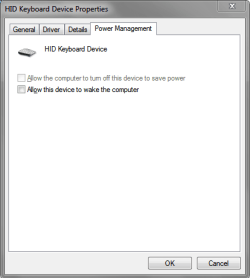
In Device Manager right click on the Keyboard device and click Properties.
In the Power Management tab uncheck "Allow this device to wake the computer".
You probably also want to set your Mouse this way.

KBDSP01.PNG
 

My Computer

Computer type
PC/Desktop
Computer Manufacturer/Model Number
home built
OS
Multi-Boot W7_Pro_x64 W8.1_Pro_x64 W10_Pro_x64 +Linux_VMs +Chromium_VM
CPU
AMD Athlon II x4 620
Motherboard
Gigabyte GA-MA785G-UD3H
Memory
6GB GSkill DDR2 800
Graphics Card(s)
AMD 4670 GPU + AMD 4200 IGP
Sound Card
on board Realtek ALC889A
Monitor(s) Displays
RCA 40" LCD TV, Insignia 32" LCD TV, HP 15" LCD monitor
Screen Resolution
1680 x 1050
Hard Drives
OCZ Vertex 3 120GB,
Samsung F3 1TB (3),
Several others - WD, Seagate, Hitachi, ...
PSU
Corsair 500 W
Case
Rosewill mid tower
Cooling
CM 90mm rifle
Keyboard
Gyration wireless, Logitech wireless, Dell USB wired
Mouse
Gyration wireless, Logitech wireless, V7 USB wired
Internet Speed
Spectrum - 100Mbps D / 10Mbps U
Antivirus
Avast, MBAM3, EMET, WinPatrol
Browser
Pale Moon, Firefox, IE
Other Info
2 multi-boot PC's
Mainly HTPC/Office/Gen purpose (no gaming).
Trendnet USB KVM.
LG DVD burner/Blue Ray Player.
Tray system for removable SATA backup drives.

Not currently OCd, under-volted.
I use Hybrid sleep, rarely re-boot or shutdown.

Hauppauge HD-PVR, Avermedia PCIe TV Tuner, Hauppauge PCI TV Tuner.
That did it! Thanks.:D
 

My Computer

Computer type
PC/Desktop
Computer Manufacturer/Model Number
Custom Build
OS
Windows 7 Home Premium 64-bit SP1
CPU
AMD Phenom II X2 550 Callisto
Motherboard
MSI 970A-G46
Memory
8.00GB Dual-Channel DDR3 @ 805MHz (9-9-9-24)
Graphics Card(s)
MSI GT210
Monitor(s) Displays
Acer X193W+ (1680x1050@59Hz)
Screen Resolution
1680x1050 pixels
Hard Drives
298GB Seagate ST3320620AS ATA Device (SATA)
932GB Hitachi HDS721010CLA332 ATA Device (SATA)
932GB Seagate ST31000528AS ATA Device (SATA)
PSU
ANTEC|EA650 RT
Case
ANTEC|THREE HUNDRED BK
Antivirus
Avast
Browser
Chrome
You're most welcome.
Glad to hear it's solved and thanks for posting back!
:)
 

My Computer

Computer type
PC/Desktop
Computer Manufacturer/Model Number
home built
OS
Multi-Boot W7_Pro_x64 W8.1_Pro_x64 W10_Pro_x64 +Linux_VMs +Chromium_VM
CPU
AMD Athlon II x4 620
Motherboard
Gigabyte GA-MA785G-UD3H
Memory
6GB GSkill DDR2 800
Graphics Card(s)
AMD 4670 GPU + AMD 4200 IGP
Sound Card
on board Realtek ALC889A
Monitor(s) Displays
RCA 40" LCD TV, Insignia 32" LCD TV, HP 15" LCD monitor
Screen Resolution
1680 x 1050
Hard Drives
OCZ Vertex 3 120GB,
Samsung F3 1TB (3),
Several others - WD, Seagate, Hitachi, ...
PSU
Corsair 500 W
Case
Rosewill mid tower
Cooling
CM 90mm rifle
Keyboard
Gyration wireless, Logitech wireless, Dell USB wired
Mouse
Gyration wireless, Logitech wireless, V7 USB wired
Internet Speed
Spectrum - 100Mbps D / 10Mbps U
Antivirus
Avast, MBAM3, EMET, WinPatrol
Browser
Pale Moon, Firefox, IE
Other Info
2 multi-boot PC's
Mainly HTPC/Office/Gen purpose (no gaming).
Trendnet USB KVM.
LG DVD burner/Blue Ray Player.
Tray system for removable SATA backup drives.

Not currently OCd, under-volted.
I use Hybrid sleep, rarely re-boot or shutdown.

Hauppauge HD-PVR, Avermedia PCIe TV Tuner, Hauppauge PCI TV Tuner.
Back
Top