
VBA object libraries Office 2003 vs 2007

jagman653

New member
Local time
1:52 PM
Messages
3
Location
California
I developed an Excel addin in Win7 using Office 2007. The user wants to run it under Win7 but using Office 2003. It's getting compile errors "Can't find project or libraries." I'm familiar with the issue because it came up a couple years ago when the same user was using the code with Office 2003 on an XP machine. I was able to solve the problem because I happened to have XP and Office 2003 on another machine. It was a matter of getting the Office 2007 (Office 12) object files into the right places. However, to solve the current problem experimentally would mean installing Office 2003 on my Win7 machine which is not attractive to me.

So, the question is this: What object libraries do I have to put onto his machine, and where. The attachment shows a screenshot he's getting now. My guess is I have to make it use Office 12 stuff instead of Office 11 since that's what works on my Win7, albeit with Office 2007.
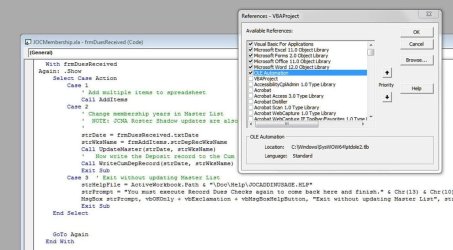
ExcelReferences.JPG


TIA

Ed
 
Last edited:

My Computer

Computer type
PC/Desktop
Computer Manufacturer/Model Number
custom build
OS
Windows 7 Ultimate, 32 bit
CPU
AMD dual processor
Motherboard
Asus M2N-E
Memory
4GB
Hard Drives
Disk 0: Old_C(G:) NTFS
Disk 1: Win7(C:) WD 1TB NTFS
Disk 2: Storage(D:) 427 GB NTFS & E: 39 GB NTFS
Disk 3: Expansion Drive (H:)
Antivirus
AVG
Browser
IE 8
I assume you are talking about VBA

I have written a lot of Excel addins for Excel 2003 over the years
I recently purchased Office 2010 because after Excel 2010 I believe the code language is not VBA although older VBA code will run.
If 2010 last me another 5 to 8 years it will get me past my use-by date.
I have to rewrite some of my 80 addins to be compatible with Excel 2003 and Excel 2010 for some of my clients.
You are possibly up against several problems
  1. 2007 References not available in 2003, ie, some 2007 objects/methods/functions are simply not available in 2003 and visa versa.
    References can be enabled/disabled with VBA
  2. in 2003 Excel, some early bound classes might Err in a 2007 environment, depending on References.
    Late bound Classes can be very helpful where the addin is to be used by different versions of Excel
    Or simply disable Excel v12 Reference , and write your addin from that point.
  3. Are you using forms?
You might have to use late-bound classes to work around MS changes to methods/functions.
2003 numeric data-types are maxed at Long Integer for 65,xxx rows where as I think Excel-2007 has 1million rows, and there is a new numeric Extra Long integer data-type for Excel 2007.

Not being familiar with 2007, I am not absolutely clear on differences between 2003 and 2007 VBA
But I am willing to help you as much as I can.

Hope this is clear enough, way past my bed time.
 

My Computer

Computer type
PC/Desktop
Computer Manufacturer/Model Number
Toshiba, Lenovo (laptops) + 4 rigs
OS
XP Pro (x86) | 7 HP (x86) & (x64) | 7 Pro (x64)
Can you post the xla addin here? Then I can have a look.

Use "Late Binding" if you will bind to "current excel library" for example.
What happens if you simply copy/paste the vba code from office 2007 to office 2003 ... what compile or run errors?
 

My Computer

Computer type
Laptop
Computer Manufacturer/Model Number
ACER ASPIRE 5742G
OS
Microsoft Windows 7 Home Premium 64-bits 7601 Multiprocessor Free Service Pack 1
CPU
Intel(R) Core(TM) i3 CPU M 370 @ 2.40GHz
Motherboard
Acer Aspire 5742G
Memory
4,00 GB
Graphics Card(s)
ATI Mobility Radeon HD 5400 Series
Sound Card
(1) AMD High Definition Audio Device (2) Realtek High Defi
Screen Resolution
1366 x 768 x 32 bits (4294967296 colors) @ 60 Hz
Hard Drives
WDC WD5000BEVT-22ZAT0
However, to solve the current problem experimentally would mean installing Office 2003 on my Win7 machine which is not attractive to me.
Ed,

I use XP Mode in Windows 7 to run Office 2003. That way it is isolated from you Windows 7 and Office 2007.

I agree that Late Binding would solve your reference issues because the the library reference is set at runtime. .

This assumes your VBA code is backwardly compatible with 2003. For me that mean you should still install 2003 for proper testing.

See: http://www.jpsoftwaretech.com/excel-vba/early-late-binding
 

My Computer

OS
Windows 7 Ultimate x64
Back
Top