
Solved VBox v 4.1.16 swiches-off

amflores

New member
Member
Local time
9:29 AM
Messages
97
Location
Rio de Janeiro, Brazil
I am not well acquainted with virtualization.
I have both VMWare Player and VitualBox v.4.1.16 using XP SP2 installed on my laptop (Win7 Home Premium 32 bits), to compare and decide which one suits me best.

Both are OK, but VBox seems better and a bit faster.

For a time both worked just fine.
Yesterday, I was tweaking with VBox when something went wrong.
Now I can't run VBox anymore.
As always, it starts by showing the black XP screen being loaded and then, before the blue "Welcome" screen appears, it switches off abruptly and returns to the Win7 desktop.

Have tried the repair option (Programs<>Control Panel) but it didn't work.
Uninstalled and re-installed VBox, but the problem still remains.
I thought that after re-installing VBox it would be necessary to re-install XP, but this option is not available and it seems to me that XP is already installed, even after having removed VBox. That is because VMWare is running XP?

What can be done and how to completely remove VBox to start a fresh install?

I'm not sure if I made myself clear on this subject.

In the meantime I will be using VMware, but hoping to have VBox back on track again.

Any help is welcome.
Flores
 

Attachments
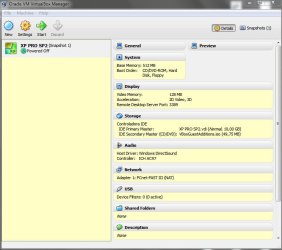
  • VMBox Manager.jpg
    VMBox Manager.jpg
    51.5 KB · Views: 10

My Computer My Computer

At a glance

Windows 7 Home Premium 32bits
Computer type
Laptop
Computer Manufacturer/Model Number
DELL Vostro 1510
OS
Windows 7 Home Premium 32bits
Hard Drives
Seagate external HD 500Gb
Browser
IE11 and Chrome
Other Info
DELL Vostro 1510
what do you mean by there is no option to re-install?Iam using VBox and might be some help...
 

My Computer My Computer

At a glance

Microsoft Windows 7 Ultimate 64-bit Service P...Intel(R) Core(TM)2 Quad Q 9550 @ 2.83 GHz4x1024 GB DDR2 Corsair PC2-6400 800 MhzMSI TwiFrozer II 1024MB GDDR5
Computer type
PC/Desktop
Computer Manufacturer/Model Number
Homebuilt,Quadcore processor on Asus MB
OS
Microsoft Windows 7 Ultimate 64-bit Service Pack 1
CPU
Intel(R) Core(TM)2 Quad Q 9550 @ 2.83 GHz
Motherboard
ASUS P5B-Deluxe Wi-Fi Edition
Memory
4x1024 GB DDR2 Corsair PC2-6400 800 Mhz
Graphics Card(s)
MSI TwiFrozer II 1024MB GDDR5
Sound Card
Realtek ALC883 @ Intel 82801HB ICH8 - High Def
Monitor(s) Displays
Asus VW195 [19" LCD]
Screen Resolution
1440x860 pixels
Hard Drives
OCZ Vertex Plus Series SATA II 2.5" SSD 128GB-

Westarn Digital SATA II 250GB
PSU
Corsair CX600W
Case
Custom built,cut and painted
Cooling
Xigmatek Gaia 2x120mm fan
Keyboard
MS Generic
Mouse
MS Optical 6000
Internet Speed
never enough
Antivirus
ESET Smart Security 6.0.306.0
I thought that after re-installing VBox it would be necessary to re-install XP, but this option was not available and it seems to me that XP is already installed, even after having removed VBox....

Hi proudtobegreek,

As I wrote, I am not familiar with VBox and VMWare Player.

Something went wrong, and I decided to remove and reinstall VBox.
What I meant was that I thought that after removing and reinstalling VBox, it would be necessary to reinstall XP again, and it was not.

HTH,
Flores
 

My Computer My Computer

At a glance

Windows 7 Home Premium 32bits
Computer type
Laptop
Computer Manufacturer/Model Number
DELL Vostro 1510
OS
Windows 7 Home Premium 32bits
Hard Drives
Seagate external HD 500Gb
Browser
IE11 and Chrome
Other Info
DELL Vostro 1510
It probably told you that this VHD is used by another machine,thats ok,if you dont uninstall the guest OS,it is still there,even if u upgrade to version 4.1.18.Take care...
 

My Computer My Computer

At a glance

Microsoft Windows 7 Ultimate 64-bit Service P...Intel(R) Core(TM)2 Quad Q 9550 @ 2.83 GHz4x1024 GB DDR2 Corsair PC2-6400 800 MhzMSI TwiFrozer II 1024MB GDDR5
Computer type
PC/Desktop
Computer Manufacturer/Model Number
Homebuilt,Quadcore processor on Asus MB
OS
Microsoft Windows 7 Ultimate 64-bit Service Pack 1
CPU
Intel(R) Core(TM)2 Quad Q 9550 @ 2.83 GHz
Motherboard
ASUS P5B-Deluxe Wi-Fi Edition
Memory
4x1024 GB DDR2 Corsair PC2-6400 800 Mhz
Graphics Card(s)
MSI TwiFrozer II 1024MB GDDR5
Sound Card
Realtek ALC883 @ Intel 82801HB ICH8 - High Def
Monitor(s) Displays
Asus VW195 [19" LCD]
Screen Resolution
1440x860 pixels
Hard Drives
OCZ Vertex Plus Series SATA II 2.5" SSD 128GB-

Westarn Digital SATA II 250GB
PSU
Corsair CX600W
Case
Custom built,cut and painted
Cooling
Xigmatek Gaia 2x120mm fan
Keyboard
MS Generic
Mouse
MS Optical 6000
Internet Speed
never enough
Antivirus
ESET Smart Security 6.0.306.0
It probably told you that this VHD is used by another machine,thats ok,if you dont uninstall the guest OS,it is still there,even if u upgrade to version 4.1.18.Take care...

Hello proudtobegreek,

Remember that I am still experimenting with virtual machines.
I have two: VMWare Player and VirtualBox, each with just one guest VHD.
And YES, you are damn right - I must take care.
Thanks and regards,
Flores
 

My Computer My Computer

At a glance

Windows 7 Home Premium 32bits
Computer type
Laptop
Computer Manufacturer/Model Number
DELL Vostro 1510
OS
Windows 7 Home Premium 32bits
Hard Drives
Seagate external HD 500Gb
Browser
IE11 and Chrome
Other Info
DELL Vostro 1510
Finally you will probably stick to Virtual Box,dont forget to install guest additions for each version and do not assign more than half of your memory to the guest.Try to install your actual OS as a guest,thats the funny part...
 

My Computer My Computer

At a glance

Microsoft Windows 7 Ultimate 64-bit Service P...Intel(R) Core(TM)2 Quad Q 9550 @ 2.83 GHz4x1024 GB DDR2 Corsair PC2-6400 800 MhzMSI TwiFrozer II 1024MB GDDR5
Computer type
PC/Desktop
Computer Manufacturer/Model Number
Homebuilt,Quadcore processor on Asus MB
OS
Microsoft Windows 7 Ultimate 64-bit Service Pack 1
CPU
Intel(R) Core(TM)2 Quad Q 9550 @ 2.83 GHz
Motherboard
ASUS P5B-Deluxe Wi-Fi Edition
Memory
4x1024 GB DDR2 Corsair PC2-6400 800 Mhz
Graphics Card(s)
MSI TwiFrozer II 1024MB GDDR5
Sound Card
Realtek ALC883 @ Intel 82801HB ICH8 - High Def
Monitor(s) Displays
Asus VW195 [19" LCD]
Screen Resolution
1440x860 pixels
Hard Drives
OCZ Vertex Plus Series SATA II 2.5" SSD 128GB-

Westarn Digital SATA II 250GB
PSU
Corsair CX600W
Case
Custom built,cut and painted
Cooling
Xigmatek Gaia 2x120mm fan
Keyboard
MS Generic
Mouse
MS Optical 6000
Internet Speed
never enough
Antivirus
ESET Smart Security 6.0.306.0
Hi proudtobegreek,

Thanks for the advices.

The funny side of this story:
I thought your login name was proudtobegeek, until I saw the Greek flag! :eek:

Cheers,
Flores
 

My Computer My Computer

At a glance

Windows 7 Home Premium 32bits
Computer type
Laptop
Computer Manufacturer/Model Number
DELL Vostro 1510
OS
Windows 7 Home Premium 32bits
Hard Drives
Seagate external HD 500Gb
Browser
IE11 and Chrome
Other Info
DELL Vostro 1510
Back
Top