Very long lag AFTER startup

LaptopSoldier

New member
Local time
10:41 AM
Messages
5
I've seen the threads regardinga very long start up time. Mine is around 20-30 seconds after the log-on screen, but my problem is concerning after the laptop appears to have fully started up...

The desktop appears to be ready for use, yet, when I click on an icon, nothing appears to happen for around 40-50 seconds.

For Example.. I turn on the comp. 30 secs later the log on screen appears. 30 Seconds later the desktop appears and the computer appears at rest. I click on the I-Explorer icon on the task bar and it shows a click. But nothing happens until 42 seconds later. If i keep clicking, more and more windows will open, but only after the wait.

This occurs on all icons on the task bar and start menu.

I have done the obvious startup things, disabled pretty much everything inc AVG antivirus, defragged, cleaned-up.

I thought it may be the graphics driver , updated it - no change.

So now i'm at a loose end... Any suggestions?

Cheers
 

My Computer

Computer Manufacturer/Model Number
Acer Aspire 5535
OS
Windows 7 Evaluation Copy Build 7100
CPU
AMD Turion X2
Motherboard
?
Memory
4Gb
Graphics Card(s)
ATI Radeon HD 3200
Sound Card
Realtek HD
Monitor(s) Displays
15.4
Hard Drives
300 Gb 2 Partitions
Well, laptop drives are typically insanely slow. The delays sound like they /could/ be consistant with windows loading and preloading all it's components at various stages (and yes that does continue after login)

Would have to compare with other peoples startup experiences on similar laptops I guess.
 

My Computer

Computer Manufacturer/Model Number
Scratch built
OS
Windows 7 x64 Ultimate
CPU
i7 960
Motherboard
Asus P6X58D
Memory
12 Gig Corsair Dominator
Graphics Card(s)
Nvidia 480
Sound Card
Maudio Delta 44 + breakout box
Monitor(s) Displays
Dell UltraSharp U2410 24in and Samsung 21 dual monitors
Screen Resolution
1920x1200 and 1280x1024
Hard Drives
Primary: Intel X-25M G2 160G SSD
Secondary: Segate baracuda 1.0 TB
HDs in AHCI mode.
PSU
Corasair TX850
Case
Cooler Master HAF
Cooling
Corsair H50
Keyboard
Logitech G15 + N52 game pad
Mouse
Logitech MX518
Internet Speed
15kbs down 4.5kbps up
Other Info
WEI 7.6
CPU & RAM 7.6
Graphics 7.9
Hard disk 7.7
fseal is correct my question is was this a clean install or upgrade?
 

My Computer

Computer Manufacturer/Model Number
HP Pavillion dv-7 1005 Tx
OS
Win 8 Release candidate 8400
CPU
[email protected]
Memory
4 gigs
Graphics Card(s)
Nvidia 9600M
Sound Card
HD built-in
Monitor(s) Displays
17" Wxga
Screen Resolution
1440x900
Cooling
none
Internet Speed
45Mb down 5Mb up
Those times may be OK depending on your system specs. One thing that holds loading up is the sidebar. If you have that with a bunch of gadgets, disable it for a test and see what happens.
 

My Computer

Computer Manufacturer/Model Number
HP, Dell, Gateway, Toshiba - 4 laptops and 2 desktops
OS
Vista, Windows7, Mint Mate, Zorin, Windows 8
CPU
from 1.6GHz Duo to i7
Monitor(s) Displays
2x HP w2207
Hard Drives
5x HDD, 7x SSD, 12x Externals
Keyboard
with trackball - no mices
Mouse
Trackball mice
Internet Speed
DSL 6000

My Computer

Computer Manufacturer/Model Number
Self Build 64bit
OS
Vista Ult64, Win7600
CPU
Intel Core 2 Quad Q6600 @ 2400 MHz 64bit OS
Motherboard
Asus P5E3 Deluxe WiFi @p 64 bit OS
Memory
4096 MB DDR3-SDRAM
Graphics Card(s)
ATI Radeon HD 3870 Series x2 Crossfired
Sound Card
Realtek on board
Monitor(s) Displays
Samsung SyncMaster - 23 inches
Screen Resolution
1680x1050 pixels at 60 Hz in True Colors
Hard Drives
Hitachi (250 GB)/Samsung 750 GB. /Barracuda 160 GB.
My Book 1 TB external..
PSU
Cooler Master 1000w
Case
Cooler Master Cosmos 1000.
Cooling
Fans and fresh air,
Keyboard
Wireless
Mouse
Wireless
Internet Speed
Never fast enough
Other Info
I use a Magnum.
When I first installed this build of win 7 boot time was 25 seconds. Now just before an upcoming clean install its 75 sec. Most of the AV apps slow you down, sidebar does, SF gadget does alot. Vista used to take 4-5 minutes
 

My Computer

Computer Manufacturer/Model Number
HP Pavillion dv-7 1005 Tx
OS
Win 8 Release candidate 8400
CPU
[email protected]
Memory
4 gigs
Graphics Card(s)
Nvidia 9600M
Sound Card
HD built-in
Monitor(s) Displays
17" Wxga
Screen Resolution
1440x900
Cooling
none
Internet Speed
45Mb down 5Mb up
When I first installed this build of win 7 boot time was 25 seconds. Now just before an upcoming clean install its 75 sec. Most of the AV apps slow you down, sidebar does, SF gadget does alot. Vista used to take 4-5 minutes


Huh, 4 to 5 minutes is a lot. And I thought my 2 minutes for Vista (60GB footprint including 2 vBox virtual partitions) were a lot. I guess I got away cheap. But it did incent me to buy an OCZ Vertex for W7 (10 seconds boot time). I hate to wait around.
 

My Computer

Computer Manufacturer/Model Number
HP, Dell, Gateway, Toshiba - 4 laptops and 2 desktops
OS
Vista, Windows7, Mint Mate, Zorin, Windows 8
CPU
from 1.6GHz Duo to i7
Monitor(s) Displays
2x HP w2207
Hard Drives
5x HDD, 7x SSD, 12x Externals
Keyboard
with trackball - no mices
Mouse
Trackball mice
Internet Speed
DSL 6000
The LaptopSoldier is not describing a startup issue. He is describing a 42 second delay between clicking an icon and the first response to the click - following startup.

LS - what is your anti-vir software? What apps have you installed that add an entry to the context (right click) menu?
 
Thanks Antman,

I've got AVG antivirus, but i've completely disabled it to see if it help - doesn't seem so.

My right-click menu has the Catalyst Control Centre plus the normal. The graphics card won't let you remove Catalyst.

I have the sidebar removed and my hard-drive is pretty much empty. I upgraded from windows Vista, which it ran generally alot faster on. (Which I know doesn't make sense as Win 7 should be alot quicker)

The laptops only a few months old 2 Ghz dual core 4 Gb Ram etc..

Is it possible to do a new clean install with the Win 7 evaluation copy?

@Jfar, my reboot time is 209 seconds

Thanks
 

My Computer

Computer Manufacturer/Model Number
Acer Aspire 5535
OS
Windows 7 Evaluation Copy Build 7100
CPU
AMD Turion X2
Motherboard
?
Memory
4Gb
Graphics Card(s)
ATI Radeon HD 3200
Sound Card
Realtek HD
Monitor(s) Displays
15.4
Hard Drives
300 Gb 2 Partitions
On the older build, almost anyting is possible. I first suspect AVG's entry in the context menu. You can try ShellExView to disable the entry. Else, uninstall AVG and test. Disabling AVG is not the same thing.

Yes, you can clean install - several options on how. Personally, I would do that as my first option.

In the older build, you may also be dealing with a chipset driver issue.

ShellExView - Shell Extension Manager For Windows
 
Ok, clean install sounds the solution then. How do I start that? Do I need to download from the Win7 website again? I don't still have the original iso type file.

Would System Restore do the trick do u think?
 

My Computer

Computer Manufacturer/Model Number
Acer Aspire 5535
OS
Windows 7 Evaluation Copy Build 7100
CPU
AMD Turion X2
Motherboard
?
Memory
4Gb
Graphics Card(s)
ATI Radeon HD 3200
Sound Card
Realtek HD
Monitor(s) Displays
15.4
Hard Drives
300 Gb 2 Partitions
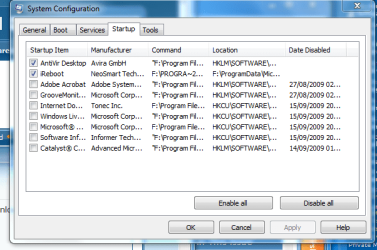
Hi, I know you are talking about after it logs on, but just to cut down the time that it's taking to come to life, Type in MSCONFIG and click on it when it starts, then click on Startup,
and then untick all the programs that you don't want to startup, every time you start the machine. I just have one or two box's checked in mine, and that is for my Anti Virus, this should knock a few seconds off that 209 seconds.

Msconfig..PNG
 

My Computer

Computer Manufacturer/Model Number
Self Build 64bit
OS
Vista Ult64, Win7600
CPU
Intel Core 2 Quad Q6600 @ 2400 MHz 64bit OS
Motherboard
Asus P5E3 Deluxe WiFi @p 64 bit OS
Memory
4096 MB DDR3-SDRAM
Graphics Card(s)
ATI Radeon HD 3870 Series x2 Crossfired
Sound Card
Realtek on board
Monitor(s) Displays
Samsung SyncMaster - 23 inches
Screen Resolution
1680x1050 pixels at 60 Hz in True Colors
Hard Drives
Hitachi (250 GB)/Samsung 750 GB. /Barracuda 160 GB.
My Book 1 TB external..
PSU
Cooler Master 1000w
Case
Cooler Master Cosmos 1000.
Cooling
Fans and fresh air,
Keyboard
Wireless
Mouse
Wireless
Internet Speed
Never fast enough
Other Info
I use a Magnum.
Have you looked in the System and Application event logs using the Event Viewer? Are there any warnings or errors there?

For example, my two to ten-minute delay during "Starting Windows" can be traced to iaStor error messages in the event log.

30-second delays always make me think of network timeouts. Do you have network connections that are automatically restored at startup but which are not always present?
 

My Computer

Computer Manufacturer/Model Number
home-built
OS
Win 7-32, XP Pro-32
CPU
Xeon 3070 (2.66 GHz)
Motherboard
Asus P5W DH Deluxe, BIOS 2901
Memory
4 GB
Graphics Card(s)
PowerColor ATI Radeon HD 5750 (fanless)
Sound Card
on-board
Monitor(s) Displays
Dell U2711
Screen Resolution
2560x1440
Hard Drives
All SATA:
ICH7R (AHCI): 1 Intel X-25M 80GB SSD, 2 Samsung HD103UJ 1TB, 1 Seagate ST3750330MS 750GB;
JMB363: Samsung SH-S223L DVD;
Promise TX4302: two mobile racks, normally powered off
PSU
Seasonic SS-650HT
Case
Antec P180
Cooling
Sunbeam Tuniq Tower 120, 4 120mm fans (variable rpm)
Keyboard
Lexmark IBM Type "M" - PS/2 connector
Mouse
Wacom Intous4, Logitech Wheel Mouse as backup
Internet Speed
Cable ~ 6 mbps
Other Info
DVD: Samsung SH-S223L (SATA),
SanDisk CompactFlash reader,
Epson R280 printer,
HP Laserjet 4100dtn,
Epson scanner,
NeatReceipts scanner

Laptops: Dell XPS 15 L501x, Dell E5420
That maybe something I think. I'm in event viewer now, but can't really understand what its saying. There are a number of errors on startup. I'll try to copy them below...

Error 17/09/2009 12:05:58 Windows Media Player Network Sharing Service 14338 None
Error 17/09/2009 12:05:57 Windows Media Player Network Sharing Service 14338 None
Error 17/09/2009 12:03:35 WMI 10 None
Error 17/09/2009 12:03:34 Service Control Manager 7026 None
Error 17/09/2009 12:03:13 Dhcp-Client 1002 Address Configuration State Event
Error 17/09/2009 12:02:54 atikmdag 43029 DAL
Error 17/09/2009 12:02:54 atikmdag 52236 CPLIB
Warning 17/09/2009 12:02:54 b57nd60x 4 None
Error 17/09/2009 12:02:57 EventLog 6008 None

thats what I get during and immediately after the startup sequence. the "atikmag" is referring to the graphics card i think and the "b57nd60x" refers to the ethernet card.

Any suggestions ideas? This is well above my knowledge now!!
 

My Computer

Computer Manufacturer/Model Number
Acer Aspire 5535
OS
Windows 7 Evaluation Copy Build 7100
CPU
AMD Turion X2
Motherboard
?
Memory
4Gb
Graphics Card(s)
ATI Radeon HD 3200
Sound Card
Realtek HD
Monitor(s) Displays
15.4
Hard Drives
300 Gb 2 Partitions
LS

any video problems?
 

My Computer

Computer Manufacturer/Model Number
HP Pavillion dv-7 1005 Tx
OS
Win 8 Release candidate 8400
CPU
[email protected]
Memory
4 gigs
Graphics Card(s)
Nvidia 9600M
Sound Card
HD built-in
Monitor(s) Displays
17" Wxga
Screen Resolution
1440x900
Cooling
none
Internet Speed
45Mb down 5Mb up
Yeah, but maybe not related. Flashplayer videos on the inet are very jumpy, not smooth like they normally are. I've re-installed the drivers the other day, but no difference.
 

My Computer

Computer Manufacturer/Model Number
Acer Aspire 5535
OS
Windows 7 Evaluation Copy Build 7100
CPU
AMD Turion X2
Motherboard
?
Memory
4Gb
Graphics Card(s)
ATI Radeon HD 3200
Sound Card
Realtek HD
Monitor(s) Displays
15.4
Hard Drives
300 Gb 2 Partitions
With a list like that, look at the time stamps. When there is a big jump in the timestamp, that message is related to a time delay.

In your case, the DHCP client generates an error message after a delay. The Service Control Manager error is probably reporting drivers failing to load. Finally, WMP is reporting network problems.

My guess is that all sorts of drivers aren't loading, including network components.

You say you've disabled various things. I wonder if you disabled one or more critical things that are causing these symptoms?

In the event viewer, if you double click on an item, then click on the Copy button, it will copy a full description of the error to the clipboard and you can post more info here. The Service Control Manager 7026 error might have a revealing list of drivers that have failed to load.

Iif reinstall is straightforward (you don't have a lot of data and applications that need a lot of effort to restore), I'd do that. If you have delays after the reinstall, look at the event log for errors before trying anything.

Since this is a laptop, you must have installed Windows 7 yourself (as nothing is shipping with Win 7 yet). It is possible that some of the devices on the laptop are not (yet) supported in Win7. Did the network and other components work properly (aside from any possible delays) before you starting disabling things?
 

My Computer

Computer Manufacturer/Model Number
home-built
OS
Win 7-32, XP Pro-32
CPU
Xeon 3070 (2.66 GHz)
Motherboard
Asus P5W DH Deluxe, BIOS 2901
Memory
4 GB
Graphics Card(s)
PowerColor ATI Radeon HD 5750 (fanless)
Sound Card
on-board
Monitor(s) Displays
Dell U2711
Screen Resolution
2560x1440
Hard Drives
All SATA:
ICH7R (AHCI): 1 Intel X-25M 80GB SSD, 2 Samsung HD103UJ 1TB, 1 Seagate ST3750330MS 750GB;
JMB363: Samsung SH-S223L DVD;
Promise TX4302: two mobile racks, normally powered off
PSU
Seasonic SS-650HT
Case
Antec P180
Cooling
Sunbeam Tuniq Tower 120, 4 120mm fans (variable rpm)
Keyboard
Lexmark IBM Type "M" - PS/2 connector
Mouse
Wacom Intous4, Logitech Wheel Mouse as backup
Internet Speed
Cable ~ 6 mbps
Other Info
DVD: Samsung SH-S223L (SATA),
SanDisk CompactFlash reader,
Epson R280 printer,
HP Laserjet 4100dtn,
Epson scanner,
NeatReceipts scanner

Laptops: Dell XPS 15 L501x, Dell E5420
Back
Top