Solved Very slow boot up 20+ mins

CityLady

New member
Member
Local time
12:08 AM
Messages
85
Location
Cape Town, South Africa
Hi there,

I have recently discovered my pc is taking 20+ minute to boot up, I have virus scanned and sfc/scannow which has not pick up any violations. I have also tried a clean boot to see if I can locate the issue and still nothing seems to sort it. I also read that it may be a ram problem which I used memtest to check and I let it pass overnight 8-9 passes and still nothing please help as I'm completely confused as to why this could be happening. My pc always boots up just taking a long time to do so plus my Avg updates as soon as desktop appears. The only problem I think may have caused it was a critical update in windows which stopped when my pc froze when i rebooted it didn't take as long as it does now but longer than it normally did. I have updated all drivers and updates and still the problem persists.

Any help on this would be very much appreciated.

CityLady
 

My Computer My Computer

At a glance

windows 7 64bit EnterpriseIntel core i5- 3330 CPU @ 3.00GHz8gbNvidia GeForce GT630 2Gb ram
Computer type
PC/Desktop
Computer Manufacturer/Model Number
ACPI x 86-based pc
OS
windows 7 64bit Enterprise
CPU
Intel core i5- 3330 CPU @ 3.00GHz
Motherboard
MSI MS-7756
Memory
8gb
Graphics Card(s)
Nvidia GeForce GT630 2Gb ram
Sound Card
High definition audio device
Monitor(s) Displays
Dell 1908 FP (Analog)
Screen Resolution
1440 x900
Hard Drives
Maxtor 2F040L0 ATA 360gb
SATA ST3120026a ATA 120gb
SATA ST332061 3AS 120gb
WD 2tb hard drive
PSU
500watts
Case
not sure
Cooling
not sure
Keyboard
Standard PS/2 Keyboard
Mouse
Logitech wireless HID-compliant mouse
Internet Speed
4MB/s
Windows 7 boot time should not be more than 30 seconds.

Right click on Computer and click on Manage and then select Event Viewer. Go to the System - Windows logs section and check which process is taking up more time during booting up. Try checking the boot speed in safe mode and compare.

You can use some of these tips to make your windows 7 to boot faster.

Speed Up Windows 7 – Ultimate Guide To Make Windows 7 Blazing Fast!!!
 

My Computer My Computer

At a glance

MS Windows 7 Ultimate 64-bit SP1i5-2410M 2.3GHz (2.9GHz Turbo-Boost) Sandy Br...4GB+4GB Samsung DDR3 PC3-10700 (1333 MHz)Video Intel(R) HD Graphics Family, 1696MB ava...
Computer Manufacturer/Model Number
Toshiba Satellite P775-S7232
OS
MS Windows 7 Ultimate 64-bit SP1
CPU
i5-2410M 2.3GHz (2.9GHz Turbo-Boost) Sandy Bridge 32nm
Motherboard
Toshiba PHRAA ver. PSBY1U-00F003
Memory
4GB+4GB Samsung DDR3 PC3-10700 (1333 MHz)
Graphics Card(s)
Video Intel(R) HD Graphics Family, 1696MB available memory
Sound Card
Realtek High Definition Audio version=6.0.1.6323
Monitor(s) Displays
17.3 " Trubrite TFT LCD, LED Backlit
Screen Resolution
1600x900 32 bit, Native support for 720P content
Hard Drives
TOSHIBA MK6476GSXN
580.614 [GB] partitioned C: 80GB and D: 500GB with hidden recovery partitons.

Spare bay for 2nd HDD but no SATA connector :-(
PSU
Toshiba AC/DC Adapter
Case
Notebook
Cooling
Built-in Fan
Keyboard
Premium Raised Tile keyboard
Mouse
Logitech M215 wireless mouse
Internet Speed
Not fast enough
Other Info
Built-in Harman Kardon speakers with Dolby Advanced Audio, Waves MaxxAudio® 3. HDMI, 1xUSB3+3xUSB2 ports, WebCam, Battery life 4hrs 11mins, 4GB Readyboost SDHC card, WD My Book Essential Ext HDDs 2 TB, 2x1TB, My Passport SE 1TB and WDTV 1st Gen for Multimedia playing on a Sony Wega 32" LCD.
Recent addition to my toys are Asus Transformer Pad TF300T with 32GB onboard sd card + 32GB microsd card.
I have seen these issues with RAID controllers from time to time. Do you have a RAID controller? If not, follow the next steps.

Recommend the following:
1. Shut down and turn off the computer.
2. Turn on your computer and follow the steps in the http://www.sevenforums.com/tutorials/666-advanced-boot-options.html tutorial
3. Run Repair Your Computer
4. Run a startup repair following the steps in http://www.sevenforums.com/tutorials/668-system-recovery-options.html OPTION ONE

If the above does not work, run http://www.sevenforums.com/tutorials/1538-sfc-scannow-command-system-file-checker.html. You may need to run it up to three times to repair all system files.
 

My Computer My Computer

At a glance

Windows 7 Home Premium 64 BitIntel(R) Core(TM)2 Quad CPU Q9550 @ 2.83GHz6.00 GB Hundai HMT125U6BFR8C-H9ATI Radeon HD 4850
Computer Manufacturer/Model Number
HP Pavilion e9110t
OS
Windows 7 Home Premium 64 Bit
CPU
Intel(R) Core(TM)2 Quad CPU Q9550 @ 2.83GHz
Motherboard
Pegatron IPIEL-LA3
Memory
6.00 GB Hundai HMT125U6BFR8C-H9
Graphics Card(s)
ATI Radeon HD 4850
Sound Card
Realtek High Definition Audio/ATI High Definition Audio
Monitor(s) Displays
Acer AL2216W
Screen Resolution
1680x1050
Hard Drives
Hitachi HDP725050GLA360 ATA Device 500 GB
PSU
Unknown/installed by HP
Case
HP generic case
Cooling
Intel Stock Cooling
Keyboard
HP Keyboard
Mouse
HP Mouse
Internet Speed
Download: 19.15 Mbps Upload: 1.67 Mbps
Other Info
Network Adapter Realtek RTL8168D/8111D Family PCI-E Gigabit Ethernet NIC (NDIS 6.20)
Network Adapter 802.11n Wireless PCI Express Card LAN Adapter
Hello CityLady,

As well as the advice the others have given you...

* Please list your System Security.
Did you computer come with an Anti Virus program preinstalled?
If so, how did you remove it?

BTW There should be no need for AVG to update
as soon as your desktop appears. {Change the update schedule if more convenient}

* On a regular basis check in Task Manager/ Processes/ All Users to see what is running there.

Check Start > run > msconfig > Start up { See what is listed there. }

* Check in Event Viewer/ for errors frequently.
Note any with a red mark in Application.

* Monitor regularly >Task manager - Performance - - Resource monitor - CPU, Memory etc}

*Remove any software you have evaluated and decided you don't want to keep.


FYI.

Windows 7 Os and all programs are running very slowly - Microsoft Answers

Windows 7 is extremely slow to boot - Microsoft Answers

Increase PC speed: Optimize your computer, help your PC run faster
 

My Computer My Computer

At a glance

Win 7 Ultimate 64-bit. SP1.Intel i7 -720QM.[1.6GHz Turbo Boost 2.8GHz. 6...8 DDR 3 RAM. 1066MHZATI 1024 MB. DDR3. Radeon HD5650
Computer Manufacturer/Model Number
LAPTOP. HP Pavilion dv7-4010TX .
OS
Win 7 Ultimate 64-bit. SP1.
CPU
Intel i7 -720QM.[1.6GHz Turbo Boost 2.8GHz. 6MB Cache.]
Memory
8 DDR 3 RAM. 1066MHZ
Graphics Card(s)
ATI 1024 MB. DDR3. Radeon HD5650
Monitor(s) Displays
17.3" High Definition Brightview LCD. LED Backlit.
Screen Resolution
1600 x 900.
Hard Drives
640GB
Case
Laptop / notebook.
Mouse
Logitech Anywhere mouse. MX.
Internet Speed
ADSL [ but too slow ]
Hello again and thank you for your quick responses to my problem.

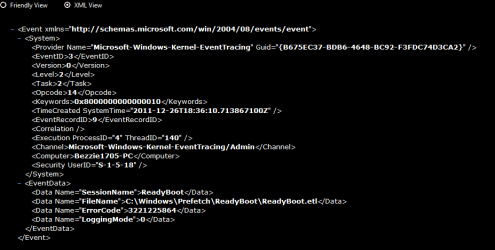
Here are some recent errors in the event log. I have tried most of the things you suggest here and still it persists. My AV is and always has been AVG. I am not sure about raid as not very experienced with this so I wouldn't know where to look. My pc works fine when booted to desktop but just takes so long to get there.

I am a little concerned about the user profile service errors or am I worrying over nothing there. I am also having trouble with backups too saying back was unsuccessful as error reporting service will not connect to MS error reporting. please tell me anything more you require to assist....and how to get what you need to diagnose the problem.

again thanks

CityLady
 

Attachments

  • Errors last few days.PNG
    Errors last few days.PNG
    6.4 KB · Views: 479
  • Ready boot error.PNG
    Ready boot error.PNG
    13.3 KB · Views: 573

My Computer My Computer

At a glance

windows 7 64bit EnterpriseIntel core i5- 3330 CPU @ 3.00GHz8gbNvidia GeForce GT630 2Gb ram
Computer type
PC/Desktop
Computer Manufacturer/Model Number
ACPI x 86-based pc
OS
windows 7 64bit Enterprise
CPU
Intel core i5- 3330 CPU @ 3.00GHz
Motherboard
MSI MS-7756
Memory
8gb
Graphics Card(s)
Nvidia GeForce GT630 2Gb ram
Sound Card
High definition audio device
Monitor(s) Displays
Dell 1908 FP (Analog)
Screen Resolution
1440 x900
Hard Drives
Maxtor 2F040L0 ATA 360gb
SATA ST3120026a ATA 120gb
SATA ST332061 3AS 120gb
WD 2tb hard drive
PSU
500watts
Case
not sure
Cooling
not sure
Keyboard
Standard PS/2 Keyboard
Mouse
Logitech wireless HID-compliant mouse
Internet Speed
4MB/s
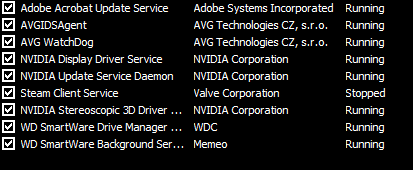
Also in msconfig there are not many services running 6 in total and programs 1 which is Avg the rest are all unticked as, I was told that only my AV should be the only one ticked in the programs.

here is a list of services running
 

Attachments

  • services running non MS.PNG
    services running non MS.PNG
    3.8 KB · Views: 333

My Computer My Computer

At a glance

windows 7 64bit EnterpriseIntel core i5- 3330 CPU @ 3.00GHz8gbNvidia GeForce GT630 2Gb ram
Computer type
PC/Desktop
Computer Manufacturer/Model Number
ACPI x 86-based pc
OS
windows 7 64bit Enterprise
CPU
Intel core i5- 3330 CPU @ 3.00GHz
Motherboard
MSI MS-7756
Memory
8gb
Graphics Card(s)
Nvidia GeForce GT630 2Gb ram
Sound Card
High definition audio device
Monitor(s) Displays
Dell 1908 FP (Analog)
Screen Resolution
1440 x900
Hard Drives
Maxtor 2F040L0 ATA 360gb
SATA ST3120026a ATA 120gb
SATA ST332061 3AS 120gb
WD 2tb hard drive
PSU
500watts
Case
not sure
Cooling
not sure
Keyboard
Standard PS/2 Keyboard
Mouse
Logitech wireless HID-compliant mouse
Internet Speed
4MB/s
Do you have a restore point going back prior to when the startup issue first began?

http://www.sevenforums.com/tutorials/700-system-restore.html

If yes, see if that fixes the problem. Using a restore point will remove any updates, drivers, programs, etc that were installed after the restore point date.

I'd suggest running Windows Updates again. Depending on how many updates need to be reinstalled, I'd do just a few at a time. Check your computer for any problems. If the slow startup occurs you'll know which three or four updates to remove. Install them one at a time. If the slow startup happens you'll knw exactly which update is the problem.

As for drivers, I believe in the old saying, "If it ain't broke, don't fix it it." Installing newer drivers can cause issues so if your machine is working fine without the newer drivers, don't reinstall them. IMHO.

If you installed any programs after the restore point date, same thing. Reinstall just one at a time, see how your machine acts. If problems occur you'll know which program is causing the issue.

If you DON'T have a restore point going back prior to when the startup issue first began, none of the above will matter. :D
 

My Computer My Computer

At a glance

Win 7 Pro 64-bitIntel i5 2.4 Ghz8GB DDR3Intel HD 3000
Computer type
Laptop
Computer Manufacturer/Model Number
Sony Vaio VPCEB47GM Laptop
OS
Win 7 Pro 64-bit
CPU
Intel i5 2.4 Ghz
Memory
8GB DDR3
Graphics Card(s)
Intel HD 3000
Sound Card
IDT High Definition
Monitor(s) Displays
15.6 WGXA Anti-Glare LED
Screen Resolution
1280x800
Hard Drives
640Gb 7200rpm
Antivirus
MSE
Browser
Opera (primary) with IE9 backup
marsmimar,

Yes I have several restore points which last night I restored to about 8 days ago and still this boot up the same..... I can go back further up to 3 weeks if I remember but this problem only started 2-3 days ago so going back 8 days would have shown some improvements maybe....

CityLady
 

My Computer My Computer

At a glance

windows 7 64bit EnterpriseIntel core i5- 3330 CPU @ 3.00GHz8gbNvidia GeForce GT630 2Gb ram
Computer type
PC/Desktop
Computer Manufacturer/Model Number
ACPI x 86-based pc
OS
windows 7 64bit Enterprise
CPU
Intel core i5- 3330 CPU @ 3.00GHz
Motherboard
MSI MS-7756
Memory
8gb
Graphics Card(s)
Nvidia GeForce GT630 2Gb ram
Sound Card
High definition audio device
Monitor(s) Displays
Dell 1908 FP (Analog)
Screen Resolution
1440 x900
Hard Drives
Maxtor 2F040L0 ATA 360gb
SATA ST3120026a ATA 120gb
SATA ST332061 3AS 120gb
WD 2tb hard drive
PSU
500watts
Case
not sure
Cooling
not sure
Keyboard
Standard PS/2 Keyboard
Mouse
Logitech wireless HID-compliant mouse
Internet Speed
4MB/s
marsmimar,

Yes I have several restore points which last night I restored to about 8 days ago and still this boot up the same..... I can go back further up to 3 weeks if I remember but this problem only started 2-3 days ago so going back 8 days would have shown some improvements maybe....

CityLady

When you restored to about 8 days ago, did you reinstall any of the Windows Updates, drivers, etc?
 

My Computer My Computer

At a glance

Win 7 Pro 64-bitIntel i5 2.4 Ghz8GB DDR3Intel HD 3000
Computer type
Laptop
Computer Manufacturer/Model Number
Sony Vaio VPCEB47GM Laptop
OS
Win 7 Pro 64-bit
CPU
Intel i5 2.4 Ghz
Memory
8GB DDR3
Graphics Card(s)
Intel HD 3000
Sound Card
IDT High Definition
Monitor(s) Displays
15.6 WGXA Anti-Glare LED
Screen Resolution
1280x800
Hard Drives
640Gb 7200rpm
Antivirus
MSE
Browser
Opera (primary) with IE9 backup
marsmimar,

Yes I have several restore points which last night I restored to about 8 days ago and still this boot up the same..... I can go back further up to 3 weeks if I remember but this problem only started 2-3 days ago so going back 8 days would have shown some improvements maybe....

CityLady

When you restored to about 8 days ago, did you reinstall any of the Windows Updates, drivers, etc?[/QUOTE


I think my problem has been solved as I just restored back again to 2 weeks ago and restarted my pc and it took 1:12 seconds to boot up....Weird! But will update windows now to see if it improves as I got a few actions to sort out with updates will keep you posted on my progress...

Thanks again guys most of the help you gave me has been useful and kind....


CityLady
 

My Computer My Computer

At a glance

windows 7 64bit EnterpriseIntel core i5- 3330 CPU @ 3.00GHz8gbNvidia GeForce GT630 2Gb ram
Computer type
PC/Desktop
Computer Manufacturer/Model Number
ACPI x 86-based pc
OS
windows 7 64bit Enterprise
CPU
Intel core i5- 3330 CPU @ 3.00GHz
Motherboard
MSI MS-7756
Memory
8gb
Graphics Card(s)
Nvidia GeForce GT630 2Gb ram
Sound Card
High definition audio device
Monitor(s) Displays
Dell 1908 FP (Analog)
Screen Resolution
1440 x900
Hard Drives
Maxtor 2F040L0 ATA 360gb
SATA ST3120026a ATA 120gb
SATA ST332061 3AS 120gb
WD 2tb hard drive
PSU
500watts
Case
not sure
Cooling
not sure
Keyboard
Standard PS/2 Keyboard
Mouse
Logitech wireless HID-compliant mouse
Internet Speed
4MB/s
Good to hear things are looking better. Couple of other things that can affect boot time ...

Occasionally clean out old temp files, etc.

http://www.sevenforums.com/tutorials/818-disk-cleanup-open-use.html

Periodically check for hard drive defragmentation.

http://www.sevenforums.com/tutorials/11733-disk-defragmenter-open-use.html

Sometimes a USB device kept plugged into the computer can go bad and cause weird things to happen. Or a device like a printer may have updates that need to be obtained from the manufacturer.

Please keep us informed of your progress.
 

My Computer My Computer

At a glance

Win 7 Pro 64-bitIntel i5 2.4 Ghz8GB DDR3Intel HD 3000
Computer type
Laptop
Computer Manufacturer/Model Number
Sony Vaio VPCEB47GM Laptop
OS
Win 7 Pro 64-bit
CPU
Intel i5 2.4 Ghz
Memory
8GB DDR3
Graphics Card(s)
Intel HD 3000
Sound Card
IDT High Definition
Monitor(s) Displays
15.6 WGXA Anti-Glare LED
Screen Resolution
1280x800
Hard Drives
640Gb 7200rpm
Antivirus
MSE
Browser
Opera (primary) with IE9 backup
And one other suggestion if I may. Restore points serve a limited function. As you've seen, using a restore point removes drivers, updates, programs, etc that were installed after the restore point was created. A much better safety net (once your computer is running fine) is to create a system image on a different hard drive. A system image is an exact duplicate of your primary hard drive. All of your files, folders, updates, personal settings, programs, even the operating system, are preserved exactly as they were when the image was created. If your computer suffers a nasty virus, or even if the primary hard drive dies and you have to replace it, a system image can have you back online in usually an hour or less.
 

My Computer My Computer

At a glance

Win 7 Pro 64-bitIntel i5 2.4 Ghz8GB DDR3Intel HD 3000
Computer type
Laptop
Computer Manufacturer/Model Number
Sony Vaio VPCEB47GM Laptop
OS
Win 7 Pro 64-bit
CPU
Intel i5 2.4 Ghz
Memory
8GB DDR3
Graphics Card(s)
Intel HD 3000
Sound Card
IDT High Definition
Monitor(s) Displays
15.6 WGXA Anti-Glare LED
Screen Resolution
1280x800
Hard Drives
640Gb 7200rpm
Antivirus
MSE
Browser
Opera (primary) with IE9 backup
Thank you so much guys for you help my pc running much better now, the rep was a pleasure as you have helped me sort my problem out. I have downloaded CCleaner on recommendation of MS Tech to clean temp file etc. I am now in the process of creating a windows image of my well working windows.

Again thank you so much and I hope you continue to do the very excellent free service you offer to people in distress.

finally i also want to wish you all the very best for the new year...

A very grateful

CityLady
 

My Computer My Computer

At a glance

windows 7 64bit EnterpriseIntel core i5- 3330 CPU @ 3.00GHz8gbNvidia GeForce GT630 2Gb ram
Computer type
PC/Desktop
Computer Manufacturer/Model Number
ACPI x 86-based pc
OS
windows 7 64bit Enterprise
CPU
Intel core i5- 3330 CPU @ 3.00GHz
Motherboard
MSI MS-7756
Memory
8gb
Graphics Card(s)
Nvidia GeForce GT630 2Gb ram
Sound Card
High definition audio device
Monitor(s) Displays
Dell 1908 FP (Analog)
Screen Resolution
1440 x900
Hard Drives
Maxtor 2F040L0 ATA 360gb
SATA ST3120026a ATA 120gb
SATA ST332061 3AS 120gb
WD 2tb hard drive
PSU
500watts
Case
not sure
Cooling
not sure
Keyboard
Standard PS/2 Keyboard
Mouse
Logitech wireless HID-compliant mouse
Internet Speed
4MB/s
Our pleasure. And Happy Holidays to you too.
 

My Computer My Computer

At a glance

Win 7 Pro 64-bitIntel i5 2.4 Ghz8GB DDR3Intel HD 3000
Computer type
Laptop
Computer Manufacturer/Model Number
Sony Vaio VPCEB47GM Laptop
OS
Win 7 Pro 64-bit
CPU
Intel i5 2.4 Ghz
Memory
8GB DDR3
Graphics Card(s)
Intel HD 3000
Sound Card
IDT High Definition
Monitor(s) Displays
15.6 WGXA Anti-Glare LED
Screen Resolution
1280x800
Hard Drives
640Gb 7200rpm
Antivirus
MSE
Browser
Opera (primary) with IE9 backup
i got my pc boot up 30 mins, but now just 1 mins.
first i though it's virus, but then i just turned off superfect, and voila. all is good.
 

My Computer My Computer

At a glance

64bit3770k i7 Overclock Series16gb 4x4 vengeance550 gtx ti
OS
64bit
CPU
3770k i7 Overclock Series
Motherboard
Asus Durable
Memory
16gb 4x4 vengeance
Graphics Card(s)
550 gtx ti
Monitor(s) Displays
samsung 23" full HD TV series 6
Screen Resolution
1920x1080
Hard Drives
WDC Green 2x 2TB
mind to get SSD, any suggestion?
PSU
700 Watt Cooler Master
Case
X Habu
Cooling
Cooler master
Keyboard
Razer
Mouse
Razer
Internet Speed
1 mbps
Antivirus
MSE
Browser
Aurora
As an additional $0.02 JMH's advice about looking at Task Manager is spot on and often can lead to removing suspect software.
For example my boot got so slow it was taking 4 minutes for the pulsing four color window to pass and get to the password input screen.
I'd prior installed the trial package for software called Anonymizer Universal ( a $79.00 program) which trial had expired. Checking Task manager I saw it was still running.
I uninstalled it letting it restore the registry entries it has altered and now my boot is 45.4 seconds.
While I really liked the way Anonymizer worked to keep me hidden on the web (random generated IP among other things) it seemed a CPU hog during boot.
 

My Computer My Computer

At a glance

ASUS X79 DELUXE LGA 2011 Intel X79 SATA 6Gb/s...Intel Core i7-4930K Ivy Bridge-E 3.4GHz LGA 2...CORSAIR Dominator Platinum 16GB (4 x 4GB) 240...ASUS EAH6450 Silent/DI/1GD3(LP) Radeon HD 645...
Computer type
PC/Desktop
Computer Manufacturer/Model Number
Home built
OS
ASUS X79 DELUXE LGA 2011 Intel X79 SATA 6Gb/s USB 3.0 ATX
CPU
Intel Core i7-4930K Ivy Bridge-E 3.4GHz LGA 2011 130W 6-Core
Motherboard
ASUS X79 DELUXE LGA 2011 Intel X79 SATA 6Gb/s USB 3.0 ATX
Memory
CORSAIR Dominator Platinum 16GB (4 x 4GB) 240-Pin DDR3 SDRAM
Graphics Card(s)
ASUS EAH6450 Silent/DI/1GD3(LP) Radeon HD 6450 1GB 64-bit DD
Sound Card
onboard
Monitor(s) Displays
Dell lcd 32"
Hard Drives
1tb SATA, 2tb SATA, 500 gig SATA, 500 Gig SATA, 500 Gig IDE
PSU
CORSAIR HX Series HX750 750W ATX12V 2.3 / EPS12V 2.91 SLI Re
Case
something colored black
Cooling
Cooler Master Seidon 120XL
Keyboard
this thing with buttons on it
Mouse
a tailed devil
Internet Speed
whizzing along
Antivirus
KASPERSKY
Browser
Firefox. Opra, Explorer.
Other Info
I am naked and outside your window shouting Non Sequiturs in a loony high pitched voice.
Made an account for this in case anyone else stumbles upon as I did.

The problem I found after looking through the event viewer and windows logs was an Itunes secondary program called "Bonjour" it's supposedly used for streaming over airplay but after uninstalling the program my computer was back to normal and running much much faster. If you cant uninstall through control panel, I went into my program files and program files(x86) and deleted the Bonjour folders directly. After reboot it was running visible faster as the loading screens were shortened by many minutes.

I hope this can help someone in the future!
 

My Computer My Computer

At a glance

Windows 7 Pro x64
Computer type
PC/Desktop
OS
Windows 7 Pro x64
I am having windows 10 and do not have a system restore point .what should I do?
 

My Computer My Computer

At a glance

Windows 10
Computer type
PC/Desktop
OS
Windows 10
Back
Top