Very Strange Windows Live Network Problem

Magoo

New member
Member
Local time
4:07 PM
Messages
75
Couple Days , I bought a Netgear wndr3700, Has the newest firmware. UNPN Enabled. I noticed that Windows Live Messenger would no longer sign in automatically. It wouldn't even attempt. To fix I would have to open the window and hit the "sign in button" So after searching for a fix online, I wasn't really sure if it was the router or something had gone wrong with my system. I tried reinstalling WLM and a few other things and nothing has fixed it yet.

I found this in the router log [DoS Attack: ACK Scan] from source: 64.4.34.224, port 1863.

I assume thats the Firewall.

Tried Netgear's tech Support = USELESS!

Anyone have any ideas?
 

My Computer

OS
Window 7 x64
CPU
I7 930
Motherboard
P6X58-Premium
Memory
6 gig Corsair Dominator
Graphics Card(s)
ATI 5800
Sound Card
Onboard
Monitor(s) Displays
24" Dell IPS
Hard Drives
Vertex 2 100 SSD
6 X 2TB Samgsung HDD
PSU
Seasonic X750
Case
Corsair 800D
Cooling
Corsair H50
Internet Speed
100 Mb/s
I ran the Internet Connectivity Test and for some reason the the UPNP Support Test did not run and said:

The test was not run, possibly because the tool was unable to detect a usable Internet connection. Please verify that your Internet connection is working and try running the tool again. If this does not resolve the problem, read the detailed report for more information.

All other tests worked and passed?
 

My Computer

OS
Window 7 x64
CPU
I7 930
Motherboard
P6X58-Premium
Memory
6 gig Corsair Dominator
Graphics Card(s)
ATI 5800
Sound Card
Onboard
Monitor(s) Displays
24" Dell IPS
Hard Drives
Vertex 2 100 SSD
6 X 2TB Samgsung HDD
PSU
Seasonic X750
Case
Corsair 800D
Cooling
Corsair H50
Internet Speed
100 Mb/s
Hi Magoo, for a moment, forget about the network and take it as any other normal connection. For me, WLM opens automatically when I turn on my PC and it attempts to sign in. Since you have already reinstalled WLM, just make sure that your AV/Firewall is not blocking WLM to connect to the internet automatically.
 

My Computer

Computer Manufacturer/Model Number
Samsung NP530U4B-S02IN
OS
Windows® 8 Pro (64-bit)
CPU
Intel® Core™ i5 Processor 2467M (1.60GHz, 3MB L3 Cache)
Motherboard
Samsung Electronics
Memory
6GB DDR3 System Memory at 1,333MHz (on BD 4GB + 2GB x 1)
Graphics Card(s)
AMD Radeon™ HD7550M 1GB DDR3 (Ext. Graphic)
Sound Card
Realtek High Definition Audio
Monitor(s) Displays
35.56cm (14.0) SuperBright 300nit HD LED Display
Screen Resolution
1366x768
Hard Drives
1TB S-ATA II Hard Drive (5400RPM) with ExpressCache 16GB SSD
Internet Speed
sucks
Antivirus
Microsoft Security Essentials
Browser
Google Chrome (Sync enabled)
Yup no AV Blocking anything , Unless its windows firewall itself. Thats exactly how my system was every time I would turn it on, WLM would start, Until I installed the new Netgear Router. I switched back to my DGL-4300 and all is well. I just dont understand how a router can seem to work perfectly (so far). Except not sign you into WLM automatically. When I 1st installed the Netgear I got this msg that a new network had been found and it called it network 2 and I had to select the type and wait a couple minutes while it applies setting and stuff.....
 

My Computer

OS
Window 7 x64
CPU
I7 930
Motherboard
P6X58-Premium
Memory
6 gig Corsair Dominator
Graphics Card(s)
ATI 5800
Sound Card
Onboard
Monitor(s) Displays
24" Dell IPS
Hard Drives
Vertex 2 100 SSD
6 X 2TB Samgsung HDD
PSU
Seasonic X750
Case
Corsair 800D
Cooling
Corsair H50
Internet Speed
100 Mb/s
Open msconfig and click the Startup tab to see if WLM is set to load automatically when windows starts.
 

My Computer

Computer Manufacturer/Model Number
Samsung NP530U4B-S02IN
OS
Windows® 8 Pro (64-bit)
CPU
Intel® Core™ i5 Processor 2467M (1.60GHz, 3MB L3 Cache)
Motherboard
Samsung Electronics
Memory
6GB DDR3 System Memory at 1,333MHz (on BD 4GB + 2GB x 1)
Graphics Card(s)
AMD Radeon™ HD7550M 1GB DDR3 (Ext. Graphic)
Sound Card
Realtek High Definition Audio
Monitor(s) Displays
35.56cm (14.0) SuperBright 300nit HD LED Display
Screen Resolution
1366x768
Hard Drives
1TB S-ATA II Hard Drive (5400RPM) with ExpressCache 16GB SSD
Internet Speed
sucks
Antivirus
Microsoft Security Essentials
Browser
Google Chrome (Sync enabled)
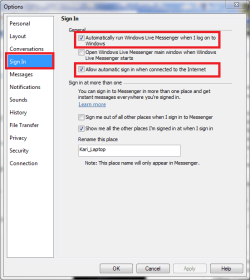
Check Live Messenger preferences (Tools menu > Options). Is automatic sign in enabled?

Kari

Messenger_SignIn.png
 

My Computer

Computer type
Laptop
Computer Manufacturer/Model Number
HP ENVY 17-1150eg
OS
Windows 10 Pro x64 EN-GB
CPU
1.6 GHz Intel Core i7-720QM Processor
Memory
6 GB
Graphics Card(s)
ATI Mobility Radeon HD 5850 Graphics
Sound Card
Beats sound system with integrated subwoofer
Monitor(s) Displays
17" laptop display, 22" LED and 32" Full HD TV through HDMI
Screen Resolution
1600*900 (1), 1920*1080 (2&3)
Hard Drives
Internal: 2 x 500 GB SATA Hard Disk Drive 7200 rpm
External: 2TB for backups, 3TB USB3 network drive for media
Cooling
As Envy runs a bit warm, I have it on a Cooler Master pad
Keyboard
Logitech diNovo Media Desktop Laser (bluetooth)
Mouse
Logitech Performance Mouse MX
Internet Speed
50/10 Mbps VDSL
Antivirus
Windows Defender 4.3.9431.0
Browser
Maxthon 3.5.2., IE11
yup all of that is set correctly.
 

My Computer

OS
Window 7 x64
CPU
I7 930
Motherboard
P6X58-Premium
Memory
6 gig Corsair Dominator
Graphics Card(s)
ATI 5800
Sound Card
Onboard
Monitor(s) Displays
24" Dell IPS
Hard Drives
Vertex 2 100 SSD
6 X 2TB Samgsung HDD
PSU
Seasonic X750
Case
Corsair 800D
Cooling
Corsair H50
Internet Speed
100 Mb/s
Well Guys thanks for trying to help out . Pretty sure the router is just a dude, It started to get worse and worse where web pages wouldn't load, So I'm just gonna return it. Everything perfect with older D-link router.
 

My Computer

OS
Window 7 x64
CPU
I7 930
Motherboard
P6X58-Premium
Memory
6 gig Corsair Dominator
Graphics Card(s)
ATI 5800
Sound Card
Onboard
Monitor(s) Displays
24" Dell IPS
Hard Drives
Vertex 2 100 SSD
6 X 2TB Samgsung HDD
PSU
Seasonic X750
Case
Corsair 800D
Cooling
Corsair H50
Internet Speed
100 Mb/s
Grabbed another Netgear WNDR3700 and it really doesnt seem to like Windows 7 for some reason, on my XP desktop everything logs in instantly.....
 

My Computer

OS
Window 7 x64
CPU
I7 930
Motherboard
P6X58-Premium
Memory
6 gig Corsair Dominator
Graphics Card(s)
ATI 5800
Sound Card
Onboard
Monitor(s) Displays
24" Dell IPS
Hard Drives
Vertex 2 100 SSD
6 X 2TB Samgsung HDD
PSU
Seasonic X750
Case
Corsair 800D
Cooling
Corsair H50
Internet Speed
100 Mb/s
Back
Top