Solved VIA HD Audio Deck - Front panel headphone device not producing sound

np726

New member
Member
Local time
4:46 AM
Messages
31
Location
USA
I built a custom desktop a couple of months ago. I have a Gigabyte Z77X-DH3 mobo inside an Antec Nine Hundred case.

Gigabyte Z77X-DH3 Manual

Nine Hundred Manual

I'm not very sharp when it comes to computer audio, but here's what I'm looking at (I think...). The mobo has integrated audio which uses the VIA VT2021 audio codec. The case also has headphone/mic inputs on the front panel. This is connected to the mobo using the provided High Definition Audio cable (as opposed to AC97). I have speakers connected to the integrated audio, and a headset connected to the front panel headphone/mic ports.

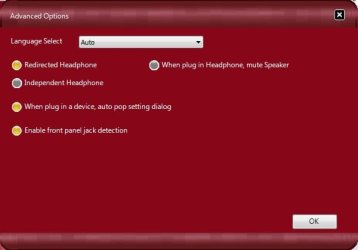
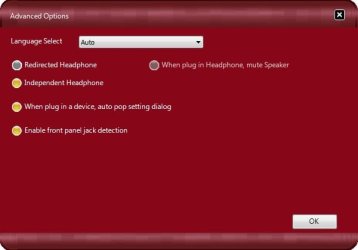
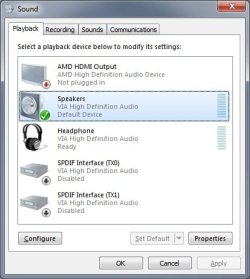
In windows, I am using the VIA HD Audio Deck software. In the advanced options menu, I have the headphones set on the "Independent Headphone" option, which makes the headphones show up as it's own device in the windows playback device menu (which is what I want), instead of showing it as the speakers. The problem is, when I make the headphones the active device, they don't play any sound. The green equalizer bars next to the device in the windows menu show the device is playing, but no sound comes from the headphones themselves. If I switch the setting in the VIA software to "Redirected Headphone", using the same port, it works fine (but it shows up as the same device as the speakers).

In the Device Manager, under "Sounds, video and game controllers", I have 3 devices listed:
  • AMD High Definition Audio Device
  • High Definition Audio Device
  • VIA High Definition Audio
The High Definition Audio Device has the yellow "!" triangle and is showing the following device status: "This device cannot start. (Code 10)". I have tried updating the drivers, which windows reports they are already up to date.
There is also a USB Controller device which has the "!" triangle. It shows an error of no device drivers installed (Code 28). When I try to update the drivers, none are found. When I uninstalled and re-installed the audio device, the USB device also uninstalled/re-installed (which leads me to believe that this is the 2 USB ports on the front panel).

This is all of the info that I can think of to gather. I'm sure the headphone problem is a result of these errors in the device manager, but at this point I'm not too sure where to go from here.

Any help would be more than greatly appreciated!
 

My Computer My Computer

At a glance

Windows 7 Pro x64Intel Core i5-3570K Ivy Bridge 3.4GHz (3.8GHz...Corsair Vengeance 16GB (4 x 4GB)XFX Radeon HD 6870
Computer Manufacturer/Model Number
Custom Build
OS
Windows 7 Pro x64
CPU
Intel Core i5-3570K Ivy Bridge 3.4GHz (3.8GHz Turbo) LGA 115
Motherboard
Gigabyte GA-Z77X-D3H
Memory
Corsair Vengeance 16GB (4 x 4GB)
Graphics Card(s)
XFX Radeon HD 6870
Sound Card
On Board VIA High Definition Audio
Monitor(s) Displays
2 x 24" ASUS VE247
Screen Resolution
1920x1080x2
Hard Drives
Western Digital 1003FBYX - 1TB
Western Digital 15EARS - 1.5TB
Samsung HD103UJ - 1TB
PSU
Corsair Builder Series CX600 V2 600W ATX 12V v2.3 80 PLUS
Case
Antec Nine Hundred
Cooling
Zalman CNPS9500 AT 2 Ball CPU Cooling Fan/Heatsink
Keyboard
Logitech G110, Razer Nostromo
Mouse
Razer Deathadder
Internet Speed
20 Mbps down/30 Mbps up
Other Info
Internal SATA to external eSATA PCI Bracket
First get rid of the High Definition Audio Device. That was probably a default device that Windows installed, before you installed either the AMD video drivers or the VIA sound drivers. Whether that is interferring with what you want to do? (or if what you want to do can be done).

I just built a new PC with a gigabyte Z77X UD5H motherboard and it has RealTek audio on it.

In the RealTek control panel, I can set the front panel headset jack to either mute the speakers (normal) or to not mute the speakers so that both the speakers and headset work.

But, if you are trying to get two different default audio playback devices at the same time, you can't do that. Windows limits you to only one default audio playback device.
 

My Computer My Computer

At a glance

Windows 10 64 bitIntel i7 6700K16GB Corsair DominatorIntel CPU Graphics
Computer type
PC/Desktop
Computer Manufacturer/Model Number
My Own Build
OS
Windows 10 64 bit
CPU
Intel i7 6700K
Motherboard
ASUS ROG Maximus VIII Hero
Memory
16GB Corsair Dominator
Graphics Card(s)
Intel CPU Graphics
Sound Card
RealTek
Monitor(s) Displays
27" Dell S2719dgf
Screen Resolution
2560X1440
Hard Drives
1 TB Samsung 850 EVO SSD for Win 10 Pro
500GB Samsung 850 EVO SSD for Win 10 Insider
2 TB drive for backup
PSU
EVGA Supernova 750G2
Case
BeQuiet Silent Base 600
Cooling
Deepcool Captain 120EX
Keyboard
Microsoft Wireless 2000
Mouse
Microsoft wireless
Internet Speed
100 MB/sec (Cable)
Antivirus
Microsoft Defender and Malwarebytes
Browser
Edge/Firefox
Other Info
Cakewalk (Sonar) by BandLab and Studio One 4.1 Pro recording studio software. MOTU 896Mk3 Hybrid recording interface, Frontier Tranzport wireless control unit, Behringer X-Touch Control Surface.
Five USB connected optical drives for CD Audio production using Nero BurningROM
But, if you are trying to get two different default audio playback devices at the same time, you can't do that. Windows limits you to only one default audio playback device.

I'm not trying to have two different default devices at the same time. I just want to be able to have both my headphones plugged into the front, and speakers in the back, and be able to switch devices without having to unplug the headphones (lazy, I know).

Hopefully these images can help me to better explain what I'm trying to accomplish:

When I select "Redirected Headphones" below from the VIA HD Audio Deck Control Panel:
HDOptions2.jpg

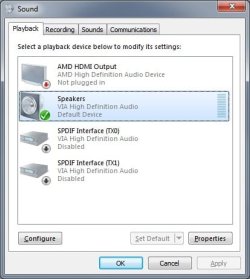
...Windows shows my audio devices as such (regardless of whether i'm using the speakers or the headphones):
PlaybackDevices2.jpg

Now when I have "Independent Headphones" selected:
HDOptions.jpg

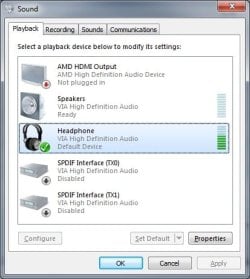
...Windows shows the speakers and headphones as two different devices:
PlaybackDevices.jpg

Under this second setting, the speakers still function as expected. When I switch the default device to the headphones, I get no sound from the headphones. The green equalizer bar to the right of the headphone device in the image above does show sound playing to the device, but no sound is actually playing from the headset.
 

My Computer My Computer

At a glance

Windows 7 Pro x64Intel Core i5-3570K Ivy Bridge 3.4GHz (3.8GHz...Corsair Vengeance 16GB (4 x 4GB)XFX Radeon HD 6870
Computer Manufacturer/Model Number
Custom Build
OS
Windows 7 Pro x64
CPU
Intel Core i5-3570K Ivy Bridge 3.4GHz (3.8GHz Turbo) LGA 115
Motherboard
Gigabyte GA-Z77X-D3H
Memory
Corsair Vengeance 16GB (4 x 4GB)
Graphics Card(s)
XFX Radeon HD 6870
Sound Card
On Board VIA High Definition Audio
Monitor(s) Displays
2 x 24" ASUS VE247
Screen Resolution
1920x1080x2
Hard Drives
Western Digital 1003FBYX - 1TB
Western Digital 15EARS - 1.5TB
Samsung HD103UJ - 1TB
PSU
Corsair Builder Series CX600 V2 600W ATX 12V v2.3 80 PLUS
Case
Antec Nine Hundred
Cooling
Zalman CNPS9500 AT 2 Ball CPU Cooling Fan/Heatsink
Keyboard
Logitech G110, Razer Nostromo
Mouse
Razer Deathadder
Internet Speed
20 Mbps down/30 Mbps up
Other Info
Internal SATA to external eSATA PCI Bracket
I still think "you can't get there from here" on what you want to do. When you select the headphones as default playback device there is no sound module to generate the audio thus you don't get any sound. You are going to have to leave the Speakers (actually your VIA sound device) set as default playback device and then manually set set the sound routing in the Via control panel when you want to do what you want.
 

My Computer My Computer

At a glance

Windows 10 64 bitIntel i7 6700K16GB Corsair DominatorIntel CPU Graphics
Computer type
PC/Desktop
Computer Manufacturer/Model Number
My Own Build
OS
Windows 10 64 bit
CPU
Intel i7 6700K
Motherboard
ASUS ROG Maximus VIII Hero
Memory
16GB Corsair Dominator
Graphics Card(s)
Intel CPU Graphics
Sound Card
RealTek
Monitor(s) Displays
27" Dell S2719dgf
Screen Resolution
2560X1440
Hard Drives
1 TB Samsung 850 EVO SSD for Win 10 Pro
500GB Samsung 850 EVO SSD for Win 10 Insider
2 TB drive for backup
PSU
EVGA Supernova 750G2
Case
BeQuiet Silent Base 600
Cooling
Deepcool Captain 120EX
Keyboard
Microsoft Wireless 2000
Mouse
Microsoft wireless
Internet Speed
100 MB/sec (Cable)
Antivirus
Microsoft Defender and Malwarebytes
Browser
Edge/Firefox
Other Info
Cakewalk (Sonar) by BandLab and Studio One 4.1 Pro recording studio software. MOTU 896Mk3 Hybrid recording interface, Frontier Tranzport wireless control unit, Behringer X-Touch Control Surface.
Five USB connected optical drives for CD Audio production using Nero BurningROM
When you select the headphones as default playback device there is no sound module to generate the audio thus you don't get any sound.

Forgive my inexperience here, but I don't understand what you mean by there not being a sound module to generate audio. Also, why would the software give me the ability to make the front panel it's own device if I am unable to use it as such?

And if this really isn't possible given the available hardware, would adding another sound card such as this allow me to do it?
 

My Computer My Computer

At a glance

Windows 7 Pro x64Intel Core i5-3570K Ivy Bridge 3.4GHz (3.8GHz...Corsair Vengeance 16GB (4 x 4GB)XFX Radeon HD 6870
Computer Manufacturer/Model Number
Custom Build
OS
Windows 7 Pro x64
CPU
Intel Core i5-3570K Ivy Bridge 3.4GHz (3.8GHz Turbo) LGA 115
Motherboard
Gigabyte GA-Z77X-D3H
Memory
Corsair Vengeance 16GB (4 x 4GB)
Graphics Card(s)
XFX Radeon HD 6870
Sound Card
On Board VIA High Definition Audio
Monitor(s) Displays
2 x 24" ASUS VE247
Screen Resolution
1920x1080x2
Hard Drives
Western Digital 1003FBYX - 1TB
Western Digital 15EARS - 1.5TB
Samsung HD103UJ - 1TB
PSU
Corsair Builder Series CX600 V2 600W ATX 12V v2.3 80 PLUS
Case
Antec Nine Hundred
Cooling
Zalman CNPS9500 AT 2 Ball CPU Cooling Fan/Heatsink
Keyboard
Logitech G110, Razer Nostromo
Mouse
Razer Deathadder
Internet Speed
20 Mbps down/30 Mbps up
Other Info
Internal SATA to external eSATA PCI Bracket
Adding another card wont do what you want. The only way to do what your talking about is to have a switch and then manually flip the switch or push a button to switch between the 2 devices...if your wanting to keep them both connected and fucntioning at the same time. Other wise by default, windows and your audio driver are set up to fucntion as one device working at one time...hence when redirected is enabled in audio manager, then plugging in headphones becomes the default listening device and when headphones are unplugged the speakers become the default listening device.
 

My Computer My Computer

At a glance

Windows 7 Ultimate 64 bitAMD Phenom II X4 965 Black EditionGSkill 4 X 2 GB PC 8500XFX Radeon HD 6790 D
Computer Manufacturer/Model Number
Custom built
OS
Windows 7 Ultimate 64 bit
CPU
AMD Phenom II X4 965 Black Edition
Motherboard
Gigabyte GA-MA790X-DS4
Memory
GSkill 4 X 2 GB PC 8500
Graphics Card(s)
XFX Radeon HD 6790 D
Sound Card
On board RealTek HD
Monitor(s) Displays
Dual monitors:Samsung SyncMaster S20B300
Screen Resolution
1600 X 900
Hard Drives
Seagate Barracuda 1TB (primary)
Seagate Barracuda 2 X 320 GB
PSU
Ultra X4 750 watt fully modular
Case
Thermaltake Overseer RX 1 full tower
Cooling
Core-Contact 92 mm CPU Cooler
Keyboard
Logitech G510
Mouse
Razor DeathAdder
Internet Speed
50/5 Mbps UL/DL
Other Info
Optical: Super Muliti DVD burner w/lightscribe, Hauppauge WinTV HVR-1800
I understand that you can only have one default device. I have a small program that allows you to switch which of the devices is the "default". Audio Switcher Program. I don't want them to be operating at the same time, I just want the rear output to be recognized as a different output device then the front input panel, so that using the program from the link above, I can switch which device is the "default" one.

Using the "Independent Headphone" setting in the VIA CP, they do show as two devices in Windows (as shown in the earlier post). I just can't get the headphones to produce any sound under that setting.
 

My Computer My Computer

At a glance

Windows 7 Pro x64Intel Core i5-3570K Ivy Bridge 3.4GHz (3.8GHz...Corsair Vengeance 16GB (4 x 4GB)XFX Radeon HD 6870
Computer Manufacturer/Model Number
Custom Build
OS
Windows 7 Pro x64
CPU
Intel Core i5-3570K Ivy Bridge 3.4GHz (3.8GHz Turbo) LGA 115
Motherboard
Gigabyte GA-Z77X-D3H
Memory
Corsair Vengeance 16GB (4 x 4GB)
Graphics Card(s)
XFX Radeon HD 6870
Sound Card
On Board VIA High Definition Audio
Monitor(s) Displays
2 x 24" ASUS VE247
Screen Resolution
1920x1080x2
Hard Drives
Western Digital 1003FBYX - 1TB
Western Digital 15EARS - 1.5TB
Samsung HD103UJ - 1TB
PSU
Corsair Builder Series CX600 V2 600W ATX 12V v2.3 80 PLUS
Case
Antec Nine Hundred
Cooling
Zalman CNPS9500 AT 2 Ball CPU Cooling Fan/Heatsink
Keyboard
Logitech G110, Razer Nostromo
Mouse
Razer Deathadder
Internet Speed
20 Mbps down/30 Mbps up
Other Info
Internal SATA to external eSATA PCI Bracket
In your 3rd and 4th pictures, in that setup, click on the headphones and set that as your default device and see what you happens.
 

My Computer My Computer

At a glance

Windows 7 Ultimate 64 bitAMD Phenom II X4 965 Black EditionGSkill 4 X 2 GB PC 8500XFX Radeon HD 6790 D
Computer Manufacturer/Model Number
Custom built
OS
Windows 7 Ultimate 64 bit
CPU
AMD Phenom II X4 965 Black Edition
Motherboard
Gigabyte GA-MA790X-DS4
Memory
GSkill 4 X 2 GB PC 8500
Graphics Card(s)
XFX Radeon HD 6790 D
Sound Card
On board RealTek HD
Monitor(s) Displays
Dual monitors:Samsung SyncMaster S20B300
Screen Resolution
1600 X 900
Hard Drives
Seagate Barracuda 1TB (primary)
Seagate Barracuda 2 X 320 GB
PSU
Ultra X4 750 watt fully modular
Case
Thermaltake Overseer RX 1 full tower
Cooling
Core-Contact 92 mm CPU Cooler
Keyboard
Logitech G510
Mouse
Razor DeathAdder
Internet Speed
50/5 Mbps UL/DL
Other Info
Optical: Super Muliti DVD burner w/lightscribe, Hauppauge WinTV HVR-1800
That way when the head phones are plugged in, they will be your default listening device and you should have sound and when unplugged your speakers will take over.
 

My Computer My Computer

At a glance

Windows 7 Ultimate 64 bitAMD Phenom II X4 965 Black EditionGSkill 4 X 2 GB PC 8500XFX Radeon HD 6790 D
Computer Manufacturer/Model Number
Custom built
OS
Windows 7 Ultimate 64 bit
CPU
AMD Phenom II X4 965 Black Edition
Motherboard
Gigabyte GA-MA790X-DS4
Memory
GSkill 4 X 2 GB PC 8500
Graphics Card(s)
XFX Radeon HD 6790 D
Sound Card
On board RealTek HD
Monitor(s) Displays
Dual monitors:Samsung SyncMaster S20B300
Screen Resolution
1600 X 900
Hard Drives
Seagate Barracuda 1TB (primary)
Seagate Barracuda 2 X 320 GB
PSU
Ultra X4 750 watt fully modular
Case
Thermaltake Overseer RX 1 full tower
Cooling
Core-Contact 92 mm CPU Cooler
Keyboard
Logitech G510
Mouse
Razor DeathAdder
Internet Speed
50/5 Mbps UL/DL
Other Info
Optical: Super Muliti DVD burner w/lightscribe, Hauppauge WinTV HVR-1800
Under the "Independent Headphone" setting, with headphones set as the default device, this is what is shown in the playback devices window:
PlaybackDevices3.jpg

Notice that the device is receiving sound. However, there is no sound coming from the headphones.

That way when the head phones are plugged in, they will be your default listening device and you should have sound and when unplugged your speakers will take over.
The point of what I am trying to accomplish is to have the headset always plugged in, and be able to switch between my stereo and my headset without having to unplug the headset, and instead simply changing which device is the "default" device.
 

My Computer My Computer

At a glance

Windows 7 Pro x64Intel Core i5-3570K Ivy Bridge 3.4GHz (3.8GHz...Corsair Vengeance 16GB (4 x 4GB)XFX Radeon HD 6870
Computer Manufacturer/Model Number
Custom Build
OS
Windows 7 Pro x64
CPU
Intel Core i5-3570K Ivy Bridge 3.4GHz (3.8GHz Turbo) LGA 115
Motherboard
Gigabyte GA-Z77X-D3H
Memory
Corsair Vengeance 16GB (4 x 4GB)
Graphics Card(s)
XFX Radeon HD 6870
Sound Card
On Board VIA High Definition Audio
Monitor(s) Displays
2 x 24" ASUS VE247
Screen Resolution
1920x1080x2
Hard Drives
Western Digital 1003FBYX - 1TB
Western Digital 15EARS - 1.5TB
Samsung HD103UJ - 1TB
PSU
Corsair Builder Series CX600 V2 600W ATX 12V v2.3 80 PLUS
Case
Antec Nine Hundred
Cooling
Zalman CNPS9500 AT 2 Ball CPU Cooling Fan/Heatsink
Keyboard
Logitech G110, Razer Nostromo
Mouse
Razer Deathadder
Internet Speed
20 Mbps down/30 Mbps up
Other Info
Internal SATA to external eSATA PCI Bracket
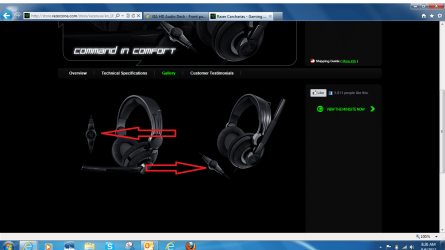
check your headphones....is there a switch on them to mute sound...I have the Razer Carcharias headset. Like most high end headsets there is an independent volume control with a mute switch. Make sure that it's not in the off position.
 

My Computer My Computer

At a glance

Windows 7 Ultimate 64 bitAMD Phenom II X4 965 Black EditionGSkill 4 X 2 GB PC 8500XFX Radeon HD 6790 D
Computer Manufacturer/Model Number
Custom built
OS
Windows 7 Ultimate 64 bit
CPU
AMD Phenom II X4 965 Black Edition
Motherboard
Gigabyte GA-MA790X-DS4
Memory
GSkill 4 X 2 GB PC 8500
Graphics Card(s)
XFX Radeon HD 6790 D
Sound Card
On board RealTek HD
Monitor(s) Displays
Dual monitors:Samsung SyncMaster S20B300
Screen Resolution
1600 X 900
Hard Drives
Seagate Barracuda 1TB (primary)
Seagate Barracuda 2 X 320 GB
PSU
Ultra X4 750 watt fully modular
Case
Thermaltake Overseer RX 1 full tower
Cooling
Core-Contact 92 mm CPU Cooler
Keyboard
Logitech G510
Mouse
Razor DeathAdder
Internet Speed
50/5 Mbps UL/DL
Other Info
Optical: Super Muliti DVD burner w/lightscribe, Hauppauge WinTV HVR-1800
Here is what I'm talking about....


headset.PNG
 

My Computer My Computer

At a glance

Windows 7 Ultimate 64 bitAMD Phenom II X4 965 Black EditionGSkill 4 X 2 GB PC 8500XFX Radeon HD 6790 D
Computer Manufacturer/Model Number
Custom built
OS
Windows 7 Ultimate 64 bit
CPU
AMD Phenom II X4 965 Black Edition
Motherboard
Gigabyte GA-MA790X-DS4
Memory
GSkill 4 X 2 GB PC 8500
Graphics Card(s)
XFX Radeon HD 6790 D
Sound Card
On board RealTek HD
Monitor(s) Displays
Dual monitors:Samsung SyncMaster S20B300
Screen Resolution
1600 X 900
Hard Drives
Seagate Barracuda 1TB (primary)
Seagate Barracuda 2 X 320 GB
PSU
Ultra X4 750 watt fully modular
Case
Thermaltake Overseer RX 1 full tower
Cooling
Core-Contact 92 mm CPU Cooler
Keyboard
Logitech G510
Mouse
Razor DeathAdder
Internet Speed
50/5 Mbps UL/DL
Other Info
Optical: Super Muliti DVD burner w/lightscribe, Hauppauge WinTV HVR-1800
BTW...what brand is your headset that you are using?
 

My Computer My Computer

At a glance

Windows 7 Ultimate 64 bitAMD Phenom II X4 965 Black EditionGSkill 4 X 2 GB PC 8500XFX Radeon HD 6790 D
Computer Manufacturer/Model Number
Custom built
OS
Windows 7 Ultimate 64 bit
CPU
AMD Phenom II X4 965 Black Edition
Motherboard
Gigabyte GA-MA790X-DS4
Memory
GSkill 4 X 2 GB PC 8500
Graphics Card(s)
XFX Radeon HD 6790 D
Sound Card
On board RealTek HD
Monitor(s) Displays
Dual monitors:Samsung SyncMaster S20B300
Screen Resolution
1600 X 900
Hard Drives
Seagate Barracuda 1TB (primary)
Seagate Barracuda 2 X 320 GB
PSU
Ultra X4 750 watt fully modular
Case
Thermaltake Overseer RX 1 full tower
Cooling
Core-Contact 92 mm CPU Cooler
Keyboard
Logitech G510
Mouse
Razor DeathAdder
Internet Speed
50/5 Mbps UL/DL
Other Info
Optical: Super Muliti DVD burner w/lightscribe, Hauppauge WinTV HVR-1800
The headset isn't muted. It's a Steelseries Siberia V2. Volume knob is turned up on the independent volume control, tested by connecting to another device.
 

My Computer My Computer

At a glance

Windows 7 Pro x64Intel Core i5-3570K Ivy Bridge 3.4GHz (3.8GHz...Corsair Vengeance 16GB (4 x 4GB)XFX Radeon HD 6870
Computer Manufacturer/Model Number
Custom Build
OS
Windows 7 Pro x64
CPU
Intel Core i5-3570K Ivy Bridge 3.4GHz (3.8GHz Turbo) LGA 115
Motherboard
Gigabyte GA-Z77X-D3H
Memory
Corsair Vengeance 16GB (4 x 4GB)
Graphics Card(s)
XFX Radeon HD 6870
Sound Card
On Board VIA High Definition Audio
Monitor(s) Displays
2 x 24" ASUS VE247
Screen Resolution
1920x1080x2
Hard Drives
Western Digital 1003FBYX - 1TB
Western Digital 15EARS - 1.5TB
Samsung HD103UJ - 1TB
PSU
Corsair Builder Series CX600 V2 600W ATX 12V v2.3 80 PLUS
Case
Antec Nine Hundred
Cooling
Zalman CNPS9500 AT 2 Ball CPU Cooling Fan/Heatsink
Keyboard
Logitech G110, Razer Nostromo
Mouse
Razer Deathadder
Internet Speed
20 Mbps down/30 Mbps up
Other Info
Internal SATA to external eSATA PCI Bracket
Well...I'm out of ideas...I'm betting that it's a setting issue...I just can't pin point it. Maybe someone else might have an idea...one we've over looked...something.
 

My Computer My Computer

At a glance

Windows 7 Ultimate 64 bitAMD Phenom II X4 965 Black EditionGSkill 4 X 2 GB PC 8500XFX Radeon HD 6790 D
Computer Manufacturer/Model Number
Custom built
OS
Windows 7 Ultimate 64 bit
CPU
AMD Phenom II X4 965 Black Edition
Motherboard
Gigabyte GA-MA790X-DS4
Memory
GSkill 4 X 2 GB PC 8500
Graphics Card(s)
XFX Radeon HD 6790 D
Sound Card
On board RealTek HD
Monitor(s) Displays
Dual monitors:Samsung SyncMaster S20B300
Screen Resolution
1600 X 900
Hard Drives
Seagate Barracuda 1TB (primary)
Seagate Barracuda 2 X 320 GB
PSU
Ultra X4 750 watt fully modular
Case
Thermaltake Overseer RX 1 full tower
Cooling
Core-Contact 92 mm CPU Cooler
Keyboard
Logitech G510
Mouse
Razor DeathAdder
Internet Speed
50/5 Mbps UL/DL
Other Info
Optical: Super Muliti DVD burner w/lightscribe, Hauppauge WinTV HVR-1800
Id like to bump this thread because im having an IDENTICAL problem to the OP.

My motherboard is similar of the same generation (Gigabyte Z77-D3H) and im using Windows 7 64 bit home premium. My audio header is identical to the OPs, and my front panel audio is connected to my motherboard using the HD audio connector.

If i select redirected headphones in the via deck it works fine and even mutes the speakers if that option is selected (this proves that the font panel HD audio is working)

However when i select independent headphones, windows shows sounds being played from it (using the playback devices screen) but no sound is coming from the headphones.

Im using the latest drivers from VIA.

Is there no solution to this??
 

My Computer My Computer

At a glance

Win 7 64bit home preium
OS
Win 7 64bit home preium
I still think "you can't get there from here" on what you want to do. When you select the headphones as default playback device there is no sound module to generate the audio thus you don't get any sound. You are going to have to leave the Speakers (actually your VIA sound device) set as default playback device and then manually set set the sound routing in the Via control panel when you want to do what you want.

This is completely untrue (or rather if it is true then its going against the HD Audio specs)

Front panel audio has its own header which is why you can have independent or redirected output and even swap the front plugs if you want to.
 

My Computer My Computer

At a glance

Win 7 64bit home preium
OS
Win 7 64bit home preium
I found this on the VIA forums. Problems configuring Via VT2021 - VIA Forums

In short, the latest 3 versions of the drivers for the VT2021 audio header is bugged. The only solution is to install an older driver (newest with working indept headphones is ver 10100).

The newest version of the driver on the Gigabyte website is version 10.800a released (13 august) whereas the latest on the VIA website is ver 10.500d.

I will try both and update with the result.
 

My Computer My Computer

At a glance

Win 7 64bit home preium
OS
Win 7 64bit home preium
It works!

GOOD NEWS! I just tested the latest 10.800a drivers released just released by gigabyte and now my independent headphones work as they are supposed to!

To the OP just go to gigabyte and download the latest (august 2012) audio drivers and that should solve your problem :)
 

My Computer My Computer

At a glance

Win 7 64bit home preium
OS
Win 7 64bit home preium
Back
Top