VIA HD Audio Deck or similar needed to configure 5.1 speakers

smuddell

New member
Local time
8:06 PM
Messages
26
Please can anybody help!

Specs : Windows 7, Motherboard : Gigabyte GA-78LMT-USB3, Sound Device : Via HD Audio

My PC was built in January by a local computer store, and included a piece of software called Via HD Vdeck or Via HD Audio Deck which I used to configure my Creative Inspire 5.1 5300 speaker system. I upgraded to Windows 10 soon after launch, then in October had to wipe the computer and go back to Windows 7 as 10 seemed to have corrupted everything.

However, I no longer have this Via HD Vdeck since reloading Windows 7, so currently I only have sound coming from 2 speakers instead of all 5. I've tried reloading the drivers, and Googled every option I can think of!

What I need to know is, either, how on earth do I get this Via software, or is there another piece of software available that I can use to configure my speakers? (Using Playback Devices in Windows doesn't work!!!)
 

My Computer My Computer

At a glance

Windows 7 Home Premium 64bit
OS
Windows 7 Home Premium 64bit
Have you tried configuring them through "Sound" in your control panel?
 

My Computer My Computer

At a glance

Windows 7 Professional 64bitIntel i7-5960X64GB Corsair Dominator 2400MHz3 EVGA GTX980's
Computer type
PC/Desktop
Computer Manufacturer/Model Number
custom build
OS
Windows 7 Professional 64bit
CPU
Intel i7-5960X
Motherboard
EVGA X99 Classified
Memory
64GB Corsair Dominator 2400MHz
Graphics Card(s)
3 EVGA GTX980's
Sound Card
on board
Monitor(s) Displays
3 Dell E2715H 27"
Screen Resolution
1920x1080 (5760x1080)
Hard Drives
Samsung 950 Pro 1TB M.2 SSD,
Western Digital Black 2TB HDD's x5
Western Digital Black 1TB HDD's x3
PSU
Corsair AX1200i
Case
Corsair 750D
Cooling
Corsair H110i GT
Keyboard
Corsair K70
Mouse
Corsair M45
Internet Speed
250 down/10 up
Antivirus
Microsoft Security Essentials
Browser
IE 11, Google Chrome
Have you tried configuring them through "Sound" in your control panel?

Yes, I select 5.1 but in test only the front left and right play sound.
 

My Computer My Computer

At a glance

Windows 7 Home Premium 64bit
OS
Windows 7 Home Premium 64bit
From looking at the Gigabyte website, only Revision 5.0 of the GA-78LMT-USB3 has VIA audio.

Here is a link to the complete set of drivers for the Gigabyte GA-78LMT-USB3 Rev. 5.0

I hope this helps.
 

My Computer My Computer

At a glance

Windows 7 Home Premium x64Intel Core i7 5960X @3.0 GHz4 x 4 GB G.Skill Ripjaws4 DDR4-2400PNY GTX 780
Computer type
PC/Desktop
Computer Manufacturer/Model Number
Custom Build
OS
Windows 7 Home Premium x64
CPU
Intel Core i7 5960X @3.0 GHz
Motherboard
Gigabyte GA-X99-SOC Force
Memory
4 x 4 GB G.Skill Ripjaws4 DDR4-2400
Graphics Card(s)
PNY GTX 780
Sound Card
Realtek on-board ALC1150
Monitor(s) Displays
HP Z30i + Asus PA246Q + Dell U2412M
Screen Resolution
2560x1600 + 1920x1200 + 1920x1200
Hard Drives
Samsung 830 256GB
PSU
Antec EarthWatts 650W
Case
Cooler Master HAF 932
Cooling
Corsair Hydro Series H105
Keyboard
Razer BlackWidow Tournament Edition Stealth
Mouse
Razer Naga
Are the speakers connected to the ports on the back of the PC only?
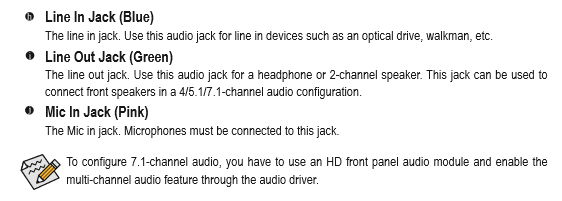
Here's what the manual says.
 

Attachments

  • Capture.PNG
    Capture.PNG
    8.5 KB · Views: 43

My Computer My Computer

At a glance

Windows 7 Professional 64bitIntel i7-5960X64GB Corsair Dominator 2400MHz3 EVGA GTX980's
Computer type
PC/Desktop
Computer Manufacturer/Model Number
custom build
OS
Windows 7 Professional 64bit
CPU
Intel i7-5960X
Motherboard
EVGA X99 Classified
Memory
64GB Corsair Dominator 2400MHz
Graphics Card(s)
3 EVGA GTX980's
Sound Card
on board
Monitor(s) Displays
3 Dell E2715H 27"
Screen Resolution
1920x1080 (5760x1080)
Hard Drives
Samsung 950 Pro 1TB M.2 SSD,
Western Digital Black 2TB HDD's x5
Western Digital Black 1TB HDD's x3
PSU
Corsair AX1200i
Case
Corsair 750D
Cooling
Corsair H110i GT
Keyboard
Corsair K70
Mouse
Corsair M45
Internet Speed
250 down/10 up
Antivirus
Microsoft Security Essentials
Browser
IE 11, Google Chrome
From looking at the Gigabyte website, only Revision 5.0 of the GA-78LMT-USB3 has VIA audio.

Here is a link to the complete set of drivers for the Gigabyte GA-78LMT-USB3 Rev. 5.0

I hope this helps.

Absolutely fantastic, thank you!!!

Finally that is the software I needed! I did go to that page on Gigabyte's site, but didn't think to look at the different Revisions!

Still not getting any sound from the two rear speakers but I'm sure there is an elusive setting somewhere I've missed! Front left, front right, centre and subwoofer are all working!
 

My Computer My Computer

At a glance

Windows 7 Home Premium 64bit
OS
Windows 7 Home Premium 64bit
Are the speakers connected to the ports on the back of the PC only?
Here's what the manual says.

Yes, I just have 3 ports on the back of the PC. As I just mentioned in my last post a minute ago, after downloading the software from the link provided by Lava King, I now have front left, front right, centre and subwoofer working, just silence from the rear two!
 

My Computer My Computer

At a glance

Windows 7 Home Premium 64bit
OS
Windows 7 Home Premium 64bit
What set of speakers are you using for the 5.1 setup?
 

My Computer My Computer

At a glance

Windows 7 Professional 64bitIntel i7-5960X64GB Corsair Dominator 2400MHz3 EVGA GTX980's
Computer type
PC/Desktop
Computer Manufacturer/Model Number
custom build
OS
Windows 7 Professional 64bit
CPU
Intel i7-5960X
Motherboard
EVGA X99 Classified
Memory
64GB Corsair Dominator 2400MHz
Graphics Card(s)
3 EVGA GTX980's
Sound Card
on board
Monitor(s) Displays
3 Dell E2715H 27"
Screen Resolution
1920x1080 (5760x1080)
Hard Drives
Samsung 950 Pro 1TB M.2 SSD,
Western Digital Black 2TB HDD's x5
Western Digital Black 1TB HDD's x3
PSU
Corsair AX1200i
Case
Corsair 750D
Cooling
Corsair H110i GT
Keyboard
Corsair K70
Mouse
Corsair M45
Internet Speed
250 down/10 up
Antivirus
Microsoft Security Essentials
Browser
IE 11, Google Chrome

My Computer My Computer

At a glance

Windows 7 Home Premium 64bit
OS
Windows 7 Home Premium 64bit
I had that set before buying my current 5.1 system. Where do you have the light green, black, orange plugs connected? I'm thinking you may have something connected wrong. Is anything plugged into the front of the computer?
 

My Computer My Computer

At a glance

Windows 7 Professional 64bitIntel i7-5960X64GB Corsair Dominator 2400MHz3 EVGA GTX980's
Computer type
PC/Desktop
Computer Manufacturer/Model Number
custom build
OS
Windows 7 Professional 64bit
CPU
Intel i7-5960X
Motherboard
EVGA X99 Classified
Memory
64GB Corsair Dominator 2400MHz
Graphics Card(s)
3 EVGA GTX980's
Sound Card
on board
Monitor(s) Displays
3 Dell E2715H 27"
Screen Resolution
1920x1080 (5760x1080)
Hard Drives
Samsung 950 Pro 1TB M.2 SSD,
Western Digital Black 2TB HDD's x5
Western Digital Black 1TB HDD's x3
PSU
Corsair AX1200i
Case
Corsair 750D
Cooling
Corsair H110i GT
Keyboard
Corsair K70
Mouse
Corsair M45
Internet Speed
250 down/10 up
Antivirus
Microsoft Security Essentials
Browser
IE 11, Google Chrome
I had that set before buying my current 5.1 system. Where do you have the light green, black, orange plugs connected? I'm thinking you may have something connected wrong. Is anything plugged into the front of the computer?
Ugh, this was quite disturbing. I finally found what he needed only problem was that in the motherboard pdf there was no Configuring Speakers page or anything so:

http://download.gigabyte.eu/FileList/Manual/mb_manual_ga-z77m(h77m)-d3h(-mvp)_e.pdf
And scroll down to page 88.

/Boris :)
 

My Computer My Computer

At a glance

Windows 7 Home Premiumi5-3570k16 GB DDR3 G Skill SniperGIGABYTE GeForce GTX 970 GV-N970WF3OC-4GD
Computer type
PC/Desktop
Computer Manufacturer/Model Number
Custom build
OS
Windows 7 Home Premium
CPU
i5-3570k
Motherboard
ASUS Sabertooth z77
Memory
16 GB DDR3 G Skill Sniper
Graphics Card(s)
GIGABYTE GeForce GTX 970 GV-N970WF3OC-4GD
Monitor(s) Displays
ASUS ROG PG278Q
Screen Resolution
2560x1440@60Hz/120Hz/144Hz
Hard Drives
56GB KINGSTON SVP200S37A60G
512GB Crucial MX100
1863GB Seagate ST2000DM001-1CH164
2795GB Seagate ST3000DM001-9YN166
PSU
Corsair GS800
Case
Storm Trooper Stryker White
Keyboard
Logitech G910 Orion Spark
Mouse
Logitech G502
Antivirus
MSE
Browser
Firefox/Chrome
Other Info
Logitech G633
Logitech Mouse Matt
Orange green and black, all plugged into appropriate holes on the back of the tower. My PC case is a Fractal Define R4, this does has two sockets on the top of the case labelled microphone and headphone but I've never used them. But there is no way I could connect one of the leads to either of these anyway because the orange green and black wires are all moulded together!
 

My Computer My Computer

At a glance

Windows 7 Home Premium 64bit
OS
Windows 7 Home Premium 64bit
Orange green and black, all plugged into appropriate holes on the back of the tower. My PC case is a Fractal Define R4, this does has two sockets on the top of the case labelled microphone and headphone but I've never used them. But there is no way I could connect one of the leads to either of these anyway because the orange green and black wires are all moulded together!

Right well then I would recommend you going into Device Manager and right clicking the Audio Driver, selecting Uninstall and rebooting the computer. And upon starting it should reinstall the driver and hopefully once and for all fix your issue.
 

My Computer My Computer

At a glance

Windows 7 Home Premiumi5-3570k16 GB DDR3 G Skill SniperGIGABYTE GeForce GTX 970 GV-N970WF3OC-4GD
Computer type
PC/Desktop
Computer Manufacturer/Model Number
Custom build
OS
Windows 7 Home Premium
CPU
i5-3570k
Motherboard
ASUS Sabertooth z77
Memory
16 GB DDR3 G Skill Sniper
Graphics Card(s)
GIGABYTE GeForce GTX 970 GV-N970WF3OC-4GD
Monitor(s) Displays
ASUS ROG PG278Q
Screen Resolution
2560x1440@60Hz/120Hz/144Hz
Hard Drives
56GB KINGSTON SVP200S37A60G
512GB Crucial MX100
1863GB Seagate ST2000DM001-1CH164
2795GB Seagate ST3000DM001-9YN166
PSU
Corsair GS800
Case
Storm Trooper Stryker White
Keyboard
Logitech G910 Orion Spark
Mouse
Logitech G502
Antivirus
MSE
Browser
Firefox/Chrome
Other Info
Logitech G633
Logitech Mouse Matt
Orange green and black, all plugged into appropriate holes on the back of the tower. My PC case is a Fractal Define R4, this does has two sockets on the top of the case labelled microphone and headphone but I've never used them. But there is no way I could connect one of the leads to either of these anyway because the orange green and black wires are all moulded together!

Right well then I would recommend you going into Device Manager and right clicking the Audio Driver, selecting Uninstall and rebooting the computer. And upon starting it should reinstall the driver and hopefully once and for all fix your issue.

Tried this but no difference! Thanks for everyone's help, at least I have better sound than when I started the query, just not full 5.1 sound!!!
 

My Computer My Computer

At a glance

Windows 7 Home Premium 64bit
OS
Windows 7 Home Premium 64bit
Orange green and black, all plugged into appropriate holes on the back of the tower. My PC case is a Fractal Define R4, this does has two sockets on the top of the case labelled microphone and headphone but I've never used them. But there is no way I could connect one of the leads to either of these anyway because the orange green and black wires are all moulded together!

Right well then I would recommend you going into Device Manager and right clicking the Audio Driver, selecting Uninstall and rebooting the computer. And upon starting it should reinstall the driver and hopefully once and for all fix your issue.

Tried this but no difference! Thanks for everyone's help, at least I have better sound than when I started the query, just not full 5.1 sound!!!
Well the last thing you could try is to connect to another system to see if it is the Via HD Audio thingy or if it is something with the actual speakers.
 

My Computer My Computer

At a glance

Windows 7 Home Premiumi5-3570k16 GB DDR3 G Skill SniperGIGABYTE GeForce GTX 970 GV-N970WF3OC-4GD
Computer type
PC/Desktop
Computer Manufacturer/Model Number
Custom build
OS
Windows 7 Home Premium
CPU
i5-3570k
Motherboard
ASUS Sabertooth z77
Memory
16 GB DDR3 G Skill Sniper
Graphics Card(s)
GIGABYTE GeForce GTX 970 GV-N970WF3OC-4GD
Monitor(s) Displays
ASUS ROG PG278Q
Screen Resolution
2560x1440@60Hz/120Hz/144Hz
Hard Drives
56GB KINGSTON SVP200S37A60G
512GB Crucial MX100
1863GB Seagate ST2000DM001-1CH164
2795GB Seagate ST3000DM001-9YN166
PSU
Corsair GS800
Case
Storm Trooper Stryker White
Keyboard
Logitech G910 Orion Spark
Mouse
Logitech G502
Antivirus
MSE
Browser
Firefox/Chrome
Other Info
Logitech G633
Logitech Mouse Matt
The speakers are definitely working because if I use Via HD Deck to switch the front and rear speakers, the sound stops coming from front speakers, and comes from the rear instead!
 

My Computer My Computer

At a glance

Windows 7 Home Premium 64bit
OS
Windows 7 Home Premium 64bit
The speakers are definitely working because if I use Via HD Deck to switch the front and rear speakers, the sound stops coming from front speakers, and comes from the rear instead!
Well the thing is that by looking at the motherboard's support page it clearly shows that the audio chip is Realtek Azalia so it might happen that it doesn't work because you are using another software and that might cause the speakers to not work as they should, have tried downloading and installing the driver from Gigabyte's page:

download.gigabyte.eu/FileList/Driver/motherboard_driver_audio_realtek_azalia-ati.exe

/Boris :)
 

My Computer My Computer

At a glance

Windows 7 Home Premiumi5-3570k16 GB DDR3 G Skill SniperGIGABYTE GeForce GTX 970 GV-N970WF3OC-4GD
Computer type
PC/Desktop
Computer Manufacturer/Model Number
Custom build
OS
Windows 7 Home Premium
CPU
i5-3570k
Motherboard
ASUS Sabertooth z77
Memory
16 GB DDR3 G Skill Sniper
Graphics Card(s)
GIGABYTE GeForce GTX 970 GV-N970WF3OC-4GD
Monitor(s) Displays
ASUS ROG PG278Q
Screen Resolution
2560x1440@60Hz/120Hz/144Hz
Hard Drives
56GB KINGSTON SVP200S37A60G
512GB Crucial MX100
1863GB Seagate ST2000DM001-1CH164
2795GB Seagate ST3000DM001-9YN166
PSU
Corsair GS800
Case
Storm Trooper Stryker White
Keyboard
Logitech G910 Orion Spark
Mouse
Logitech G502
Antivirus
MSE
Browser
Firefox/Chrome
Other Info
Logitech G633
Logitech Mouse Matt
Still the same, a total mystery!
 

My Computer My Computer

At a glance

Windows 7 Home Premium 64bit
OS
Windows 7 Home Premium 64bit
Still the same, a total mystery!
But what does it say in the Realtek window? I mean it should indicate that you have something plugged into the audio ports at the back, at least it says that for me whenever I unplug or plug something.

And what happened to the Realtek installer that I linked to you, unfortunately I couldn't test it so I don't know but it might happen that it only installed like drivers and I guess you would need to install Realtek HD Audio Manager unless you have it installed.
 

My Computer My Computer

At a glance

Windows 7 Home Premiumi5-3570k16 GB DDR3 G Skill SniperGIGABYTE GeForce GTX 970 GV-N970WF3OC-4GD
Computer type
PC/Desktop
Computer Manufacturer/Model Number
Custom build
OS
Windows 7 Home Premium
CPU
i5-3570k
Motherboard
ASUS Sabertooth z77
Memory
16 GB DDR3 G Skill Sniper
Graphics Card(s)
GIGABYTE GeForce GTX 970 GV-N970WF3OC-4GD
Monitor(s) Displays
ASUS ROG PG278Q
Screen Resolution
2560x1440@60Hz/120Hz/144Hz
Hard Drives
56GB KINGSTON SVP200S37A60G
512GB Crucial MX100
1863GB Seagate ST2000DM001-1CH164
2795GB Seagate ST3000DM001-9YN166
PSU
Corsair GS800
Case
Storm Trooper Stryker White
Keyboard
Logitech G910 Orion Spark
Mouse
Logitech G502
Antivirus
MSE
Browser
Firefox/Chrome
Other Info
Logitech G633
Logitech Mouse Matt
Still the same, a total mystery!
But what does it say in the Realtek window? I mean it should indicate that you have something plugged into the audio ports at the back, at least it says that for me whenever I unplug or plug something.

And what happened to the Realtek installer that I linked to you, unfortunately I couldn't test it so I don't know but it might happen that it only installed like drivers and I guess you would need to install Realtek HD Audio Manager unless you have it installed.

When I unplug the back speakers it greys out on the Audio Manager, when I plug back in it asks me to confirm which speakers they are. The installer unzipped files onto my hard drive, so I ran the setup.exe then rebooted, no change!
 

My Computer My Computer

At a glance

Windows 7 Home Premium 64bit
OS
Windows 7 Home Premium 64bit
Back
Top