Video Converters, what's the best?

Orbital Shark

New member
Guru
Gold Member
VIP
Local time
4:11 PM
Messages
6,298
Location
Milton Keynes, United Kingdom
Hey all,

I use WinAVI to convert my videos to DVD & other formats, but it causes Windows (Vista & 7) to revert to the Basic theme. I was wondering if there was anything better out there as I have a lot of Vids I'd like converting. Or, is there anything designed specifically for Windows 7 yet?

Thanks in advance
 

My Computer My Computer

At a glance

Windows 7 Ultimate x64AMD Sempron Dual Core3GBNVIDIA GeForce 6150SE nForce 430
Computer Manufacturer/Model Number
Compaq Desktop
OS
Windows 7 Ultimate x64
CPU
AMD Sempron Dual Core
Memory
3GB
Graphics Card(s)
NVIDIA GeForce 6150SE nForce 430
Screen Resolution
1024x768
Hard Drives
150GB Sata
Format factory is the mutts n***s when it comes to video conversion, and the best thing is that it's free. Easy to use, reliable, supports every format i've ever thrown at it and utilises 4 cores aswell.

As for dvd authoring, i'd have to say ConvertXtoDVD as the all time best. Again, it utilises 4 cores and is as simple as pie, whilst giving professional options but without all the pissing around with too many sub menues etc.


It's not free but you can get a serial anywhere, if you don't want to pay for it that is.

You can use it without a serial, but you get an annoying print in one of the corners of the screen.

However the trial lets you see just how easy and versatile it is to use :)


A normal 1.5hr dvd will take my Q6600 at 3.4 about 8-12 mins to author it. All that is then needed is to burn it with whatever tool you like.


It does have it's own burning tool built in f you want to use it aswell :)
 

My Computer My Computer

At a glance

Vista X64 ultimate/ 7 X64 Ultimate (7264)Q6600 @3.4GHzCrucial Ballastix 4GB DDR2 PC2-6400C4 @ 1033MHzNvidia 7600gt (Got better things to do than g...
Computer Manufacturer/Model Number
Home Brew
OS
Vista X64 ultimate/ 7 X64 Ultimate (7264)
CPU
Q6600 @3.4GHz
Motherboard
Asus P5Q-Pro
Memory
Crucial Ballastix 4GB DDR2 PC2-6400C4 @ 1033MHz
Graphics Card(s)
Nvidia 7600gt (Got better things to do than game!)
Sound Card
Onboard
Monitor(s) Displays
19" Widescreen
Screen Resolution
1440 x 900
Hard Drives
WD800HLFS OS Drive
1.5TB Total Storage
PSU
Hiper Type-M 880W
Case
Tai-Chi
Cooling
Custom water
Keyboard
Generic
Mouse
Logitech MX1100 Laser Cordless
Internet Speed
20Meg
Look around on doom9.org forums or videohelp.com

Those are the 2 sites I've been digging. I learn about backing up DVD videos into HDD though, so can't help you much here :p
 

My Computer My Computer

At a glance

Win7 x64 7232 // XP x86 SP3E8400 @ 3.825GHz4GB G.Skill DDR2 1000MHzMSI 8800GTS (G92) in SLI
OS
Win7 x64 7232 // XP x86 SP3
CPU
E8400 @ 3.825GHz
Motherboard
EVGA 750i FTW
Memory
4GB G.Skill DDR2 1000MHz
Graphics Card(s)
MSI 8800GTS (G92) in SLI
Sound Card
HT|OMEGA Claro Plus+
Monitor(s) Displays
Dell S2209W
Screen Resolution
1920x1080
Hard Drives
WD Caviar Black 1TB //
Hitachi 7k1000.B 1TB //
WD SE16 640GB
PSU
Corsair 750TX
Case
ABS Monolith
Back-up software...

That's easy.... Imgburn :) Full size backups that is.


Or dvd shrink if you want to save space and delete extras, menues, trailers etc...
 

My Computer My Computer

At a glance

Vista X64 ultimate/ 7 X64 Ultimate (7264)Q6600 @3.4GHzCrucial Ballastix 4GB DDR2 PC2-6400C4 @ 1033MHzNvidia 7600gt (Got better things to do than g...
Computer Manufacturer/Model Number
Home Brew
OS
Vista X64 ultimate/ 7 X64 Ultimate (7264)
CPU
Q6600 @3.4GHz
Motherboard
Asus P5Q-Pro
Memory
Crucial Ballastix 4GB DDR2 PC2-6400C4 @ 1033MHz
Graphics Card(s)
Nvidia 7600gt (Got better things to do than game!)
Sound Card
Onboard
Monitor(s) Displays
19" Widescreen
Screen Resolution
1440 x 900
Hard Drives
WD800HLFS OS Drive
1.5TB Total Storage
PSU
Hiper Type-M 880W
Case
Tai-Chi
Cooling
Custom water
Keyboard
Generic
Mouse
Logitech MX1100 Laser Cordless
Internet Speed
20Meg
Well that's not all of it :) There's also converting the MPEG-2 on DVD to H.264 which compresses more efficiently. The goal is to produce nearly visually identical copy of the movie at less than half the original file size.
 

My Computer My Computer

At a glance

Win7 x64 7232 // XP x86 SP3E8400 @ 3.825GHz4GB G.Skill DDR2 1000MHzMSI 8800GTS (G92) in SLI
OS
Win7 x64 7232 // XP x86 SP3
CPU
E8400 @ 3.825GHz
Motherboard
EVGA 750i FTW
Memory
4GB G.Skill DDR2 1000MHz
Graphics Card(s)
MSI 8800GTS (G92) in SLI
Sound Card
HT|OMEGA Claro Plus+
Monitor(s) Displays
Dell S2209W
Screen Resolution
1920x1080
Hard Drives
WD Caviar Black 1TB //
Hitachi 7k1000.B 1TB //
WD SE16 640GB
PSU
Corsair 750TX
Case
ABS Monolith
Ahhhhh

I didn't think about compression as i prefer full back-ups myself..

I did have some really good software for doing that, but i never used it so i deleted it to save space funnily enough :)
 

My Computer My Computer

At a glance

Vista X64 ultimate/ 7 X64 Ultimate (7264)Q6600 @3.4GHzCrucial Ballastix 4GB DDR2 PC2-6400C4 @ 1033MHzNvidia 7600gt (Got better things to do than g...
Computer Manufacturer/Model Number
Home Brew
OS
Vista X64 ultimate/ 7 X64 Ultimate (7264)
CPU
Q6600 @3.4GHz
Motherboard
Asus P5Q-Pro
Memory
Crucial Ballastix 4GB DDR2 PC2-6400C4 @ 1033MHz
Graphics Card(s)
Nvidia 7600gt (Got better things to do than game!)
Sound Card
Onboard
Monitor(s) Displays
19" Widescreen
Screen Resolution
1440 x 900
Hard Drives
WD800HLFS OS Drive
1.5TB Total Storage
PSU
Hiper Type-M 880W
Case
Tai-Chi
Cooling
Custom water
Keyboard
Generic
Mouse
Logitech MX1100 Laser Cordless
Internet Speed
20Meg
Of course bit-by-bit identical backup is better. But for backing up to HDD so you don't have to get up and dig out the DVDs, you can get away with some compromise. :p

Both MPEG-2 (used on DVD) and H.264 (used on Blu-ray) are lossy compression methods so there's bound to be some quality loss when converting from one to another. If the conversion is done right, most people won't notice the loss. The file size savings, however, is noticeable.
 

My Computer My Computer

At a glance

Win7 x64 7232 // XP x86 SP3E8400 @ 3.825GHz4GB G.Skill DDR2 1000MHzMSI 8800GTS (G92) in SLI
OS
Win7 x64 7232 // XP x86 SP3
CPU
E8400 @ 3.825GHz
Motherboard
EVGA 750i FTW
Memory
4GB G.Skill DDR2 1000MHz
Graphics Card(s)
MSI 8800GTS (G92) in SLI
Sound Card
HT|OMEGA Claro Plus+
Monitor(s) Displays
Dell S2209W
Screen Resolution
1920x1080
Hard Drives
WD Caviar Black 1TB //
Hitachi 7k1000.B 1TB //
WD SE16 640GB
PSU
Corsair 750TX
Case
ABS Monolith
Convertxtodvd is working nicely with windows 7.
 

My Computer My Computer

At a glance

Windows 7 Ultimate Build 7100 RC x86/Windows ...Intel Pentium Dual CPU E2200 @ 2.20 GHz2GBNVIDIA GeForce 9600 GSO
Computer Manufacturer/Model Number
PNY Technologies
OS
Windows 7 Ultimate Build 7100 RC x86/Windows XP SP3 x86 (Dual Boot)
CPU
Intel Pentium Dual CPU E2200 @ 2.20 GHz
Motherboard
PNY Technologies MBM630I7150 1.0
Memory
2GB
Graphics Card(s)
NVIDIA GeForce 9600 GSO
Sound Card
NVIDIA HDMI Audio Device
Monitor(s) Displays
Acer LCD Monitor V223W
Screen Resolution
1680x1050
Hard Drives
WDC WD7500AYPS-01ZKB0 [Hard drive] (750.16 GB)
Keyboard
Gateway
Mouse
Logitech
Internet Speed
DSL
I have friends at school (college students - they may not be the best informed but they are informed) and a lot of folks rely on MediaCoder....

I have also heard info about AviDemux being good....

I have tried neither product myself, as I save .ISOs myself :P
 

My Computers My Computers

  • At a glance

    Windows 11 21H2 Current buildAMD Ryzen 9 3950X4 * 32 GB - Corsair Vengeance 3600 MHzEVGA GeForce RTX 3080 Ti XC3 ULTRA GAMING (12...
    Computer type
    PC/Desktop
    Computer Manufacturer/Model Number
    The Beast Model A (homebrew)
    OS
    Windows 11 21H2 Current build
    CPU
    AMD Ryzen 9 3950X
    Motherboard
    MSI MEG X570 GODLIKE
    Memory
    4 * 32 GB - Corsair Vengeance 3600 MHz
    Graphics Card(s)
    EVGA GeForce RTX 3080 Ti XC3 ULTRA GAMING (12G-P5-3955-KR)
    Sound Card
    Realtek® ALC1220 Codec
    Monitor(s) Displays
    2x Eve Spectrum ES07D03 4K Gaming Monitor (Matte) | Eve Spec
    Screen Resolution
    3x 3840 x 2160
    Hard Drives
    3x Samsung 980 Pro NVMe PCIe 4 M.2 2 TB SSD (MZ-V8P2T0B/AM) } 3x Sabrent Rocket NVMe 4.0 1 TB SSD
    PSU
    PC Power & Cooling’s Silencer Series 1050 Watt, 80 Plus Plat
    Case
    Fractal Design Define 7 XL Dark ATX Full Tower Case
    Cooling
    SteelSeries Apex Pro Wired Gaming Keyboard
    Keyboard
    SteelSeries Apex Pro
    Mouse
    Logitech MX Master 3S | MX Master 3 for business
    Internet Speed
    AT&T LightSpeed Gigabit Duplex Ftth
    Antivirus
    Windows Defender + MB 3
    Browser
    Nightly (default) + Firefox (stable),Chrome, Edge
  • At a glance

    ChromeOS Flex Dev Channel (current)Intel(R) Core(TM) i5-6300U CPU @ 2.40GHz, 250...16 GBIntel(R) HD Graphics 520
    Computer type
    PC/Desktop
    System Manufacturer/Model Number
    Dell Latitude E5470
    OS
    ChromeOS Flex Dev Channel (current)
    CPU
    Intel(R) Core(TM) i5-6300U CPU @ 2.40GHz, 2501 Mhz, 2 Core(s), 4 Logical Processor(s)
    Motherboard
    Dell
    Memory
    16 GB
    Graphics Card(s)
    Intel(R) HD Graphics 520
    Sound Card
    Intel(R) HD Graphics 520 + RealTek Audio
    Monitor(s) Displays
    Dell laptop display 15"
    Screen Resolution
    1920 * 1080
    Hard Drives
    Toshiba 128GB M.2 22300 drive
    INTEL Cherryville 520 Series SSDSC2CW180A 180 GB SATA III SSD
    PSU
    Dell
    Case
    Dell
    Cooling
    Dell
    Keyboard
    Dell
    Mouse
    Logitech MX Master 3S (shared w. Sys 1) | Dell TouchPad
    Internet Speed
    AT&T LightSpeed Gigabit Duplex Ftth
Of course bit-by-bit identical backup is better. But for backing up to HDD so you don't have to get up and dig out the DVDs, you can get away with some compromise. :p

Both MPEG-2 (used on DVD) and H.264 (used on Blu-ray) are lossy compression methods so there's bound to be some quality loss when converting from one to another. If the conversion is done right, most people won't notice the loss. The file size savings, however, is noticeable.

HDD space is incredibly cheap so unless you've loads and loads of DVD's why even compress them.

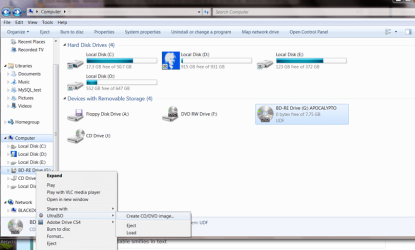
Backing up bit by bit to HDD can be done easily with Ultra ISO -- this just makes an ISO of the original DVD -- even if it's > 4.7 GB.

You can mount it and play it in any applicable software.

For example to copy Mel gibsons APOCALYPTO DVD (7.75GB)

-- see images

Cheers
jimbo
 

Attachments

  • dvd1.png
    dvd1.png
    18 KB · Views: 19
  • dvd2.png
    dvd2.png
    54 KB · Views: 21

My Computer My Computer

At a glance

Linux CENTOS 7 / various Windows OS'es and se...Intel i7 Intel i58GB, 16GBOn Motherboard
Computer type
PC/Desktop
Computer Manufacturer/Model Number
Custom built, several laptops HP/ASUS
OS
Linux CENTOS 7 / various Windows OS'es and servers
CPU
Intel i7 Intel i5
Memory
8GB, 16GB
Graphics Card(s)
On Motherboard
Sound Card
Realtek HD audio
Monitor(s) Displays
Apple Cinema display, Samsung LCD
Screen Resolution
1920 X 1080
Hard Drives
4 X 1TB SATA
Mouse
Toshiba wireless laser
Internet Speed
> 20MB up
But but... blu-ray is already here :D Your 1TB drive would only hold 20 movies, if they do use all 50GB on a BD. It's gonna be some time until I get to blu-ray though.
 

My Computer My Computer

At a glance

Win7 x64 7232 // XP x86 SP3E8400 @ 3.825GHz4GB G.Skill DDR2 1000MHzMSI 8800GTS (G92) in SLI
OS
Win7 x64 7232 // XP x86 SP3
CPU
E8400 @ 3.825GHz
Motherboard
EVGA 750i FTW
Memory
4GB G.Skill DDR2 1000MHz
Graphics Card(s)
MSI 8800GTS (G92) in SLI
Sound Card
HT|OMEGA Claro Plus+
Monitor(s) Displays
Dell S2209W
Screen Resolution
1920x1080
Hard Drives
WD Caviar Black 1TB //
Hitachi 7k1000.B 1TB //
WD SE16 640GB
PSU
Corsair 750TX
Case
ABS Monolith
But but... blu-ray is already here :D Your 1TB drive would only hold 20 movies, if they do use all 50GB on a BD. It's gonna be some time until I get to blu-ray though.


AAAH -- but the trick NOW is to use backup software to archive the ISO's -- the backup software will "Compress" (Losslessly -- I.e no data degradation etc) up to around 50 %. This will give you up 100 - 140 movies per 1TB drive -- whilst the ISO might be 50 GB in size the actual data content will be very much less.

When you want to play a movie just restore the ISO from your backup, "Virtual Mount it" and play.

OK a bit fiddly but IMO it's the best way of Archiving DVD's -- a 1TB disc these days in any case doesn't actually cost much more than a single Blu Ray DVD. :mad:

For Archive I use the Arconis program Backup software for data backup and disaster recovery in Windows and Linux - Acronis

so to repeat

proceed as follows A) Backup

1) Stage the DVD's to an "ISO" with Ultra ISO

2) Archive the ISO's with Acronis true image on to a different disk (can be external so you can play the movies when travelling on a laptop).

3) Delete the original .ISO archive

B) Recovery and playing

1) Restore the .ISO to local hard disk

2) Virtual mount the ISO (can be done with UltraISO)

3) use your DVD playing software to play the disk.

Works for Blu Ray as well -- creating the ISO is simply DATA for the computer -- so long as your device can read and handle BLU RAY then no problems. Not really sure however why anyone would actually want BLU RAY on a small laptop -- standard resolution is just fine on an 11 inch laptop -- I'm certainly got going to "Lug around" one of those Alienware beasts -- and I'm quite big and strong. Just imagine a small petite woman with one of those monsters. :cry:

Cheers

jimbo
 

My Computer My Computer

At a glance

Linux CENTOS 7 / various Windows OS'es and se...Intel i7 Intel i58GB, 16GBOn Motherboard
Computer type
PC/Desktop
Computer Manufacturer/Model Number
Custom built, several laptops HP/ASUS
OS
Linux CENTOS 7 / various Windows OS'es and servers
CPU
Intel i7 Intel i5
Memory
8GB, 16GB
Graphics Card(s)
On Motherboard
Sound Card
Realtek HD audio
Monitor(s) Displays
Apple Cinema display, Samsung LCD
Screen Resolution
1920 X 1080
Hard Drives
4 X 1TB SATA
Mouse
Toshiba wireless laser
Internet Speed
> 20MB up
But but... blu-ray is already here :D Your 1TB drive would only hold 20 movies, if they do use all 50GB on a BD. It's gonna be some time until I get to blu-ray though.

But they currently are not using all 50 GB of space. In fact, I'd say they are hard-pressed for even half of that in terms of content thus far, even with a movie as long as The Dark Knight.

I have Blu-Ray versions of Serenity and Underworld: Director's Cut and both only use about 14 GB in .ISO format....

AAAH -- but the trick NOW is to use backup software to archive the ISOs -- the backup software will "Compress" (Losslessly -- I.e no data degradation etc) up to around 50 %. This will give you up 100 - 140 movies per 1TB drive -- whilst the ISO might be 50 GB in size the actual data content will be very much less.

When you want to play a movie just restore the ISO from your backup, "Virtual Mount it" and play.

OK a bit fiddly but IMO it's the best way of Archiving DVDs -- a 1TB disc these days in any case doesn't actually cost much more than a single Blu Ray DVD. :mad:

For Archive I use the Acronis program Backup software for data backup and disaster recovery in Windows and Linux - Acronis

so to repeat

proceed as follows A) Backup

1) Stage the DVDs to an "ISO" with Ultra ISO

2) Archive the ISOs with Acronis true image on to a different disk (can be external so you can play the movies when traveling on a laptop).

3) Delete the original .ISO archive

B) Recovery and playing

1) Restore the .ISO to local hard disk

2) Virtual mount the ISO (can be done with UltraISO)

3) use your DVD playing software to play the disk.

Works for Blu Ray as well -- creating the ISO is simply DATA for the computer -- so long as your device can read and handle BLU RAY then no problems. Not really sure however why anyone would actually want BLU RAY on a small laptop -- standard resolution is just fine on an 11 inch laptop -- I'm certainly got going to "Lug around" one of those Alienware beasts -- and I'm quite big and strong. Just imagine a small petite woman with one of those monsters. :cry:

Cheers

jimbo

I already have the 'other' disk built into my system - I have a pair of 500 GB Seagate Barracudas, and a 250 GB WD for storage, and a 60 GB 7200 RPM IDE 3.5" drive that I converted to portable by buying a portable HD case.

The 250 is named my storage, and the 60 GB is my travel drive - so my ISOs go with me as I need them to....
 

My Computers My Computers

  • At a glance

    Windows 11 21H2 Current buildAMD Ryzen 9 3950X4 * 32 GB - Corsair Vengeance 3600 MHzEVGA GeForce RTX 3080 Ti XC3 ULTRA GAMING (12...
    Computer type
    PC/Desktop
    Computer Manufacturer/Model Number
    The Beast Model A (homebrew)
    OS
    Windows 11 21H2 Current build
    CPU
    AMD Ryzen 9 3950X
    Motherboard
    MSI MEG X570 GODLIKE
    Memory
    4 * 32 GB - Corsair Vengeance 3600 MHz
    Graphics Card(s)
    EVGA GeForce RTX 3080 Ti XC3 ULTRA GAMING (12G-P5-3955-KR)
    Sound Card
    Realtek® ALC1220 Codec
    Monitor(s) Displays
    2x Eve Spectrum ES07D03 4K Gaming Monitor (Matte) | Eve Spec
    Screen Resolution
    3x 3840 x 2160
    Hard Drives
    3x Samsung 980 Pro NVMe PCIe 4 M.2 2 TB SSD (MZ-V8P2T0B/AM) } 3x Sabrent Rocket NVMe 4.0 1 TB SSD
    PSU
    PC Power & Cooling’s Silencer Series 1050 Watt, 80 Plus Plat
    Case
    Fractal Design Define 7 XL Dark ATX Full Tower Case
    Cooling
    SteelSeries Apex Pro Wired Gaming Keyboard
    Keyboard
    SteelSeries Apex Pro
    Mouse
    Logitech MX Master 3S | MX Master 3 for business
    Internet Speed
    AT&T LightSpeed Gigabit Duplex Ftth
    Antivirus
    Windows Defender + MB 3
    Browser
    Nightly (default) + Firefox (stable),Chrome, Edge
  • At a glance

    ChromeOS Flex Dev Channel (current)Intel(R) Core(TM) i5-6300U CPU @ 2.40GHz, 250...16 GBIntel(R) HD Graphics 520
    Computer type
    PC/Desktop
    System Manufacturer/Model Number
    Dell Latitude E5470
    OS
    ChromeOS Flex Dev Channel (current)
    CPU
    Intel(R) Core(TM) i5-6300U CPU @ 2.40GHz, 2501 Mhz, 2 Core(s), 4 Logical Processor(s)
    Motherboard
    Dell
    Memory
    16 GB
    Graphics Card(s)
    Intel(R) HD Graphics 520
    Sound Card
    Intel(R) HD Graphics 520 + RealTek Audio
    Monitor(s) Displays
    Dell laptop display 15"
    Screen Resolution
    1920 * 1080
    Hard Drives
    Toshiba 128GB M.2 22300 drive
    INTEL Cherryville 520 Series SSDSC2CW180A 180 GB SATA III SSD
    PSU
    Dell
    Case
    Dell
    Cooling
    Dell
    Keyboard
    Dell
    Mouse
    Logitech MX Master 3S (shared w. Sys 1) | Dell TouchPad
    Internet Speed
    AT&T LightSpeed Gigabit Duplex Ftth
Lossless compression helps but not much, or even any at all, when it comes to MPEG-2, H.264 or other lossy video formats because the video is already compressed, after discarding data.

Case in point: I have an anime ISO at 1.64GB. Acronis at max compression brings it down to 1.59GB. WinRAR at best brings it down to 1.57GB. 7zip LZMA ultra, 64MB dictionary size brings it down to 1.55GB. That's about 5.5% saved. Now if I use the above 7zip method on some mkv files (a container, like avi, in this case it has H.264 video and DTS audio inside) that I made from converting DVD, I get from 3% to 0% compression.

So if you want to drastically decrease the file size (because of small HDD, too many DVDs, for use on a mobile device, whatever), I think re-encoding is the only option. I see your points though. With 1TB drives going for 70 bucks, I may as well close my converting business :p

Anyway, back to the original topic... OP, how are you doing with your DVD? :sarc: I think Avidemux works ok with win7... Haven't used it for a while though.
 

My Computer My Computer

At a glance

Win7 x64 7232 // XP x86 SP3E8400 @ 3.825GHz4GB G.Skill DDR2 1000MHzMSI 8800GTS (G92) in SLI
OS
Win7 x64 7232 // XP x86 SP3
CPU
E8400 @ 3.825GHz
Motherboard
EVGA 750i FTW
Memory
4GB G.Skill DDR2 1000MHz
Graphics Card(s)
MSI 8800GTS (G92) in SLI
Sound Card
HT|OMEGA Claro Plus+
Monitor(s) Displays
Dell S2209W
Screen Resolution
1920x1080
Hard Drives
WD Caviar Black 1TB //
Hitachi 7k1000.B 1TB //
WD SE16 640GB
PSU
Corsair 750TX
Case
ABS Monolith
Anyway, back to the original topic... OP, how are you doing with your DVD? :sarc: I think Avidemux works ok with win7... Haven't used it for a while though.

Avidemux works very well with Win7. The h.264/aac encoding is fast, uses all your cores, and is of impressive quality even at default settings.
 

My Computer My Computer

At a glance

El Capitan / Windows 10i7-4980HQ16GBIris 5200
Computer type
Laptop
Computer Manufacturer/Model Number
Apple
OS
El Capitan / Windows 10
CPU
i7-4980HQ
Memory
16GB
Graphics Card(s)
Iris 5200
Hi all
I take your point about some formats are already compressed so Acronis won't necessarily buy you too much.

However why I started running the Acronis Backup to compress ISO's was that I have been using a DVD-RAM DVD recorder as well for a while -- whilst DVD-RAM might be getting long in the tooth it's still great for being able to record whilst watching (from the same DISC) at the same time -- so if you record say in LP (that's 4 hrs --approx 2 films in watchable quality - especially "Upscaled" on a 36 inch LCD TV) you can watch Film 1 whilst recording Film 2.

It's also good for "Partial edit" -- editing out the commercials etc. I like recording programs from things like "The Discovery channel" etc as well.

The ISO created is always 4.7GB irrespective of the amount of data on it - so using Acronis to "chop this down" was fine. OK you could hobble round with TS and VOB files but why bother -- as I pointed out Disk storage is getting so cheap it's almost reached "Throw away level".

Actually I think with current technology (1080p) the Jury is still out on whether BLU RAY is actually worth the extra cost on TV's 36 inch or smaller if you have a quality "Upscaling" DVD machine.

My computer has a BD RE device on it -- but I've never bothered using a BD disk for archiving -- I can get the nice little 320GB WD passport drives for almost the price of two BD-RE re-writable disc anyway (320 GB vs around 40GB).

As a photographer I understand a lot about "Up-rezzing" images (upscaling). We've done this for years . When DSLR's first came out 3 and 4MP sensor size was the norm. I'm not giving a maths lecture here but without a decent amount of "Upscaling" you wouldn't have even been able to print a decent A4 image -- to say nothing of A3+ and Poster sizes. -- The original Canon 1D professional DSLR only had 3 - 4 MP size but any PRO shooter at the time was able to make decent A4 Pics with this.

Algorithms these days are pretty good and unless you have a HUGE screen (and I don't like my living room to be dominated by a giant screen or look like a Hotel Lobby) I would defy anyone to really see any significant difference between a " True 1080p Upscaled" DVD and a Blu Ray one.

I'm not against technology but I don't think Blu Ray is worth it until the TV definition improves significantly.

Now Genuine 3D -- that's a topic for another thread.

Cheers
jimbo
 

My Computer My Computer

At a glance

Linux CENTOS 7 / various Windows OS'es and se...Intel i7 Intel i58GB, 16GBOn Motherboard
Computer type
PC/Desktop
Computer Manufacturer/Model Number
Custom built, several laptops HP/ASUS
OS
Linux CENTOS 7 / various Windows OS'es and servers
CPU
Intel i7 Intel i5
Memory
8GB, 16GB
Graphics Card(s)
On Motherboard
Sound Card
Realtek HD audio
Monitor(s) Displays
Apple Cinema display, Samsung LCD
Screen Resolution
1920 X 1080
Hard Drives
4 X 1TB SATA
Mouse
Toshiba wireless laser
Internet Speed
> 20MB up
Back
Top