
This is a brief guide on how graphics memory works and is reported in Windows 7. There has been much confusion here and elsewhere with this due to how things are worded when looking at the detailed report from a WEI score for example,
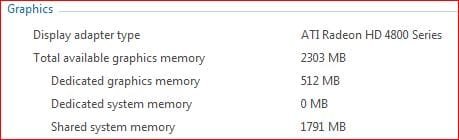
Looking at the numbers above it would appear that there is a total of 2303 MB of video memory, however that isn't the case. To break it down and make it easier to understand you need to realize what the three variables listed are,
Dedicated graphics memory
This is the actual amount of physical memory that the video card will have, whether it is onboard or a dedicated video card. For most onboard video this value is what is allocated in the bios and deducted from the total of the system ram, and cannot be changed from within Windows. For a dedicated card this is physical ram on the card and cannot be upgraded like system ram can.
Dedicated system memory
This is mainly seen on Intel graphics solutions as seen here,
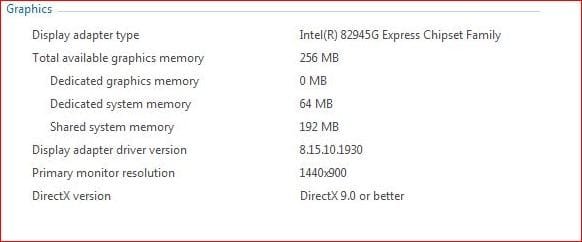
Another thing with the current generations of Intel graphics is that the amount of graphics memory is dynamic, meaning that the graphics run on the base amount as shown above but will increase as needed (and also lower the amount of available system ram at the same time).
Shared system memory
This is the number that throws a lot of people off. It is more like a pagefile for the video card, also known as "Virtualized video memory",
Windows Display Driver Model - Wikipedia, the free encyclopedia
and is a total of graphics memory and total system ram. What it doesn't do is take anything from system memory unless the full amount of graphics memory has been used, and then will only use what is required and release it once it is no longer needed.
This is what Microsoft has to say about it,
Graphics Memory Reporting through WDDM
Engineering Windows 7 Graphics Performance - Engineering Windows 7 - Site Home - MSDN Blogs
Hopefully this will help clear up some of the confusion some have when looking at those numbers when they look at their WEI results.
Looking at the numbers above it would appear that there is a total of 2303 MB of video memory, however that isn't the case. To break it down and make it easier to understand you need to realize what the three variables listed are,
Dedicated graphics memory
This is the actual amount of physical memory that the video card will have, whether it is onboard or a dedicated video card. For most onboard video this value is what is allocated in the bios and deducted from the total of the system ram, and cannot be changed from within Windows. For a dedicated card this is physical ram on the card and cannot be upgraded like system ram can.
Dedicated system memory
This is mainly seen on Intel graphics solutions as seen here,
Another thing with the current generations of Intel graphics is that the amount of graphics memory is dynamic, meaning that the graphics run on the base amount as shown above but will increase as needed (and also lower the amount of available system ram at the same time).
Shared system memory
This is the number that throws a lot of people off. It is more like a pagefile for the video card, also known as "Virtualized video memory",
Windows Display Driver Model - Wikipedia, the free encyclopedia
and is a total of graphics memory and total system ram. What it doesn't do is take anything from system memory unless the full amount of graphics memory has been used, and then will only use what is required and release it once it is no longer needed.
This is what Microsoft has to say about it,
Graphics Memory Reporting through WDDM
There is also a white paper on the above link for those interested in exactly how this number is determined. There is more about the changes made to how video memory works in Windows 7 here,The new Microsoft Windows Vista Display Driver Model (WDDM) brings fundamental changes to the management of graphics memory in a system.
Prior to Windows Vista, graphics memory was reported by the graphics driver as a single number through the Display applet in the control panel. Some legacy APIs exposed two types of memory: local and non-local. However, these numbers were selected by the driver and were mostly inaccurate.
With the introduction of Windows Vista, the operating system is putting a much heavier load on the GPU than ever before. Overall system performance is now closely associated with the graphics subsystem performance and is directly affected by the amount of graphics memory available. Microsoft is enhancing how graphics memory is reported, so that end users can better understand the factors that directly impact the system performance. With WDDM, Windows Vista can accurately account for each of the graphics memory contributors and report available memory precisely through new APIs.
It's important for software running on Windows Vista to be able to accurately determine the amount of available graphics memory. WDDM manages the virtualization of graphics memory in itself and also ensures accurate reporting of various aspects of graphics memory. Application developers and software vendors are encouraged to take advantage of the DirectX 10 API for retrieving the accurate set of graphics memory values on systems that have WDDM drivers.
Engineering Windows 7 Graphics Performance - Engineering Windows 7 - Site Home - MSDN Blogs
Hopefully this will help clear up some of the confusion some have when looking at those numbers when they look at their WEI results.
Last edited by a moderator:


