
View Shortcut as Folder

anonymust

New member
Local time
5:01 AM
Messages
11
Location
In a house on earth, near the bushes
How can I get my windows to view a shortcut that i created in alphabetical order like all my other folders in that location?


Eg:
I made a folder "GUnit"

C\:Artist\GUnit\50Cent

But in my "Artist" directory i created a shortcut folder to the "50Cent" folder I made.

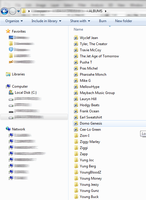
But when I try to view the directory of "Artist" in alphabetical order it groups all the shortcut to the top/bottom.
_________________________________________________________
Screenshot is a photo example.. of what i mean.

I sorted this directory from Z-A and all the shortcuts show up on top.
 
Last edited:

My Computer My Computer

At a glance

Windows 7 Ultimate x64AMD X24GBNO
Computer type
PC/Desktop
Computer Manufacturer/Model Number
Asus
OS
Windows 7 Ultimate x64
CPU
AMD X2
Motherboard
Asus
Memory
4GB
Graphics Card(s)
NO
Sound Card
NO
Monitor(s) Displays
2
Screen Resolution
Large
Hard Drives
2x2TB
PSU
400W
Keyboard
Full
Mouse
Small
Internet Speed
Fast
Antivirus
AVG
Browser
Chrome
Other Info
None
I don't see any attachment.
 

My Computer My Computer

At a glance

Windows 10 Pro X64Intel Quad Core i7-4770 @ 3.4Ghz16.0GB PC3-12800 DDR3 SDRAM 1600 MHzIntel Integrated HD Graphics
Computer type
PC/Desktop
Computer Manufacturer/Model Number
Lenovo IdeaCenter 450
OS
Windows 10 Pro X64
CPU
Intel Quad Core i7-4770 @ 3.4Ghz
Memory
16.0GB PC3-12800 DDR3 SDRAM 1600 MHz
Graphics Card(s)
Intel Integrated HD Graphics
Sound Card
Realtek HD Audio
Monitor(s) Displays
HP 22" LCD
Screen Resolution
1680 x 1050
Hard Drives
250GB Samsung EVO SATA-3 SSD
2TB Seagate ST2000DM001 SATA-2
1.5TB Seagate ST3150041AS SATA
Keyboard
Dell USB
Mouse
Lenovo USB
Internet Speed
Cable via Road Runner 3MB Upload, 30MB Download
Antivirus
Windows Defender, MBAM Pro, MBAE
Browser
Seamonkey
Other Info
UEFI/GPT
PLDS DVD-RW DH16AERSH
Screenshot is the attachment. :)
 

My Computer My Computer

At a glance

64-bit Windows 11 Pro for WorkstationsIntel i7-8700K OC'd to 5 GHz64 GB (4x16GB) G.SKILL TridentZ RGB DDR4 3600...ASUS ROG-STRIX-GTX1080TI-O11G-GAMING
Computer type
PC/Desktop
Computer Manufacturer/Model Number
Self built custom
OS
64-bit Windows 11 Pro for Workstations
CPU
Intel i7-8700K OC'd to 5 GHz
Motherboard
ASUS ROG Maximus XI Formula Z390
Memory
64 GB (4x16GB) G.SKILL TridentZ RGB DDR4 3600 MHz
Graphics Card(s)
ASUS ROG-STRIX-GTX1080TI-O11G-GAMING
Sound Card
Integrated
Monitor(s) Displays
2 x Samsung Odyssey G7 27"
Screen Resolution
2560x1440
Hard Drives
1TB Samsung 990 PRO M.2,
4TB Samsung 990 PRO PRO M.2,
TerraMaster F8 SSD Plus NAS
PSU
Seasonic Prime Titanium 850W
Case
Thermaltake Core P3
Cooling
Corsair Hydro H115i
Keyboard
Logitech wireless K800
Mouse
Logitech MX Master 4
Internet Speed
2 Gb/s Download and 100 Mb/s Upload
Antivirus
Malwarebyte Anti-Malware Premium
Browser
Google Chrome
Other Info
Logitech Z625 speaker system,
Logitech BRIO 4K Pro webcam,
HP Color LaserJet Pro MFP M477fdn,
APC SMART-UPS RT 1000 XL - SURT1000XLI,
Galaxy S23 Plus phone
There are three types of objects in NTFS file system. Folders, Files and Links (shortcuts, hard links etc.)

Folders are always sorted separately and grouped together.

Links are also small files and are sorted together along with files.

Hence you can not mix Folders and shortcuts of folders to sort and display in alphabetical order.

When you use the type sort order, Folders are sorted and displayed on the top. Next are sorted files and then sorted shortcuts.
 

My Computer My Computer

At a glance

MS Windows 7 Ultimate 64-bit SP1i5-2410M 2.3GHz (2.9GHz Turbo-Boost) Sandy Br...4GB+4GB Samsung DDR3 PC3-10700 (1333 MHz)Video Intel(R) HD Graphics Family, 1696MB ava...
Computer Manufacturer/Model Number
Toshiba Satellite P775-S7232
OS
MS Windows 7 Ultimate 64-bit SP1
CPU
i5-2410M 2.3GHz (2.9GHz Turbo-Boost) Sandy Bridge 32nm
Motherboard
Toshiba PHRAA ver. PSBY1U-00F003
Memory
4GB+4GB Samsung DDR3 PC3-10700 (1333 MHz)
Graphics Card(s)
Video Intel(R) HD Graphics Family, 1696MB available memory
Sound Card
Realtek High Definition Audio version=6.0.1.6323
Monitor(s) Displays
17.3 " Trubrite TFT LCD, LED Backlit
Screen Resolution
1600x900 32 bit, Native support for 720P content
Hard Drives
TOSHIBA MK6476GSXN
580.614 [GB] partitioned C: 80GB and D: 500GB with hidden recovery partitons.

Spare bay for 2nd HDD but no SATA connector :-(
PSU
Toshiba AC/DC Adapter
Case
Notebook
Cooling
Built-in Fan
Keyboard
Premium Raised Tile keyboard
Mouse
Logitech M215 wireless mouse
Internet Speed
Not fast enough
Other Info
Built-in Harman Kardon speakers with Dolby Advanced Audio, Waves MaxxAudio® 3. HDMI, 1xUSB3+3xUSB2 ports, WebCam, Battery life 4hrs 11mins, 4GB Readyboost SDHC card, WD My Book Essential Ext HDDs 2 TB, 2x1TB, My Passport SE 1TB and WDTV 1st Gen for Multimedia playing on a Sony Wega 32" LCD.
Recent addition to my toys are Asus Transformer Pad TF300T with 32GB onboard sd card + 32GB microsd card.
There are three types of objects in NTFS file system. Folders, Files and Links (shortcuts, hard links etc.)

Folders are always sorted separately and grouped together.

Links are also small files and are sorted together along with files.

Hence you can not mix Folders and shortcuts of folders to sort and display in alphabetical order.

When you use the type sort order, Folders are sorted and displayed on the top. Next are sorted files and then sorted shortcuts.


Isn't there some sort of tweak for this?, I recall using a tweaking programs once (not sure if this would work) but it used to remove the little arrow image on the corner or shortcuts...

just asking..
 

My Computer My Computer

At a glance

Windows 7 Ultimate x64AMD X24GBNO
Computer type
PC/Desktop
Computer Manufacturer/Model Number
Asus
OS
Windows 7 Ultimate x64
CPU
AMD X2
Motherboard
Asus
Memory
4GB
Graphics Card(s)
NO
Sound Card
NO
Monitor(s) Displays
2
Screen Resolution
Large
Hard Drives
2x2TB
PSU
400W
Keyboard
Full
Mouse
Small
Internet Speed
Fast
Antivirus
AVG
Browser
Chrome
Other Info
None

My Computer My Computer

At a glance

Microsoft Windows 7 Home Premium 64-bit 7600IIx4 amd athelon 635 processor2x2gbati radeon HD 5450
Computer Manufacturer/Model Number
Hewlett packard/p6512uk
OS
Microsoft Windows 7 Home Premium 64-bit 7600
CPU
IIx4 amd athelon 635 processor
Motherboard
FOXCONN 2AA9
Memory
2x2gb
Graphics Card(s)
ati radeon HD 5450
Sound Card
(1) Realtek High Definition Audio (2) AMD High Definition
Monitor(s) Displays
samsung lcd tv 32"
Screen Resolution
1360x 768
Hard Drives
(1) WDC WD10 01FAES-60Z2A0 SATA Disk Device (2) Maxtor OneTouch USB Device (3) ST310003 33AS USB Device (4) WD My Book 1111 USB Device
PSU
?
Cooling
air!
Keyboard
wireless hp
Mouse
wireless Hp,optical
Internet Speed
1.10mb/s
Antivirus
MSE
Browser
Firefox
There IS a solution! :-) You can use the mklink command to make a "junction". For example, [C:\Users\MyName\Google Drive>mklink /j "..\My Online Photos (junction to Google Drive folder)" Photos]. Of course, the square brackets are NOT part of the command. Both quoted items can be either relative or absolute file paths. Either path can include the ".." (parent directory) type of reference. Quotes are only necessary if spaces are included in the filepath.

I choose to have my junction "copies" include a parenthetical junction reference in their name, as I don't want to forget the item is also "located" somewhere else.

FYI - I found the core part of this answer at another website but I could swear I've seen the answer on this website. For legal (and moral) purposes of giving credit (possibly for copyright) I am disclosing the source as wwDOTvistaheads.com/forums/microsoft-public-windows-vista-file-management/194591-how-do-i-have-shortcut-folders-sort-alphabetically.html.
Webmaster: If my publishing of this link violates website policy, you can delete it it but at least I will have not violated any laws or moral rules of giving credit where credit is due.
 

My Computer My Computer

At a glance

windows 7 home premium 64-bit
OS
windows 7 home premium 64-bit
Back
Top