virtial box vs virtual pc 2007

chrysalis

New member
Power User
VIP
Local time
11:33 PM
Messages
529
Location
Leics, UK
I was using virtual pc 2007 (not the latest version as didnt want XP mode) and found it fine, fairly fast and easy to use. However no 64bit which I needed.

So downloaded virtualbox which has some nice features such as sata emulation, 64bit amongst other things. My main problem is that it slows down the host system to the point using it whilst playing a video clip makes the clip stutter and this is on a quad core i5 machine. On top of this the VM also feels slower dispite been so hard on the host system. I had to throttle the virtualbox to just 1 core and still get some stutters, on 2-4 cores its quite bad. 3 cores can saturate all 4 real cores.

I have vt-x on
vt-d off (slows down host i/o)
nested pageing off as this is i7 and above only.
sata emulation with host i/o cache off
currently VM has 2 gig of ram and previously was 0.5gig, both same affects.
nothing is been swapped out as I have 8 gig of real ram.

do others have a problem with virtualbox hitting the host hard?
 

My Computer

Computer type
PC/Desktop
Computer Manufacturer/Model Number
home built
OS
windows 8.1 Pro x64
CPU
intel i5 4670k @ 4.3ghz
Motherboard
asus z87-plus
Memory
16 gig ram ddr3 @ 1600 corsair vengeance
Graphics Card(s)
evga 970 GTX 4 GIG FTW ACX 2.0
Sound Card
asus xonar D2X
Monitor(s) Displays
benq gw2765ht
Screen Resolution
2560x1440
Hard Drives
Samsung 850 pro SSD 512gig - boot device wooosh
WD black cavalier 640gig WD6401AALS
Seagate 500gig ST3500630AS
WD 2TB Green WDC20EARS
2 x WD Red 3TB WD30EFRX
Samsung 750gig HD753LG - on asmedia controller
PSU
coolermaster silent pro 600watt modular
Case
fractal define R4
Cooling
artic freezer i30, 3 case fans
Keyboard
microsoft business ps2 keyboard
Mouse
microsoft optical black mouse
Internet Speed
80/20 FTTC SkyBB
Antivirus
Nod32 AV v8, HitmanProAlert, SRP, System Hardening
Browser
Chrome x64
Other Info
Intel controller is in AHCI mode currently using IaSTOR 12.8.0.1016 drivers
Never had a problem with VBox, although I've not used it under Windows, just under Ubuntu.

Did you install Guest Additions ??
 

My Computer

Computer Manufacturer/Model Number
Dell Optiplex
OS
Windows 7 Professional 64 bit
Memory
4096
Virtual Box - Can install any OS on it. (Requires VT-x support)
Virtual PC - Can only install Windows OS on it. (Does not require VT-x support)

Virtual Box is an easy program to use.
 

My Computer

Computer Manufacturer/Model Number
Macbook Pro 15" (2011) (Matte Version)
OS
Win 7 Pro x64 SP1 OS X Snow Leopard 10.6.7
CPU
Intel Core i7 2820QM 2.3GHz (Quad-Core)
Motherboard
N/A
Memory
8GB 1333 MHz PC3-10600 DDR3 SDRAM
Graphics Card(s)
ATI Radeon HD 6750M (1GB, GDDR5)
Sound Card
N/A
Monitor(s) Displays
1 Display
Screen Resolution
1,680 x 1050 (Matte Screen, Anti-Glare)
Hard Drives
750GB SATA (5400 rpm)
WD My Passport Essential 1TB Portable Hard Drive
PSU
N/A
Case
N/A
Cooling
N/A
Keyboard
Apple Wireless Keyboard
Mouse
Apple Wireless Magic Mouse
Internet Speed
Max - 2.2MB/sec; DSL provided by Telecom NZ
Other Info
MS Office Professional 2010
McAfee Total Protection 2011
On a Laptop Stand (Hand-Built)
guest additions is only for windows OS I think, I am using freebsd on it.

virtual pc can run non windows OS also. at least virtual pc 2007 can.
 

My Computer

Computer type
PC/Desktop
Computer Manufacturer/Model Number
home built
OS
windows 8.1 Pro x64
CPU
intel i5 4670k @ 4.3ghz
Motherboard
asus z87-plus
Memory
16 gig ram ddr3 @ 1600 corsair vengeance
Graphics Card(s)
evga 970 GTX 4 GIG FTW ACX 2.0
Sound Card
asus xonar D2X
Monitor(s) Displays
benq gw2765ht
Screen Resolution
2560x1440
Hard Drives
Samsung 850 pro SSD 512gig - boot device wooosh
WD black cavalier 640gig WD6401AALS
Seagate 500gig ST3500630AS
WD 2TB Green WDC20EARS
2 x WD Red 3TB WD30EFRX
Samsung 750gig HD753LG - on asmedia controller
PSU
coolermaster silent pro 600watt modular
Case
fractal define R4
Cooling
artic freezer i30, 3 case fans
Keyboard
microsoft business ps2 keyboard
Mouse
microsoft optical black mouse
Internet Speed
80/20 FTTC SkyBB
Antivirus
Nod32 AV v8, HitmanProAlert, SRP, System Hardening
Browser
Chrome x64
Other Info
Intel controller is in AHCI mode currently using IaSTOR 12.8.0.1016 drivers
Virtual Box - Can install any OS on it. (Requires VT-x support)
Virtual PC - Can only install Windows OS on it. (Does not require VT-x support)

Virtual Box is an easy program to use.
Correction: Also several Linux distros can be installed on Virtual PC vm, as shown for instance here.

Only XP Mode can be run without VT-x support, when XP Mode update is installed (download #3 here). All other virtual machines in Virtual PC need VT-x support.

guest additions is only for windows OS I think, I am using freebsd on it.

virtual pc can run non windows OS also. at least virtual pc 2007 can.
Correction: VirtualBox Guest Additions ISO contains installers and drivers for (and should always be installed on) every Windows (Win NT and later), Linux and Solaris guest virtual machines.

Kari
 
Last edited:

My Computer

Computer type
Laptop
Computer Manufacturer/Model Number
HP ENVY 17-1150eg
OS
Windows 10 Pro x64 EN-GB
CPU
1.6 GHz Intel Core i7-720QM Processor
Memory
6 GB
Graphics Card(s)
ATI Mobility Radeon HD 5850 Graphics
Sound Card
Beats sound system with integrated subwoofer
Monitor(s) Displays
17" laptop display, 22" LED and 32" Full HD TV through HDMI
Screen Resolution
1600*900 (1), 1920*1080 (2&3)
Hard Drives
Internal: 2 x 500 GB SATA Hard Disk Drive 7200 rpm
External: 2TB for backups, 3TB USB3 network drive for media
Cooling
As Envy runs a bit warm, I have it on a Cooler Master pad
Keyboard
Logitech diNovo Media Desktop Laser (bluetooth)
Mouse
Logitech Performance Mouse MX
Internet Speed
50/10 Mbps VDSL
Antivirus
Windows Defender 4.3.9431.0
Browser
Maxthon 3.5.2., IE11
Got that mixed up. Keep getting confused with Virtual PC and Windows Xp Mode.
 

My Computer

Computer Manufacturer/Model Number
Macbook Pro 15" (2011) (Matte Version)
OS
Win 7 Pro x64 SP1 OS X Snow Leopard 10.6.7
CPU
Intel Core i7 2820QM 2.3GHz (Quad-Core)
Motherboard
N/A
Memory
8GB 1333 MHz PC3-10600 DDR3 SDRAM
Graphics Card(s)
ATI Radeon HD 6750M (1GB, GDDR5)
Sound Card
N/A
Monitor(s) Displays
1 Display
Screen Resolution
1,680 x 1050 (Matte Screen, Anti-Glare)
Hard Drives
750GB SATA (5400 rpm)
WD My Passport Essential 1TB Portable Hard Drive
PSU
N/A
Case
N/A
Cooling
N/A
Keyboard
Apple Wireless Keyboard
Mouse
Apple Wireless Magic Mouse
Internet Speed
Max - 2.2MB/sec; DSL provided by Telecom NZ
Other Info
MS Office Professional 2010
McAfee Total Protection 2011
On a Laptop Stand (Hand-Built)
VirtualBox has 3d acceleration (OpenGL and DirectX8), last time I checked (and the reason I don't use it), XP mode dosent support 3d acceleration.
 

My Computer

Computer Manufacturer/Model Number
HP dv6519tx
OS
Windows 7 Ultimate x64
CPU
1.80 GHz Intel Core 2 Duo processor T7100
Memory
3 gig ddr2
Graphics Card(s)
NVIDIA GeForce 8400M GS
Sound Card
Realtek High Definition Audio
Monitor(s) Displays
15.4” WXGA High Definition BrightView Widescreen
Screen Resolution
1280 x 800
Hard Drives
Hitachi 320 GB (5400 rpm)
PSU
90 W AC Power Adapter
Cooling
Kitchen plate under the lappy
Keyboard
101 key compatible
Mouse
Touch Pad with On/Off button and dedicated vertical Scroll
Internet Speed
Three Wireless internet prepaid using E160G USB dongle
do others have a problem with virtualbox hitting the host hard?

I'm running XP in VirtualBox, but I don't really push it so there is no obvious impact on the Host. Did you know that VirtualBox 4.0 was just released? Perhaps it will address your problem?
 

My Computer

Computer type
PC/Desktop
OS
Windows 7 x64
CPU
Intel Core2 Extreme Q6850 3.00GHz
Motherboard
EVGA 132-CK-NF79
Memory
8 GB
Graphics Card(s)
Radeon R7 260X
Sound Card
Xonar DS
Hard Drives
Hitachi Deskstar 1 tb
nope thanks for letting me know.

when the VM is idle my host pc doesnt struggle although does have higher than normal idle cpu usage (also didnt happen in virtual pc).

its mainly when doing things like compiling, and even tho the host pc cpu isnt saturated it makes videos stutter.

will report back on how 4.0 goes (assuming I can upgrade to it with existing VM).

I think its worth mentioning that virtual pc 2007 doesnt requre vt-x. Microsoft only added that requirement to the latest version.

--edit--

changelog looks very nice so far.

Resource control: added support for limiting a VM’s CPU time and IO bandwidth
im sold :D
 

My Computer

Computer type
PC/Desktop
Computer Manufacturer/Model Number
home built
OS
windows 8.1 Pro x64
CPU
intel i5 4670k @ 4.3ghz
Motherboard
asus z87-plus
Memory
16 gig ram ddr3 @ 1600 corsair vengeance
Graphics Card(s)
evga 970 GTX 4 GIG FTW ACX 2.0
Sound Card
asus xonar D2X
Monitor(s) Displays
benq gw2765ht
Screen Resolution
2560x1440
Hard Drives
Samsung 850 pro SSD 512gig - boot device wooosh
WD black cavalier 640gig WD6401AALS
Seagate 500gig ST3500630AS
WD 2TB Green WDC20EARS
2 x WD Red 3TB WD30EFRX
Samsung 750gig HD753LG - on asmedia controller
PSU
coolermaster silent pro 600watt modular
Case
fractal define R4
Cooling
artic freezer i30, 3 case fans
Keyboard
microsoft business ps2 keyboard
Mouse
microsoft optical black mouse
Internet Speed
80/20 FTTC SkyBB
Antivirus
Nod32 AV v8, HitmanProAlert, SRP, System Hardening
Browser
Chrome x64
Other Info
Intel controller is in AHCI mode currently using IaSTOR 12.8.0.1016 drivers
4.0 so far seems worse. I tried the resource limit stuff but appears to not work at all. On this one tho even when I throttle 1 cpu in the VM I get worse symptons, my mouse pointer in windows pauses at the same time as video stutters so now my entire system gets pauses instead of just video clips.

I get the impression most users of virtualbox run it on linux rather than windows so thats what its optimised for.

what is effective is using cpu affinity to lock virtualbox to only one core.
 

My Computer

Computer type
PC/Desktop
Computer Manufacturer/Model Number
home built
OS
windows 8.1 Pro x64
CPU
intel i5 4670k @ 4.3ghz
Motherboard
asus z87-plus
Memory
16 gig ram ddr3 @ 1600 corsair vengeance
Graphics Card(s)
evga 970 GTX 4 GIG FTW ACX 2.0
Sound Card
asus xonar D2X
Monitor(s) Displays
benq gw2765ht
Screen Resolution
2560x1440
Hard Drives
Samsung 850 pro SSD 512gig - boot device wooosh
WD black cavalier 640gig WD6401AALS
Seagate 500gig ST3500630AS
WD 2TB Green WDC20EARS
2 x WD Red 3TB WD30EFRX
Samsung 750gig HD753LG - on asmedia controller
PSU
coolermaster silent pro 600watt modular
Case
fractal define R4
Cooling
artic freezer i30, 3 case fans
Keyboard
microsoft business ps2 keyboard
Mouse
microsoft optical black mouse
Internet Speed
80/20 FTTC SkyBB
Antivirus
Nod32 AV v8, HitmanProAlert, SRP, System Hardening
Browser
Chrome x64
Other Info
Intel controller is in AHCI mode currently using IaSTOR 12.8.0.1016 drivers
Hmm, maybe you are too much of an expert and tweaked it too much. I am a simple straight forward user running Ubuntu in vBox (with Guest Additions). It is extremely smooth on both Ubuntu and Win7. And I run it on a modest 2.5GHz duo core with 3GBs of RAM of which I allocated 1GB to vBox. I really do not notice vBox when it is running whilst I operate on the host. The same the other way around.
Maybe you want to reduce all the settings to "vanilla" rather than trying to "optimize" it.

Note: forgot to mention that my host system Win7 is installed on a SSD.
 

My Computer

Computer Manufacturer/Model Number
HP, Dell, Gateway, Toshiba - 4 laptops and 2 desktops
OS
Vista, Windows7, Mint Mate, Zorin, Windows 8
CPU
from 1.6GHz Duo to i7
Monitor(s) Displays
2x HP w2207
Hard Drives
5x HDD, 7x SSD, 12x Externals
Keyboard
with trackball - no mices
Mouse
Trackball mice
Internet Speed
DSL 6000
VirtualBox easily, is the better option.

VirtualPC cannot even do 24/32 bit colour unless you mess around with it, it has terrible guest performance, no hardware 3d support, much less options. The only thing it has going for it, is that it's possibly the best support for Windows 9x versions compared to VirtualBox and VMware but this is only true with VirtualPC 2004/2007 as the newest one only goes as far back as supporting XP.

VirtualBox is updated much more often, has VNC, a better seamless mode, d3d/opengl support to some degree, Compiz on Linux guests, snapshots, much more hardware options, 32bit colour support off the bat, multiple monitors and even multiple cores. As for VT-x, you do not need it if you are running a 32bit guest OS but it is necessary if you are running a 64 bit guest on either a 32 or a 64 bit host. VirtualPC cannot run 64bit guests, also VirtualBox does not have guest additions for Windows 9x versions but being an option source project, the potential is there should anyone want to work on it.

VirtualBoxes and VirtualPCs aside, I personally see VMware Workstation(Paid) or VMware Player(free, missing snapshots and a few other minor things), as the unequivocal winners here though, it supports everything mentioned that VirtualBox does but did many of those things first. For video, it supports hardware OpenGL 2 and DirectX 9c. It supports dragging and dropping files between guest and host as well as cutting and pasting them and it can do Aero for Vista/7 guests. Vmware's seamless mode, or "unity" as it's called, integrates with the host's taskbar, whereas VirtualBox's just shows the guest taskbar ontop of the host's. Aside form all of this, it just runs the smoothest. you can see windows move around smoother, little things like that. VMware has guest additions for Windows 9x versions, though no 3d support for these exist and these additions are no longer updated.

VT-x is always recommended, it gets the guest OS to communicate directly to the host CPU. I don't Why VT-d would be a problem either way since none of these virtual machines even support it. Vt-d is meant more for Hypervisors like Xen in which case the guest OS can see the real pci(e) hardware, have a look on youtube for "Xen VT-d passthrough" or similar, there are videos of xen guests with XP seeing the real Nvidia graphics card, running directx 11 benchmarks at native speeds.

What it all comes down to for me:
-VMware for Windows 2000 and newer guests, (best performance, best 3d support, best features, Aero supported).
-VirtualBox for Linux guests, (mouse works in linux unlike vmware, Compiz supported).
-DosBox for Win9x and older, (because its an emulator and not a virtual machine, it fully software emulates old hardware to run the old stuff and is now adding emulation of Voodoo graphics chips and Soundblaster Awe32).
 
Last edited:

My Computer

OS
windows 7 x64
Well I done some diagnosis and have improved the situation here is my report.

First snapshots, when you do snapshots in virtualbox it will stop using the original virtual image you setup and make a diff image file inside the defined snapshot folder which defaults to the C: drive. This alone will decrease performance especially over multiple snapshots. For me tho it was a killer as I had my first virtual disk on C: and my 2nd on H: 2 seperate physical drives for obvious reasons, and setup zfs mirror on my freeBSD guest OS. Since I had several snapshots my virtual disks were now both on C: and it was been overloaded with requests. The fix? I removed all snapshots and cloned the disks to a non snapshot virtual server. This gave a big improvement.
Second, well I dont know to be honest, for me whats most important is the host OS remains responsive whilst the guest is running, even if it means the guest slows down, virtual pc had an option where can deprioritise the guest OS which made it very slow when not in foreground :D, but even without that option set virtual pc never made my host OS lag ever. I also will repeat that even without multiple cpu support the guest OS was snappier on virtual pc, this may be due to me using 32bit guest OS as apparently on virtual box APIC is a performance killer but unfortenatly is required for emulating 64bit.

The crunch is that virtual box for me is slower on both guest OS and host OS than virtual pc 2007. I put it down to the extra freatures and hardware it emulates which ultimately will require more host resources. The snapshots are useless due to the way it works but I can live without them, I just backup my virtual disks instead. End of the day tho its a great app for something free. I plan to try vmware one day and see how that compares also.

Also to note things like 2d/3d performance are no use to me I am emulating command line operating systems. Doing things like compiling.
 

My Computer

Computer type
PC/Desktop
Computer Manufacturer/Model Number
home built
OS
windows 8.1 Pro x64
CPU
intel i5 4670k @ 4.3ghz
Motherboard
asus z87-plus
Memory
16 gig ram ddr3 @ 1600 corsair vengeance
Graphics Card(s)
evga 970 GTX 4 GIG FTW ACX 2.0
Sound Card
asus xonar D2X
Monitor(s) Displays
benq gw2765ht
Screen Resolution
2560x1440
Hard Drives
Samsung 850 pro SSD 512gig - boot device wooosh
WD black cavalier 640gig WD6401AALS
Seagate 500gig ST3500630AS
WD 2TB Green WDC20EARS
2 x WD Red 3TB WD30EFRX
Samsung 750gig HD753LG - on asmedia controller
PSU
coolermaster silent pro 600watt modular
Case
fractal define R4
Cooling
artic freezer i30, 3 case fans
Keyboard
microsoft business ps2 keyboard
Mouse
microsoft optical black mouse
Internet Speed
80/20 FTTC SkyBB
Antivirus
Nod32 AV v8, HitmanProAlert, SRP, System Hardening
Browser
Chrome x64
Other Info
Intel controller is in AHCI mode currently using IaSTOR 12.8.0.1016 drivers
The snapshots are useless due to the way it works but I can live without them, I just backup my virtual disks instead.
Completely, utterly impossible to understand how you can say so.

First, VirtualBox snapshot feature is the easiest, fastest way to do a complete image backup of your system and restore it when needed. You can create a snapshot in seconds, the machine running or shut down. Restoring takes seconds.

Secondly, snapshots do not fill you C: drive as told if you don't want to; simply change the snapshots location to whatever external or internal drive you want to. You can set snapshots to be saved in several drives, so that every virtual machine has it's own snapshot drive.

Kari
 

My Computer

Computer type
Laptop
Computer Manufacturer/Model Number
HP ENVY 17-1150eg
OS
Windows 10 Pro x64 EN-GB
CPU
1.6 GHz Intel Core i7-720QM Processor
Memory
6 GB
Graphics Card(s)
ATI Mobility Radeon HD 5850 Graphics
Sound Card
Beats sound system with integrated subwoofer
Monitor(s) Displays
17" laptop display, 22" LED and 32" Full HD TV through HDMI
Screen Resolution
1600*900 (1), 1920*1080 (2&3)
Hard Drives
Internal: 2 x 500 GB SATA Hard Disk Drive 7200 rpm
External: 2TB for backups, 3TB USB3 network drive for media
Cooling
As Envy runs a bit warm, I have it on a Cooler Master pad
Keyboard
Logitech diNovo Media Desktop Laser (bluetooth)
Mouse
Logitech Performance Mouse MX
Internet Speed
50/10 Mbps VDSL
Antivirus
Windows Defender 4.3.9431.0
Browser
Maxthon 3.5.2., IE11
My reseach suggests you wrong I am afraid.

1 - the docs say can specify a snapshot dir, but it it is a global setting.
2 - I found numerous pages of people coming across the same issue and complaining about it.
3 - Per virtual machine is no good for me anyway I need it per virtual drive to be of use.

So example.

1st virtual hdd on c:\disk1.vdi
2nd h:\disk2.vdi

if I save a snapshot it will then change to
1st c:\disk1.vdi -> c:\<snapshot dir>
2nd h:\disk2.vdi -> c:\<snapshot dir>

I spent many hours on this, its just one snapshot dir shared. It makes new vdi files in there for each snapshot done. In addition if multiple snapshots you end up with multiple vdi files and it gets more interesting.

Lets say you have dyanamic disks so they grow as used and you do a first snapshot after 2 gig of use, then the original disks will be 2 gig, and then all future writes goto the diff vdi disks in the snapshot dir, however the reads are split over the 2 disks as only new data is written to the snapshot vdi, if multiple snapshots this can end up with reads split over many files.

After stopping using snapshots I got probably a 3-4 fold performance increase on i/o and lower cpu usage. It made a massive difference. Yes snapshots are easy to use when you using the gui to create them etc. However how it works under the hood is not so pretty.

If you insist I am wrong and can have a dynamic snapshot location per virtual drive then you will have to show me documentation that says as such please as what I have read says otherwise.

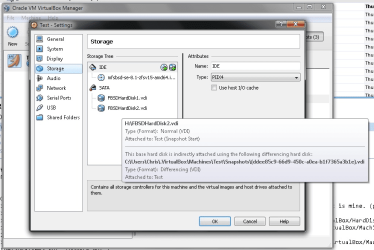
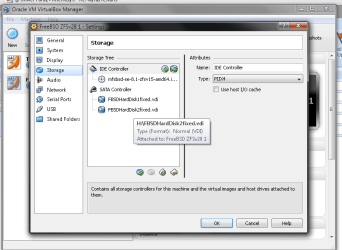
2nd screenshot shows after I fixed and not using any differencing disk on c: for my h: image.
 

Attachments

  • vbox1a.png
    vbox1a.png
    64.8 KB · Views: 6
  • vbox2a.png
    vbox2a.png
    61.2 KB · Views: 7

My Computer

Computer type
PC/Desktop
Computer Manufacturer/Model Number
home built
OS
windows 8.1 Pro x64
CPU
intel i5 4670k @ 4.3ghz
Motherboard
asus z87-plus
Memory
16 gig ram ddr3 @ 1600 corsair vengeance
Graphics Card(s)
evga 970 GTX 4 GIG FTW ACX 2.0
Sound Card
asus xonar D2X
Monitor(s) Displays
benq gw2765ht
Screen Resolution
2560x1440
Hard Drives
Samsung 850 pro SSD 512gig - boot device wooosh
WD black cavalier 640gig WD6401AALS
Seagate 500gig ST3500630AS
WD 2TB Green WDC20EARS
2 x WD Red 3TB WD30EFRX
Samsung 750gig HD753LG - on asmedia controller
PSU
coolermaster silent pro 600watt modular
Case
fractal define R4
Cooling
artic freezer i30, 3 case fans
Keyboard
microsoft business ps2 keyboard
Mouse
microsoft optical black mouse
Internet Speed
80/20 FTTC SkyBB
Antivirus
Nod32 AV v8, HitmanProAlert, SRP, System Hardening
Browser
Chrome x64
Other Info
Intel controller is in AHCI mode currently using IaSTOR 12.8.0.1016 drivers
1. In order to avoid any snapshot problems, would it not be easier to image the host (which obviously will include the vBox)? I do that all the time. Takes less than 4 minutes (from SSD to the internal HDD.

2. I run vBox with Ubuntu on a Win7 32bit host and I see no performance degradation on either the host or the Guest systems. In fact I was extremely amazed that the performance on both was quasi the same as if there was no virtualization. And this on a modest duo core system with 2.5 GHz and a total of 3GBs of RAM of which I allocated 1GB to vBox. But Win7 and vBox are on a SSD.
 

My Computer

Computer Manufacturer/Model Number
HP, Dell, Gateway, Toshiba - 4 laptops and 2 desktops
OS
Vista, Windows7, Mint Mate, Zorin, Windows 8
CPU
from 1.6GHz Duo to i7
Monitor(s) Displays
2x HP w2207
Hard Drives
5x HDD, 7x SSD, 12x Externals
Keyboard
with trackball - no mices
Mouse
Trackball mice
Internet Speed
DSL 6000
My reseach suggests you wrong I am afraid.
When you are talking about how much you have reserached, then I really wish you had researched a bit better before saying I'm wrong and showing you have in fact not researched at all.

Snapshots are saved to a global, default location only on those vm's you have not chosen an alternative location.

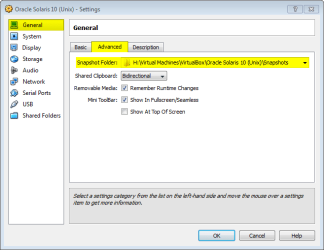
In VirtualBox, simply choose the snapshot location for every vm as you want to. Another folder on the same disk, another disk if you want to (internal or external), wherever you want to store your snapshots. The screenshot here shows that for instance my Solaris Unix vm stores snapshots in external drive H:, where I have created a folder for snapshots:

VBox_Snapshot_Location.png

After stopping using snapshots I got probably a 3-4 fold performance increase on i/o and lower cpu usage. It made a massive difference. Yes snapshots are easy to use when you using the gui to create them etc. However how it works under the hood is not so pretty.

Snapshots or amount of them do not, in non whatsoever way, affect CPU performance or resources. They are just disk images, only one is used in any given time.

I must say you "research" methods seem quite comical to me.

Kari
 
Last edited:

My Computer

Computer type
Laptop
Computer Manufacturer/Model Number
HP ENVY 17-1150eg
OS
Windows 10 Pro x64 EN-GB
CPU
1.6 GHz Intel Core i7-720QM Processor
Memory
6 GB
Graphics Card(s)
ATI Mobility Radeon HD 5850 Graphics
Sound Card
Beats sound system with integrated subwoofer
Monitor(s) Displays
17" laptop display, 22" LED and 32" Full HD TV through HDMI
Screen Resolution
1600*900 (1), 1920*1080 (2&3)
Hard Drives
Internal: 2 x 500 GB SATA Hard Disk Drive 7200 rpm
External: 2TB for backups, 3TB USB3 network drive for media
Cooling
As Envy runs a bit warm, I have it on a Cooler Master pad
Keyboard
Logitech diNovo Media Desktop Laser (bluetooth)
Mouse
Logitech Performance Mouse MX
Internet Speed
50/10 Mbps VDSL
Antivirus
Windows Defender 4.3.9431.0
Browser
Maxthon 3.5.2., IE11
Kari oh dear.

I told you its a global setting and not per disk, and what do you do. :(

you show me a screenshot proving I am right.

I will repeat the problem.

1 - I run zfs raid mirror in my guest OS.
2 - if both virtual drives are on the same physical hdd there is a severe performance penalty (obvious).
3 - if snapshots are used 'ALL' snapshots will go in the defined snapshot dir forcing both virtual drives to be on the same physical hdd.

There is a performance penalty for (a) reading over multiple diff files and (b) for excessive read/writes to a single physical hdd. Zfs writes data 3 times in a mirror configuration, when using snapshots its writing data 3 times for every write to one physical hdd. The same performance penalty would apply in a real system if I used a software raid mirror on one physical hdd.

Here are some facts.

I got a large performance improvement after stopping using snapshots, not just pseudo is benchmarked.
I no longer have freezing mouse pointers etc. whilst compiling on the guest OS.

I am simply passing on my info to help others who may have same problem, whilst you seem to have taken offense to it. Now of course if I was running my guest OS of a 'single' drive, then this may not be such a problem, but remember I am running a raid in the guest OS that will detoriate if all on one physical drive.

Do you now understand for 'less' performance hit I would need 'two' snapshot locations for one VM, so one location per .vdi file?

For further help to others I have also discovered that using the HPET timer in vbox hurts the host OS a lot, since changing FreeBSD guest OS to use TSC, real cpu usage has gone down by about a 3rd. So am getting there.
 

My Computer

Computer type
PC/Desktop
Computer Manufacturer/Model Number
home built
OS
windows 8.1 Pro x64
CPU
intel i5 4670k @ 4.3ghz
Motherboard
asus z87-plus
Memory
16 gig ram ddr3 @ 1600 corsair vengeance
Graphics Card(s)
evga 970 GTX 4 GIG FTW ACX 2.0
Sound Card
asus xonar D2X
Monitor(s) Displays
benq gw2765ht
Screen Resolution
2560x1440
Hard Drives
Samsung 850 pro SSD 512gig - boot device wooosh
WD black cavalier 640gig WD6401AALS
Seagate 500gig ST3500630AS
WD 2TB Green WDC20EARS
2 x WD Red 3TB WD30EFRX
Samsung 750gig HD753LG - on asmedia controller
PSU
coolermaster silent pro 600watt modular
Case
fractal define R4
Cooling
artic freezer i30, 3 case fans
Keyboard
microsoft business ps2 keyboard
Mouse
microsoft optical black mouse
Internet Speed
80/20 FTTC SkyBB
Antivirus
Nod32 AV v8, HitmanProAlert, SRP, System Hardening
Browser
Chrome x64
Other Info
Intel controller is in AHCI mode currently using IaSTOR 12.8.0.1016 drivers
1. In order to avoid any snapshot problems, would it not be easier to image the host (which obviously will include the vBox)? I do that all the time. Takes less than 4 minutes (from SSD to the internal HDD.

2. I run vBox with Ubuntu on a Win7 32bit host and I see no performance degradation on either the host or the Guest systems. In fact I was extremely amazed that the performance on both was quasi the same as if there was no virtualization. And this on a modest duo core system with 2.5 GHz and a total of 3GBs of RAM of which I allocated 1GB to vBox. But Win7 and vBox are on a SSD.

not sure what you mean by #1 sorry.

#2 it could be freebsd as a guest OS is not playing too well with virtualbox I dont know, doesnt seem a common usage of virtualbox as most people seem to use it with ubuntu and/or windows. Are you running a raid setup on your guest OS? as this snapshot issue is heavily related to that.
 

My Computer

Computer type
PC/Desktop
Computer Manufacturer/Model Number
home built
OS
windows 8.1 Pro x64
CPU
intel i5 4670k @ 4.3ghz
Motherboard
asus z87-plus
Memory
16 gig ram ddr3 @ 1600 corsair vengeance
Graphics Card(s)
evga 970 GTX 4 GIG FTW ACX 2.0
Sound Card
asus xonar D2X
Monitor(s) Displays
benq gw2765ht
Screen Resolution
2560x1440
Hard Drives
Samsung 850 pro SSD 512gig - boot device wooosh
WD black cavalier 640gig WD6401AALS
Seagate 500gig ST3500630AS
WD 2TB Green WDC20EARS
2 x WD Red 3TB WD30EFRX
Samsung 750gig HD753LG - on asmedia controller
PSU
coolermaster silent pro 600watt modular
Case
fractal define R4
Cooling
artic freezer i30, 3 case fans
Keyboard
microsoft business ps2 keyboard
Mouse
microsoft optical black mouse
Internet Speed
80/20 FTTC SkyBB
Antivirus
Nod32 AV v8, HitmanProAlert, SRP, System Hardening
Browser
Chrome x64
Other Info
Intel controller is in AHCI mode currently using IaSTOR 12.8.0.1016 drivers
Kari oh dear.

I told you its a global setting and not per disk, and what do you do. :(

you show me a screenshot proving I am right.

I will repeat the problem.

1 - I run zfs raid mirror in my guest OS.
2 - if both virtual drives are on the same physical hdd there is a severe performance penalty (obvious).
3 - if snapshots are used 'ALL' snapshots will go in the defined snapshot dir forcing both virtual drives to be on the same physical hdd.
No, you are wrong. Again.

That point 3 is meaningless, because only one snapshot at any given time can be used.

Snapshots do not need to be on the same disk than original vhd or vdi. In fact, all my snapshot are on the different disk than originals for better performance, for instance that Solaris from my screenshot has original vhd (vdi) in internal E:, and snapshots in external H:.

However you run your vm's, you can always choose to have all vdi-files on the same disk, or different disks.

Check Wikipedia for word "research" ;)

Kari
 

My Computer

Computer type
Laptop
Computer Manufacturer/Model Number
HP ENVY 17-1150eg
OS
Windows 10 Pro x64 EN-GB
CPU
1.6 GHz Intel Core i7-720QM Processor
Memory
6 GB
Graphics Card(s)
ATI Mobility Radeon HD 5850 Graphics
Sound Card
Beats sound system with integrated subwoofer
Monitor(s) Displays
17" laptop display, 22" LED and 32" Full HD TV through HDMI
Screen Resolution
1600*900 (1), 1920*1080 (2&3)
Hard Drives
Internal: 2 x 500 GB SATA Hard Disk Drive 7200 rpm
External: 2TB for backups, 3TB USB3 network drive for media
Cooling
As Envy runs a bit warm, I have it on a Cooler Master pad
Keyboard
Logitech diNovo Media Desktop Laser (bluetooth)
Mouse
Logitech Performance Mouse MX
Internet Speed
50/10 Mbps VDSL
Antivirus
Windows Defender 4.3.9431.0
Browser
Maxthon 3.5.2., IE11
Back
Top