virtual CD program not working

maelstormer7851

New member
Local time
11:01 PM
Messages
1
Location
Manila
I've just setup/installed Windows 7 32-Bit and looks like everything is OK but I installed a virtual CD program/s (i.e. Daemon Tools, PowerISO and or MagicISO) my system is not detecting the virtual CD's that Daemon Tools, PowerISO and or MagicISO have created. can you suggest any procedures for this? or do i need to install something or update my drivers? help is very much appreciated.

-- Leo
 
Last edited by a moderator:

My Computer

OS
Windows 7 Ultimate 32-Bit
istall ultraISO and add virtual drives from settings
 

My Computer

Computer Manufacturer/Model Number
Asus P5B-SE
OS
Windows 7 Ultimate x64
CPU
Intel® Core™2 Duo Processor E7500
Motherboard
Asus P5B-SE
Memory
6 GB
Graphics Card(s)
GigaByte Nvidia GT 220
Sound Card
REaltek HD
Monitor(s) Displays
LG L1734S
Hard Drives
WD 1000 GB
WD 320 GB
PSU
N/A
Case
Discovery
Cooling
Ion Gas Cooler
Hello maelstormer,

did you install all of these virtual CD/DVD emulators together? If yes, they are likely to conflict with each other and cause strange behavior. I would recommend that you uninstall all except one - my personal recommendation is MagicISO, although it's certainly your choice - and see if you are then able to mount CD/DVD images.

If they still won't appear in Explorer once mounted, please post back and we'll find another solution.
 

My Computer

Computer type
PC/Desktop
Computer Manufacturer/Model Number
Custom-built
OS
Windows 7 Professional SP1 32-bit
CPU
Intel Core 2 Duo E6600 2.4GHz
Motherboard
Asus PL5D2
Memory
4GB DDR2-667 (4x1GB in dual-channel config)
Graphics Card(s)
nVidia GeForce 9800 GT
Sound Card
Creative X-Fi XtremeMusic
Monitor(s) Displays
Acer P236H
Screen Resolution
1920x1200 (DVI)
Hard Drives
OCZ SSD Vertex Plus 60GB SATA (Firmware 3.55), 64MB cache
Hitachi HD321KJ SATA, 320GB, 7200rpm, 16MB cache
PSU
Antec TruePower 2.0
Case
Cooler Master Centurion
Cooling
Too many fans
Keyboard
Standard
Mouse
Microsoft wireless optical mouse
Internet Speed
AT&T U-verse (18mbit/sec)
Antivirus
Microsoft Security Essentials
Browser
Firefox
Other Info
Other devices:
Compaq CQ-60 laptop
Google Nexus 7 (2012) tablet
Nvidia SHIELD tablet (US/LTE)
Hardkernel ODROID-XU single-board computer (Samsung Exynos 5420)
I've just setup/installed Windows 7 32-Bit and looks like everything is OK but I installed a virtual CD program/s (i.e. Daemon Tools, PowerISO and or MagicISO) my system is not detecting the virtual CD's that Daemon Tools, PowerISO and or MagicISO have created. can you suggest any procedures for this? or do i need to install something or update my drivers? help is very much appreciated.

-- Leo

Dear maelstormer
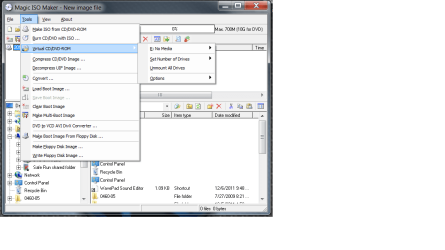
Based on my experience i can tell you that by default magic iso does NOT create a virtual CD, go to the magic iso application, under tools, you should see
(VIRTUAL CD/DVD-ROM)
Untitled.png
Yours should say install magic disk freeware, click on it and download it (its a FREE addon)
Install it
(PS: the driver is not digitally signed so when windows warns you about it just ignore the warning :P )

Now on my computer you should see a new cd/dvd device.
To mount just right click on any .iso/any supported file and under magic iso selectd mount to: (Driver letter)
I hope this helps ;)
 

My Computer

Computer Manufacturer/Model Number
Dell Studio XPS 16
OS
Windows 7 Ultimate x64
CPU
Intel(R) Core(TM)2 Duo CPU T9600 @ 2.80 GHz 6MB cache
Memory
6 GB DDR3
Graphics Card(s)
ATI Mobility Radeon HD 4670
Monitor(s) Displays
1
Screen Resolution
1920x1080
Cooling
NZXT Cryo LX
Mouse
Logitech G9X
Internet Speed
512 Kbps
Back
Top