Virtual Hard Disk - Unattach and Delete VHD

How to Unattach and Delete a Virtual Hard Disk in Windows 7


   Information
A Virtual Hard Disk is a created VHD file on your hard drive that acts as a separate hard drive disk in Computer. This will show you how to unattach, or unattach and delete, the VHD that you have already created and attached in Windows 7.
   Warning

  • Unattach VHD - This will only remove the VHD from Disk Management and make it unavailable in Computer until the VHD file is attached again. It does not delete the VHD file.
  • Delete VHD - This will remove the VHD from Disk Management and Computer, and also permanently delete the VHD file and all data stored on it.
  • If you disable the Disk Defragmenter service, then you will get the error below when you try to do anything in Disk Management. If you get this error, then make sure that the Disk Defragmenter service is set to only Manual.
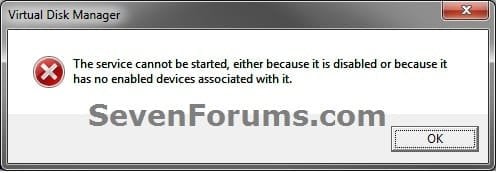
Error.jpg

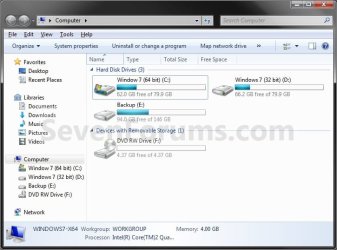
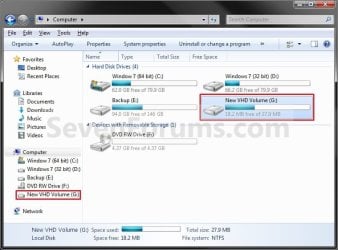
EXAMPLE: Virtual Hard Disk (VHD) in Computer Computer.jpg
Here's How: 1. Open the Control Panel (icons view). A) Click on the Administrative Tools icon, and click on Computer Management.

B) Go to step 3.
OR

2. Open the Start Menu. A) In the Search box, type compmgmt.msc and press Enter.
3. If prompted by UAC, then click on Yes.

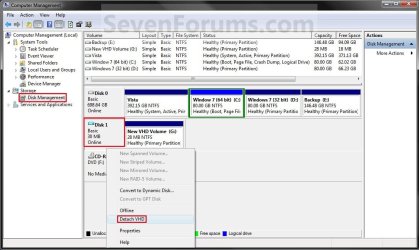
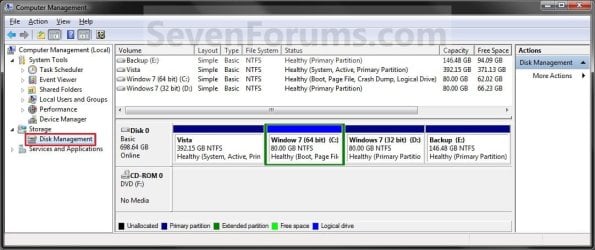
4. In the left pane, click on Disk Management. (See screenshot below step 5)

5. In the middle pane, right click on the Disk # of the VHD (left side in middle pane), and click on Detach VHD. (See screenshot below) Detach_VHD.jpg
6. To Only Detach the Virtual Hard Disk A) Uncheck the Delete the virtual hard disk file after removing the disk box. (See screenshot below step 8)

B) Go to step 8.
7. To Detach and Delete the Virtual Hard Disk A) Check the Delete the virtual hard disk file after removing the disk box. (See screenshot below step 8)
8. Click on OK. (See screenshot below) Detach-2.jpg
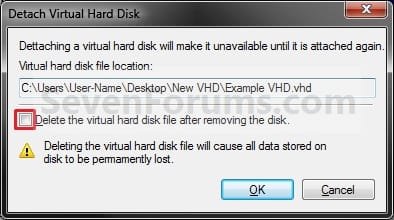
9. The VHD has been removed from Disk Management and Computer. (See screenshots below)
NOTE: If you did step 7, the VHD file will also now be deleted to. Unattached_VHD_Disk_Mangement.jpg
Computer-Unattached.jpg

That's it,
Shawn


Last edited:
Thanks....
 

My Computer

Computer Manufacturer/Model Number
HP
OS
Windows 7 64 bit
CPU
Inter Core 2 Duo T6600
Memory
4GB DDR3
Graphics Card(s)
ATI Radeon
Sound Card
Altec Lansing
You're welcome Suranjit. :)
 

My Computer

Computer type
PC/Desktop
Computer Manufacturer/Model Number
Self built custom
OS
64-bit Windows 11 Pro for Workstations
CPU
Intel i7-8700K OC'd to 5 GHz
Motherboard
ASUS ROG Maximus XI Formula Z390
Memory
64 GB (4x16GB) G.SKILL TridentZ RGB DDR4 3600 MHz
Graphics Card(s)
ASUS ROG-STRIX-GTX1080TI-O11G-GAMING
Sound Card
Integrated
Monitor(s) Displays
2 x Samsung Odyssey G7 27"
Screen Resolution
2560x1440
Hard Drives
1TB Samsung 990 PRO M.2,
4TB Samsung 990 PRO PRO M.2,
TerraMaster F8 SSD Plus NAS
PSU
Seasonic Prime Titanium 850W
Case
Thermaltake Core P3
Cooling
Corsair Hydro H115i
Keyboard
Logitech wireless K800
Mouse
Logitech MX Master 4
Internet Speed
2 Gb/s Download and 100 Mb/s Upload
Antivirus
Malwarebyte Anti-Malware Premium
Browser
Google Chrome
Other Info
Logitech Z625 speaker system,
Logitech BRIO 4K Pro webcam,
HP Color LaserJet Pro MFP M477fdn,
APC SMART-UPS RT 1000 XL - SURT1000XLI,
Galaxy S23 Plus phone
I cannot detach it!

It is weird. I attached a VHD (a Windows Backup file), in Disk Management, that worked fine. But when I right-click it, there is no option to detach it, I cannot mfind that detach option anywhere.

How do I get that option?
 

My Computer

OS
Windows 7
Hello Maiki, and welcome to Seven Forums.

Be sure that you are right click on the Disk # part on the left side (box in red under step 5), and not on the actual driver letter part with the partition.

Hope this helps,
Shawn
 

My Computer

Computer type
PC/Desktop
Computer Manufacturer/Model Number
Self built custom
OS
64-bit Windows 11 Pro for Workstations
CPU
Intel i7-8700K OC'd to 5 GHz
Motherboard
ASUS ROG Maximus XI Formula Z390
Memory
64 GB (4x16GB) G.SKILL TridentZ RGB DDR4 3600 MHz
Graphics Card(s)
ASUS ROG-STRIX-GTX1080TI-O11G-GAMING
Sound Card
Integrated
Monitor(s) Displays
2 x Samsung Odyssey G7 27"
Screen Resolution
2560x1440
Hard Drives
1TB Samsung 990 PRO M.2,
4TB Samsung 990 PRO PRO M.2,
TerraMaster F8 SSD Plus NAS
PSU
Seasonic Prime Titanium 850W
Case
Thermaltake Core P3
Cooling
Corsair Hydro H115i
Keyboard
Logitech wireless K800
Mouse
Logitech MX Master 4
Internet Speed
2 Gb/s Download and 100 Mb/s Upload
Antivirus
Malwarebyte Anti-Malware Premium
Browser
Google Chrome
Other Info
Logitech Z625 speaker system,
Logitech BRIO 4K Pro webcam,
HP Color LaserJet Pro MFP M477fdn,
APC SMART-UPS RT 1000 XL - SURT1000XLI,
Galaxy S23 Plus phone
Excellent advice.

I also couldn't find the Detach option. Thanks for clearing up the fact that the area to click is on the left part which actually has the drive #.

Kudos!
 

My Computer

Computer Manufacturer/Model Number
i7-950 / 12gig based workhorse [Self Built]
OS
Windows 7 Ultimate
CPU
Intel [email protected] OC'd 3.6ghz
Motherboard
ASUS Rampage II Extreme LGA1366 X58
Memory
12 GB of G-Skill DDR3 1333mhz
Graphics Card(s)
Dual Sapphire Radeon 5870
Sound Card
HT | OMEGA CLARO 7.1 Channels (based on the CMI 8788)
Monitor(s) Displays
2
Screen Resolution
1920x1200
Hard Drives
OCZ 128SSD System Drive, 8x1TB (4 TB in a RAID 1 config) DATA
PSU
SILVERSTONE 1000w
Case
SILVERSTONE FORTRESS SERIES FT02
Cooling
SPIRE Thermax Eclipse II SP984B1-V2 Heatsink
Keyboard
Wireless Logitech
Mouse
Wireless Logitech
Internet Speed
30mbit down/5mbit up
Other Info
I gave my nephew the Dell 9000 box and built myself something more along my performance wishes.

I'm still not done and need some odds and ends, but so far this PC blows away anything I've ever built.
You're welcome, and thank you StreetSpirit. :)
 

My Computer

Computer type
PC/Desktop
Computer Manufacturer/Model Number
Self built custom
OS
64-bit Windows 11 Pro for Workstations
CPU
Intel i7-8700K OC'd to 5 GHz
Motherboard
ASUS ROG Maximus XI Formula Z390
Memory
64 GB (4x16GB) G.SKILL TridentZ RGB DDR4 3600 MHz
Graphics Card(s)
ASUS ROG-STRIX-GTX1080TI-O11G-GAMING
Sound Card
Integrated
Monitor(s) Displays
2 x Samsung Odyssey G7 27"
Screen Resolution
2560x1440
Hard Drives
1TB Samsung 990 PRO M.2,
4TB Samsung 990 PRO PRO M.2,
TerraMaster F8 SSD Plus NAS
PSU
Seasonic Prime Titanium 850W
Case
Thermaltake Core P3
Cooling
Corsair Hydro H115i
Keyboard
Logitech wireless K800
Mouse
Logitech MX Master 4
Internet Speed
2 Gb/s Download and 100 Mb/s Upload
Antivirus
Malwarebyte Anti-Malware Premium
Browser
Google Chrome
Other Info
Logitech Z625 speaker system,
Logitech BRIO 4K Pro webcam,
HP Color LaserJet Pro MFP M477fdn,
APC SMART-UPS RT 1000 XL - SURT1000XLI,
Galaxy S23 Plus phone
Thanx

Hey mann, It's cool..................:cool:
 

My Computer

Computer Manufacturer/Model Number
Intel
OS
Microsoft Windows 7 Ultimate
Motherboard
Intel Core 2 Duo
Monitor(s) Displays
LG Flatron 19.0"
Hard Drives
4
Administrator can n0t detach virual drives

I am using an account which is classified as an Administrator account. I have disabled the administrator account that tMicrosoft incoludes in windows 7. However I am unable to detach virtual drives, as you showed.
 

My Computer

Computer Manufacturer/Model Number
HPPavillian elite
OS
windows 7
CPU
intel double core
Motherboard
don't know
Memory
2 GB
Graphics Card(s)
NVIDA
Sound Card
on motherboard
Monitor(s) Displays
Sceptre 32 inch.
Hard Drives
750 GB 1000 GB
PSU
don't know
Case
don't know
Cooling
fans
Hello Kennie, and welcome to Seven Forums.

Could you post some screenshots of what you see instead of what's in the tutorial, and any message it gives you when you try to detach a VHD?
 

My Computer

Computer type
PC/Desktop
Computer Manufacturer/Model Number
Self built custom
OS
64-bit Windows 11 Pro for Workstations
CPU
Intel i7-8700K OC'd to 5 GHz
Motherboard
ASUS ROG Maximus XI Formula Z390
Memory
64 GB (4x16GB) G.SKILL TridentZ RGB DDR4 3600 MHz
Graphics Card(s)
ASUS ROG-STRIX-GTX1080TI-O11G-GAMING
Sound Card
Integrated
Monitor(s) Displays
2 x Samsung Odyssey G7 27"
Screen Resolution
2560x1440
Hard Drives
1TB Samsung 990 PRO M.2,
4TB Samsung 990 PRO PRO M.2,
TerraMaster F8 SSD Plus NAS
PSU
Seasonic Prime Titanium 850W
Case
Thermaltake Core P3
Cooling
Corsair Hydro H115i
Keyboard
Logitech wireless K800
Mouse
Logitech MX Master 4
Internet Speed
2 Gb/s Download and 100 Mb/s Upload
Antivirus
Malwarebyte Anti-Malware Premium
Browser
Google Chrome
Other Info
Logitech Z625 speaker system,
Logitech BRIO 4K Pro webcam,
HP Color LaserJet Pro MFP M477fdn,
APC SMART-UPS RT 1000 XL - SURT1000XLI,
Galaxy S23 Plus phone
hellow sir............
if any vhd created in anoter drive like E DRIVE,how can i delete it......
plz reply soon as possible as....................:confused::confused::confused:
 

My Computer

OS
windows7 home basic 64bit
Hello ggg999, and welcome to Seven Forums.

If the VHD is not in use or attached as a drive, you should be able to just open the E drive, right click on the VHD file, and click on Delete to do so. It's the same as deleting any other file. :)
 

My Computer

Computer type
PC/Desktop
Computer Manufacturer/Model Number
Self built custom
OS
64-bit Windows 11 Pro for Workstations
CPU
Intel i7-8700K OC'd to 5 GHz
Motherboard
ASUS ROG Maximus XI Formula Z390
Memory
64 GB (4x16GB) G.SKILL TridentZ RGB DDR4 3600 MHz
Graphics Card(s)
ASUS ROG-STRIX-GTX1080TI-O11G-GAMING
Sound Card
Integrated
Monitor(s) Displays
2 x Samsung Odyssey G7 27"
Screen Resolution
2560x1440
Hard Drives
1TB Samsung 990 PRO M.2,
4TB Samsung 990 PRO PRO M.2,
TerraMaster F8 SSD Plus NAS
PSU
Seasonic Prime Titanium 850W
Case
Thermaltake Core P3
Cooling
Corsair Hydro H115i
Keyboard
Logitech wireless K800
Mouse
Logitech MX Master 4
Internet Speed
2 Gb/s Download and 100 Mb/s Upload
Antivirus
Malwarebyte Anti-Malware Premium
Browser
Google Chrome
Other Info
Logitech Z625 speaker system,
Logitech BRIO 4K Pro webcam,
HP Color LaserJet Pro MFP M477fdn,
APC SMART-UPS RT 1000 XL - SURT1000XLI,
Galaxy S23 Plus phone
Back
Top