
Virtual Hard Drive VHD File - Create and Start with at Boot

How to Create a Windows 7 VHD at Boot to Start with from Boot


   Information
This will show you how to create a Windows 7 VHD file at boot on an existing installed OS's (ex: Vista or Windows 7) C: hard disk or partition to be able to natively boot from the Windows 7 VHD at startup in the Windows Boot Manager.

   Note
This tutorial uses an example that will create a C:\(file name).vhd file on the C: drive/partition at boot that is used to natively boot from at startup.

You will be able to create the VHD file on any partition or drive letter that you like though.

   Warning
All Vista, Windows 7, and Windows 8 (except Windows 8 RT) editions support booting from a VHD.

You must have either Windows 7 Ultimate, Windows 7 Enterprise, Windows 8 Pro, or Windows 8 Enterprise installed on the VHD to be able to boot from the VHD natively.


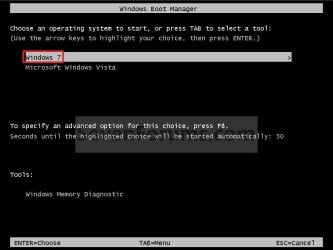
EXAMPLE: Windows Boot Manager
NOTE: You will be able to either select your currently installed OS (ex: Vista) or the VHD file (ex: Windows 7) in the Windows Boot Manager to start your computer with.
Boot_Manager.jpg
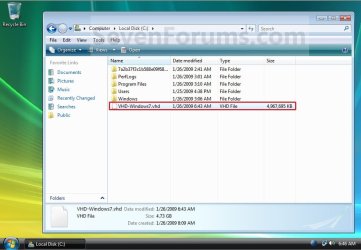
EXAMPLE: VHD file in your Current OS (ex: Vista)
NOTE: This is where the VHD file will be stored at on your currently installed OS (ex: Vista) to be used to boot from.
Example.jpg


OPTION ONE

To Create and Add the VHD to Boot From


1. Boot from your retail copy Windows 7 Ultimate or Enterprise installation DVD/USB, and do step 2 or 3 below for what you would like to do.
NOTE: To have Windows 8 on VHD, see instead: How to Create a Windows 8 VHD at Boot to Dual Boot with Windows 7 or Vista

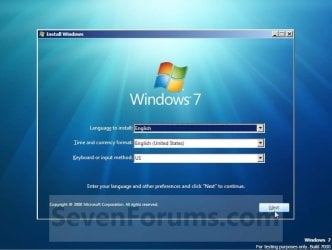
2. When you are at the start of the Windows 7 installation screen, press the Shift+F10 keys, and go to step 4 below. (See screenshot below)
Setup.jpg
3. Boot into the command prompt from the Startup Recovery Options screen, and go to step 4 below. (See screenshot below)
NOTE: You will use OPTION TWO at that link.
Step1.jpg
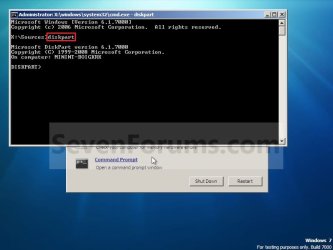
4. In the command prompt, type diskpart and press Enter. (See screenshot below)
Step2.jpg
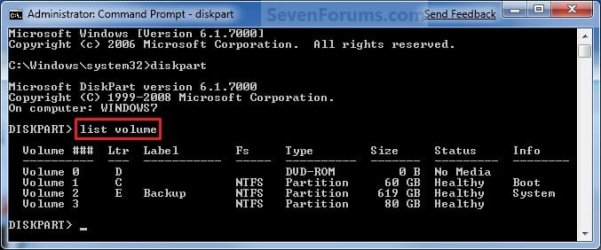
5. In the elevated command prompt, type list volume and press Enter. Make note of the drive letter for the volume that you want to create the VHD file on. (See screenshot below)
NOTE: This will allow you to see what the drive letters are for each volume. They are not always the same at boot as they are in Windows.
list-disk.jpg
6. Do either step 7 or 8 below for what type of VHD file you would like to create.

7. To Create a Fixed VHD File
NOTE: A fixed VHD file will allocate the entire maximum size (ex: 40GB) that you set below for the VHD file size.
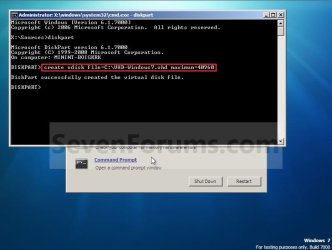
A) In the command prompt, type the command below and press Enter.
NOTE: Substitute the C drive letter in the command below for what volume (step 5) you would like to create the VHD on.

Code:
[B]create vdisk file=[COLOR=red]C[/COLOR]:\[COLOR=red]VHD-Windows7[/COLOR].vhd maximum=[COLOR=red]40960[/COLOR][/B]

NOTE: You can substitute the VHD-Windows7 name with any name you would like for the VHD file instead. You can also substitute the maximum size of 40960 MB for the VHD to the maximum size you want instead in MB (1GB = 1024MB).
Step3.jpg
B) Go to step 9.
8. To Create an Expandable VHD File
NOTE: An expandable VHD file will only be as large as the amount of data that is saved in the VHD file, but still can get as large as the maximium size (ex: 40GB) that you set below. For example, using this option, the VHD file showed only 7GB instead of the full 40GB. Even though the VHD file is expandable, you may need to install Windows Virtual PC to have a program associated with VHD files to actual see only the smaller size instead of the larger size for the VHD file.
A) In the command prompt, type the command below and press Enter.
NOTE: Substitute the C drive letter in the command below for what volume (step 5) you would like to create the VHD on.
Code:
[B]create vdisk file=[COLOR=red]C[/COLOR]:\[COLOR=red]VHD-Windows7[/COLOR].vhd maximum=[COLOR=red]40960[/COLOR][/B] [B]type=expandable[/B]

NOTE: You can substitute the VHD-Windows7 name with any name you would like for the VHD file instead. You can also substitute the maximum size of 40960 MB for the VHD to the maximum size you want instead in MB (1GB = 1024MB).
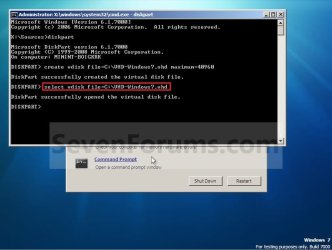
9. In the command prompt, type the command below and press Enter. (See screenshot below)
NOTE: If you subsituted the VHD-Windows7 name in step 7 or 8, then you will need to use it here as well. Substitute the C drive letter in the command below for what volume (step 5) you would like to create the VHD on.

Code:
[B]select vdisk file=[COLOR=red]C[/COLOR]:\[COLOR=red]VHD-Windows7[/COLOR].vhd[/B]
Step4.jpg
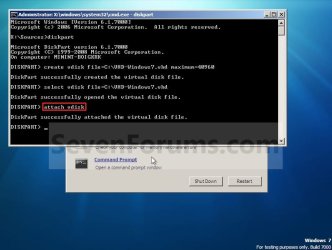
10. In the command prompt, type attach vdisk and press Enter. (See screenshot below)
Step5.jpg
11. In the command prompt, type exit and press Enter. (See screenshot below)
Step6.jpg
12. Close the command prompt window. (See screenshot above)
A) If you used step 2 above, then click on Next, and go to step 13 below.

B) If you used step 3 above, then continue on to step 14 below.
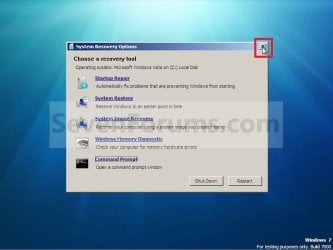
13. Close the System Recovery Options window. (See screenshot below)
WARNING: You must close it only. Do not click on the Shut Down or Restart button.
Step7.jpg
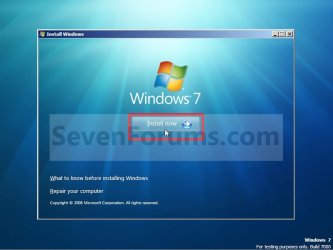
14. Click on the Install now button. (See screenshot below)
Step8.jpg
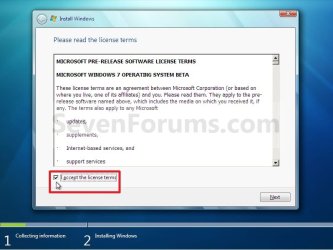
15. Check the I accept the license terms box and click on Next. (See screenshot below)
Step9.jpg
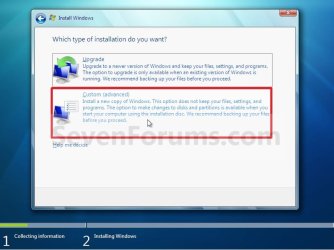
16. Click on the Custom (advanced) option. (See screenshot below)
Step10.jpg
17. Select the available option with the unallocated space that is the same maximum VHD size (ex: 40GB = 40960MB) that you specified in step 7 or 8 above, and click on the Next button. (See screenshot below)
NOTE: If you see the Windows cannot be installed to this disk warning, then you can ignore it. Windows 7 will still install on the VHD file.
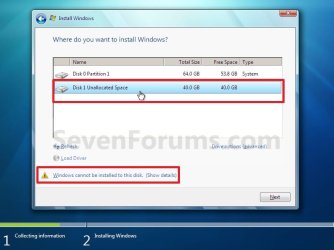
Step11.jpg
18. Finish doing a clean install of Windows 7.
NOTE: You will pick up at step 10 at that link to finish installing Windows 7 on the VHD file.

19. When you restart or start the computer, you will now have Windows 7 to select from at boot to start natively from the VHD file. (See the first example at top of the tutorial.)


OPTION TWO

To Delete the VHD and Remove from Boot List


1. To Remove OS VHD from Windows Boot Manager List
A) Delete the listed OS VHD from the Windows Boot Manager in msconfig.
2. To Delete the VHD File
A) In Windows Explorer, navigate to the VHD file that you have created in step 7 or 8 of OPTION ONE above (ex: C:\VHD-Windows7.vhd), right click on the VHD file and click on Delete.

B) Click on Yes to approve deletion.
That's it,
Shawn


Last edited:
Hello Boredwin7tester, and welcome to Seven Forums.

Sorry, but no. The tutorial can only be done using a Windows 7 Ultimate installation DVD. :(

Shawn
 

My Computer My Computer

At a glance

64-bit Windows 11 Pro for WorkstationsIntel i7-8700K OC'd to 5 GHz64 GB (4x16GB) G.SKILL TridentZ RGB DDR4 3600...ASUS ROG-STRIX-GTX1080TI-O11G-GAMING
Computer type
PC/Desktop
Computer Manufacturer/Model Number
Self built custom
OS
64-bit Windows 11 Pro for Workstations
CPU
Intel i7-8700K OC'd to 5 GHz
Motherboard
ASUS ROG Maximus XI Formula Z390
Memory
64 GB (4x16GB) G.SKILL TridentZ RGB DDR4 3600 MHz
Graphics Card(s)
ASUS ROG-STRIX-GTX1080TI-O11G-GAMING
Sound Card
Integrated
Monitor(s) Displays
2 x Samsung Odyssey G7 27"
Screen Resolution
2560x1440
Hard Drives
1TB Samsung 990 PRO M.2,
4TB Samsung 990 PRO PRO M.2,
TerraMaster F8 SSD Plus NAS
PSU
Seasonic Prime Titanium 850W
Case
Thermaltake Core P3
Cooling
Corsair Hydro H115i
Keyboard
Logitech wireless K800
Mouse
Logitech MX Master 4
Internet Speed
2 Gb/s Download and 100 Mb/s Upload
Antivirus
Malwarebyte Anti-Malware Premium
Browser
Google Chrome
Other Info
Logitech Z625 speaker system,
Logitech BRIO 4K Pro webcam,
HP Color LaserJet Pro MFP M477fdn,
APC SMART-UPS RT 1000 XL - SURT1000XLI,
Galaxy S23 Plus phone
What I meant was, can Windows XP be used as the base operating system before the Windows 7 Virtual Hard Disk file is created. (and can the same process be used to create and attach the VHD?)

I plan on using the dvd, but the os on my testing computer is XP.

win7tester
 

My Computer My Computer

At a glance

Windows XP, Vista, Damn Small Linux, Pendrive...
OS
Windows XP, Vista, Damn Small Linux, PendriveLinux
I know you can with Vista, but I have not tried it with XP. You can give it a try using the Windows 7 Ultimate installation DVD to see. If it does not work, then you can just delete the VHD.
 

My Computer My Computer

At a glance

64-bit Windows 11 Pro for WorkstationsIntel i7-8700K OC'd to 5 GHz64 GB (4x16GB) G.SKILL TridentZ RGB DDR4 3600...ASUS ROG-STRIX-GTX1080TI-O11G-GAMING
Computer type
PC/Desktop
Computer Manufacturer/Model Number
Self built custom
OS
64-bit Windows 11 Pro for Workstations
CPU
Intel i7-8700K OC'd to 5 GHz
Motherboard
ASUS ROG Maximus XI Formula Z390
Memory
64 GB (4x16GB) G.SKILL TridentZ RGB DDR4 3600 MHz
Graphics Card(s)
ASUS ROG-STRIX-GTX1080TI-O11G-GAMING
Sound Card
Integrated
Monitor(s) Displays
2 x Samsung Odyssey G7 27"
Screen Resolution
2560x1440
Hard Drives
1TB Samsung 990 PRO M.2,
4TB Samsung 990 PRO PRO M.2,
TerraMaster F8 SSD Plus NAS
PSU
Seasonic Prime Titanium 850W
Case
Thermaltake Core P3
Cooling
Corsair Hydro H115i
Keyboard
Logitech wireless K800
Mouse
Logitech MX Master 4
Internet Speed
2 Gb/s Download and 100 Mb/s Upload
Antivirus
Malwarebyte Anti-Malware Premium
Browser
Google Chrome
Other Info
Logitech Z625 speaker system,
Logitech BRIO 4K Pro webcam,
HP Color LaserJet Pro MFP M477fdn,
APC SMART-UPS RT 1000 XL - SURT1000XLI,
Galaxy S23 Plus phone
New Method

Because I do not currently have a DVD RW disc with me, I mounted the win7.iso using virtual clonedrive. Because of the virtualization, the boot record is not found at start up. Would the command line commands still work if I run the command prompt with shift+F10 after activating the setup.exe file contained on the .iso?

I'm just improvising this method, but I think that once setup.exe is run, I can just go to the install now link after executing the virtual diskpart that the tutorial outlines.

win7tester
 

My Computer My Computer

At a glance

Windows XP, Vista, Damn Small Linux, Pendrive...
OS
Windows XP, Vista, Damn Small Linux, PendriveLinux
It may work like that with a mounted virtual CD drive. Please let us know how it turns out for you.
 

My Computer My Computer

At a glance

64-bit Windows 11 Pro for WorkstationsIntel i7-8700K OC'd to 5 GHz64 GB (4x16GB) G.SKILL TridentZ RGB DDR4 3600...ASUS ROG-STRIX-GTX1080TI-O11G-GAMING
Computer type
PC/Desktop
Computer Manufacturer/Model Number
Self built custom
OS
64-bit Windows 11 Pro for Workstations
CPU
Intel i7-8700K OC'd to 5 GHz
Motherboard
ASUS ROG Maximus XI Formula Z390
Memory
64 GB (4x16GB) G.SKILL TridentZ RGB DDR4 3600 MHz
Graphics Card(s)
ASUS ROG-STRIX-GTX1080TI-O11G-GAMING
Sound Card
Integrated
Monitor(s) Displays
2 x Samsung Odyssey G7 27"
Screen Resolution
2560x1440
Hard Drives
1TB Samsung 990 PRO M.2,
4TB Samsung 990 PRO PRO M.2,
TerraMaster F8 SSD Plus NAS
PSU
Seasonic Prime Titanium 850W
Case
Thermaltake Core P3
Cooling
Corsair Hydro H115i
Keyboard
Logitech wireless K800
Mouse
Logitech MX Master 4
Internet Speed
2 Gb/s Download and 100 Mb/s Upload
Antivirus
Malwarebyte Anti-Malware Premium
Browser
Google Chrome
Other Info
Logitech Z625 speaker system,
Logitech BRIO 4K Pro webcam,
HP Color LaserJet Pro MFP M477fdn,
APC SMART-UPS RT 1000 XL - SURT1000XLI,
Galaxy S23 Plus phone
Because I do not currently have a DVD RW disc with me, I mounted the win7.iso using virtual clonedrive. Because of the virtualization, the boot record is not found at start up. Would the command line commands still work if I run the command prompt with shift+F10 after activating the setup.exe file contained on the .iso?

I'm just improvising this method, but I think that once setup.exe is run, I can just go to the install now link after executing the virtual diskpart that the tutorial outlines.

win7tester
That doesn't seem likely:

The host OS may or may not allow 'setup.exe' to execute from the mounted iso, but when you hit 'Shift-F10', that 'command' will go to the Host OS, not to the running setup.exe.

The tutorial does not deal with a "virtual diskpart", but a real Win 7 diskpart.exe.
The reason that the tutorial works properly, is the fact that you are booting a real Win7 system
into 'empty-memory' from the DVD, USB, etc...
The 'Shift-F10' command will now go to the real Win 7.

Otherwise, the so-called 'empty-memory' contains whatever you last booted,
which became filled with XP, Vista, etc, not what's on the 'mounted iso'.

Q: What does the "boot record" have to do with anything?
That's simply code to read the CD...
 

My Computer My Computer

At a glance

XP_Pro, W7_7201, W7RC.vhd, SciLinux5.3, Fedor...AMD 64x21 gigDunno
Computer Manufacturer/Model Number
Gateway GT5056
OS
XP_Pro, W7_7201, W7RC.vhd, SciLinux5.3, Fedora12, Fedora9_2x, OpenSolaris_09-06
CPU
AMD 64x2
Motherboard
Yes
Memory
1 gig
Graphics Card(s)
Dunno
Sound Card
Realtek something
Monitor(s) Displays
Samsung SyncMaster 940MW w/TV
Screen Resolution
1280x1024
Hard Drives
250 GB WD, USB Seagate Freedesk 1.5 T
Internet Speed
Cable modem
Other Info
1 + 1 = 10b,
7 + 7 = 16o,
a + b = 15h.
As I expected, the method didn't work.
As for the boot record, what I meant was even though the computer knew that a disk was inserted, it didn't find the boot record and proceeded with regular startup.
 

My Computer My Computer

At a glance

Windows XP, Vista, Damn Small Linux, Pendrive...
OS
Windows XP, Vista, Damn Small Linux, PendriveLinux
After I had set up the VHD and booted into it, windows woudn't accept my reg number.. I left it blank and pressed enter and it did some more setup and then said there was a licenses problem and VHD would not be supported on this machine. Can't believe I wasted an entire day with this to have it crap out. I used my valid reg number Microsoft sent to me.
 

My Computer My Computer

At a glance

Windows 7Core I73 gigs
Computer Manufacturer/Model Number
Gateway
OS
Windows 7
CPU
Core I7
Memory
3 gigs
I followed this guide tonight to get Windows 7 installed on my work laptop alongside the Vista that I need for work purposes. It worked perfectly, was super easy and now I have a laptop booting Vista, 7 and Ubuntu. It's a good day.
 

My Computer My Computer

At a glance

Windows 7 Ultimate x64Intel Q9550 2.83Ghz OC'd to 3.40Ghz8GB G.Skill PI DDR2-800, 4-4-4-12 timingsEVGA 1280MB Nvidia GeForce GTX570
Computer Manufacturer/Model Number
Self-Built in July 2009
OS
Windows 7 Ultimate x64
CPU
Intel Q9550 2.83Ghz OC'd to 3.40Ghz
Motherboard
Gigabyte GA-EP45-UD3R rev. 1.1, F12 BIOS
Memory
8GB G.Skill PI DDR2-800, 4-4-4-12 timings
Graphics Card(s)
EVGA 1280MB Nvidia GeForce GTX570
Sound Card
Realtek ALC899A 8 channel onboard audio
Monitor(s) Displays
23" Acer x233H
Screen Resolution
1920x1080
Hard Drives
Intel X25-M 80GB Gen 2 SSD
Western Digital 1TB Caviar Black, 32MB cache. WD1001FALS
PSU
Corsair 620HX modular
Case
Antec P182
Cooling
stock
Keyboard
ABS M1 Mechanical
Mouse
Logitech G9 Laser Mouse
Internet Speed
15/2 cable modem
Other Info
Windows and Linux enthusiast. Logitech G35 Headset.
Parks,

I'm happy to hear all went well for you. Thank you for posting back your results. :)

Shawn
 

My Computer My Computer

At a glance

64-bit Windows 11 Pro for WorkstationsIntel i7-8700K OC'd to 5 GHz64 GB (4x16GB) G.SKILL TridentZ RGB DDR4 3600...ASUS ROG-STRIX-GTX1080TI-O11G-GAMING
Computer type
PC/Desktop
Computer Manufacturer/Model Number
Self built custom
OS
64-bit Windows 11 Pro for Workstations
CPU
Intel i7-8700K OC'd to 5 GHz
Motherboard
ASUS ROG Maximus XI Formula Z390
Memory
64 GB (4x16GB) G.SKILL TridentZ RGB DDR4 3600 MHz
Graphics Card(s)
ASUS ROG-STRIX-GTX1080TI-O11G-GAMING
Sound Card
Integrated
Monitor(s) Displays
2 x Samsung Odyssey G7 27"
Screen Resolution
2560x1440
Hard Drives
1TB Samsung 990 PRO M.2,
4TB Samsung 990 PRO PRO M.2,
TerraMaster F8 SSD Plus NAS
PSU
Seasonic Prime Titanium 850W
Case
Thermaltake Core P3
Cooling
Corsair Hydro H115i
Keyboard
Logitech wireless K800
Mouse
Logitech MX Master 4
Internet Speed
2 Gb/s Download and 100 Mb/s Upload
Antivirus
Malwarebyte Anti-Malware Premium
Browser
Google Chrome
Other Info
Logitech Z625 speaker system,
Logitech BRIO 4K Pro webcam,
HP Color LaserJet Pro MFP M477fdn,
APC SMART-UPS RT 1000 XL - SURT1000XLI,
Galaxy S23 Plus phone
Way more simple

Here is a MUCH MUCH easier and simple way to create the VHD


* You need to download the following 3 files and run the script:
* YOU WILL FIRST NEED the program ImageX.exe Here is a shortcut to get the 32 or
64 bit versions (WITHOUT the need to download the 1 GB Developer's kit iso from
Microsoft and burn it to cd to extract it.)
ImageX 6001.18000 (x86 and x64 for Windows Server 2008 and Vista SP1) Standalone Download » Tip and Trick
* Second, You'll need to download "Wim2vhd.scr"
The Lazy Admin : Create a “Bootable” Windows 7 VHD

* I STRONGLY recommend that you create a folder name VHD and put ImagX.exe,
Wim2Vhd.scr and COPY BcdBoot.exe and BcdEdit.exe (from your \windows\system32
folder) into it - then go to the command prompt in the VHD folder, verify you
have those 4 files and THEN run the script.
As you will find (on that web page) the command line ( you run from the command prompt) is:
cscript wim2vhd.wsf /wim:X:\sources\install.wim /sku:ULTIMATE /vhd:C:\Win7Ultimate.vhd /size:40960 /disktype:Fixed
This command won't work until you change the X to C because install.wim is on
your C: drive by default. Make sure the path to install.wim is correct before
you run the script. Install.wim also on the Windows 7 cd.
NOTE the VHD file size is 40 gb in the example. Windows VHD only needs 7 gb for
Win 7 BUT you need space for installing programs and downloading files, so I
changed mine to 20 gb. The file size can be set to dynamic, rather than fixed...
and it will expand if/when needed HOWEVER, you system will be VERY SLOW when/if
it has to expand the file size. This is not recommended - but keep in mind that
you can not increase the size of a fixed VHD once it has been created.

* Here is the exact command I copied and pasted to the command prompt in my VHD folder:

cscript wim2vhd.wsf /wim:C:\sources\install.wim /sku:ULTIMATE /vhd:C:\vhd\Win7Ultimate.vhd /size:20960 /disktype:Fixed
Note I also put the Win7ultamate.vhd file in the VHD folder rather than the root
drive in the example. This makes it easier to find, backup, and increment.

* When your VHD file is ceated you can finish the process with this handy tool:
VHD Mount for Windows 7 -- adds all VHD related action like Mount, Un-mount,
Boot from VHD images right in your Right Click Context menu. After you run it,
just right click on any VHD image and select "add to boot menu."
https://brentf.com/blog/software/vhd-utilities-for-windows-7/


That's it...

Now reboot and install windows 7 and reboot back to your Host OS and backup the VHD file....

NOW you can beat your VHD os like a rented mule and when it dies you oly have to copy over the backup and start again.

Oh you can run Msconfig and go to the boot tab to modify the timeout and boot sequence ...etc etc.
 
Last edited by a moderator:

My Computer My Computer

At a glance

Windows 7Core I73 gigs
Computer Manufacturer/Model Number
Gateway
OS
Windows 7
CPU
Core I7
Memory
3 gigs
Is it possible to install Mac OSX Leopard on a VHD?
 

My Computer My Computer

At a glance

Windows 7 Ultimate x64AMD Athlon X2 6400+XFX GeForce 7600GS
OS
Windows 7 Ultimate x64
CPU
AMD Athlon X2 6400+
Motherboard
Gigabyte MA-790X-UD4P
Graphics Card(s)
XFX GeForce 7600GS
Sound Card
E-MU 1212M
PSU
Antec Earthwatts 500
is it possible windows xp or xp mode install with sysprep on vpc's vhd boot from windows 7.

1) install windows 7 on pc
2) install virtual pc on windows 7
3) install windows xp or xp mode on vpc
4) install sysprep on windows xp or xp mode
5) use this vhd boot on windows 7

is it possible :S
 

My Computer My Computer

At a glance

windows 7Pentium D 3.02.5 GbNvidia 8600GT (GTS Mode)
OS
windows 7
CPU
Pentium D 3.0
Motherboard
Asus P5LD2
Memory
2.5 Gb
Graphics Card(s)
Nvidia 8600GT (GTS Mode)
Sound Card
Creative Audigy 2
Monitor(s) Displays
Samsung 997MB
Hard Drives
Seagate Baracuda 250 GB
PSU
Thermaltake Pure
Case
Thermaltake Armor

My Computer My Computer

At a glance

64-bit Windows 11 Pro for WorkstationsIntel i7-8700K OC'd to 5 GHz64 GB (4x16GB) G.SKILL TridentZ RGB DDR4 3600...ASUS ROG-STRIX-GTX1080TI-O11G-GAMING
Computer type
PC/Desktop
Computer Manufacturer/Model Number
Self built custom
OS
64-bit Windows 11 Pro for Workstations
CPU
Intel i7-8700K OC'd to 5 GHz
Motherboard
ASUS ROG Maximus XI Formula Z390
Memory
64 GB (4x16GB) G.SKILL TridentZ RGB DDR4 3600 MHz
Graphics Card(s)
ASUS ROG-STRIX-GTX1080TI-O11G-GAMING
Sound Card
Integrated
Monitor(s) Displays
2 x Samsung Odyssey G7 27"
Screen Resolution
2560x1440
Hard Drives
1TB Samsung 990 PRO M.2,
4TB Samsung 990 PRO PRO M.2,
TerraMaster F8 SSD Plus NAS
PSU
Seasonic Prime Titanium 850W
Case
Thermaltake Core P3
Cooling
Corsair Hydro H115i
Keyboard
Logitech wireless K800
Mouse
Logitech MX Master 4
Internet Speed
2 Gb/s Download and 100 Mb/s Upload
Antivirus
Malwarebyte Anti-Malware Premium
Browser
Google Chrome
Other Info
Logitech Z625 speaker system,
Logitech BRIO 4K Pro webcam,
HP Color LaserJet Pro MFP M477fdn,
APC SMART-UPS RT 1000 XL - SURT1000XLI,
Galaxy S23 Plus phone
is it possible windows xp or xp mode install with sysprep on vpc's vhd boot from windows 7.

1) install windows 7 on pc
2) install virtual pc on windows 7
3) install windows xp or xp mode on vpc
4) install sysprep on windows xp or xp mode
5) use this vhd boot on windows 7

is it possible :S

if i understand correctly you are trying to boot a XP vhd image correct?
if this is true then no its not currently possible to boot XP from a image...
only Windows 7 (and then only the two higher SKUs (Enterprise and Ult.)....) allow native vhd booting...
someone already tried booting of a vhd xp but he said its not possible...
http://www.sevenforums.com/installation-setup/4445-vhd-boot.html
 

My Computer My Computer

At a glance

Windows 7 Ult x64(x2), HomePrem x32(x4), Serv...Turion X2 ultra (oh well came with laptop)/P4...OCZ Dual Channel 4GB kit/ 1gb Dual ChannelHD 3200 graphics /GMA x3100 (yay for intergra...
Computer Manufacturer/Model Number
Tx2500z Tablet Pc/Homemade Server
OS
Windows 7 Ult x64(x2), HomePrem x32(x4), Server 08 (+VM), 08 R2 (VM) , SuSe 11.2 (VM), XP 32 (VM)
CPU
Turion X2 ultra (oh well came with laptop)/P4 @3.2 (yes P4)
Motherboard
IDK HP Motherboard / Intel DG965SS
Memory
OCZ Dual Channel 4GB kit/ 1gb Dual Channel
Graphics Card(s)
HD 3200 graphics /GMA x3100 (yay for intergrated!!)
Sound Card
Realtek HD Audio(mic working, well sort of)/Siig IC-70012
Monitor(s) Displays
built-in Hp 12" laptop screen/ Acer 19"
Screen Resolution
1280x800 /1440x900
Cooling
All Air Cooled
Mouse
Logi MX Rev. /MS Wheel Optical 1.1A /Logitech Optical Mouse
Internet Speed
College baby but its still routed through vpn to 1536k...
Other Info
love my wacom pen and pressure sensitivity...
wished it worked in 7, SUSE for that matter though
everyone give to me a link. i visited this links. my head turned. but i could not find a result for my idea.
 

My Computer My Computer

At a glance

windows 7Pentium D 3.02.5 GbNvidia 8600GT (GTS Mode)
OS
windows 7
CPU
Pentium D 3.0
Motherboard
Asus P5LD2
Memory
2.5 Gb
Graphics Card(s)
Nvidia 8600GT (GTS Mode)
Sound Card
Creative Audigy 2
Monitor(s) Displays
Samsung 997MB
Hard Drives
Seagate Baracuda 250 GB
PSU
Thermaltake Pure
Case
Thermaltake Armor
Soulcube,

It doesn't appear to be possible with a XP VHD. :(
 

My Computer My Computer

At a glance

64-bit Windows 11 Pro for WorkstationsIntel i7-8700K OC'd to 5 GHz64 GB (4x16GB) G.SKILL TridentZ RGB DDR4 3600...ASUS ROG-STRIX-GTX1080TI-O11G-GAMING
Computer type
PC/Desktop
Computer Manufacturer/Model Number
Self built custom
OS
64-bit Windows 11 Pro for Workstations
CPU
Intel i7-8700K OC'd to 5 GHz
Motherboard
ASUS ROG Maximus XI Formula Z390
Memory
64 GB (4x16GB) G.SKILL TridentZ RGB DDR4 3600 MHz
Graphics Card(s)
ASUS ROG-STRIX-GTX1080TI-O11G-GAMING
Sound Card
Integrated
Monitor(s) Displays
2 x Samsung Odyssey G7 27"
Screen Resolution
2560x1440
Hard Drives
1TB Samsung 990 PRO M.2,
4TB Samsung 990 PRO PRO M.2,
TerraMaster F8 SSD Plus NAS
PSU
Seasonic Prime Titanium 850W
Case
Thermaltake Core P3
Cooling
Corsair Hydro H115i
Keyboard
Logitech wireless K800
Mouse
Logitech MX Master 4
Internet Speed
2 Gb/s Download and 100 Mb/s Upload
Antivirus
Malwarebyte Anti-Malware Premium
Browser
Google Chrome
Other Info
Logitech Z625 speaker system,
Logitech BRIO 4K Pro webcam,
HP Color LaserJet Pro MFP M477fdn,
APC SMART-UPS RT 1000 XL - SURT1000XLI,
Galaxy S23 Plus phone
I am trying to install a vLite-created Windows 7 Pro 64 to a VHD.
I want to boot the the VHD to test the vLite version before wiping out all the DELL-created partions and re-installing Win 7
I have followed this tutorial but when I get to the point in the install where I select the partition where I want to install Win7, I have a problem.
If my VHD is unallocated space, it does not show up in the list of partitions.
If I create a simple volume on my VHD, it does show up, but when I try to install to that partition I get the message that Windows cannot be installed to this disk and the NEXT button is inactive and I can go no further with the install.
I tried creating the VHD through the installed Windows 7 OS.
I tried creating the VHD during the Windows 7 install.
I tried installing from a vLite-created version of Win7 on disk.
I tried installing from the OEM DVD that came with my Dell.
I hope someone on this forum has some ideas of how to get this to work.
Thanks.
 

My Computer My Computer

At a glance

windows 7 Pro 64Intel Core i7-720QM4GB,DDR3,1333MHzATI Mobility Radeon HD 4650 1GB
Computer Manufacturer/Model Number
Dell Studio 1747
OS
windows 7 Pro 64
CPU
Intel Core i7-720QM
Memory
4GB,DDR3,1333MHz
Graphics Card(s)
ATI Mobility Radeon HD 4650 1GB
Monitor(s) Displays
17.3", 1920x1080 B+RG LED
Hard Drives
2x320GB Seagate Momentus 7200rpm SATA

My Computer My Computer

At a glance

64-bit Windows 11 Pro for WorkstationsIntel i7-8700K OC'd to 5 GHz64 GB (4x16GB) G.SKILL TridentZ RGB DDR4 3600...ASUS ROG-STRIX-GTX1080TI-O11G-GAMING
Computer type
PC/Desktop
Computer Manufacturer/Model Number
Self built custom
OS
64-bit Windows 11 Pro for Workstations
CPU
Intel i7-8700K OC'd to 5 GHz
Motherboard
ASUS ROG Maximus XI Formula Z390
Memory
64 GB (4x16GB) G.SKILL TridentZ RGB DDR4 3600 MHz
Graphics Card(s)
ASUS ROG-STRIX-GTX1080TI-O11G-GAMING
Sound Card
Integrated
Monitor(s) Displays
2 x Samsung Odyssey G7 27"
Screen Resolution
2560x1440
Hard Drives
1TB Samsung 990 PRO M.2,
4TB Samsung 990 PRO PRO M.2,
TerraMaster F8 SSD Plus NAS
PSU
Seasonic Prime Titanium 850W
Case
Thermaltake Core P3
Cooling
Corsair Hydro H115i
Keyboard
Logitech wireless K800
Mouse
Logitech MX Master 4
Internet Speed
2 Gb/s Download and 100 Mb/s Upload
Antivirus
Malwarebyte Anti-Malware Premium
Browser
Google Chrome
Other Info
Logitech Z625 speaker system,
Logitech BRIO 4K Pro webcam,
HP Color LaserJet Pro MFP M477fdn,
APC SMART-UPS RT 1000 XL - SURT1000XLI,
Galaxy S23 Plus phone
Thanks for the help, Brink.
I tried the IMAGEX solution before trying VIRTUALPC.

I followed the steps I found at
leedesmond’s blog
(scroll down to "How to: boot from VHD...")

This procedure allowed me to run the install procedure for the vLite generated Windows 7 Pro 64 installation. The install aborted with a problem later, so I still have issues with vLite but at least I can get the install to run on a VHD now.
 

My Computer My Computer

At a glance

windows 7 Pro 64Intel Core i7-720QM4GB,DDR3,1333MHzATI Mobility Radeon HD 4650 1GB
Computer Manufacturer/Model Number
Dell Studio 1747
OS
windows 7 Pro 64
CPU
Intel Core i7-720QM
Memory
4GB,DDR3,1333MHz
Graphics Card(s)
ATI Mobility Radeon HD 4650 1GB
Monitor(s) Displays
17.3", 1920x1080 B+RG LED
Hard Drives
2x320GB Seagate Momentus 7200rpm SATA
Back
Top