Virtual Hard Drive VHD File - Create and Start with at Boot

How to Create a Windows 7 VHD at Boot to Start with from Boot


   Information
This will show you how to create a Windows 7 VHD file at boot on an existing installed OS's (ex: Vista or Windows 7) C: hard disk or partition to be able to natively boot from the Windows 7 VHD at startup in the Windows Boot Manager.

   Note
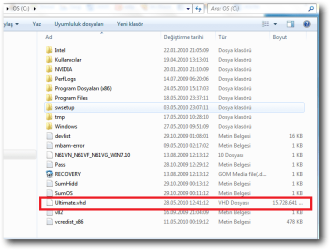
This tutorial uses an example that will create a C:\(file name).vhd file on the C: drive/partition at boot that is used to natively boot from at startup.

You will be able to create the VHD file on any partition or drive letter that you like though.

   Warning
All Vista, Windows 7, and Windows 8 (except Windows 8 RT) editions support booting from a VHD.

You must have either Windows 7 Ultimate, Windows 7 Enterprise, Windows 8 Pro, or Windows 8 Enterprise installed on the VHD to be able to boot from the VHD natively.


EXAMPLE: Windows Boot Manager
NOTE: You will be able to either select your currently installed OS (ex: Vista) or the VHD file (ex: Windows 7) in the Windows Boot Manager to start your computer with.
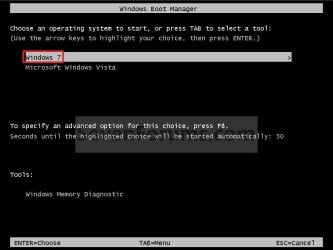
Boot_Manager.jpg
EXAMPLE: VHD file in your Current OS (ex: Vista)
NOTE: This is where the VHD file will be stored at on your currently installed OS (ex: Vista) to be used to boot from.
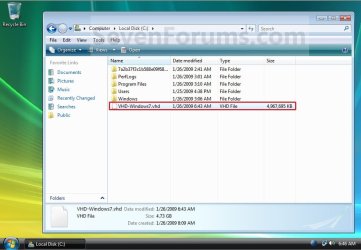
Example.jpg


OPTION ONE

To Create and Add the VHD to Boot From


1. Boot from your retail copy Windows 7 Ultimate or Enterprise installation DVD/USB, and do step 2 or 3 below for what you would like to do.
NOTE: To have Windows 8 on VHD, see instead: How to Create a Windows 8 VHD at Boot to Dual Boot with Windows 7 or Vista

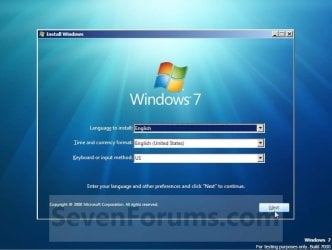
2. When you are at the start of the Windows 7 installation screen, press the Shift+F10 keys, and go to step 4 below. (See screenshot below)
Setup.jpg
3. Boot into the command prompt from the Startup Recovery Options screen, and go to step 4 below. (See screenshot below)
NOTE: You will use OPTION TWO at that link.
Step1.jpg
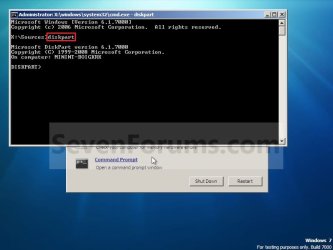
4. In the command prompt, type diskpart and press Enter. (See screenshot below)
Step2.jpg
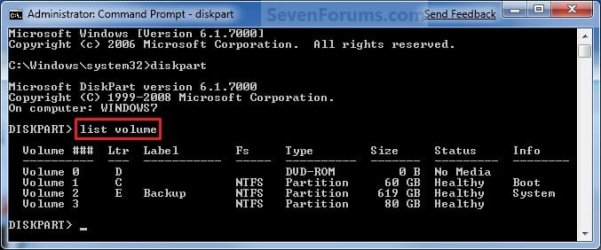
5. In the elevated command prompt, type list volume and press Enter. Make note of the drive letter for the volume that you want to create the VHD file on. (See screenshot below)
NOTE: This will allow you to see what the drive letters are for each volume. They are not always the same at boot as they are in Windows.
list-disk.jpg
6. Do either step 7 or 8 below for what type of VHD file you would like to create.

7. To Create a Fixed VHD File
NOTE: A fixed VHD file will allocate the entire maximum size (ex: 40GB) that you set below for the VHD file size.
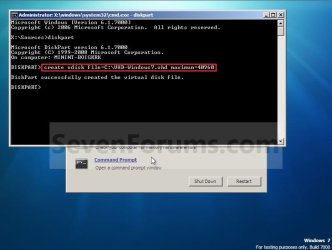
A) In the command prompt, type the command below and press Enter.
NOTE: Substitute the C drive letter in the command below for what volume (step 5) you would like to create the VHD on.

Code:
[B]create vdisk file=[COLOR=red]C[/COLOR]:\[COLOR=red]VHD-Windows7[/COLOR].vhd maximum=[COLOR=red]40960[/COLOR][/B]

NOTE: You can substitute the VHD-Windows7 name with any name you would like for the VHD file instead. You can also substitute the maximum size of 40960 MB for the VHD to the maximum size you want instead in MB (1GB = 1024MB).
Step3.jpg
B) Go to step 9.
8. To Create an Expandable VHD File
NOTE: An expandable VHD file will only be as large as the amount of data that is saved in the VHD file, but still can get as large as the maximium size (ex: 40GB) that you set below. For example, using this option, the VHD file showed only 7GB instead of the full 40GB. Even though the VHD file is expandable, you may need to install Windows Virtual PC to have a program associated with VHD files to actual see only the smaller size instead of the larger size for the VHD file.
A) In the command prompt, type the command below and press Enter.
NOTE: Substitute the C drive letter in the command below for what volume (step 5) you would like to create the VHD on.
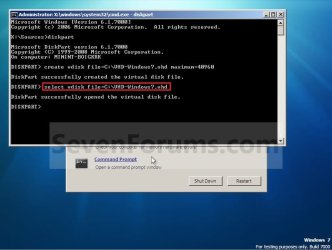
Code:
[B]create vdisk file=[COLOR=red]C[/COLOR]:\[COLOR=red]VHD-Windows7[/COLOR].vhd maximum=[COLOR=red]40960[/COLOR][/B] [B]type=expandable[/B]

NOTE: You can substitute the VHD-Windows7 name with any name you would like for the VHD file instead. You can also substitute the maximum size of 40960 MB for the VHD to the maximum size you want instead in MB (1GB = 1024MB).
9. In the command prompt, type the command below and press Enter. (See screenshot below)
NOTE: If you subsituted the VHD-Windows7 name in step 7 or 8, then you will need to use it here as well. Substitute the C drive letter in the command below for what volume (step 5) you would like to create the VHD on.

Code:
[B]select vdisk file=[COLOR=red]C[/COLOR]:\[COLOR=red]VHD-Windows7[/COLOR].vhd[/B]
Step4.jpg
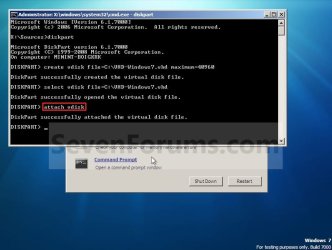
10. In the command prompt, type attach vdisk and press Enter. (See screenshot below)
Step5.jpg
11. In the command prompt, type exit and press Enter. (See screenshot below)
Step6.jpg
12. Close the command prompt window. (See screenshot above)
A) If you used step 2 above, then click on Next, and go to step 13 below.

B) If you used step 3 above, then continue on to step 14 below.
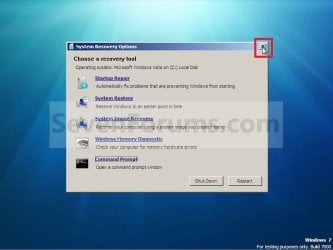
13. Close the System Recovery Options window. (See screenshot below)
WARNING: You must close it only. Do not click on the Shut Down or Restart button.
Step7.jpg
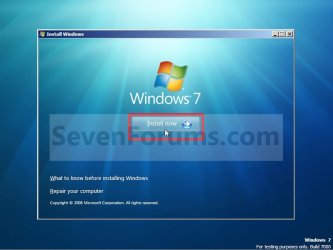
14. Click on the Install now button. (See screenshot below)
Step8.jpg
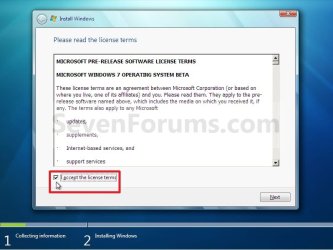
15. Check the I accept the license terms box and click on Next. (See screenshot below)
Step9.jpg
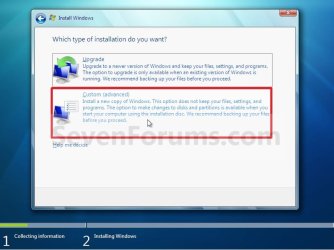
16. Click on the Custom (advanced) option. (See screenshot below)
Step10.jpg
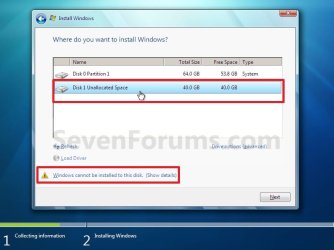
17. Select the available option with the unallocated space that is the same maximum VHD size (ex: 40GB = 40960MB) that you specified in step 7 or 8 above, and click on the Next button. (See screenshot below)
NOTE: If you see the Windows cannot be installed to this disk warning, then you can ignore it. Windows 7 will still install on the VHD file.
Step11.jpg
18. Finish doing a clean install of Windows 7.
NOTE: You will pick up at step 10 at that link to finish installing Windows 7 on the VHD file.

19. When you restart or start the computer, you will now have Windows 7 to select from at boot to start natively from the VHD file. (See the first example at top of the tutorial.)


OPTION TWO

To Delete the VHD and Remove from Boot List


1. To Remove OS VHD from Windows Boot Manager List
A) Delete the listed OS VHD from the Windows Boot Manager in msconfig.
2. To Delete the VHD File
A) In Windows Explorer, navigate to the VHD file that you have created in step 7 or 8 of OPTION ONE above (ex: C:\VHD-Windows7.vhd), right click on the VHD file and click on Delete.

B) Click on Yes to approve deletion.
That's it,
Shawn


Last edited:
That's good news. Thank you for posting back with your results. :)
 

My Computer My Computer

At a glance

64-bit Windows 11 Pro for WorkstationsIntel i7-8700K OC'd to 5 GHz64 GB (4x16GB) G.SKILL TridentZ RGB DDR4 3600...ASUS ROG-STRIX-GTX1080TI-O11G-GAMING
Computer type
PC/Desktop
Computer Manufacturer/Model Number
Self built custom
OS
64-bit Windows 11 Pro for Workstations
CPU
Intel i7-8700K OC'd to 5 GHz
Motherboard
ASUS ROG Maximus XI Formula Z390
Memory
64 GB (4x16GB) G.SKILL TridentZ RGB DDR4 3600 MHz
Graphics Card(s)
ASUS ROG-STRIX-GTX1080TI-O11G-GAMING
Sound Card
Integrated
Monitor(s) Displays
2 x Samsung Odyssey G7 27"
Screen Resolution
2560x1440
Hard Drives
1TB Samsung 990 PRO M.2,
4TB Samsung 990 PRO PRO M.2,
TerraMaster F8 SSD Plus NAS
PSU
Seasonic Prime Titanium 850W
Case
Thermaltake Core P3
Cooling
Corsair Hydro H115i
Keyboard
Logitech wireless K800
Mouse
Logitech MX Master 4
Internet Speed
2 Gb/s Download and 100 Mb/s Upload
Antivirus
Malwarebyte Anti-Malware Premium
Browser
Google Chrome
Other Info
Logitech Z625 speaker system,
Logitech BRIO 4K Pro webcam,
HP Color LaserJet Pro MFP M477fdn,
APC SMART-UPS RT 1000 XL - SURT1000XLI,
Galaxy S23 Plus phone
I am still having problems getting a vLite-generated install to complete so I thought I would try installing Win 7 Pro 64 from the Dell reinstallation DVD that came with my system.

Imagine my surprise when, at the END of the install, I got a LICENSE ERROR message telling me that I could not boot this system from a VHD. I assume that this has something to do with the OEM version from Dell and would not be a problem with a retail version.

I just thought that someone who is contemplating installing Windows 7 to a VHD might like to know this.
 

My Computer My Computer

At a glance

windows 7 Pro 64Intel Core i7-720QM4GB,DDR3,1333MHzATI Mobility Radeon HD 4650 1GB
Computer Manufacturer/Model Number
Dell Studio 1747
OS
windows 7 Pro 64
CPU
Intel Core i7-720QM
Memory
4GB,DDR3,1333MHz
Graphics Card(s)
ATI Mobility Radeon HD 4650 1GB
Monitor(s) Displays
17.3", 1920x1080 B+RG LED
Hard Drives
2x320GB Seagate Momentus 7200rpm SATA
MNcamper,

What edition of Windows 7 do you currently have installed?

While all Windows 7 editions can create and attach a VHD, only the Windows 7 Ultimate and Enterprise editions support booting from a VHD. :(
 

My Computer My Computer

At a glance

64-bit Windows 11 Pro for WorkstationsIntel i7-8700K OC'd to 5 GHz64 GB (4x16GB) G.SKILL TridentZ RGB DDR4 3600...ASUS ROG-STRIX-GTX1080TI-O11G-GAMING
Computer type
PC/Desktop
Computer Manufacturer/Model Number
Self built custom
OS
64-bit Windows 11 Pro for Workstations
CPU
Intel i7-8700K OC'd to 5 GHz
Motherboard
ASUS ROG Maximus XI Formula Z390
Memory
64 GB (4x16GB) G.SKILL TridentZ RGB DDR4 3600 MHz
Graphics Card(s)
ASUS ROG-STRIX-GTX1080TI-O11G-GAMING
Sound Card
Integrated
Monitor(s) Displays
2 x Samsung Odyssey G7 27"
Screen Resolution
2560x1440
Hard Drives
1TB Samsung 990 PRO M.2,
4TB Samsung 990 PRO PRO M.2,
TerraMaster F8 SSD Plus NAS
PSU
Seasonic Prime Titanium 850W
Case
Thermaltake Core P3
Cooling
Corsair Hydro H115i
Keyboard
Logitech wireless K800
Mouse
Logitech MX Master 4
Internet Speed
2 Gb/s Download and 100 Mb/s Upload
Antivirus
Malwarebyte Anti-Malware Premium
Browser
Google Chrome
Other Info
Logitech Z625 speaker system,
Logitech BRIO 4K Pro webcam,
HP Color LaserJet Pro MFP M477fdn,
APC SMART-UPS RT 1000 XL - SURT1000XLI,
Galaxy S23 Plus phone
My OS, as delivered from Dell, is Windows 7 Professional 64.

I either missed that big red warning at the beginning of your tutorial or, at the time, I did not know enough about what I was doing to grasp the meaning of the warning.
It was not a complete waste of my time, however. I did learn a few things about how to set up a VHD and a bit about the inside of Windows 7.
 

My Computer My Computer

At a glance

windows 7 Pro 64Intel Core i7-720QM4GB,DDR3,1333MHzATI Mobility Radeon HD 4650 1GB
Computer Manufacturer/Model Number
Dell Studio 1747
OS
windows 7 Pro 64
CPU
Intel Core i7-720QM
Memory
4GB,DDR3,1333MHz
Graphics Card(s)
ATI Mobility Radeon HD 4650 1GB
Monitor(s) Displays
17.3", 1920x1080 B+RG LED
Hard Drives
2x320GB Seagate Momentus 7200rpm SATA
Don't feel bad MNcamper. It just dawned on me as well that your Windows 7 edition may not support it as well. :o

Well, at least you'll be ready to do it if you should decide to upgrade to Ultimate later. ;)
 

My Computer My Computer

At a glance

64-bit Windows 11 Pro for WorkstationsIntel i7-8700K OC'd to 5 GHz64 GB (4x16GB) G.SKILL TridentZ RGB DDR4 3600...ASUS ROG-STRIX-GTX1080TI-O11G-GAMING
Computer type
PC/Desktop
Computer Manufacturer/Model Number
Self built custom
OS
64-bit Windows 11 Pro for Workstations
CPU
Intel i7-8700K OC'd to 5 GHz
Motherboard
ASUS ROG Maximus XI Formula Z390
Memory
64 GB (4x16GB) G.SKILL TridentZ RGB DDR4 3600 MHz
Graphics Card(s)
ASUS ROG-STRIX-GTX1080TI-O11G-GAMING
Sound Card
Integrated
Monitor(s) Displays
2 x Samsung Odyssey G7 27"
Screen Resolution
2560x1440
Hard Drives
1TB Samsung 990 PRO M.2,
4TB Samsung 990 PRO PRO M.2,
TerraMaster F8 SSD Plus NAS
PSU
Seasonic Prime Titanium 850W
Case
Thermaltake Core P3
Cooling
Corsair Hydro H115i
Keyboard
Logitech wireless K800
Mouse
Logitech MX Master 4
Internet Speed
2 Gb/s Download and 100 Mb/s Upload
Antivirus
Malwarebyte Anti-Malware Premium
Browser
Google Chrome
Other Info
Logitech Z625 speaker system,
Logitech BRIO 4K Pro webcam,
HP Color LaserJet Pro MFP M477fdn,
APC SMART-UPS RT 1000 XL - SURT1000XLI,
Galaxy S23 Plus phone
Hmmm...I wish I found this thread first...

I found other articles on booting from a VHD first a few months ago. After getting all the way throught the process on a 7-Home disk earlier today I got a "...not supported on this OS" error when I tried to boot from the completed install. I clicked on a further reading link at the bottom, got here, and saw the message in big bold red...Ultimate and Enterprise only! Ouch!

Thanks Brink, for presenting such a good guide.

I have a TV card in a 7-Home, that won't work on my 2008Server RC2, thus prompting my experimentation with VHDs. I tried the Hyper-V only to find out I don't have a lot of necessary access to peripherals like the graphics card which I need for the TV. I read tons, and never found out about the limitations, so I was a bit frustrated right from the start, and now this roadblock.

I was hoping before I go too far, even if I go buy an Ultimate disk, when I boot from a VHD, will I still get access to my shared programs on my server?

Somebody will save me from hours of work, and possible self-hair pulling if they know.

P.S. on February 1: I found a trial of Ultimate I'd downloaded but never tried from my earlier roadblocks, got the booting .vhd going with it, and I did get access to my server's programs from other computers. The TV card is working too. My USB to VGA adapter isn't though. If I can't get a 3rd monitor going, I'll have to switch back to the previous computer. Two steps forward, one step back.
 
Last edited:

My Computer My Computer

At a glance

Windows 7 Home (64-bit)AMD Dual Core 2.8 Ghz4GBRadeon X600 and disabled onboard X1200, eVGA ...
Computer Manufacturer/Model Number
Home Build
OS
Windows 7 Home (64-bit)
CPU
AMD Dual Core 2.8 Ghz
Motherboard
Asus
Memory
4GB
Graphics Card(s)
Radeon X600 and disabled onboard X1200, eVGA UV Plus+ USB
Sound Card
Realtek High Definition onboard
Monitor(s) Displays
Unrecognized LCDs all mirrored. (ancient)
Hard Drives
SATA 80GB 7200
PSU
Generic
Case
Antec 300
Cooling
Case fans and hard disk fan
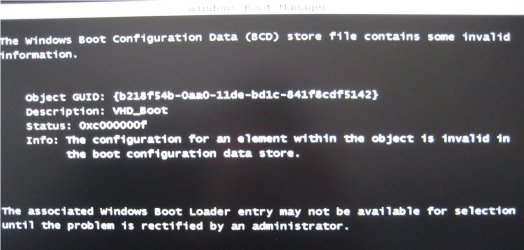
When I started the PC and noticed no entry of VHD drive in the hard disc menue(two HDDs in the hard system). I selected the one which contains the W7 and the data partition where VHD resides. Then I got the following message. I pressed ENTER as prompt indicated to proceed. Then, Windows 7 booted up without going through any menu selection process. Obviously there must be only one entry in the menu. What could be the problem?
 

Attachments

  • Error.jpg
    Error.jpg
    73.8 KB · Views: 207

My Computer My Computer

At a glance

W7 Ult x64, W8 Pro x64 and W10 Pro x64Phenom FX630016GB DDR3 1866 G.Skill F3-1866C9D-16GWM x2Radeon R7 360
Computer type
PC/Desktop
OS
W7 Ult x64, W8 Pro x64 and W10 Pro x64
CPU
Phenom FX6300
Motherboard
Gigabyte GA-970A-UD3 rev. 1.2
Memory
16GB DDR3 1866 G.Skill F3-1866C9D-16GWM x2
Graphics Card(s)
Radeon R7 360
Sound Card
Asus Xonar DS
Monitor(s) Displays
27" x2, Dell P2715Q
Screen Resolution
3840 x 2160
Hard Drives
Samsung 850Pro 1TB SSD - system
Samsung 4TB SSD - Data
PSU
Corsair CX450M
Case
Corsair 200R
Cooling
Zalman CNPS5X Performa
Internet Speed
400Mbps/12Mbps
Other Info
2nd machine: Same as above
3rd machine: Apple MacAir with W7 Ult installed
Hello Churin,

From looking at your other posts, did you use this tutorial to create the VHD?
 

My Computer My Computer

At a glance

64-bit Windows 11 Pro for WorkstationsIntel i7-8700K OC'd to 5 GHz64 GB (4x16GB) G.SKILL TridentZ RGB DDR4 3600...ASUS ROG-STRIX-GTX1080TI-O11G-GAMING
Computer type
PC/Desktop
Computer Manufacturer/Model Number
Self built custom
OS
64-bit Windows 11 Pro for Workstations
CPU
Intel i7-8700K OC'd to 5 GHz
Motherboard
ASUS ROG Maximus XI Formula Z390
Memory
64 GB (4x16GB) G.SKILL TridentZ RGB DDR4 3600 MHz
Graphics Card(s)
ASUS ROG-STRIX-GTX1080TI-O11G-GAMING
Sound Card
Integrated
Monitor(s) Displays
2 x Samsung Odyssey G7 27"
Screen Resolution
2560x1440
Hard Drives
1TB Samsung 990 PRO M.2,
4TB Samsung 990 PRO PRO M.2,
TerraMaster F8 SSD Plus NAS
PSU
Seasonic Prime Titanium 850W
Case
Thermaltake Core P3
Cooling
Corsair Hydro H115i
Keyboard
Logitech wireless K800
Mouse
Logitech MX Master 4
Internet Speed
2 Gb/s Download and 100 Mb/s Upload
Antivirus
Malwarebyte Anti-Malware Premium
Browser
Google Chrome
Other Info
Logitech Z625 speaker system,
Logitech BRIO 4K Pro webcam,
HP Color LaserJet Pro MFP M477fdn,
APC SMART-UPS RT 1000 XL - SURT1000XLI,
Galaxy S23 Plus phone
Hello Churin,

From looking at your other posts, did you use this tutorial to create the VHD?
Yes, I did. I wonder if I need to detach it and start over.
 

My Computer My Computer

At a glance

W7 Ult x64, W8 Pro x64 and W10 Pro x64Phenom FX630016GB DDR3 1866 G.Skill F3-1866C9D-16GWM x2Radeon R7 360
Computer type
PC/Desktop
OS
W7 Ult x64, W8 Pro x64 and W10 Pro x64
CPU
Phenom FX6300
Motherboard
Gigabyte GA-970A-UD3 rev. 1.2
Memory
16GB DDR3 1866 G.Skill F3-1866C9D-16GWM x2
Graphics Card(s)
Radeon R7 360
Sound Card
Asus Xonar DS
Monitor(s) Displays
27" x2, Dell P2715Q
Screen Resolution
3840 x 2160
Hard Drives
Samsung 850Pro 1TB SSD - system
Samsung 4TB SSD - Data
PSU
Corsair CX450M
Case
Corsair 200R
Cooling
Zalman CNPS5X Performa
Internet Speed
400Mbps/12Mbps
Other Info
2nd machine: Same as above
3rd machine: Apple MacAir with W7 Ult installed
Let me correct my previous post including the error message.
The first two sentences in my post which includes the error message image are irrelevant to the present problem. Please assume I stared the PC to boot W7 and the error message was displayed before the W7 was up. I then clicked Continue on the display and the W7 was launched as usual. Before the W7 was up, there was no menu from which VHD was supposed to be selected. Obviously, the system detected only one bootable item.
 

My Computer My Computer

At a glance

W7 Ult x64, W8 Pro x64 and W10 Pro x64Phenom FX630016GB DDR3 1866 G.Skill F3-1866C9D-16GWM x2Radeon R7 360
Computer type
PC/Desktop
OS
W7 Ult x64, W8 Pro x64 and W10 Pro x64
CPU
Phenom FX6300
Motherboard
Gigabyte GA-970A-UD3 rev. 1.2
Memory
16GB DDR3 1866 G.Skill F3-1866C9D-16GWM x2
Graphics Card(s)
Radeon R7 360
Sound Card
Asus Xonar DS
Monitor(s) Displays
27" x2, Dell P2715Q
Screen Resolution
3840 x 2160
Hard Drives
Samsung 850Pro 1TB SSD - system
Samsung 4TB SSD - Data
PSU
Corsair CX450M
Case
Corsair 200R
Cooling
Zalman CNPS5X Performa
Internet Speed
400Mbps/12Mbps
Other Info
2nd machine: Same as above
3rd machine: Apple MacAir with W7 Ult installed
Churin,

Yeah, it sounds like a mistake may have been made somewhere. I would start all over, and see how it does this round.
 

My Computer My Computer

At a glance

64-bit Windows 11 Pro for WorkstationsIntel i7-8700K OC'd to 5 GHz64 GB (4x16GB) G.SKILL TridentZ RGB DDR4 3600...ASUS ROG-STRIX-GTX1080TI-O11G-GAMING
Computer type
PC/Desktop
Computer Manufacturer/Model Number
Self built custom
OS
64-bit Windows 11 Pro for Workstations
CPU
Intel i7-8700K OC'd to 5 GHz
Motherboard
ASUS ROG Maximus XI Formula Z390
Memory
64 GB (4x16GB) G.SKILL TridentZ RGB DDR4 3600 MHz
Graphics Card(s)
ASUS ROG-STRIX-GTX1080TI-O11G-GAMING
Sound Card
Integrated
Monitor(s) Displays
2 x Samsung Odyssey G7 27"
Screen Resolution
2560x1440
Hard Drives
1TB Samsung 990 PRO M.2,
4TB Samsung 990 PRO PRO M.2,
TerraMaster F8 SSD Plus NAS
PSU
Seasonic Prime Titanium 850W
Case
Thermaltake Core P3
Cooling
Corsair Hydro H115i
Keyboard
Logitech wireless K800
Mouse
Logitech MX Master 4
Internet Speed
2 Gb/s Download and 100 Mb/s Upload
Antivirus
Malwarebyte Anti-Malware Premium
Browser
Google Chrome
Other Info
Logitech Z625 speaker system,
Logitech BRIO 4K Pro webcam,
HP Color LaserJet Pro MFP M477fdn,
APC SMART-UPS RT 1000 XL - SURT1000XLI,
Galaxy S23 Plus phone
Kari pointed me here. I didn't know this capability existed. Thanks for another great tutorial Shawn.

Can the vhd be created on a drive other than the boot drive? Mine only has 40GB free (of 80GB) but I have other drives with >200GB free.
 

My Computer My Computer

At a glance

Windows 10 Pro X64Intel Quad Core i7-4770 @ 3.4Ghz16.0GB PC3-12800 DDR3 SDRAM 1600 MHzIntel Integrated HD Graphics
Computer type
PC/Desktop
Computer Manufacturer/Model Number
Lenovo IdeaCenter 450
OS
Windows 10 Pro X64
CPU
Intel Quad Core i7-4770 @ 3.4Ghz
Memory
16.0GB PC3-12800 DDR3 SDRAM 1600 MHz
Graphics Card(s)
Intel Integrated HD Graphics
Sound Card
Realtek HD Audio
Monitor(s) Displays
HP 22" LCD
Screen Resolution
1680 x 1050
Hard Drives
250GB Samsung EVO SATA-3 SSD
2TB Seagate ST2000DM001 SATA-2
1.5TB Seagate ST3150041AS SATA
Keyboard
Dell USB
Mouse
Lenovo USB
Internet Speed
Cable via Road Runner 3MB Upload, 30MB Download
Antivirus
Windows Defender, MBAM Pro, MBAE
Browser
Seamonkey
Other Info
UEFI/GPT
PLDS DVD-RW DH16AERSH
Hello Rich,

I have not tried it, but you should be able to as long as it's an internal hard drive. Just substitute the drive letter in the instructions to the drive letter of the drive you want to use instead. :)
 

My Computer My Computer

At a glance

64-bit Windows 11 Pro for WorkstationsIntel i7-8700K OC'd to 5 GHz64 GB (4x16GB) G.SKILL TridentZ RGB DDR4 3600...ASUS ROG-STRIX-GTX1080TI-O11G-GAMING
Computer type
PC/Desktop
Computer Manufacturer/Model Number
Self built custom
OS
64-bit Windows 11 Pro for Workstations
CPU
Intel i7-8700K OC'd to 5 GHz
Motherboard
ASUS ROG Maximus XI Formula Z390
Memory
64 GB (4x16GB) G.SKILL TridentZ RGB DDR4 3600 MHz
Graphics Card(s)
ASUS ROG-STRIX-GTX1080TI-O11G-GAMING
Sound Card
Integrated
Monitor(s) Displays
2 x Samsung Odyssey G7 27"
Screen Resolution
2560x1440
Hard Drives
1TB Samsung 990 PRO M.2,
4TB Samsung 990 PRO PRO M.2,
TerraMaster F8 SSD Plus NAS
PSU
Seasonic Prime Titanium 850W
Case
Thermaltake Core P3
Cooling
Corsair Hydro H115i
Keyboard
Logitech wireless K800
Mouse
Logitech MX Master 4
Internet Speed
2 Gb/s Download and 100 Mb/s Upload
Antivirus
Malwarebyte Anti-Malware Premium
Browser
Google Chrome
Other Info
Logitech Z625 speaker system,
Logitech BRIO 4K Pro webcam,
HP Color LaserJet Pro MFP M477fdn,
APC SMART-UPS RT 1000 XL - SURT1000XLI,
Galaxy S23 Plus phone
I have Pro X64 which does not seem to support booting a VHD, at least that's what one one the posts in this thread said. Is that still true?

I'll try creating it using a different drive, just to see if I can, but it doesn't look like I'll actually be able to boot it.
 

My Computer My Computer

At a glance

Windows 10 Pro X64Intel Quad Core i7-4770 @ 3.4Ghz16.0GB PC3-12800 DDR3 SDRAM 1600 MHzIntel Integrated HD Graphics
Computer type
PC/Desktop
Computer Manufacturer/Model Number
Lenovo IdeaCenter 450
OS
Windows 10 Pro X64
CPU
Intel Quad Core i7-4770 @ 3.4Ghz
Memory
16.0GB PC3-12800 DDR3 SDRAM 1600 MHz
Graphics Card(s)
Intel Integrated HD Graphics
Sound Card
Realtek HD Audio
Monitor(s) Displays
HP 22" LCD
Screen Resolution
1680 x 1050
Hard Drives
250GB Samsung EVO SATA-3 SSD
2TB Seagate ST2000DM001 SATA-2
1.5TB Seagate ST3150041AS SATA
Keyboard
Dell USB
Mouse
Lenovo USB
Internet Speed
Cable via Road Runner 3MB Upload, 30MB Download
Antivirus
Windows Defender, MBAM Pro, MBAE
Browser
Seamonkey
Other Info
UEFI/GPT
PLDS DVD-RW DH16AERSH
Ah, I didn't even notice that as your OS. Yes, only the Windows 7 Ultimate and Enterprise editions support booting from a VHD. :o:(
 

My Computer My Computer

At a glance

64-bit Windows 11 Pro for WorkstationsIntel i7-8700K OC'd to 5 GHz64 GB (4x16GB) G.SKILL TridentZ RGB DDR4 3600...ASUS ROG-STRIX-GTX1080TI-O11G-GAMING
Computer type
PC/Desktop
Computer Manufacturer/Model Number
Self built custom
OS
64-bit Windows 11 Pro for Workstations
CPU
Intel i7-8700K OC'd to 5 GHz
Motherboard
ASUS ROG Maximus XI Formula Z390
Memory
64 GB (4x16GB) G.SKILL TridentZ RGB DDR4 3600 MHz
Graphics Card(s)
ASUS ROG-STRIX-GTX1080TI-O11G-GAMING
Sound Card
Integrated
Monitor(s) Displays
2 x Samsung Odyssey G7 27"
Screen Resolution
2560x1440
Hard Drives
1TB Samsung 990 PRO M.2,
4TB Samsung 990 PRO PRO M.2,
TerraMaster F8 SSD Plus NAS
PSU
Seasonic Prime Titanium 850W
Case
Thermaltake Core P3
Cooling
Corsair Hydro H115i
Keyboard
Logitech wireless K800
Mouse
Logitech MX Master 4
Internet Speed
2 Gb/s Download and 100 Mb/s Upload
Antivirus
Malwarebyte Anti-Malware Premium
Browser
Google Chrome
Other Info
Logitech Z625 speaker system,
Logitech BRIO 4K Pro webcam,
HP Color LaserJet Pro MFP M477fdn,
APC SMART-UPS RT 1000 XL - SURT1000XLI,
Galaxy S23 Plus phone
Hi shawn
I have a problem and some questions for you :)
I use a N61VN ASUS notebook and window 7 home pre. 64 bit.I hve allready created a .vhd file ;
sshot25.png

And I can attach it easily;

sshot26.png

But when I want to try install Windows 7 Ultimate on this .vhd partition I can not click next button (Yout tuttorial step 15) it's warning "Windows cannot be install to this disk"
and ofcourse i can't install :confused: (I have to say; I start installing proses from desktop)
So what is the wrong thing?

Ah i find the problem here sorry

And second thing;
I'm traying to understand this virtualisation tecnology and where i can use it.

1-I want to install a windows 7 like this tuttorial on a vhd partition and I want to cary it as a .vhd format (for ex. in a flash drive) for use On another computer. Is it posible?
if not why we do this tuttorial instead of using for example this one
What is the difference?

2-Some times i see windows 7 or windows 3.1 or another files like that in vhd format.İf I download one of that how I'll use it? I download a windows 3.1 but i failed to work it:confused:
 
Last edited:

My Computer My Computer

At a glance

vistat77002 gb8600M
Computer Manufacturer/Model Number
asus f3sv240dr
OS
vista
CPU
t7700
Memory
2 gb
Graphics Card(s)
8600M
Hard Drives
250 GB
Hello Nonpasaran,

Q1) Since you have Vista listed as your OS, you will not be able to use this tutorial to boot from a VHD file. You would only be able to if you had the Windows 7 Ultimate or Enterprise edition installed since only they support booting from a VHD.

If you woulld like to use VHD files with Vista, then you would need to use a program like Virtual PC 2007 SP1 to create a virtual machine first and select to use a VHD file of your choice instead of creating a new VHD while setting up the virtual machine.

Hope this helps,
Shawn
 

My Computer My Computer

At a glance

64-bit Windows 11 Pro for WorkstationsIntel i7-8700K OC'd to 5 GHz64 GB (4x16GB) G.SKILL TridentZ RGB DDR4 3600...ASUS ROG-STRIX-GTX1080TI-O11G-GAMING
Computer type
PC/Desktop
Computer Manufacturer/Model Number
Self built custom
OS
64-bit Windows 11 Pro for Workstations
CPU
Intel i7-8700K OC'd to 5 GHz
Motherboard
ASUS ROG Maximus XI Formula Z390
Memory
64 GB (4x16GB) G.SKILL TridentZ RGB DDR4 3600 MHz
Graphics Card(s)
ASUS ROG-STRIX-GTX1080TI-O11G-GAMING
Sound Card
Integrated
Monitor(s) Displays
2 x Samsung Odyssey G7 27"
Screen Resolution
2560x1440
Hard Drives
1TB Samsung 990 PRO M.2,
4TB Samsung 990 PRO PRO M.2,
TerraMaster F8 SSD Plus NAS
PSU
Seasonic Prime Titanium 850W
Case
Thermaltake Core P3
Cooling
Corsair Hydro H115i
Keyboard
Logitech wireless K800
Mouse
Logitech MX Master 4
Internet Speed
2 Gb/s Download and 100 Mb/s Upload
Antivirus
Malwarebyte Anti-Malware Premium
Browser
Google Chrome
Other Info
Logitech Z625 speaker system,
Logitech BRIO 4K Pro webcam,
HP Color LaserJet Pro MFP M477fdn,
APC SMART-UPS RT 1000 XL - SURT1000XLI,
Galaxy S23 Plus phone
thanks shawn
 

My Computer My Computer

At a glance

vistat77002 gb8600M
Computer Manufacturer/Model Number
asus f3sv240dr
OS
vista
CPU
t7700
Memory
2 gb
Graphics Card(s)
8600M
Hard Drives
250 GB
You're welcome. :)
 

My Computer My Computer

At a glance

64-bit Windows 11 Pro for WorkstationsIntel i7-8700K OC'd to 5 GHz64 GB (4x16GB) G.SKILL TridentZ RGB DDR4 3600...ASUS ROG-STRIX-GTX1080TI-O11G-GAMING
Computer type
PC/Desktop
Computer Manufacturer/Model Number
Self built custom
OS
64-bit Windows 11 Pro for Workstations
CPU
Intel i7-8700K OC'd to 5 GHz
Motherboard
ASUS ROG Maximus XI Formula Z390
Memory
64 GB (4x16GB) G.SKILL TridentZ RGB DDR4 3600 MHz
Graphics Card(s)
ASUS ROG-STRIX-GTX1080TI-O11G-GAMING
Sound Card
Integrated
Monitor(s) Displays
2 x Samsung Odyssey G7 27"
Screen Resolution
2560x1440
Hard Drives
1TB Samsung 990 PRO M.2,
4TB Samsung 990 PRO PRO M.2,
TerraMaster F8 SSD Plus NAS
PSU
Seasonic Prime Titanium 850W
Case
Thermaltake Core P3
Cooling
Corsair Hydro H115i
Keyboard
Logitech wireless K800
Mouse
Logitech MX Master 4
Internet Speed
2 Gb/s Download and 100 Mb/s Upload
Antivirus
Malwarebyte Anti-Malware Premium
Browser
Google Chrome
Other Info
Logitech Z625 speaker system,
Logitech BRIO 4K Pro webcam,
HP Color LaserJet Pro MFP M477fdn,
APC SMART-UPS RT 1000 XL - SURT1000XLI,
Galaxy S23 Plus phone
Dear all,

Am having a Win 7 ultimate 64 as base and i follow the tutorial. But de thing is....

At the 1st step, Create vdisk....

It does not create any but it just show

Microsoft diskpart version 6.0.6011
partition - cretae a partition
volume - create a volume.

May i know what is wrong????

I tried boot into OS and do the same thing.. the VHD can be created,

Thanks
 

My Computer My Computer

At a glance

Win 7 Ultimate 64
OS
Win 7 Ultimate 64
Back
Top