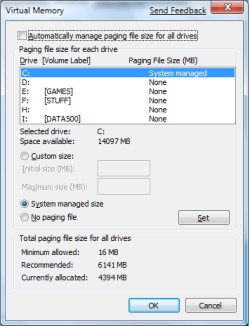
Virtual memory - Pagefile problem: no drives in list!

Have you installed the drivers yet to see if it changes anything

I don't know how to install them, rember? Intel installation chipset utility doesn't work.
 

My Computer My Computer

OS
Windows 7 beta 1
CPU
E8400 (sometimes @4Ghz)
Motherboard
Asus Maxiumus Formula
Memory
CORSAIR DDR2 4GB (2x2GB) Kit DOMINATOR PC2-8500 1066MHz CL
Graphics Card(s)
Nvidia 8800 GTS 512
Have you tried installing them in compatibility mode for Vista?
 

My Computer My Computer

Computer Manufacturer/Model Number
Home Brew
OS
Windows 7 Ultimate Vista Ultimate x64
CPU
Core 2 Duo E8500 3.16Ghz @ 3.8Ghz
Motherboard
eVGA 750i FTW
Memory
2x2Gigs Patriot PC2-6400 LL
Graphics Card(s)
Inno3D GeForce GTX260 216 SP
Monitor(s) Displays
ASUS VW222U 22" 2ms Response time
Screen Resolution
1680x1050
Hard Drives
SATA 150GB
SATA II 250GB
USB IDE 750GB Ext.
PSU
HYTEC 600W & Thermaltake 650W Toughpower Power Exp
Case
Thermaltake Armor LCS (Liquid Cooling System)
Cooling
Liquid Cooling System
Keyboard
Logitech G15 Gaming Keyboard
Mouse
Logitech G9 Gaming Mouse
Have you tried installing them in compatibility mode for Vista?

In compatibility mode they are installed. Now I have no more undetected SM bus, but the problem with pagefile drive list is still there... :(

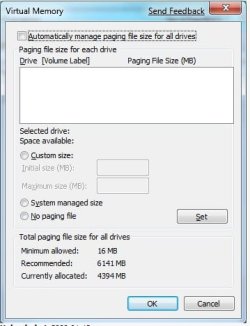
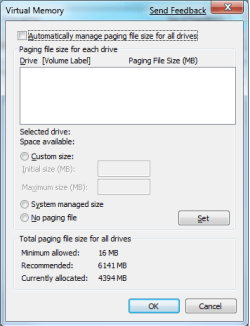
I repost the screenshoots from the new install:


Last edited:

My Computer My Computer

OS
Windows 7 beta 1
CPU
E8400 (sometimes @4Ghz)
Motherboard
Asus Maxiumus Formula
Memory
CORSAIR DDR2 4GB (2x2GB) Kit DOMINATOR PC2-8500 1066MHz CL
Graphics Card(s)
Nvidia 8800 GTS 512
Did you install this as well

Description JMicron 1.17.42.09 WHQL SATA/IDE Controller Driver
Download from
dot.gif
asus_download_pics04.gif
China
 

My Computer My Computer

Computer Manufacturer/Model Number
Home Brew
OS
Windows 7 Ultimate Vista Ultimate x64
CPU
Core 2 Duo E8500 3.16Ghz @ 3.8Ghz
Motherboard
eVGA 750i FTW
Memory
2x2Gigs Patriot PC2-6400 LL
Graphics Card(s)
Inno3D GeForce GTX260 216 SP
Monitor(s) Displays
ASUS VW222U 22" 2ms Response time
Screen Resolution
1680x1050
Hard Drives
SATA 150GB
SATA II 250GB
USB IDE 750GB Ext.
PSU
HYTEC 600W & Thermaltake 650W Toughpower Power Exp
Case
Thermaltake Armor LCS (Liquid Cooling System)
Cooling
Liquid Cooling System
Keyboard
Logitech G15 Gaming Keyboard
Mouse
Logitech G9 Gaming Mouse
monaco, to save you from trouble , I should tell you that this forum supports uploading images on posts...scroll down and find "manage attachments" then browse for your files and click upload. Close the upload window and you're done.

Since imageshack is experiencing troubles right now and I cannot see your screenshots...
 

My Computer My Computer

Computer Manufacturer/Model Number
ENIAC
OS
Windows 7 RC 7100 32bit/64bit
CPU
Intel Core2Duo E4500 2.20 GHz
Motherboard
ASUS P5LD2-X/1333
Memory
2x1GB Kinsgston DDR2 800MHz
Graphics Card(s)
Nvidia 8500GT
Sound Card
Onboard High Definition Audio Device
Monitor(s) Displays
Sony Bravia 42"
Case
LINKW 2222
Cooling
Standard Intel
Keyboard
Some cheap one
Mouse
Microsoft Intellimouse something
Internet Speed
24MBps ADSL
I just noticed that you have a page file there now.

2009-01-14_072730.jpg
83833662dk2.jpg
 

My Computer My Computer

Computer Manufacturer/Model Number
Home Brew
OS
Windows 7 Ultimate Vista Ultimate x64
CPU
Core 2 Duo E8500 3.16Ghz @ 3.8Ghz
Motherboard
eVGA 750i FTW
Memory
2x2Gigs Patriot PC2-6400 LL
Graphics Card(s)
Inno3D GeForce GTX260 216 SP
Monitor(s) Displays
ASUS VW222U 22" 2ms Response time
Screen Resolution
1680x1050
Hard Drives
SATA 150GB
SATA II 250GB
USB IDE 750GB Ext.
PSU
HYTEC 600W & Thermaltake 650W Toughpower Power Exp
Case
Thermaltake Armor LCS (Liquid Cooling System)
Cooling
Liquid Cooling System
Keyboard
Logitech G15 Gaming Keyboard
Mouse
Logitech G9 Gaming Mouse
indeed he has! and damn it's a big one!

Let me ask you though...all these happen after a clean install?

did you install anything at startup in all cases?

I'd go with Mr Grim for chipset/IDE/SATA drivers...

Also, if your mobo has let's say 4sata slots, and you have connected the sata cable on pair no2,slot1, connect it to pair no1,slot1 and boot to see ...

Maybe you've are through the Jmicron controller, while you could connect to a more standard controller on your board.
 

My Computer My Computer

Computer Manufacturer/Model Number
ENIAC
OS
Windows 7 RC 7100 32bit/64bit
CPU
Intel Core2Duo E4500 2.20 GHz
Motherboard
ASUS P5LD2-X/1333
Memory
2x1GB Kinsgston DDR2 800MHz
Graphics Card(s)
Nvidia 8500GT
Sound Card
Onboard High Definition Audio Device
Monitor(s) Displays
Sony Bravia 42"
Case
LINKW 2222
Cooling
Standard Intel
Keyboard
Some cheap one
Mouse
Microsoft Intellimouse something
Internet Speed
24MBps ADSL
It's a fresh install, i unchecked the option just before the screenshot, the page file you see is the default one!

The J-micron controller is disabled via bios, the hard drives are connected to the intel controller port.

I used imageshack for the images to have thumbnails insted the big ones, can you see them now?
 

My Computer My Computer

OS
Windows 7 beta 1
CPU
E8400 (sometimes @4Ghz)
Motherboard
Asus Maxiumus Formula
Memory
CORSAIR DDR2 4GB (2x2GB) Kit DOMINATOR PC2-8500 1066MHz CL
Graphics Card(s)
Nvidia 8800 GTS 512
That may be, but at least you have one and that's all the virtual Memory you need anyway, why do you feel you need more than that?
 

My Computer My Computer

Computer Manufacturer/Model Number
Home Brew
OS
Windows 7 Ultimate Vista Ultimate x64
CPU
Core 2 Duo E8500 3.16Ghz @ 3.8Ghz
Motherboard
eVGA 750i FTW
Memory
2x2Gigs Patriot PC2-6400 LL
Graphics Card(s)
Inno3D GeForce GTX260 216 SP
Monitor(s) Displays
ASUS VW222U 22" 2ms Response time
Screen Resolution
1680x1050
Hard Drives
SATA 150GB
SATA II 250GB
USB IDE 750GB Ext.
PSU
HYTEC 600W & Thermaltake 650W Toughpower Power Exp
Case
Thermaltake Armor LCS (Liquid Cooling System)
Cooling
Liquid Cooling System
Keyboard
Logitech G15 Gaming Keyboard
Mouse
Logitech G9 Gaming Mouse
That may be, but at least you have one and that's all the virtual Memory you need anyway, why do you feel you need more than that?

No i want to set manually the pagefile on a dedicated partion on the other hard disk and disable than on C:

The real problem is that this window doesn't work: the drive list is blank and i can't do anything.

Do you know if there is a way to set these things via registry?
 

Attachments

  • last3.png
    last3.png
    11.1 KB · Views: 5

My Computer My Computer

OS
Windows 7 beta 1
CPU
E8400 (sometimes @4Ghz)
Motherboard
Asus Maxiumus Formula
Memory
CORSAIR DDR2 4GB (2x2GB) Kit DOMINATOR PC2-8500 1066MHz CL
Graphics Card(s)
Nvidia 8800 GTS 512
Thats what I get on mine...
 

Attachments

  • capture.jpg
    capture.jpg
    88.2 KB · Views: 82

My Computer My Computer

Computer Manufacturer/Model Number
ENIAC
OS
Windows 7 RC 7100 32bit/64bit
CPU
Intel Core2Duo E4500 2.20 GHz
Motherboard
ASUS P5LD2-X/1333
Memory
2x1GB Kinsgston DDR2 800MHz
Graphics Card(s)
Nvidia 8500GT
Sound Card
Onboard High Definition Audio Device
Monitor(s) Displays
Sony Bravia 42"
Case
LINKW 2222
Cooling
Standard Intel
Keyboard
Some cheap one
Mouse
Microsoft Intellimouse something
Internet Speed
24MBps ADSL
1. There are several BIOS updates for your MOBO in Asus....try updating your BIOS too..

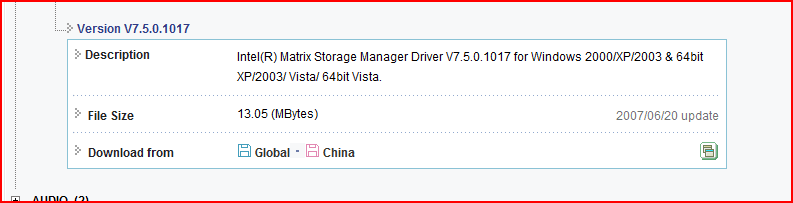
2. There's also this very nice driver for storage issues....Consider installing that too.

3. Pray.

4. Post back results
 

Attachments

  • Capture.PNG
    Capture.PNG
    5 KB · Views: 45

My Computer My Computer

Computer Manufacturer/Model Number
ENIAC
OS
Windows 7 RC 7100 32bit/64bit
CPU
Intel Core2Duo E4500 2.20 GHz
Motherboard
ASUS P5LD2-X/1333
Memory
2x1GB Kinsgston DDR2 800MHz
Graphics Card(s)
Nvidia 8500GT
Sound Card
Onboard High Definition Audio Device
Monitor(s) Displays
Sony Bravia 42"
Case
LINKW 2222
Cooling
Standard Intel
Keyboard
Some cheap one
Mouse
Microsoft Intellimouse something
Internet Speed
24MBps ADSL
I never installed that on vista, and everything worked fine with intel chipset driver only. I think the problem is seven, in particular that damned window... every other thing related to the drives works well, i think this is a sort of bug.
 

My Computer My Computer

OS
Windows 7 beta 1
CPU
E8400 (sometimes @4Ghz)
Motherboard
Asus Maxiumus Formula
Memory
CORSAIR DDR2 4GB (2x2GB) Kit DOMINATOR PC2-8500 1066MHz CL
Graphics Card(s)
Nvidia 8800 GTS 512
Still you could install it and look if it fixed...Nobody says that everything works just like it worked in Vista...If you feel uncomfortable about installing a driver from you mobo's manufacturer, you can always uninstall it later .

We're trying to get to a point here...

Tip: Since you've installed chipset etc, do a Windows Update in case it finds newer drivers for your installed drivers.
 

My Computer My Computer

Computer Manufacturer/Model Number
ENIAC
OS
Windows 7 RC 7100 32bit/64bit
CPU
Intel Core2Duo E4500 2.20 GHz
Motherboard
ASUS P5LD2-X/1333
Memory
2x1GB Kinsgston DDR2 800MHz
Graphics Card(s)
Nvidia 8500GT
Sound Card
Onboard High Definition Audio Device
Monitor(s) Displays
Sony Bravia 42"
Case
LINKW 2222
Cooling
Standard Intel
Keyboard
Some cheap one
Mouse
Microsoft Intellimouse something
Internet Speed
24MBps ADSL
Same Problem

I have Windows 7 x64 on an Asus P5B deluxe and Q6600 CPU with 8GB of RAM - my problem is i have a small Raptor drive for my OS and then a big 7200RPM SATA II Drive for data, and this automatically set pagefile is chewing up 8GB of my raptor so i need to move it to the secondary drive.

All hard drive options are installed and running well, this seems to be the only problem. As the OP said, is there a way to configure the pagefile in the registry?
 

My Computer My Computer

OS
Windows 7 x64
CPU
Intel Q6600 2.4GHz Quad Core @ 3.0 GHz
Motherboard
Asus P5B Deluxe
Memory
8GB (4x2GB) Corsair XMS2 DDR2 800 RAM
Graphics Card(s)
Asus 8600GT 256MB
Sound Card
On-board
Monitor(s) Displays
Dell 24" Ultrasharp
Screen Resolution
1900x1200
Hard Drives
76 GB WD 1000RPM Raptor Drive
500 GB WD 7200RPM/16MB SATA II Drive
PSU
Coolermaster 500w
Case
Coolermaster Centurion
Cooling
Tuniq Tower 120mm
Keyboard
MS Natural Ergonomic Keyboard 4000
Mouse
Microsoft Wireless Laser Mouse 5000
Internet Speed
Telstra's big pipe
Actually nevermind - i've found how to change it in the registry anyway - for the OP....

Run regedit, and jump to:

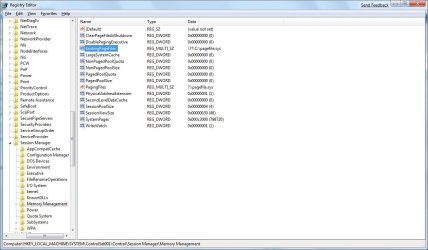
Computer\HKEY_LOCAL_MACHINE\SYSTEM\CurrentControlSet\Control\Session Manager\ Memory Management

Open the key PagingFiles and delete its contents and substitue your own settings - i went for:

f:\pagefile.sys 8192 8192

Which basically is the location of the pagefile, the min size and then the max size. I believe if you just put in the location it will create an automatically managed pagefile in that location, but i prefer mine to be static.

Hope this helps you out.
 

My Computer My Computer

OS
Windows 7 x64
CPU
Intel Q6600 2.4GHz Quad Core @ 3.0 GHz
Motherboard
Asus P5B Deluxe
Memory
8GB (4x2GB) Corsair XMS2 DDR2 800 RAM
Graphics Card(s)
Asus 8600GT 256MB
Sound Card
On-board
Monitor(s) Displays
Dell 24" Ultrasharp
Screen Resolution
1900x1200
Hard Drives
76 GB WD 1000RPM Raptor Drive
500 GB WD 7200RPM/16MB SATA II Drive
PSU
Coolermaster 500w
Case
Coolermaster Centurion
Cooling
Tuniq Tower 120mm
Keyboard
MS Natural Ergonomic Keyboard 4000
Mouse
Microsoft Wireless Laser Mouse 5000
Internet Speed
Telstra's big pipe
drives are visible - at last

I had the same problem with a gigabyte ep45-ds3r - after a new windows 7 installation on a formatted drive there was no possibility to change the pagefile location. My (the ?) solution: instal the latest (intel) raid driver and everything works fine! :)
 

My Computer My Computer

OS
windows 7 - 32
CPU
intel q9550
Motherboard
gigabyte ep45-ds3r
Memory
2gb ddr2 1150 ocz reaper
Graphics Card(s)
nvidia 8600gt
Sound Card
onboard
Monitor(s) Displays
eizo s1921
Hard Drives
seagate 250 gb
that's the case...both me and Mr.Grim have been posting here, since the beginning of the thread, replies such as:

"update your drivers" or "download latest drivers from your manufacturer" as possible solutions...

I'm glad that it helped someone.
 

My Computer My Computer

Computer Manufacturer/Model Number
ENIAC
OS
Windows 7 RC 7100 32bit/64bit
CPU
Intel Core2Duo E4500 2.20 GHz
Motherboard
ASUS P5LD2-X/1333
Memory
2x1GB Kinsgston DDR2 800MHz
Graphics Card(s)
Nvidia 8500GT
Sound Card
Onboard High Definition Audio Device
Monitor(s) Displays
Sony Bravia 42"
Case
LINKW 2222
Cooling
Standard Intel
Keyboard
Some cheap one
Mouse
Microsoft Intellimouse something
Internet Speed
24MBps ADSL

Attachments

  • solved.png
    solved.png
    12.8 KB · Views: 16

My Computer My Computer

OS
Windows 7 beta 1
CPU
E8400 (sometimes @4Ghz)
Motherboard
Asus Maxiumus Formula
Memory
CORSAIR DDR2 4GB (2x2GB) Kit DOMINATOR PC2-8500 1066MHz CL
Graphics Card(s)
Nvidia 8800 GTS 512
Glad to see you have it sorted.
 

My Computer My Computer

Computer Manufacturer/Model Number
Home Brew
OS
Windows 7 Ultimate Vista Ultimate x64
CPU
Core 2 Duo E8500 3.16Ghz @ 3.8Ghz
Motherboard
eVGA 750i FTW
Memory
2x2Gigs Patriot PC2-6400 LL
Graphics Card(s)
Inno3D GeForce GTX260 216 SP
Monitor(s) Displays
ASUS VW222U 22" 2ms Response time
Screen Resolution
1680x1050
Hard Drives
SATA 150GB
SATA II 250GB
USB IDE 750GB Ext.
PSU
HYTEC 600W & Thermaltake 650W Toughpower Power Exp
Case
Thermaltake Armor LCS (Liquid Cooling System)
Cooling
Liquid Cooling System
Keyboard
Logitech G15 Gaming Keyboard
Mouse
Logitech G9 Gaming Mouse
Back
Top