Virtual PC Integration Device - Missing...

mckids

New member
Local time
10:36 PM
Messages
21
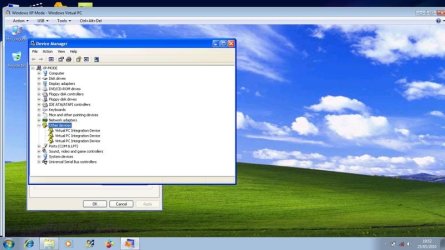
This screen shot on my XP Mode at Device Manager
Virtual PC Integration Device - Missing

Help me for this problem..

VIRTUAL PC.jpg
 

My Computer

Computer Manufacturer/Model Number
Aspire ACER
OS
Windows 7 Home Basic

My Computer

Computer Manufacturer/Model Number
Custom
OS
Win7 HP (x64)/Win7 Ultimate (x64)
CPU
Core i7 920
Motherboard
Intel X58
Memory
6 x 2GB Corsair XMS3
Graphics Card(s)
CF HD4890
Sound Card
Asus Xonar
Monitor(s) Displays
Dell 2408WFP
Screen Resolution
1920 x 1200
Hard Drives
2 x 150GB WDC Velociraptors (Raid 0)
1 x 1TB Seagate
1 x 1.5TB Seagate
PSU
Corsair HX1000W
Case
Antec 1200
Keyboard
Razer Lycosa/N52te
Mouse
Razer Lachesis
It is completely normal, not a problem. There are no drivers to this Virtual PC Integration Device.

When you boot a Virtual PC machine, your host (Windows 7) thinks you are creating a Remote Desktop Connection. Some really confusing terminology: You use a Client computer (host machine, Windows 7) to connect to a remote Host computer (virtual guest machine, XP Mode). For these two computers / machines to be able to communicate, Windows creates a so called VPC Bus (Virtual PC Host Bus Service) between the two computers, in your case between the Windows 7 and XP Mode.

Each time these buses are created, they can be seen in virtual machine's Device Manager. They need to be there, but because they are not device drivers per se, you'll see the exclamation marks. Let them just stay there, don't try to remove and / or disable them.

If you right click one of these Virtual PC Integration Devices and choose Properties from context menu, you will see that the Device Status is "This device is working properly".

More about remote Desktop Connection: open the Windows Help & Support, type Remote Desktop to search field and hit Enter. Choose Remote Desktop Connection: frequently asked questions.

Kari

 
Last edited:

My Computer

Computer type
Laptop
Computer Manufacturer/Model Number
HP ENVY 17-1150eg
OS
Windows 10 Pro x64 EN-GB
CPU
1.6 GHz Intel Core i7-720QM Processor
Memory
6 GB
Graphics Card(s)
ATI Mobility Radeon HD 5850 Graphics
Sound Card
Beats sound system with integrated subwoofer
Monitor(s) Displays
17" laptop display, 22" LED and 32" Full HD TV through HDMI
Screen Resolution
1600*900 (1), 1920*1080 (2&3)
Hard Drives
Internal: 2 x 500 GB SATA Hard Disk Drive 7200 rpm
External: 2TB for backups, 3TB USB3 network drive for media
Cooling
As Envy runs a bit warm, I have it on a Cooler Master pad
Keyboard
Logitech diNovo Media Desktop Laser (bluetooth)
Mouse
Logitech Performance Mouse MX
Internet Speed
50/10 Mbps VDSL
Antivirus
Windows Defender 4.3.9431.0
Browser
Maxthon 3.5.2., IE11
Thanks Kari
 

My Computer

Computer Manufacturer/Model Number
Custom
OS
Win7 HP (x64)/Win7 Ultimate (x64)
CPU
Core i7 920
Motherboard
Intel X58
Memory
6 x 2GB Corsair XMS3
Graphics Card(s)
CF HD4890
Sound Card
Asus Xonar
Monitor(s) Displays
Dell 2408WFP
Screen Resolution
1920 x 1200
Hard Drives
2 x 150GB WDC Velociraptors (Raid 0)
1 x 1TB Seagate
1 x 1.5TB Seagate
PSU
Corsair HX1000W
Case
Antec 1200
Keyboard
Razer Lycosa/N52te
Mouse
Razer Lachesis
You are welcome, Lomai.
 

My Computer

Computer type
Laptop
Computer Manufacturer/Model Number
HP ENVY 17-1150eg
OS
Windows 10 Pro x64 EN-GB
CPU
1.6 GHz Intel Core i7-720QM Processor
Memory
6 GB
Graphics Card(s)
ATI Mobility Radeon HD 5850 Graphics
Sound Card
Beats sound system with integrated subwoofer
Monitor(s) Displays
17" laptop display, 22" LED and 32" Full HD TV through HDMI
Screen Resolution
1600*900 (1), 1920*1080 (2&3)
Hard Drives
Internal: 2 x 500 GB SATA Hard Disk Drive 7200 rpm
External: 2TB for backups, 3TB USB3 network drive for media
Cooling
As Envy runs a bit warm, I have it on a Cooler Master pad
Keyboard
Logitech diNovo Media Desktop Laser (bluetooth)
Mouse
Logitech Performance Mouse MX
Internet Speed
50/10 Mbps VDSL
Antivirus
Windows Defender 4.3.9431.0
Browser
Maxthon 3.5.2., IE11
good stuff, thanks.

Now if I can just fix my boot partition so the VM will 'boot' up lol
 

My Computer

Computer Manufacturer/Model Number
Danpass 642
OS
Win 7 64 Pro
CPU
E4400
Motherboard
P5N-E SLI
Memory
2GB - G.Skill DDR2 800 F2-6400CL5D-2GBNQ
Graphics Card(s)
Sapphire 100172L Radeon X1550 256mb
Sound Card
built-in
Monitor(s) Displays
Viewsonic 19"
Screen Resolution
1440x900
PSU
Ultra ULT-VX600
Case
Antec Three Hundred
Cooling
Stock Antec 120 and 140 fans on low plus two 120s for intake

My Computer

Computer type
Laptop
Computer Manufacturer/Model Number
HP ENVY 17-1150eg
OS
Windows 10 Pro x64 EN-GB
CPU
1.6 GHz Intel Core i7-720QM Processor
Memory
6 GB
Graphics Card(s)
ATI Mobility Radeon HD 5850 Graphics
Sound Card
Beats sound system with integrated subwoofer
Monitor(s) Displays
17" laptop display, 22" LED and 32" Full HD TV through HDMI
Screen Resolution
1600*900 (1), 1920*1080 (2&3)
Hard Drives
Internal: 2 x 500 GB SATA Hard Disk Drive 7200 rpm
External: 2TB for backups, 3TB USB3 network drive for media
Cooling
As Envy runs a bit warm, I have it on a Cooler Master pad
Keyboard
Logitech diNovo Media Desktop Laser (bluetooth)
Mouse
Logitech Performance Mouse MX
Internet Speed
50/10 Mbps VDSL
Antivirus
Windows Defender 4.3.9431.0
Browser
Maxthon 3.5.2., IE11

My Computer

Computer Manufacturer/Model Number
Danpass 642
OS
Win 7 64 Pro
CPU
E4400
Motherboard
P5N-E SLI
Memory
2GB - G.Skill DDR2 800 F2-6400CL5D-2GBNQ
Graphics Card(s)
Sapphire 100172L Radeon X1550 256mb
Sound Card
built-in
Monitor(s) Displays
Viewsonic 19"
Screen Resolution
1440x900
PSU
Ultra ULT-VX600
Case
Antec Three Hundred
Cooling
Stock Antec 120 and 140 fans on low plus two 120s for intake
Back
Top