Virtual xpm password

neorican

New member
Member
Local time
8:55 AM
Messages
43
Hi ,

In order to get into VXPM, I now suddenly have to enter my password -- It was ok before and the system works well , but i would like to eliminate this step-- Any help would be appreciated --

Thanks,,,,,,,,,,,,,,,Ralph
 

My Computer

Computer Manufacturer/Model Number
hp athelon quad
OS
windows 7 professional
Memory
6 g ddr3
Monitor(s) Displays
hp 23"
Hard Drives
640 and 124 on xp
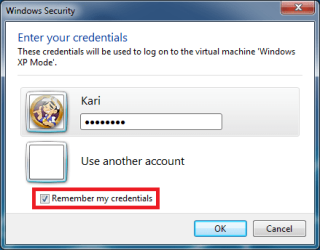
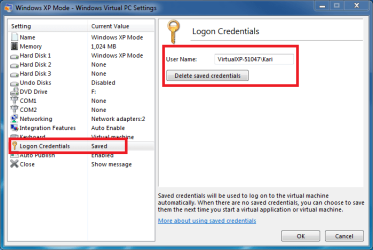
When logging in to any Virtual PC virtual machine, XP Mode included, you have to enable Remeber my credentials. To check which user's credentials are saved or to delete saved credentials, go to XP Mode's settings, choose Logon credentials.

Kari

XPM_Remember_credentials.png

XPM_Delete_credentials.png
 

My Computer

Computer type
Laptop
Computer Manufacturer/Model Number
HP ENVY 17-1150eg
OS
Windows 10 Pro x64 EN-GB
CPU
1.6 GHz Intel Core i7-720QM Processor
Memory
6 GB
Graphics Card(s)
ATI Mobility Radeon HD 5850 Graphics
Sound Card
Beats sound system with integrated subwoofer
Monitor(s) Displays
17" laptop display, 22" LED and 32" Full HD TV through HDMI
Screen Resolution
1600*900 (1), 1920*1080 (2&3)
Hard Drives
Internal: 2 x 500 GB SATA Hard Disk Drive 7200 rpm
External: 2TB for backups, 3TB USB3 network drive for media
Cooling
As Envy runs a bit warm, I have it on a Cooler Master pad
Keyboard
Logitech diNovo Media Desktop Laser (bluetooth)
Mouse
Logitech Performance Mouse MX
Internet Speed
50/10 Mbps VDSL
Antivirus
Windows Defender 4.3.9431.0
Browser
Maxthon 3.5.2., IE11
Hi Kari,

Got it ------Thank you

One more item--- How do you get a split screen --like seeing two sites at once without all the maneuvering ---

Thanks,,,,Ralph
 

My Computer

Computer Manufacturer/Model Number
hp athelon quad
OS
windows 7 professional
Memory
6 g ddr3
Monitor(s) Displays
hp 23"
Hard Drives
640 and 124 on xp
Do you mean how to tile open windows? If so, there's two ways, depending if the taskbar buttons are grouped or not.

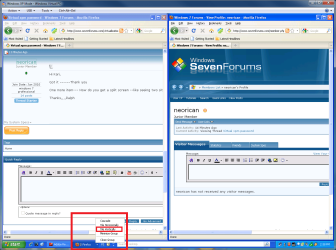
When taskbar buttons are grouped, and you want to show for instance two or more browser windows, right click the group and choose Cascade, Tile horisontally or Tile vertically. The screenshot shows what you'll see when two browser windows are tiled vertically:

XPM_Tile_windows.png

When the taskbar buttons are not grouped, or when all the windows you want to show simultaneously don't belong to same application, press and hold CTRL and click all the apps windows you want to show, right click and choose how to show them. This screenshot shows I have chosen IE, Lunascape and two instances of Firefox and chosen Tile vertically:

XPM_Tile_windows_2.png

Kari
 

My Computer

Computer type
Laptop
Computer Manufacturer/Model Number
HP ENVY 17-1150eg
OS
Windows 10 Pro x64 EN-GB
CPU
1.6 GHz Intel Core i7-720QM Processor
Memory
6 GB
Graphics Card(s)
ATI Mobility Radeon HD 5850 Graphics
Sound Card
Beats sound system with integrated subwoofer
Monitor(s) Displays
17" laptop display, 22" LED and 32" Full HD TV through HDMI
Screen Resolution
1600*900 (1), 1920*1080 (2&3)
Hard Drives
Internal: 2 x 500 GB SATA Hard Disk Drive 7200 rpm
External: 2TB for backups, 3TB USB3 network drive for media
Cooling
As Envy runs a bit warm, I have it on a Cooler Master pad
Keyboard
Logitech diNovo Media Desktop Laser (bluetooth)
Mouse
Logitech Performance Mouse MX
Internet Speed
50/10 Mbps VDSL
Antivirus
Windows Defender 4.3.9431.0
Browser
Maxthon 3.5.2., IE11
Dont remember password

So how do I get in if I forgot my password? Out of the blue, it asks me for the password and I dont ever recall XPM being a valid user name.
 

My Computer

Computer type
PC/Desktop
Computer Manufacturer/Model Number
Asus P6X58D-E, Lenovo
OS
Windows 7, Windows 10 Pro
CPU
Intel Core i7 930
Motherboard
Asus X58 P6X58D-E
Memory
G.SKILL F3-12800CL9T-6GBNQ 6GB DDR3 3X2GB DDR3-1600 CL 9-9-9
Graphics Card(s)
ATI Radeon HD 5700
Hard Drives
Seagate Barracuda 1TB x2 SATA3 6GB/S 7200RPM 64MB
WD 1TB SATA3
PSU
Coolermaster Silent Pro 700W Modular Power Supply
Back
Top