VirtualBox virtual drive not staying at desired fixed size.

yk7

New member
Member
Local time
6:18 AM
Messages
93
I'm trying to install Ubuntu 12.10 on VirtualBox with a fixed size of 30 GB. However, when I start up the VM, it says I don't have the required 4.9GB of space to install and in the settings it says there's only 4MB. I've tried Googling around but I couldn't find an answer.
 

My Computer My Computer

At a glance

Windows 7 Home Premium 64bitIntel Core i5-3570K Ivy Bridge 3.4GHzCorsair Vengeance 16GB (2 x 8GB) DDR3-1600Gigabyte Radeon HD 7970 GHz Edition 3GB
OS
Windows 7 Home Premium 64bit
CPU
Intel Core i5-3570K Ivy Bridge 3.4GHz
Motherboard
GIGABYTE GA-Z77X-UD3H ATX Intel Motherboard
Memory
Corsair Vengeance 16GB (2 x 8GB) DDR3-1600
Graphics Card(s)
Gigabyte Radeon HD 7970 GHz Edition 3GB
Sound Card
Creative SB Audigy SE 7.1 PCI and Creative SB X-Fi HD USB
Monitor(s) Displays
ASUS VS Series VS247H-P Black 23.6" (x3)
Screen Resolution
1920x1080
Hard Drives
Seagate 1TB ST1000DM003 and Samsung 840 Pro 128GB SSD
PSU
Corsair Enthusiast 650W 80 PLUS Bronze
Case
Fractal Design Define R4 (Black Pearl) ATX Mid Tower
Cooling
Cooler Master Hyper 212 EVO
Keyboard
Das Keyboard Model S Professional
Mouse
Steelseries Sensei
Internet Speed
Average 3mb/s
Antivirus
Avast IS + Malwarebytes PRO
Browser
Firefox
This is a typical error you might get when installing Ubuntu on a vm.

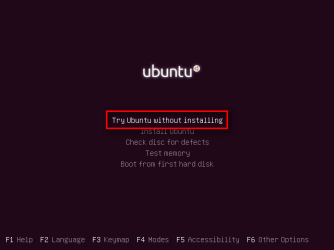
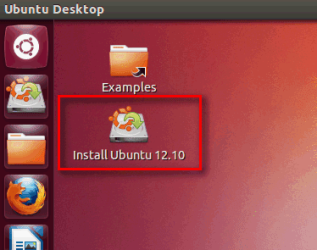
A workaround is to boot to live CD and install Ubuntu from Live Desktop.

1. Boot to Live CD:

Setup_11.png

2. Install Ubuntu:

Setup_12.png

Kari
 

My Computer My Computer

At a glance

Windows 10 Pro x64 EN-GB1.6 GHz Intel Core i7-720QM Processor6 GBATI Mobility Radeon HD 5850 Graphics
Computer type
Laptop
Computer Manufacturer/Model Number
HP ENVY 17-1150eg
OS
Windows 10 Pro x64 EN-GB
CPU
1.6 GHz Intel Core i7-720QM Processor
Memory
6 GB
Graphics Card(s)
ATI Mobility Radeon HD 5850 Graphics
Sound Card
Beats sound system with integrated subwoofer
Monitor(s) Displays
17" laptop display, 22" LED and 32" Full HD TV through HDMI
Screen Resolution
1600*900 (1), 1920*1080 (2&3)
Hard Drives
Internal: 2 x 500 GB SATA Hard Disk Drive 7200 rpm
External: 2TB for backups, 3TB USB3 network drive for media
Cooling
As Envy runs a bit warm, I have it on a Cooler Master pad
Keyboard
Logitech diNovo Media Desktop Laser (bluetooth)
Mouse
Logitech Performance Mouse MX
Internet Speed
50/10 Mbps VDSL
Antivirus
Windows Defender 4.3.9431.0
Browser
Maxthon 3.5.2., IE11
I prefer installing it on VirtualBox though. Is there any fix?
 

My Computer My Computer

At a glance

Windows 7 Home Premium 64bitIntel Core i5-3570K Ivy Bridge 3.4GHzCorsair Vengeance 16GB (2 x 8GB) DDR3-1600Gigabyte Radeon HD 7970 GHz Edition 3GB
OS
Windows 7 Home Premium 64bit
CPU
Intel Core i5-3570K Ivy Bridge 3.4GHz
Motherboard
GIGABYTE GA-Z77X-UD3H ATX Intel Motherboard
Memory
Corsair Vengeance 16GB (2 x 8GB) DDR3-1600
Graphics Card(s)
Gigabyte Radeon HD 7970 GHz Edition 3GB
Sound Card
Creative SB Audigy SE 7.1 PCI and Creative SB X-Fi HD USB
Monitor(s) Displays
ASUS VS Series VS247H-P Black 23.6" (x3)
Screen Resolution
1920x1080
Hard Drives
Seagate 1TB ST1000DM003 and Samsung 840 Pro 128GB SSD
PSU
Corsair Enthusiast 650W 80 PLUS Bronze
Case
Fractal Design Define R4 (Black Pearl) ATX Mid Tower
Cooling
Cooler Master Hyper 212 EVO
Keyboard
Das Keyboard Model S Professional
Mouse
Steelseries Sensei
Internet Speed
Average 3mb/s
Antivirus
Avast IS + Malwarebytes PRO
Browser
Firefox
I prefer installing it on VirtualBox though. Is there any fix?

Did you not understand me? I answered you telling how to install it in VirtualBox.

My last post shows exactly how to install it in VirtualBox. Boot your vm to Live CD desktop, install. Those screenshots in my previous post are from installing Ubuntu to a virtual machine.

Kari
 

My Computer My Computer

At a glance

Windows 10 Pro x64 EN-GB1.6 GHz Intel Core i7-720QM Processor6 GBATI Mobility Radeon HD 5850 Graphics
Computer type
Laptop
Computer Manufacturer/Model Number
HP ENVY 17-1150eg
OS
Windows 10 Pro x64 EN-GB
CPU
1.6 GHz Intel Core i7-720QM Processor
Memory
6 GB
Graphics Card(s)
ATI Mobility Radeon HD 5850 Graphics
Sound Card
Beats sound system with integrated subwoofer
Monitor(s) Displays
17" laptop display, 22" LED and 32" Full HD TV through HDMI
Screen Resolution
1600*900 (1), 1920*1080 (2&3)
Hard Drives
Internal: 2 x 500 GB SATA Hard Disk Drive 7200 rpm
External: 2TB for backups, 3TB USB3 network drive for media
Cooling
As Envy runs a bit warm, I have it on a Cooler Master pad
Keyboard
Logitech diNovo Media Desktop Laser (bluetooth)
Mouse
Logitech Performance Mouse MX
Internet Speed
50/10 Mbps VDSL
Antivirus
Windows Defender 4.3.9431.0
Browser
Maxthon 3.5.2., IE11
Did exactly that but it still says I don't have enough space.
 

My Computer My Computer

At a glance

Windows 7 Home Premium 64bitIntel Core i5-3570K Ivy Bridge 3.4GHzCorsair Vengeance 16GB (2 x 8GB) DDR3-1600Gigabyte Radeon HD 7970 GHz Edition 3GB
OS
Windows 7 Home Premium 64bit
CPU
Intel Core i5-3570K Ivy Bridge 3.4GHz
Motherboard
GIGABYTE GA-Z77X-UD3H ATX Intel Motherboard
Memory
Corsair Vengeance 16GB (2 x 8GB) DDR3-1600
Graphics Card(s)
Gigabyte Radeon HD 7970 GHz Edition 3GB
Sound Card
Creative SB Audigy SE 7.1 PCI and Creative SB X-Fi HD USB
Monitor(s) Displays
ASUS VS Series VS247H-P Black 23.6" (x3)
Screen Resolution
1920x1080
Hard Drives
Seagate 1TB ST1000DM003 and Samsung 840 Pro 128GB SSD
PSU
Corsair Enthusiast 650W 80 PLUS Bronze
Case
Fractal Design Define R4 (Black Pearl) ATX Mid Tower
Cooling
Cooler Master Hyper 212 EVO
Keyboard
Das Keyboard Model S Professional
Mouse
Steelseries Sensei
Internet Speed
Average 3mb/s
Antivirus
Avast IS + Malwarebytes PRO
Browser
Firefox
Delete your vm, create a new, use dynamic vhd instead of fixed size.
 

My Computer My Computer

At a glance

Windows 10 Pro x64 EN-GB1.6 GHz Intel Core i7-720QM Processor6 GBATI Mobility Radeon HD 5850 Graphics
Computer type
Laptop
Computer Manufacturer/Model Number
HP ENVY 17-1150eg
OS
Windows 10 Pro x64 EN-GB
CPU
1.6 GHz Intel Core i7-720QM Processor
Memory
6 GB
Graphics Card(s)
ATI Mobility Radeon HD 5850 Graphics
Sound Card
Beats sound system with integrated subwoofer
Monitor(s) Displays
17" laptop display, 22" LED and 32" Full HD TV through HDMI
Screen Resolution
1600*900 (1), 1920*1080 (2&3)
Hard Drives
Internal: 2 x 500 GB SATA Hard Disk Drive 7200 rpm
External: 2TB for backups, 3TB USB3 network drive for media
Cooling
As Envy runs a bit warm, I have it on a Cooler Master pad
Keyboard
Logitech diNovo Media Desktop Laser (bluetooth)
Mouse
Logitech Performance Mouse MX
Internet Speed
50/10 Mbps VDSL
Antivirus
Windows Defender 4.3.9431.0
Browser
Maxthon 3.5.2., IE11
No luck with dynamic size.
 

My Computer My Computer

At a glance

Windows 7 Home Premium 64bitIntel Core i5-3570K Ivy Bridge 3.4GHzCorsair Vengeance 16GB (2 x 8GB) DDR3-1600Gigabyte Radeon HD 7970 GHz Edition 3GB
OS
Windows 7 Home Premium 64bit
CPU
Intel Core i5-3570K Ivy Bridge 3.4GHz
Motherboard
GIGABYTE GA-Z77X-UD3H ATX Intel Motherboard
Memory
Corsair Vengeance 16GB (2 x 8GB) DDR3-1600
Graphics Card(s)
Gigabyte Radeon HD 7970 GHz Edition 3GB
Sound Card
Creative SB Audigy SE 7.1 PCI and Creative SB X-Fi HD USB
Monitor(s) Displays
ASUS VS Series VS247H-P Black 23.6" (x3)
Screen Resolution
1920x1080
Hard Drives
Seagate 1TB ST1000DM003 and Samsung 840 Pro 128GB SSD
PSU
Corsair Enthusiast 650W 80 PLUS Bronze
Case
Fractal Design Define R4 (Black Pearl) ATX Mid Tower
Cooling
Cooler Master Hyper 212 EVO
Keyboard
Das Keyboard Model S Professional
Mouse
Steelseries Sensei
Internet Speed
Average 3mb/s
Antivirus
Avast IS + Malwarebytes PRO
Browser
Firefox
Hi there
might be obvious but how much disk space do you actually have available ON THE HOST BEFORE installing / creating the VM -- from the OP it seemed you only had 4 MB spare !!!


......................says I don't have the required 4.9GB of space to install and in the settings it says there's only 4MB........................................................


Cheers
jimbo
 

My Computer My Computer

At a glance

Linux CENTOS 7 / various Windows OS'es and se...Intel i7 Intel i58GB, 16GBOn Motherboard
Computer type
PC/Desktop
Computer Manufacturer/Model Number
Custom built, several laptops HP/ASUS
OS
Linux CENTOS 7 / various Windows OS'es and servers
CPU
Intel i7 Intel i5
Memory
8GB, 16GB
Graphics Card(s)
On Motherboard
Sound Card
Realtek HD audio
Monitor(s) Displays
Apple Cinema display, Samsung LCD
Screen Resolution
1920 X 1080
Hard Drives
4 X 1TB SATA
Mouse
Toshiba wireless laser
Internet Speed
> 20MB up
Good point, Jimbo.

OP could alternatively try VMware Player instead of VirtualBox.
 

My Computer My Computer

At a glance

Windows 10 Pro x64 EN-GB1.6 GHz Intel Core i7-720QM Processor6 GBATI Mobility Radeon HD 5850 Graphics
Computer type
Laptop
Computer Manufacturer/Model Number
HP ENVY 17-1150eg
OS
Windows 10 Pro x64 EN-GB
CPU
1.6 GHz Intel Core i7-720QM Processor
Memory
6 GB
Graphics Card(s)
ATI Mobility Radeon HD 5850 Graphics
Sound Card
Beats sound system with integrated subwoofer
Monitor(s) Displays
17" laptop display, 22" LED and 32" Full HD TV through HDMI
Screen Resolution
1600*900 (1), 1920*1080 (2&3)
Hard Drives
Internal: 2 x 500 GB SATA Hard Disk Drive 7200 rpm
External: 2TB for backups, 3TB USB3 network drive for media
Cooling
As Envy runs a bit warm, I have it on a Cooler Master pad
Keyboard
Logitech diNovo Media Desktop Laser (bluetooth)
Mouse
Logitech Performance Mouse MX
Internet Speed
50/10 Mbps VDSL
Antivirus
Windows Defender 4.3.9431.0
Browser
Maxthon 3.5.2., IE11
Host as in my C drive? I have 250 gb.
 

My Computer My Computer

At a glance

Windows 7 Home Premium 64bitIntel Core i5-3570K Ivy Bridge 3.4GHzCorsair Vengeance 16GB (2 x 8GB) DDR3-1600Gigabyte Radeon HD 7970 GHz Edition 3GB
OS
Windows 7 Home Premium 64bit
CPU
Intel Core i5-3570K Ivy Bridge 3.4GHz
Motherboard
GIGABYTE GA-Z77X-UD3H ATX Intel Motherboard
Memory
Corsair Vengeance 16GB (2 x 8GB) DDR3-1600
Graphics Card(s)
Gigabyte Radeon HD 7970 GHz Edition 3GB
Sound Card
Creative SB Audigy SE 7.1 PCI and Creative SB X-Fi HD USB
Monitor(s) Displays
ASUS VS Series VS247H-P Black 23.6" (x3)
Screen Resolution
1920x1080
Hard Drives
Seagate 1TB ST1000DM003 and Samsung 840 Pro 128GB SSD
PSU
Corsair Enthusiast 650W 80 PLUS Bronze
Case
Fractal Design Define R4 (Black Pearl) ATX Mid Tower
Cooling
Cooler Master Hyper 212 EVO
Keyboard
Das Keyboard Model S Professional
Mouse
Steelseries Sensei
Internet Speed
Average 3mb/s
Antivirus
Avast IS + Malwarebytes PRO
Browser
Firefox
Hi there
Try this first -- I only have VMware player it's free so use VMware player - otherwise use equivalent comm ands in VBOX.

start your VM software - VBOX or vmplayer

1) use VM Wizard to create Virtual Machine
2) Allocate storage space
3) Choose I will install OS later.

4) now you need to "Initialize" the Virtual disk -- download something like GPARTED - create ISO and attach this to the new VM you've just created. If you don't do this you'll find the Disk will just be "RAW" without a partitiuon on it.

5) Boot GPARTED in the Virtual machine
6) Create your Disk -- ensure there's a primary partition on it -- doesn't matter if it's Linux or NTFS or even FAT32.
7) Now re-boot the vm with the Linux distro
8) you should be able to install it.

Cheers
jimbo
 

My Computer My Computer

At a glance

Linux CENTOS 7 / various Windows OS'es and se...Intel i7 Intel i58GB, 16GBOn Motherboard
Computer type
PC/Desktop
Computer Manufacturer/Model Number
Custom built, several laptops HP/ASUS
OS
Linux CENTOS 7 / various Windows OS'es and servers
CPU
Intel i7 Intel i5
Memory
8GB, 16GB
Graphics Card(s)
On Motherboard
Sound Card
Realtek HD audio
Monitor(s) Displays
Apple Cinema display, Samsung LCD
Screen Resolution
1920 X 1080
Hard Drives
4 X 1TB SATA
Mouse
Toshiba wireless laser
Internet Speed
> 20MB up
VMware player made it work right out of the box.
 

My Computer My Computer

At a glance

Windows 7 Home Premium 64bitIntel Core i5-3570K Ivy Bridge 3.4GHzCorsair Vengeance 16GB (2 x 8GB) DDR3-1600Gigabyte Radeon HD 7970 GHz Edition 3GB
OS
Windows 7 Home Premium 64bit
CPU
Intel Core i5-3570K Ivy Bridge 3.4GHz
Motherboard
GIGABYTE GA-Z77X-UD3H ATX Intel Motherboard
Memory
Corsair Vengeance 16GB (2 x 8GB) DDR3-1600
Graphics Card(s)
Gigabyte Radeon HD 7970 GHz Edition 3GB
Sound Card
Creative SB Audigy SE 7.1 PCI and Creative SB X-Fi HD USB
Monitor(s) Displays
ASUS VS Series VS247H-P Black 23.6" (x3)
Screen Resolution
1920x1080
Hard Drives
Seagate 1TB ST1000DM003 and Samsung 840 Pro 128GB SSD
PSU
Corsair Enthusiast 650W 80 PLUS Bronze
Case
Fractal Design Define R4 (Black Pearl) ATX Mid Tower
Cooling
Cooler Master Hyper 212 EVO
Keyboard
Das Keyboard Model S Professional
Mouse
Steelseries Sensei
Internet Speed
Average 3mb/s
Antivirus
Avast IS + Malwarebytes PRO
Browser
Firefox
Fix the 4MB thing

Took me a bit but I figured out what fixes the 4MB virtual disk image thing that I was having. This sounds like what the OP was having.

I was typing the size that I wanted instead of using the slider. When typing the size of the .vdi file you are creating, you have to make sure you put the decimal and GB in the box. The slider to the left will adjust to match when done correctly.

If you just enter the number of the size you want and hit next, it results in a very low sized disk file.

Hope this helps.
 
Last edited:

My Computer My Computer

At a glance

Win764pro
Computer type
PC/Desktop
OS
Win764pro
Back
Top